TextMate
OS X is blessed with many great text editors, and the current ‘big battle’ is between BBEdit and TextMate. I’ve tried both of these editors and found BBEdit was just too much. The menus were crammed with things I didn’t use, and it didn’t connect with me at all. TextMate is the new kid on the block and while initially it made no sense, once I understood how it worked I was flying.
The power of TextMate comes from its extensible bundles, snippets, and languages feature. These allow you to use and create a large set of processing commands that are specific to both the type of file you are editing, and the context within that file. For example, when editing a PHP file you often need to insert HTML. In TextMate you can do this by pressing CTRL+SHIFT+W:

A default paragraph is created for you. Any further text typed will appear immediately inside the HTML tag. Note how the end tag is automatically changed for you:

It’s a simple idea that is taken to the extreme. All language and context functionality is fully editable, and a large library of existing ‘bundles’ already exists. This library is maintained independently of TextMate.
While this example may not seem unusual, the idea is that rather than presenting hundreds of buttons, or a menu with hundreds of options, a simple set of keystrokes is used that provides the basis for everything. This does make TextMate a very keystroke-heavy program, but if you’re editing the same kinds of files regularly then it quickly becomes second nature. If you’re coming from a VI/Emacs world (as I was), then it fits all the better.
QuickSilver
QuickSilver is one of those programs that is difficult to understand what it does, but when you do, it’s hard to imagine not having it. It’s a jack-of-all-trades that sits silently until called into action by a keystroke:
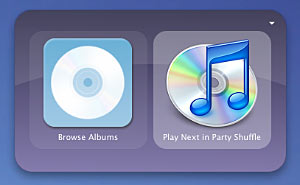
Once active it then allows you to do a variety of tasks from the keyboard. This can range from simply starting programs (by typing the first few letters of the program name), to sending emails to specific contacts in your address book. The idea behind QuickSilver is that it gives you the ability to do things with minimal interference to whatever else you are doing.
I’ve had great success automating the release of WordPress plugins by selecting the plugin directory, using QuickSilver to zip it, then using QuickSilver to upload it directly onto my website. What used to take me several applications and a few minutes now takes a few keystrokes and QuickSilver.
Just like TextMate, QuickSilver doesn’t present you with a complicated interface, but instead hides functionality behind a simple process. It is also keystroke-heavy, but you quickly learn the commands most useful to you (and there are plenty of video tutorials showing you features you didn’t know existed).
VMWare Fusion
Apple’s move to Intel chips opened up lots of opportunities, and one of these is the ability to run virtualization software. VMWare is the long-running champion in this market and they’ve been around on Windows and Linux for a long time. Fusion is their first OS X release.
Virtualization is the process of running virtual computers. The virtualisation software creates a special virtual computer, complete with virtual hardware, which then allows you to run and install other operating systems inside the virtual machine. As far as the virtual machine knows, it is a fully operational computer. As far as you know (or care), you get the ability to create machines that natively run Windows or Linux.
Performance is naturally not 100%, but it’s pretty close and more than fast enough not to notice any real difference. A killer feature is the Unity mode, which takes Windows application out of the virtual desktop and puts them alongside other OS X programs. With this running you need never know where your program lives.
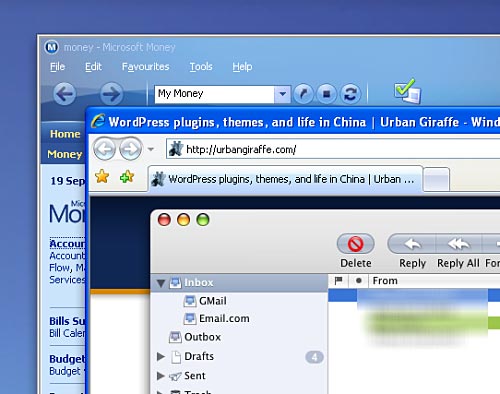
Fusion is perfect for testing websites on Internet Explorer. I have one virtual computer running IE6, and another running IE7. I also use it to run Microsoft Money. It should be noted that while virtual computers are not real, the memory they require is. You’ll get much more mileage out of Fusion when your Mac is stuffed full of memory.
OmniOutliner / iGTD
OmniOutliner is another it-looks-great-but-I-don’t-know-what-it’s-for Mac tool. At its most basic, it allows you create and organize lists of information. I use it primarily as a brain-dump repository where I quickly enter and organize thoughts and tasks without much fuss.
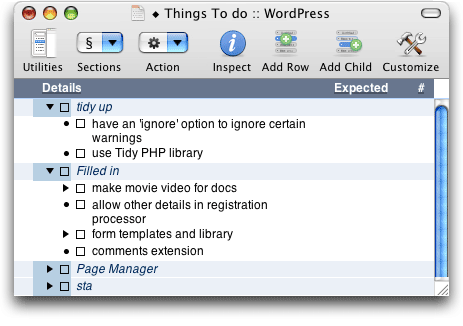
While this doesn’t look anything special, the best thing about OmniOutliner is how easy it is to use. Entries are added by pressing return and typing. If you want to indent an entry (making it a child of another entry) then just press TAB, if you want to move a child entry back up a level press SHIFT+TAB. This is an incredibly simple data-entry system, and it suits rapid ideas and tasks. I’ve used it to keep track of bugs and new features, at the same time as maintaining a shopping list, movies I want to watch, people I need to talk to, and so on. Data flows freely.
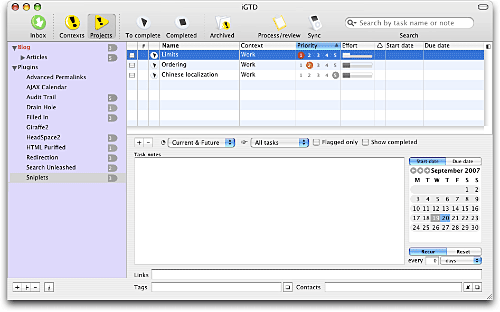
Recently I’ve been moving my tasks across into a more specific tool called iGTD (Getting Things Done). This is much more focussed as a task organizer. It also has a great hookup to Mail, allowing me to read a new mail item and then, via a quick F6 keypress, have it immediately entered as a to-do item. A link is preserved between the to-do item and the mail message, and I can then archive the mail and move on (although a bug in iGTD does cause things to go screwy if I then try and access the message from iGTD).
CocoaMySQL
As a developer I’m constantly digging around inside MySQL, and I was using phpMyAdmin to make this a little more pleasant. However, while it’s a very full-featured product, it can be quite slow, and I was always having problems with character encodings. CocoaMySQL is a Mac-specific application that provides similar functionality, but is a lot faster, and makes the whole process of using MySQL a lot nicer. One additional benefit is that it always handles character encodings properly.
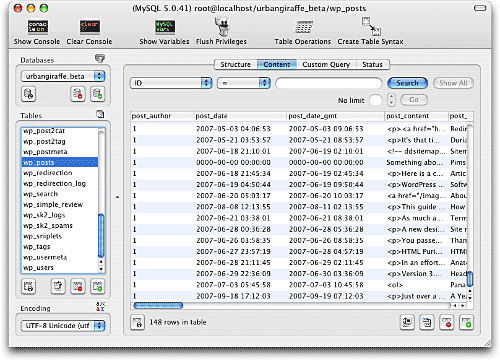
Not only does it work with local databases, but by using an SSH tunnel I can manage databases on remote websites. This is where using a native application pays off dividends, making the process so much faster than with phpMyAdmin.
ssh -NC user@mywebsite.com -L 8888:mywebsite.com:3306
Unfortunatley the program is not without problems, and it has a variety of bugs that cause it to lock up at inopportune times. It also appears to be single threaded, and any lengthly operation will freeze the entire application (without the ability to cancel). Development on the project is painfully slow, which is a shame as it’s a really nice program.
AppleScript / Automator
These are two pieces of system software that I’ve only really scratched the surface with, but offer huge potential. I’ll start with AppleScript, which is Apple’s long-standing system scripting language. Most applications have some form of AppleScript access which allows you to construct custom scripts that control your computer. For example, a Mail rule can be created which, upon receiving a certain email, will kick off an AppleScript that will download and archive a website. This is all achieved through an English-like script language.
Automator is a nice tool that sits on top of this and allows you to create simple scripts with a GUI.
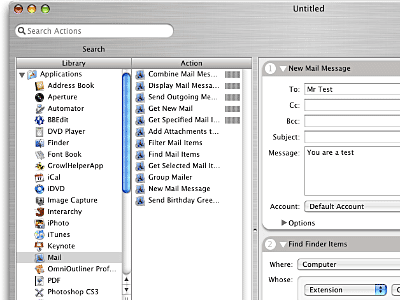
Applications need to provide Automator with actions, and the system comes with a good selection of pre-made actions (as do most major applications). Additional third-party actions can be downloaded, such as ones for Photoshop.
A nice extra feature here is that you can attach both AppleScript and Automator projects to directories so that the script/project will automatically run should you place a file inside the directory. Imagine the scripting mayhem you can create!
Dictionary
This is just one of those small but-oh-so-impressive things. In most applications (but not FireFox, alas), you can summon a pop-up dictionary by pressing CTRL+APPLE+D, and hovering over a word:
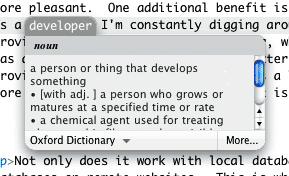
Not something for everyday use, but a great feature all the same.
Conclusion
One of the over-riding features I’ve noticed about OS X and Mac applications is that they are generally less cluttered, easier to use, and more integrated with each other (I haven’t used Windows Vista, and this is not a Windows/OS X comparison). While it’s a highly subjective measurement, I do feel like I spend less time worrying about how to use applications, and more time spent doing the things I want to do. On top of this, it’s just plain old fun! There’s no denying that the cost of an Apple system is generally higher than the cost of a normal PC, but it’s a price difference I’m prepared to pay.
Cool, always good to meet a fellow Mac person. It’s funny how much similarity we have in this post. I bought a Mini almost a year ago and love it. Although I’d been using a G4 PowerMac for the last 6 years. I use my Mini as a media center, which is very fun. I use EyeTV for recording over-the-air HDTV. Apple’s FrontRow gives a media-rich experience. And I use RemoteBuddy for a replacement Apple Remote utility. It’s like Quicksilver for the remote.
I use a lot of the apps you mentioned. 1passwd is really nice. Sadly, its success rate on the sites I use it most aren’t quite as high as its competition in the Windows world: Roboform. But one can hope that it will improve over time. 1passwd is also still missing a portable version, which Roboform has. I really love carrying my Roboform passwords with me, as I have many, many forum and web login both at the office and and home.
Mail Act-On. I love this little wonder app! The people who make it also make Mailtags, which is a full-blown productivity manager and hooks into iCal. Pretty nifty. Speaking of Mail addons, have you seen Dockstar? I love it. It’s not free, but it’s so neat, you’ll want to own it too.
I see you have iStatPro. Wow, this is a fantastic widget, isn’t it?! What is your color picker widget? That looks nice, and I love the idea of that being a widget. I’m constantly needing a color picker but the utils I’ve tried are always in the way. Will yours allow you to pick color from anything on the desktop?
What about TextWrangler? I like it a lot, although I’ll have to try TextMate.
Gotta love QuickSilver!
Isn’t iGTD fun? I just recently discovered the whole GTD craze.
I will definitely look into the CocoaMySQL app. Looks promising.
I’ve only had one problem with 1passwd so far, where it constantly forgets an SVN password on one particular site. No idea why, as it manages fine on others. The 1passwd team seem to be very active and hopefully it will get covered by a new release.
I was using Mail Badger (similar to Dockstar, and free), but after months of it working perfectly it stopped one day and wouldn’t allow me to select the Mail window (it would always hide behind everything else). I removed the plugin and everything returned to normal. A shame as I really liked the tool. I’ll have to take a look at Dockstar as an alternative.
The colour picker is ColorMod. It doesn’t have an eyedropper, but it’s otherwise a great little tool to have tucked away
Interesting choice of apps. We came down almost always on the opposite side.
Mail = Eudora
Text = BBEdit
Dashboard = none, with Art Director’s Toolkit, XE.com, Menu Meters doing substitute duty
Quicksilver = Butler
Fusion = real PC under desk
One thing to keep in mind is that if you ever activate dashboard, all those widgets suck up memory for the life of that boot. I’ve tried to disable all the dashboard hotkeys and corners to make sure that it doesn’t jump into action.
I have come around to the use of 1passwd which is very good in the latest versions.
I think the difference in application choices goes back to being an OS 9 user. I already had quite a bit of time invested into BBEdit and Eudora before switching to OS X. Ultimately as a work environment, I still prefer OS 9. Of course, I don’t miss the application crashes which would take down a system (worst with the web browsers). But for look and feel and speed and effiiciency, OS 9 set a standard which may never be surpassed.
The only real long term hope is a flavour of Linux. Both Microsoft and Apple have much too high an investment in increasing hardware requirements and hence sloppy and inefficient coding.
Thank’s from a switcher… nice post
Well, what can I say, being a Mac user (and lover) since 1987? Apple sure focused on excellent design, but often some of their machines are awkward to handle, and I still complain about silly and rally unpleasant bugs in Mac OS X. However, I wold not switch to Win for any reason. If even Macs’ defects get on my nerves, I know they still are better suited to my that anything I can think of… 😉
Alex
Just purchased am already very happy with the decision. This was a replacement system that I purchased for my wife – I am the home tech support resource and I was tired of constantly having to keep her system patched, updated and rebuilt (from XP to Vista SP1) in order to fight off ad/malware that was constantly infecting it.
Even though the hardware spec’s for the Mini are lighter than the Vista system that it replaced, it is much snappier in browsing and using the included applications as compared to the Vista equivalents. One correction to the displayed specs on Amazon – the included adapter is a mini-DVI to full DVI adapter, not a DVI/VGA adapter as listed. If your old monitor does not support DVI, you will need to get a new monitor that supports it. Considering the graphics focus of Mac systems, this is a worthwhile investment in any case if you have an old VGA only monitor – the graphics will really “pop” when you convert to DVI.