Possible MSN scam

Aug 14, 2005 | Tags: , , | Written by John

I've noticed a couple of the contacts on my MSN list have started displaying 'http://msncheck.41m.com - free way to check who blocked and deleted you on msn'. Naturally I went to this website to investigate and found that it promised the ability to check if anyone has blocked or deleted me, provided I gave my msn username and password.

Now there is no way I'm giving my username or password to anyone, let alone an unknown website. However, I was curious as to what would happen if I did. I tried the website with false information:
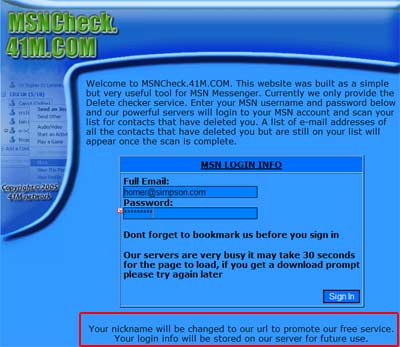
MSN Check

Note the 'your login info will be stored on our server for future use*'. This is the closest to any sort of privacy statement and/or website intent.

It then told me that it couldn't connect to my account (not surprisingly), and attempted to install a search bar. Ouch. All of this leads me to one conclusion: it's some sort of viral scam.

I may of course be wrong, but the way I see it working is this. You enter your details into the website which then stores them for future use*. Meanwhile, the website logs into your account and changes your name to contain a link back to the website (while putting adverts onto your computer with the search bar). Now all your friends will see the website's address and will probably also click on it. And so the website spreads.

Digging a bit further I find that the site has been registered to the following individual:

41M
41M - (sam@41m.com)
+1.-
Fax: -, +1.-
1212 AIM st
AIM, CA 0000000
US

Would you trust those details?

My own opinion is to avoid this website. At the end of the day, does it really matter if someone has blocked you? If they have then what are you going to do - tell them you know and force them to talk to you?

Whether the website does allow you to check for blocked/deleted friends I don't know, but I do know that once they have your password they have full access to your email and can probably extract other passwords and account details that might be stored there. This could potentially give them access to much more sensitive data. If you (or any of your friends) have entered details here then I would advise you change your password pronto.

* Future use being something bad

Suggested solutions

If you have already signed up for this service, and downloaded the 'search bar', then there are a couple of things you can do to clean your system out:

  1. Change your password and password hint immediately
  2. Run a Spyware/Trojan/Adware detection program:
  3. Run a virus scan
Share This

Comments (page 5 of 10)

  1. author
    Mariana :

    Apr 17, 2006 7:41 am

    Thanx 4 the info I was about 2 go in the website and I was not comfortable giving out my password so I looked in the internet and found this. and then i said maybe I really shouldn't look in that website!!!

  2. author
    bob :

    Feb 28, 2006 6:59 pm

    its all a big lie!!!!!!!!!!!!!!!!!!!!

  3. author
    Mallory :

    Feb 3, 2006 11:55 am

    I found this AFTER I downloaded msn blockchecker. I didn't give out my password but it doesn't work anyway. I uninstalled the program However I noticed the same problem (after it was uninstalled)when ever a friend would send me a message a bar would come up saying did you know you can see who's blocking you blah blah blah But I have found a way to get rid of that message so other people don't end up downloading it. I don't know if it removes the program but it won't show up on your messenger. I have windows xp I don't know how to do it in other programs. Click on start, then Run and type msconfig go to the startup tab and scroll down until you find the blockchecker. Uncheck it and click apply. You'll have to restart but it won't be on your msn anymore. Hope this helps

  4. Gary :

    Feb 1, 2006 7:25 pm

    Hi, everyone, please take a look at this... Its that website It will cheer you all up

    spoof

  5. John (author) :

    Jan 31, 2006 1:47 am

    If you put fake information in then you have nothing to worry about.

  6. author
    [zzz] :

    Jan 30, 2006 11:27 am

    *if I should change my own MSN password to be safe,

  7. author
    [zzz] :

    Jan 30, 2006 11:24 am

    Well, I tried the site and I put false information for both email and password. I don't know if I should my own msn password to be safe, Any tips?

  8. author
    leanne :

    Jan 2, 2006 4:09 pm

    yer ur rite sam

  9. author
    sam :

    Dec 30, 2005 4:14 am

    Its not a scam. it just installs spyware. just dont click yes and you will be fine. It is a very useful website however

  10. author
    Anjani :

    Dec 18, 2005 1:04 pm

    Wow, this really helped me alot, ty, ty, ty, ty, ty, ty, ty, ty!!!!!!!!!!
    >>> XoftSpy

Leave a comment


XHTML: You can use these tags: <a href="" title=""> <abbr title=""> <acronym title=""> <b> <blockquote cite=""> <cite> <code> <del datetime=""> <em> <i> <q cite=""> <strike> <strong>

Home | Software | Terms & Conditions | Sitemap | John Godley © 2008
Close
E-mail It