Possible MSN scam
I've noticed a couple of the contacts on my MSN list have started displaying 'http://msncheck.41m.com - free way to check who blocked and deleted you on msn'. Naturally I went to this website to investigate and found that it promised the ability to check if anyone has blocked or deleted me, provided I gave my msn username and password.
Now there is no way I'm giving my username or password to anyone, let alone an unknown website. However, I was curious as to what would happen if I did. I tried the website with false information:
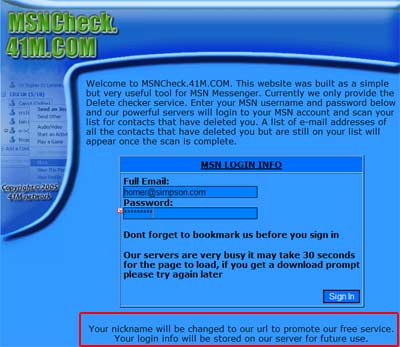
Note the 'your login info will be stored on our server for future use*'. This is the closest to any sort of privacy statement and/or website intent.
It then told me that it couldn't connect to my account (not surprisingly), and attempted to install a search bar. Ouch. All of this leads me to one conclusion: it's some sort of viral scam.
I may of course be wrong, but the way I see it working is this. You enter your details into the website which then stores them for future use*. Meanwhile, the website logs into your account and changes your name to contain a link back to the website (while putting adverts onto your computer with the search bar). Now all your friends will see the website's address and will probably also click on it. And so the website spreads.
Digging a bit further I find that the site has been registered to the following individual:
41M
41M - (sam@41m.com)
+1.-
Fax: -, +1.-
1212 AIM st
AIM, CA 0000000
US
Would you trust those details?
My own opinion is to avoid this website. At the end of the day, does it really matter if someone has blocked you? If they have then what are you going to do - tell them you know and force them to talk to you?
Whether the website does allow you to check for blocked/deleted friends I don't know, but I do know that once they have your password they have full access to your email and can probably extract other passwords and account details that might be stored there. This could potentially give them access to much more sensitive data. If you (or any of your friends) have entered details here then I would advise you change your password pronto.
* Future use being something bad
Suggested solutions
If you have already signed up for this service, and downloaded the 'search bar', then there are a couple of things you can do to clean your system out:
- Change your password and password hint immediately
- Run a Spyware/Trojan/Adware detection program:
- Run a virus scan


Comments (page 3 of 10)
Nov 14, 2005 5:48 pm
Hello Anna,
Is it hotmail that you are using? Well...if it is I think that the change password option has been experiencing a bit of trouble these past couple of days. I tryed to change my password since i do on a regular basis anyways. When i filled in the required fields and pressed continue i ended up back at the "change password page" with my password unchanged...get that one?! May be some problems with the script on that page. Look at the bottem left hand corner of the screen an see if there's a small yellow exclamation point inside a triangle or something of the sort! This indicates that the script in the webpage has an error as you have probably figured out on your own anyway. I myself, have a strong background in programming and know how annoying it is when something dosent work correctly :S!!! Try the change password option later and see if you still have the problem.
Jim
Nov 14, 2005 12:35 am
Thanks Jim, you are correct that as well as changing your password you should also change your password hint. I've added a little extra to the article describing steps you can take to clean your computer and MSN account.
Anna, can you still login? If you can login then you should be able to change your password. What happens when you try?
Nov 13, 2005 8:58 pm
well.. I was dumb enough to fall for it. but I tried to change my password.. but it won't work for me. has this happened to anyone else? and does anyone know how I can fix it?
Nov 13, 2005 7:03 pm
Well Geo_B,
If you believe that you did indeed install any software/programs on your system you can go to the microsoft website and download some nice tools for detecting and removing malicious software. You should also install the Windows Anti Spyware(Beta) program which will constantly monitor your system for spyware!
Here's the link
http://www.microsoft.com/downloads/search.aspx?displaylang=en
Just follow this and install:
1. Windows Anti Spyware (Beta)
5. Windows Malicious Software Removal Tool
These should suffice
Also, before downloading these tools your windows copy will be checked to make sure it is not an illegal copy!
As for rebelling against this GARBAGE there may be a way but I am not sure of it!
If you dont feel that these tools did the job for you you should follow the steps in the previous entries!
Jim
Nov 13, 2005 3:48 pm
Hey dude! Thank you so much for publishing this!
btw i clicked on the msn block checker thingy and now i have it on my comp does ene 1 no how to get rid of it?
plus is there ene way we can rebel against this?
Nov 13, 2005 8:18 am
This one is for the "blog author" John and Chris Cairns,
Yes it is true that if you changed you password right after the incident you would prevent anyone from accessing your account, but you should also be careful that using the "MSN Scam" service did not install any remote keyloggers on you system which may be quite well hidden from your access. Also, how long after are you talking about in reguard to changing your password? If you wait to long your secret question and answer can be changed since the "hacker" will still know your password for a short period of time (probably long enough for them to change settings). I believe that one of the previous entries "rebecca" said that she was having weird things happen to her MSN and computer which may indeed be a trojan virus. A large percentage of trojan viruses can be used as remote keyloggers!
Jim
Nov 13, 2005 7:59 am
Hi there AJ,
Well, you can do a system restore on startup, or you can reformat your hard drive. If you wish to do a system restore on start up you have press the "F12" button quickly when the POST (Power On Self Test) begins. The POST is just the page of words you see appearing a little while after you restart you computer (that is when your screen turns back on). You will then see a screen appearing telling you to press SHIFT-TAB, or TAB-SHIFT (not sure of the order now) and when this combination is pressed a screen will appear for different ways to boot your computer. Select the "Last Good Known Configuration" option. Doing a system restore this way prevents you from having to have windows open up fully and doing a system restore (since you said you could not do this).
As I also mentioned you can reformat your hard drive, which will in turn mean that you will loose any data you dont have backed up on a portable hard drive or other storage device. You can reformat your computer by pressing the "F8" key on startup or POST like i mentioned before, making sure you have your legal copy of Windows XP inserted into the CD drive (if you have one) and following the directions after that which is way too lenghty to explain here, but is not a complicated process. If you dont have you authentic Windows XP CD then you can't complete this process.
You should note that SYSTEM RESTORE or REFORMAT do not necessarily take viruses off your computer because viruses can infect more than just your hard drive which is a whole different situation, but it will let you get Windows up and running again!
Jim
Nov 12, 2005 3:49 pm
okay... I was silly enough to download this stoopid thing. I run Windows XP, and it shut down windows 'to protect' my files. I am wondering if anyone knows how to return my puter to it's previous state? The puter's currently runninn in SAFE mode... PLEASE help!!
Nov 12, 2005 5:06 am
Yes, once your password has been changed then no one can get back into your account.
Nov 11, 2005 10:31 am
thx i ended up here,
can n e 1 tell me if -- i changed my password right after i entered my information on this shittty website -- i am safe now??
Leave a comment