So here’s my little foray into WordPress themes. From here you can download any themes I’ve produced, or read a guide to creating your own.
Guides to creating your own themes
If you want to try customizing your own theme, then have a look at my WordPress Theme Dissection – a set of guides dissecting a WordPress theme and hopefully demonstrating how to begin customizing your own.
You may also find it useful to read another guide I wrote on installing WordPress on a local computer. It makes the whole theme customization process a lot faster and easier, and protects you from accidentally messing-up your live website.
Guangzhou
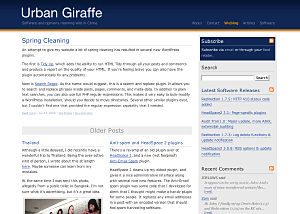
Guangzhou is a two-column fixed width theme for both WordPress and bbPress. It is highly configurable, with two widget areas (sidebar and bottom), as well as customisable skins and many other options.
Giraffe2
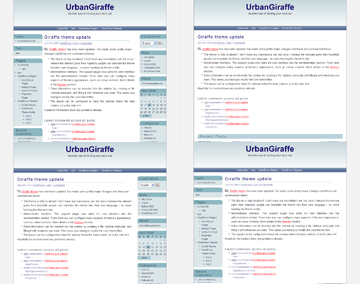
Giraffe2 – WordPress 2.0 only version of the Giraffe theme. Has everything that Giraffe 1.23 contains, with the addition of configurable columns, WordPress Widget support, live preview options, customizable colour schemes, and a logo manager.
Giraffe
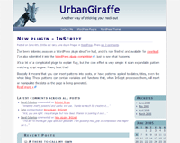
Giraffe – Fully customizable and localized fluid or fixed width theme. Posts are split into lead, recent, and older posts. Has a working print CSS, along with pre-defined colour schemes, and is configured via an administration interface.
No page numbers that I can see.
see http://ccgi.andre02.plus.com/wordpress/?m=200510 for example.
My Giraffe look at your theme 🙂
[…] Aber ich habe ja bekanntlich “viel Zeit”, deshalb habe ich mich daran gemacht, mein erstes Design mit dem WordPress Theme “Giraffe” und dem zugehörenden Plugin auf ein eigenes Thema umzustellen. […]
Andre: You’re right, there does seem a problem there. I’ll have to tackle it in the next version of Giraffe
John:
I have just started to tinker with your theme and have discovered that I am, apparently, a complete moron. I’ve tried to change the header color within the stylesheet but when I hit “update file” in theme editor, nothing happens. I’ve even deleted the color code entirey and again, nothing happens. What am I doing wrong?
Thanks.
The header color is actually a small gradient image called ‘titlegradient.png’. If you change the colour of that then you should see a change in your header. If you’ve already found that one, then changing the header colour is in the CSS style:
#header
{
background: white url(blue/titlegradient.png) repeat-x top left;
}
You can change ‘white’ to any colour, or even remove the gradient entirely.
[…] Jag har installerat nya WordPress samt temat Giraffe. SÃ¥ vitt jag kan se funkar allting, men hojta gärna till om nÃ¥gonting ser konstigt ut. Själv kör jag Firefox sÃ¥ risken finns kanske att andra webläsare funkar annorlunda […]
I am about to start using Shiny Stat (Free version) unless someone wants to recommend something else. If someone does recommend something else could you also tell me where to put it? Usually I have been putting the rpovided code somewhere at the bottom of the main index.php but this theme’s code looks a little different than others I’ve used (keep in mind I know nothing of anything to do with any sort of coding beyond my first and second year courses in Java I barely passed).
Hello,
I love your theme John but I have a little problem when I try to use the pluggins. In wordpress the next message appear:
Fatal error: Call to undefined function: giraffe_options() in /var/www/free.fr/4/0/caroline.chopinaud/wordpress/wp-content/plugins/giraffe/giraffe.php on line 22
Can you help me ?
Thanks for the theme and thanks for your help in advance!
Caroline. French user!
[…] Besides deciding what to actually write about in your blog, you will probably want to make some visual changes. Â There are tons of pre-made themes available for wordpress, but trying to edit them can be a little intimidating. Â That was until I discovered Urbangiraffe. Whether you want to start completely from scratch and build your own theme, or use the Giraffe theme as a starting point, the information found on Urbangiraffe is priceless. Â The WordPress Theme Dissection is a 4 part step by step walkthrough of a wordpress theme. Â There are also instructions on how to install a fully working copy of WordPress on your local PC for those who want to experiment without the need to upload to your live server. […]
It’s me again.
It is ok, it was my fault. The theme is beautiful!!
Thanks
Caroline
Hey John, I absolutely love your theme and am looking to modify it slighty and use it on my site. I’ve got a couple of quick questions you may be able to help with… Is there any way of making the blue line that runs on the left beside all the content end where it changes color at “home” – so it doesn’t look like it falling off the page? I’m also interested in any info you may have on using a custom logo, I’ve looked around a bit and haven’t found anything… I see heres a function for it in “giraffe_functions.php” but I don’t know what I can do there to make a custom logo appear?
Thanks!
[…] I am a complete newbie when it comes to blogging and the tools that go with it. When searching for the proper tools to start my blog I discovered WordPress. Â If you already have a domain name and a host, you are ready to get started. Â You need to know how to create an SQL database and have ftp access to your site. If not, WordPress has free blog hosting plans. Â Either way, you can be up and running in a few minutes. Besides deciding what to actually write about in your blog, you will probably want to make some visual changes. Â There are tons of pre-made themes available for wordpress, but trying to edit them can be a little intimidating. Â That was until I discovered Urbangiraffe. Whether you want to start completely from scratch and build your own theme, or use the Giraffe theme as a starting point, the information found on Urbangiraffe is priceless. Â The WordPress Theme Dissection is a 4 part step by step walkthrough of a wordpress theme. Â There are also instructions on how to install a fully working copy of WordPress on your local PC for those who want to experiment without the need to upload to your live server. Designing a theme from scratch is a large undertaking that I am not quite ready to commit to. As of today I am using the Giraffe theme along with the admin plugin for making basic changes. Â I personally think its one of the better looking themes available and the documentation makes it eaiser to edit than most. Â I am planning on slowly making changes to the theme, but for now I have all the functionality I need a look I am mosty happy with. Â I encourage anyone using a WordPress blog to give it a try. […]
To remove the left blue bar in the footer you can edit the style.css file as follows. First located the #footer section, and then delete the ‘background’ line. Your style will look something like this:
#footer
{
width: 85%;
margin: 0 auto;
clear: both;
text-align: left;
line-height: 1.5em;
padding: 20px 0;
}
A custom logo is achieved very simply by just replacing the logo.gif/logo.png files with your own!
I am confused! What is this all about? Ahh! : 0
Thanx for the great template!
Tami
i love the theme, especially how clean and uncluttered it looks. i wanted to put another vote in for a three column version. i miss having the space. but thanks so much for a beautiful theme.
I have a major problem. If possible, I would really appreciate your help. I love the theme but have several related problems. I cannot get more than one post to show on the main page. Also, both recent posts and older posts just one the most recent post, and only that one, nothing else. I have my wp options (options / reading) set to 10 and 10, and have giraffe leads set to 10. Any ideas? 🙂
[…] If you’re using a WordPress blog and looking to tweak its appearance, here’s a great site that Roy Miller has put me onto… UrbanGiraffe. Including this… […]
[…] I’m downloading WAMP. Hopefully this will speed up the process of customising a theme for WordPress 2.0 for this site. I found the link courtesy of the excellent urbangiraffe site. […]
Do other themes display the correct number of posts?
[…] Get it here. […]
Nice theme.
I ran into one problem on a wide screen laptop, with firefox. The content is not centered. See the scrshot here: http://www.flickr.com/photos/lshah/121658569/
A nice feature would be the ability to reorder the contents of the sidebar.
Can anyone explain why this post looks wrong. It must be something do do with the flash file adjusting the text below it.
http://ccgi.andre02.plus.com/wordpress/?p=109
If I insert if (is_home()) { query_posts(“cat=-20”); } before the function next_posts_link() don’t work.
hi john,
first: great theme! thanks for that. this is exactly what i was looking for.
second: i really want to include the author’s name in the line: “Posted on (date) in (category)”
so that it looks like
“Posted on (date) in (category) by (author)”,
because it is a family blog and we’re four different authors.
how do i do this, and how do i have to change the .mo-file afterwards to get it properly in my language as well.
thanks in advance, i apprechiate your help.
-i
Topino: What are you trying to do?
I have the same problem Dana has… links in my posts are always red. I can’t seem to change it.
I want to thank you for developing such an easy to use theme! I’ve been able to figure out how to modify almost everything except for one item.
I’d like the page template to appear as my main page does (no lead story, with the left-hand bar to appear right next to the text on the page). Can you tell me what I need to change to get this to happen?
Thanks!
Lisa Hartjes
Giraffe 2 Theme…
The WordPress 2 version of the giraffe theme, which this blog uses, is now out. See here for more details.
This superb and silky smooth theme will go from strength to strength now it is compatible with the WordPress widget system.
I shall be updating o…
Excellent theme.
I am using it in my blog, but in version 1,23 because the Giraffe2 does not work when I want to put the color brown and continues being blue.
Like Lisa, I’d also like to create a new page and have it appear just like my main page… ie: with no ‘lead story’ and all text alignded alongside my right side column.
At the moment, the new page treats added text like it is a ‘lead story’ that spreads across the page.
Is there a way to modify this?
I’d appreciate any advice… thanks.
Wayne
I too love this theme and want to thank you for sharing it.
I’ve not had any problems customizing it for my use but I do have a weird problem.
The site is not up yet but I will be running it with the Podpress and WPG2 plugins.
with the giraffe2 theme installed, if you go to Podpress or WPG2 within the the Administration the Themes submenu appears and not the submenu for either the Podpress or WPG2 plugins.
Set it back to the regular Worpress theme and then the options menu for Podpress and WPG2 appear as they should.
Thought I would just advise you of this behaviour in the current version of your theme.
Wayne & Lisa: I’ll include this as an option in the next release.
Nicholas: Thanks, I’ll have a look see what’s causing the weird behaviour!
When your browser does not send REFERERs and you click to submit changes anywhere in the WordPress administration screen, you get the error:
Fatal error: Undefined class name ‘g2’ in /public_html/blog/wp-content/themes/giraffe2/header.php on line 214
Like Lisa, I’d also like to create a new page and have it appear just like my main page… ie: with no ‘lead story’ and all text alignded alongside my right side column.
At the moment, the new page treats added text like it is a ‘lead story’ that spreads across the page.
Is there a way to modify this?
Hi,
Great theme.
I need your help, please. Can you modify for me the file single.php from Giraffe2 for a single page layout with sidebars at the top, justified text (not wide) the same as in the index.php? My PHP are like my english, you know.
Thank you so much.
Simos, Alexa, & Guillermo: All fixed in ‘wonky 2’ edition!
Excelent … works great!
I did notice one thing, however, and I don’t know if it’s the theme or core wordpress.
If the permissions on the theme directory were not correct (not writeable), the URL I go to after clicking the Update Options button is http://blog.example.comwp-admin/themes.php?page=admin.php&error
Notice the missing slash between ‘.com’ and ‘wp-admin’?
Hey, see an adorable impala on my blog (replaces the giraffe) 🙂
http://simos.info/blog/
Took a long time to find you but exactly what I was looking for! Thanks!!
I am having one problem… I want my archives to show my post with all links and images. I read that this was the fix?
“The category and archive views (both controlled by “archive.php” template of your theme) use the_excerpt that strips off all tags (images, links….). If you want to show text formatting and images on archives/category pages you have to replace the_excerpt with the_content. Look in Archive template”
But I can’t find the_excerpt anywhere??
David: Thanks. Fixed that one in wonky 3
OneShot: You can the_excerpt in archive.php
I just installed giraffe2 and am trying to enable 3 columns by changing the presentation/layout. When I try to update options it says “can’t find the server at itsthesystem.comwp-admin.” (the path should be itsthesystem.com/wordpress/wp-admin) WordPress itself has the right path – the update options works for options/general). What do I need to change to correct the path?
Thank you Sir, it works great 😉
Excelent theme!
Have a nice day,
gidibao 🙂
Great theme! Thanks for the wonderful design. Would love to try it out soon. And yes, the plugin for Google ad target section is brilliant!
Your capcha image is not showing up. I left a comment just now and refresh the page. My comment lost 🙁
When I choose Page Width 100% the output is:
http://www.teorema.mat.br/temp/janela.png
Hi I am using this great theme giraffe and modified it a bit but I can’t understand why it seems to be ok in IE (except the footer area) while in Firefox the 3 sections are seperated from eachother (header page & footer). What am I missing?
http://www.kikikiss.com/askkiki
Paula: It’s a bug. Coming up with a fix soon!
Bey: The header element is set to a height of 8em, but it looks like the contents are too big to fit and so they spilling out
I am w.i.l.d. about this theme, TY!
I am struggling to find the code which will allow me to change the red link to another color.
Can you help pls?
Hey hey,
I really like this theme, only i get in some trouble with the gravatar bit.
Im really a big nothing with codes like html, php ect.
I have a gravatar account, my friends do to, but i cant see gravatars, only the word author…
Please help me!
Therasan
I love this theme, thank you.
One problem I have for some reason, since I required people to log in to make comments, all the comments appear with (blog author) and they all appear with the same background. See the latest:
http://www.oldtowners.com/19/after-the-council-meeting/
Originally this was not the case, and I think I had comments open to anyone.
http://www.oldtowners.com/6/council-hears-bus-station-latest/
I don’t see the “alt” class in the stylesheet. Can you suggest what might be going on here?
Thank you again for your theme 🙂
Ross
I need to make a correction: the bug happen only if I enable the left sidebar with widget. All ok if either disable the left sidebar OR the widget.
Any suggestion? I can try to solve it by myself if you can point me where (i.e. the script) it could be the error…
Please email me when you can. I had to go to another theme. No One can leave comments on yours and also it messes up the PodPress menu…
Jim
Pheeeeeew,
I agree, you should have an award for the work that must have gone into this theme. I have just fininished uploading ALL the files…:D
Later I will see what it looks like.
Many thanks I hope it all works for me, and its finally the final choice after dl so many themes.
Have fun everyone.
K
Hi, (think my previous inquiry was lost), have several quick questions..
1. just changed to your giraffe 2 theme, thanks. Is it supposed to be missing a “Home” page (I am supposed to make one from write/page template, then).
2. I cannot locate anywhere (even in wp-admin/admin.css) where it allows for change of color of text title in header.
3. Also, I changed to your theme for the calendar ajax, attributes. But after easy widget addition (I could not get the ajax cal. to work with my previous Fallseason template by Node thirty-three which is a very simple template), it does not work for previous/next buttons, and even though the #showit and other dropdown commands are in the files, these do not appear to allow for posting on the calendar (events), and only shows the dates for the immediate month, and All posts, not just events. Can this be controlled. I have not proven any proficiency with my many attempts to alter .php and so do not want to try to do so ….and the instructions (i.e. for changing parameters for MySQL with calendar), from others’ posting comments, demonstated my continued lack of proficiency. but I will try any suggestion, am always backing up! thanks, again (I did post earlier complimenting this site).
I love your theme! I am currently using the giraffe Wonky Edition and have enjoyed it quite a bit. I wanted to see if its possible to change the color of the title for the posts? I am trying to make it easier to distinquish between each post.
What a Great Theme…
Thanks so much for all you hard work. I was wondering if you could post on how to make a 3 column layout? What do I have to insert to have another column?
I sorted out how to fix that red link color for anyone who wants to change it. It’s not in the style.css at all, but rather in a file called skin.css in the /skin/… directory of whichever skin you are using. Just do a search through it for the word “red” and change it to whatever you like.
Great theme btw
datter
http://www.datter.com
Just wanted to let you know we use your beautiful theme on our daughter’s website! http://www.friendsofava.com
Your hard work on this theme is appreciated!
I have been using the blog for about 4 months and really like it. I decided to use my own header and wanted to know how to make the header clickable without enabling the title.
Any help would be appreciated!
I recently moved my blog to a new domain and everything went smoothly but now I am unable to upload a background image. I have set permissions and no error shows. My Background folder has files in it but they are not detected in the Logo admin section. Any thoughts?
Thanks,
Beth Ellen Nagle
I cannot see anymore how many post there are in an catagorie, after installing this great Theme! 🙂
Hey, it’s a cool theme. thank you.
Please help, how do i change font of title? I mean another font which is not giraffe font. I did change on function giraffe_options() and “$g2_fonts = array” in “themes\giraffe2\admin\admin.php”. But i didn’t change. Where do i copy a font file to? What should i do ?
please help, and thank you
I changed font type arial to courer in admin->presentation->logo. But it doesn’t change. (giraffe2)
What should i do ?
thanks.
Hi! What a fabulous theme! I adore it and I would like to use it….
However, I am having a problem with it and have my site currently set to another theme because of it. Basically, whenever, I click on any of the headings for posts to go to the posts page (ie. permalinks), I get a different article: not the one that I want. It is always the same article.
It is very strange. This doesn’t happen with the Connections theme which is what I have set up at the moment.
Any thoughts on what is happening and how to fix it?
Thanks,
Cheryl
This is great! I’m just getting it set up on my blog – actually redoing my blog after months of inactivity. I want to use the 3-column layout with widgets but when I click on the Sidebar Widgets I get the following:
Fatal error: Call to undefined function: wp_deregister_script() in /home/noqualif/public_html/noqualblog/wp-content/plugins/widgets/widgets.php on line 204
I’ve re-uploaded both the widget plug-in and the theme but I still get the error.
Any idea what went wrong? If I can’t get this working, I’ll try to make my own left sidebar widgets but since I am very challenged when it comes to programming, I don’t hold out much success in that area. I really appreciate folks like you that give so much to so many of us!
Thanks much!
Gerry Marsh
Hi,
This is a brilliant theme, but I am having trouble obtaining the gravatar plug, the link on this site just seems to take me to a gravatar image but no plugin, and when i go to the gravatar website, I’m not sure which plugin i need?..
Can anybody point me in the right direction for the correct plugin for this them. and thanks for such a great them
Many Thanks
Martin
Hi,
I got the left sidebar working okay. Just had to figure out how to write the code myself (not a real easy task for a challenged 70 year old) and forgot about the sidebar widget plug-in. Now I have to add a link section to the right sidebar.
One problem I notice. I have the Title and Tagline right justified and it seems great in firefox and netscape but IE adds an extra return (br?) between them. How do I fix this? Take a look at my blog http://www.noqualifyingnocredit.com to see what I mean.
A great theme! Thanks again for sharing it.
Gerry Marsh
Martin: Gravatar plugin is at http://site.gravatar.com/site/implement#section_2_2
Cheryl: What other plugins do you have running?
When I go to make a post, I click on “publish” and I get a popup asking me if I want to “navigate away from this page”. If I click yes, the entire content of the post (except the title) is lost. I get the same results if I attempt to edit a post.
Alex, that sounds like a problem with WordPress itself. You may find help over at wordpress.org
Not that I can tell. If I switch to the default theme, there is no problem. Enabling the giraffe theme causes the error to return.
Hi John. Sorry I didn’t respond earlier…
I have the following installed: Adsense manager, Akismet, Bad behaviour, del.icio.us widget, Sidebar widgets, WP-Sticky plus a few others that are installed but not activated.
Thanks for any help you can provide!
Alex, are you using the Giraffe2 theme and not Giraffe1? There should be no way for the theme to interfere with the administration interface. Can you save the HTML from one of your edit pages and mail it to me?
Cheryl, I suspect that one of those plugins is somehow interacting badly with the Giraffe theme. You could try disabling the plugins to see if it helps at all. If you know which plugin is causing the problem I can then try and fix it.
Hi there John. Well you are correct. It appears that the plugin at issue is the AdSense Manager. I’ve decided to deactivate that plugin for now to get to use the theme as I like it so much, but would greatly appreciate it if you could look into the issues with it or recommend another similar plugin(as I really do need to use Adsense). Thanks!
Hi John. I am still having problems when my blog (http://www.noqualifyingnocredit.com/) is viewed with IE. In firefox and netscape it’s okay. The title tagline does not display right and the title of the last post (most recent)drops down and covers the date and key words. What am I missing here? Should I give up on IE? Your suggestions would be most appreciated! Thanks!
Gerry Marsh
Hi Gerry, version 2.5 should do the trick.
Cheryl, I tried installing AdSense Manager with the Giraffe theme but everything worked just fine! Are you using it to insert something into the left column of the sidebar? If you are then the easiest fix is to move the advert over to the right column. This is caused by the order in which WordPress displays things
Hi John,
Finally got around to installing 2.5 on a site and I love it! Except – Ah, you knew there was an except, right? When I click on the title of a post, either on the main page or in the side bar, it takes me to my original post – not the one I clicked on. The same thing happens when I am on the "manage" page and click "view". When I click to edit, the correct post comes up.
I obviously have something set wrong. Any ideas?
Thanks much for your time and input!
Gerry
John –
Further to my previous. The titles show up correctly but the body of the post always shows anti-aging nutrition which was the first post on this blog.
Strange??????
Gerry
Gerry, are you using the Recent Posts widget and have three columns? Certain widgets, when used in the left column, greatly leave WordPress in a very confused state.
Hey John,
I was using the Recent Posts widget but with two columns. I deleted it and everything seems to be working fine now. Thanks again for your help and a really nice looking theme!
Gerry
Do not write in English, then google writes to me. Sorry the big mistakes.
Congratulations by Giraffe2. I liked a lot, but very even. It time that I come looking for a theme and finally found. Great options for change. Fully configurable to personal taste. Taste of topics in black and I will try to make changes to my taste. I do not understand much of the language PHP and CSS but I am doing experiments. Again, congratulations on the excellent theme. After you are to my taste, certainly will use.
Hehe I love the giraffe2.
Giraffe2 is wonderful, I found it 10 months ago and since then it shows itself in may blog. Great job, thanks a lot!
Are there any plans to update this theme? Does it work correctly with WP 2.7+ ?
Is the theme still supported? I have specific questions and problems, but I don’t want to ask if nobody will answer 😉
Thank you!
It’s unlikely I will update Giraffe as I’ve moved on to Guangzhou
Hi John,
I just saw your statement that Giraffe2 will not be updated from you. That’s really a bad news for me, because i like your theme very much.
Since i updated my local WordPress Version 2.6 to the new Version 2.7.1 my left navigation column moved to the top.
It would be great if you can update Giraffe2 for WordPress 2.7+
Greetings,
trady
Great productions, I enjoy the ease of use you have included.
Thanks!