
| Download: | Search Regex |
|---|---|
| Version: | 1.4.11 |
| Supports: | WordPress 2.9.2 – 3.1.1 |
| Other: | WordPress.org | SVN |
| Support: | Forum |
Search Regex adds a powerful set of search and replace functions to WordPress. These go beyond the standard searching capabilities, and allow you to search and replace almost any data stored on your site. In addition to simple searches you have the full power of PHP’s regular expressions at your disposal.
The driving force behind this plugin is to aid in website migration and upgrading. If you’ve ever done either of these then you know the pain of having to go back through all your data, changing URL paths and fixing things. With this plugin you can reduce this work to a search and replace pattern and the job is finished in seconds.
Why would you want this? The primary reason for the plugin was to aid in relocating directories. It’s a real pain to manually go through every post and change image directory names. With this plugin all that was required was a simple search and replace pattern, and the job was finished in a few seconds.
Features include:
- Simple search and replace
- Advanced regular expression search and replaces, including back references and capture groups
- Search previews with inline replacing
- Perform searches in post & page content, excerpt, titles, URL, and meta-data, as well as comment content and author data
- Full support for WordPress roles. You can only search and replace in posts you have access to
- Fully localized
Get the Flash Player to see this movie.
Installation
Installation is just like any WordPress plugin:
- Download Search Regex
- Unzip
- Upload directory to
/wp-content/pluginson your server - Activate the plugin
- Use
Search Regexfrom theManage/Search Regexmenu
You can find full details of installing a plugin on the plugin installation page.
Usage
Searches can be performed from the Search Regex submenu, contained within the main Manage menu of the administration interface. Once there you will be presented with the following interface:
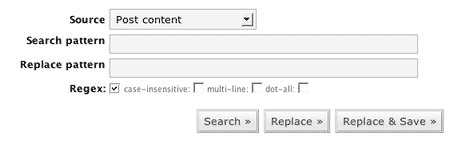
The search and replace patterns are, as you would expect, where you enter what you want to search for and what you want to replace it with. Several options exist to refine the searching capabilities, which will be explained later. You can also chose the data source.
When you have entered your patterns you need to press one of the search buttons:
- Search – Just do a search and show the results
- Replace – Perform a search and replace, but only show the results. The database is not changed.
- Replace & Save – As Replace, but the replacements are saved back into the database.
It should be noted that while you can enter any search pattern in a simple search, you must adhere to regular expression syntax when the regular expression mode is enabled. The plugin will detect any regular expression errors and warn you.
If you wish to remove a search pattern (i.e. search for ‘cheese’ and delete the any occurrences) then you can leave the replacement pattern empty.
Search Options
The following options modify the search:
- Regex – Enable regular expressions. Note that the search pattern can now only contained properly escaped characters. The @ character is used as a delimiter and also needs escaping.
- Case-less – Case insensitive search
- Multi-line – Enables multi-line mode (see PHP’s pattern modifiers page)
- Dot-all – Enables the dot-all mode (see PHP’s pattern modifiers page)
Results
Search results as presented as a list of found occurrences. Each result is shown in context with the surrounding data and, if enabled, the replacement context is also shown.
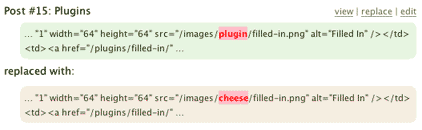
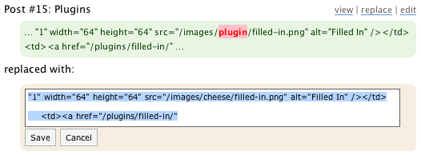
Depending upon the data source you have options to view, edit, or replace the data. Additionally, if you double-click on the highlighted search or replace patterns then an inline edit box will appear allowing you to directly edit the data.
Examples
The simplest case is changing paths:
/wp-images/
to
/images/
A more complicated regular expression version to only move PNG images:
/wp-images/(.*?).png
to
/images/png/$1.png
Warning
You should always use the Search & Replace preview before saving to the database. I will accept no responsibility for any damage caused to your data. If you are in any doubt then backup your database first.
Support & Bugs
Support and feature requests should be made through the Search Regex support forum. You can contact me directly but I spend a very limited amount of time on direct support and you stand a better chance of being answered through the forum.
If you find the plugin useful then please do consider making a donation – it is appreciated and helps towards the maintenance of the plugin.
Thanks!
Hello again John =P.
I just have gotten sometimes to play with this plugin. It works on my Test Blog!…
However, I cannot get it to work on my ‘Real’ blog, which I have ’emptied’ the wp_post & post_meta table.
It might be that the first post_ID (1) should be the "Hello World!" post and the second post_ID (2) should have been the "About" page… but I mess it up?
Don’t know if this is the reason or not, but currently I can’t the search in the "Post Content" drop-down (and every other db tables in the drop-down) yielded nothing – even though I know the searched keyword exists.
Anyway, hope you understand what I’m saying, because I don’t think this plugin is ‘incompatible’ with other plugins, because like I’ve said, I have tested it on the ‘Test’ blog =P.
SEO, do you have an admin login I can use to play around and see what happens? The first and second posts are not important at all, and you can delete or edit them as you see fit.
Hi, John have figured out what’s wrong… LoL.
Silly me, I didn’t switch the ‘limit’ from "10" to "No Limit" ;D.
Anyway, that’s why I can use the plugin on one blog and not the other xP.
*Also, just a suggestion, maybe setting the ‘default’ limit to "No Limit" AND
have a BIG BOLD RED WARNING to ‘command’ the user to BACK UP the database first
before doing the db replace?
~The SEO Blogger~
P.S. Thanks for a "dangerous-if-you-don’t-know", "useful-if-you-know" how the db works =P.
I just used your wonderful Search Regex Plugin to find all the old tag codes [tag][/tag] and [tags][/tags] that where in all my post since I tossed out my old SimpleTagsPlus plugin. BUT I first installed your HeadSpace Plugin and then "imported" all my tags from SimpleTagsPlus before I disabled and and tossed the old tag plugin.
You should add info about this Search Regex Plugin on your instructions on how to use your HeadSpace Plugin, because at first I was editing one post at a time and removing the tag codes before I found in installed Search Regex.
[…] Plugin Homepage […]
Hi there, excellent plugin and thank you very much! I’m wondering if it is possible to also include a filter for specific posts/pages, say only pages whose parent is equal to a specific id or even just specific page/post id’s?
Thanks,
Jonah
[…] позволÑет поÑетителÑм выÑтавлÑÑ‚ÑŒ рейтинг поÑтов. 58. Search Regex – плагин добавлÑет функцию продвинутого поиÑка на […]
[…] a search-and-replace tool. Search Regex adds a powerful set of search and replace functions to WordPress. These go beyond the standard […]
Hi, I am using WP2.3.3 and installed this plugin 1.4.5 ver, but I don’t see these options
# Case-less – Case insensitive search
# Multi-line – Enables multi-line mode (see PHP’s pattern modifiers page)
# Dot-all – Enables the dot-all mode (see PHP’s pattern modifiers page)
Also there is no save option below the search and replace boxes as shown in your example above.
I need to add rel=”nofollow” to <a hre tags in a particular category only. How can I do this.
[…] for wordpress:Â search-regex [Licence: free to […]
[…] a search-and-replace tool. Search Regex adds a powerful set of search and replace functions to WordPress. These go beyond the standard […]
Hi John,
Is the Search Regex plugin working with WordPress 2.5? I made some searchs and almost always I got no results even when I tried some words that I was seeing in some posts (on another tab of my browser). Initialy I wanted to change the size of my blog videos, I use FLV Embed and the way to post video is example: “flv:nameofthevideo.flv 320 240]”. I’would like to change “320 240]” with “480 360]” just an example. No results.
Thanks
[…] search-regex, version , licence GPL, web: http://urbangiraffe.com/plugins/search-regex/ , Download: […]
not working for me in wordpress 2.5 – get barely any (if) results.
I just upgraded to WordPress 2.5. and would love to know if anyone is getting this Search Regex Plugin to work with the latest WordPress? Or is there another plugin out there that does the same thing and works with WordPress 2.5. Thanks!
neither to me.. 🙁
[…] позволÑет поÑетителÑм выÑтавлÑÑ‚ÑŒ рейтинг поÑтов. 58. Search Regex – плагин добавлÑет функцию продвинутого поиÑка на […]
This looks like a magnificent plugin; the problem is that I have already finished a major file-path-change project. Oh well…I’ll download it for the next time around. Thanks.
[…] Search Regex: Diyelimki PC Labs’daki gibi arÅŸivinizde 2000 yazı var ve bu yazıların hepsinde “/images†olarak verilen resim yollarını “/resim/†olarak deÄŸiÅŸtirmek istiyorsunuz. Tek tek elinizle düzeltmeyi düşünmüyorsunuz umarım Regex desteÄŸi de olan bu eklenti, yazı içerisinde belirli öbekleri deÄŸiÅŸtirmek istediÄŸinizde kullanabileceÄŸiniz can kurtarıcı bir eklenti. Favorim diyebilirim. […]
[…] Search Regex – плагин добавлÑет функцию продвинутого поиÑка на вашем блоге. […]
I’d really appreciate a few ‘worked examples’.
E.g. I would like to change links of http://foo.bar/2008/06/05/postslug into http://foo.bar/postslug
The first test, foo.bar/[0-9]* yields an error: ‘Invalid regular expression: Delimiter must not be alphanumeric or backslash’
which doesn’t help me much…
Ahhh, here we go. Ticking regex box then the thing must be surrounded with @
e.g.
@foo.bar/[0-9][0-9][0-9][0-9]/[0-9][0-9]/[0-9][0-9]@
Manish, you only see the regex options when you click the regex button. The save option only appears when you double-click an entry.
Search Regex is now fully WP 2.5 compatible
[…] Search Regex – плагин добавлÑет функцию продвинутого поиÑка на […]
[…] позволÑет поÑетителÑм выÑтавлÑÑ‚ÑŒ рейтинг поÑтов. 58. Search Regex – плагин добавлÑет функцию продвинутого поиÑка на […]
[…] weiteres interessantes Werkzeug für den Administrator ist das Search Regex Plugin. Die Erweiterung fügt dem Backend eine leistungsstarke Suchen- und Ersetzenfunktion hinzu, die es […]
[…] a search-and-replace tool. Search Regex adds a powerful set of search and replace functions to WordPress. These go beyond the standard […]
[…] a search-and-replace tool. Search Regex adds a powerful set of search and replace functions to WordPress. These go beyond the standard […]
[…] позволÑет поÑетителÑм выÑтавлÑÑ‚ÑŒ рейтинг поÑтов. 58. Search Regex – плагин добавлÑет функцию продвинутого поиÑка на […]
John, regex searches don’t seem to be working with me. I removed /%year%/%month%/ from my permalink structure and now I want to correct the links on my posts.
I have already surrounded my regex with slashes or “at” symbols but get no results… I use WP 2.6.2, plugin 1.4.7 and have tried many expressions, e.g.:
@\/([0-9]{4})\/([0-9]{2})\/(.*)@
@\/([0-9]{4})\/@
/([0-9]{4})/
Can you help me? What am I doing wrong?
Just to confirm but you do have the regex option enabled?
Yes. I tried with all other three options checked and unchecked too but when the (no) results screen shows up, the regex options comes strangely unchecked:
Is that correct?
Here’s a screenshot: http://www.screenshots.cc/photos/medium/1966-41y5r.jpg
I’ve fixed a bug where ticking the regex box wasn’t registering. This may have caused your problem.
Thanks! Seems to work fine now!
[…] Search Regex – adds a powerful set of search and replace functions to WordPress. These go beyond the standard searching capabilities, and allow you to search and replace almost any data stored on your site. In addition to simple searches you have the full power of PHP’s regular expressions at your disposal. […]
Wow! Your plugin just saved me from a huge hole I had dug for myself. I switched over to fancy or pretty permalinks and needed to go through all the messed up slugs from over a year ago. With your plugin, I was able to clean up all sorts of punctuation marks and to lowercase everything, to remove double spaces and double hyphens, and just generally cover the whole keyboard. It worked perfectly.
Now I’m going to use it to solve my avatar problem believe it or not.
Before finding your plugin, I was trying to work directly with MySQL through phpMyAdmin. I accidentally hit the wrong button and did the following:
ALTER TABLE `wp_posts` ADD FULLTEXT (
`guid`
);
Will it cause problems? Everything still seems to be working. I tried to find information on how to “undo”; but everything I saw pointed to that I would have had to of set things up a certain way first. I find phpMyAdmin anything but intuitive. I just haven’t used it enough to become comfortable. Anyway, if my query won’t break things, I’ll leave it alone. I would have clicked on the “T” button/icon again thinking it would toggle off the “FULLTEXT,” but then I considered that it might just send a second identical query and make matters twice as bad.
Anything you can tell me will be greatly appreciated.
Blessings,
Tom Usher
Tom. adding a fulltext index to a table won’t cause any harm other than using more space to store the data – you are basically telling MySQL to add an additional index to the guid field so it can perform faster searches. You can’t add two indices to the same field so don’t worry about having a duplicate index.
Hi John,
Thank you so much for your reply. It’s a relief to hear that from someone who obviously knows what he’s talking about. By the way, I did use your plugin to clean up my old-comment email address so that my comment avatar could start working properly again on all my comments on my site. I’m going to clean up all my old post titles that contain international characters that won’t render properly in the Feedjit widget.
What a great tool you’ve created. I recommend it.
I’m not doing the regex with it, because I don’t know enough about that yet and haven’t had the time to learn it, so I can’t speak to that part; otherwise, I can say it works really well. Thanks again.
Blessings again,
Tom Usher
I get this message when i work with this plugin: Fatal error: Allowed memory size of 33554432 bytes exhausted (tried to allocate 1568345 bytes) in /mounted-storage/home95a/sub007/sc50212-SZBT/www/wp-content/plugins/search-regex/models/search.php on line 186
How can get rid of this?
//Ricard
You’ve run out of memory and will need to increase it – some details can be found here
[…] Search Regex – WordPress search with regular expressions | Urban Giraffe – […]
thanks for the great plugin but i have problem using this regex:
]*>(.*?)Error msg: Invalid regular expression: Unknown modifier ‘]’
and when I tried to use:
/]*>(.*?)/Error msg: Invalid regular expression: Unknown modifier ‘p’
how can i use it for html tags ?
You must escape any regular expression characters using a backslash.
[…] позволÑет поÑетителÑм выÑтавлÑÑ‚ÑŒ рейтинг поÑтов. 58. Search Regex – плагин добавлÑет функцию продвинутого поиÑка на […]
[…] 41 © Search Regex Site veritabanına girmeden dosya, klasör adları gibi deÄŸiÅŸiklikleri yapabilmenize yarar.. TEST […]
I have a table, where the table header hasn’t been coded as it should (thead).
For this reason I want to change
…
With..
…
I have tried the following.
Search: @(.*)@
Replace: $1
But I get no result… :S
Hi John,
I was going to post this to your support forum. I registered and received a password, but your system wouldn’t let me in.
I’m using Search Regex 1.4.8 on WordPress 2.7.
I don’t know if the problem I’m encountering is due to the new WordPress version.
When I Search on
&print=1
the plugin returns 296 results just fine.
When I Replace
&print=1
with
/print/
the plugin returns a blank page.
Thanks.
[…] Search Regex […]
Hi John,
I discovered that it was a size problem. Some of the posts involved were huge (120,000+ words) and had up to 30+ occurrences in each. Once I did a search-and-replace on the largest posts by other means, your plugin handled all the smaller posts just fine.
Hope this info helps.
Thanks.
Tom Usher
Thanks Tom, I’ve added this into the tracker and I’ll look into a proper fix.
Hi John,
It’s me again :). One very NEEDED feature suggestion for this search regex plugin:
–It would definite help to have a “POST ID: _____” field to search regex only for that post/page ID,
because when you convert HTML Page to WordPress, the IMAGE URL are broken, so it would definitely be a help
to have search & replace those BROKEN image URL with new ones =P.
Regards,
~Mint Tree~
P.S. It will save a lot of time mate ;).
What I cannot understand – is why now working examples?
Regex isn’t actually “a walk in the park”…
Thanks anyway.
This may be what I’m looking for (haven’t tried it yet) but I build many WordPress pages for clients. I usually start locally on my box using a localhost, then transfer all the data to an online host. This causes headaches primarily with the images uploaded via the WordPress media uploader.
Looks like an awesome tool to combat that problem quickly! Cheers!
What does it mean when, after clicking on “Replace>>”, each return says above it, view | ‘); return false”>replace | edit ??
I’m on WP 2.7.1
Thanks.
your notes say, “Perform searches in post & page content, excerpt, titles, URL, and meta-data, as well as comment content and author data.”
how do i do a search and replace on a “page,” not just a post?
thanks!
deb
Nothing special is needed: post=page
Hi. After reading the doc and the comments on this plugin I’ve just downloaded it as I’m getting ready to migrate my dev site to a production host. This plugin should save a LOT of time.
Being a bit rusty on Regex (its been a while since I’ve done full bore UNIX) I did a Google search and came across a ref that others might find handy: http://www.funduc.com/regexp.htm.
If you’re new to regex, study it carefully and it will make sense. There are examples given.
Hope this helps.