This page is now deprecated. Please visit the Redirection plugin website
Redirection is a WordPress plugin to manage 301 redirections, keep track of 404 errors, and generally tidy up any loose ends your site may have. This is particularly useful if you are migrating pages from an old website, or are changing the directory of your WordPress installation.
Features include:
- Supports both WordPress-based and Apache-based redirections
- 404 error monitoring – captures a log of 404 errors and allows you to easily map these to 301 redirects
- RSS feed for 404 errors
- Custom ‘pass-through’ redirections allowing you to pass a URL through to another page, file, or website.
- Full logs for all redirected URLs
- Create redirections based upon a URL, browser, referring site, or login status
- Automatically add a 301 redirection when a post’s URL changes
- Full regular expression support
- Fully localized
- Export all redirections to CSV, XML, or Apache
.htaccessfiles - Import Apache
.htaccesfiles
Redirection is available in the following languages:
- French, thanks to Oncle Tom
- Hebrew, thanks to Rami
- Spanish, thanks to Juan
- Simplified Chinese, thanks to Sha Miao
- Japanese, thanks to Naoko McCracken
- Hindi, thanks to Ashish
- Russian, thanks to Grib – with Russian manual
- Bahasa Indonesian, thanks to Septian Fujianto – with guide
- German, thanks to Fabian Schultz
- Italian, thanks to Raffaello Tesi
- Ukrainian, thanks to WordPress Plugins Ukraine
- Arabic, thanks to Jerry John
- Brazilian Portuguese, thanks to Pedro Padron
- Dutch, thanks to Marlon Navas and Pieter Carette
- Hungarian, thanks to daSSad
- Turkish, thanks to Fatih Cevik
- Romanian, thanks to Flo Bejgu @ InboxTranslation
- Greek, thanks to Stefanos Kofopoulos
- Belarusian, thanks to Alexander Ovsov
- Lithuanian, thanks to Nata Strazda
- Czech, thanks to Martin Jurica
If you can provide a language translation then please get in touch. A PO file is provided with the plugin to be used in translating with poEdit.
Installation
Installation is just like any WordPress plugin:
- Download redirection.zip
- Unzip
- Upload to
redirectiondirectory to/wp-content/pluginson your server - Activate the plugin
- Configure options from Manage – Redirection
Note that you must have a permalinks structure setup through WordPress.
You can find full details of installing a plugin on the plugin installation page.
Core Concepts
Redirection uses three core concepts:
- Modules
- Groups
- Redirects
A module consists of many groups, and each group consists of many redirections. A module determines how the redirections will be used, and a group allows you to separate redirections into logical units. A redirection represents an action performed when a particular URL is accessed.
Don’t worry, there’s more to come!
Modules
At the most basic level, a module determines how redirections are implemented. There are three types of module:
- WordPress
- Apache
- 404 errors
The WordPress module uses WordPress to implement redirections. This means it works for all permalink-enabled sites and so has the greatest compatibility.
The Apache module, as you would expect, uses Apache to implement redirections. This means that each redirection is written to an Apache .htaccess file, giving you better performance than the WordPress module, at the cost of less compatibility and less flexibility (some features, such as redirection statistics, are only available from the WordPress module).
Separate from these is the 404 error module. This uses Redirection to keep track of 404 errors.
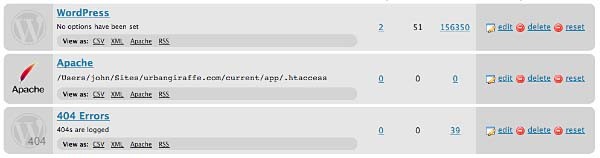
Each module can be exported to CSV, XML, or an Apache .htaccess file. You can also view logs for each module via an RSS feed
WordPress Module
The WordPress module is the default module and provides the most features. The main disadvantage of this module is that each time a URL is redirected it requires WordPress to be loaded (contrast this to the Apache module where a redirection occurs before WordPress loads).
This module is configured as follows:

These options are detailed below:
- Canonical – determine whether the
wwwshould be removed or added to your site URL. - Strip index – if enabled then any attempt to access a
index.php,index.html, orindex.aspfile will cause an automatic redirection to the same URL, minus the index file. - Time Limit – sets a site-wide PHP timeout limit. Useful if something is timing out.
- Error level – sets the PHP error reporting level. Useful for removing unwanted warnings, or for viewing hidden ones
Apache Module
Rather than using WordPress to provide redirections the Apache module writes data to an Apache .htaccess file. If you site supports these then this will give you the greatest performance, at the cost of losing a few items of functionality. For example, the Apache module provides no statistical information so it is not possible for the Redirection plugin to keep track of how many times a particular redirection has been used.
The module is configured as follows:
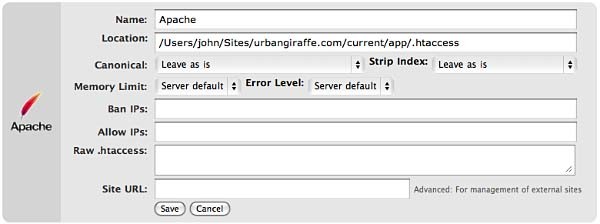
The options that differ from the WordPress module are:
- Location – the location of the .htaccess file. The default will be your site directory
- Ban IPs – prevents certain IPs from accessing your site
- Allow IPs – allow certain IPs to access your site
- Raw
.htaccess– add custom rules - Site URL – an advanced option which allows you to set the site base URL
Note that when writing to a .htaccess file the Apache module will retain any existing non-WordPress data, so you can still add custom rules.
404 Module
This module is a little different to the others in that it is designed to record 404 errors. Rather than make this a general function, as in previous versions, the power of this module comes from the fact that redirections created inside it will be ignored from the 404 log. In other words, the module records all 404 errors except the specified URLs. Combined with the RSS feed this gives you a lot of options to keep track of errors on your site.

If you do want to ignore a 404 error (for example, you site may not have a favicon.ico and you don’t want this recorded) then you should create redirections as normal, but set the action to ‘Do nothing’. As for other modules you can create redirections based upon any action or rule, or matching a particular regular expression.
Groups
A group is a logical collection of redirected URLs. You can create as many groups as you wish, and groups can be re-ordered. URLs are matched based not only on the order in which they occur within a group, but the order in which groups occur within a module.
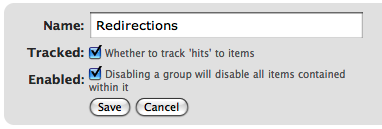
As well as allowing you to collect redirections together, you can also specify whether the redirections within a group are logged.
As an additional configuration option you can select which group an automatically generated URL is put in when a post/page or category is changed.
Using Redirection
The main idea behind Redirection is that you create several URLs that you want to redirect. These URLs are placed within a group, which in turn is placed within a module. The module determines how the URLs are redirected, and the group allows you to logically organise the URLs.
Each URL (or redirection) can be configured to behave in different ways. When creating a redirection there are several pieces of information you must provide:
- Source URL – This is the original URL that you want to redirect somewhere else
- Match – This tells the plugin how you want to match the source URL
- Action – Determines what happens if the URL is matched
- Regular expression – Tells the plugin that the source URL is a regular expression (i.e. a pattern that may match many URLs)
- Target URL – most actions have a target URL. This is typically the URL that the user will be redirected to should the pattern match

Note that items can be re-ordered and this may influence which redirection takes effect.
Matching URLs
Matching a URL is a key part of Redirection and consists of a source URL. This URL must exactly match a URL that you want to redirect. For example, your site has the page:
http://yoursite.com/oldpage/that/needs/redirecting/
The source URL for this is: /oldpage/that/needs/redirecting/. The source does not require your website address, and it is only possible to redirect a URL that exists on your website (you cannot redirect an external website, for example).
Advanced users can make use of regular expressions to reduce the number of redirections they need to create. A regular expression is basically a pattern that tells the plugin how to match. For example:
/(\d*)/(\d*)/(.*)
This pattern tells the plugin that you want to match a URL that looks like:
/2007/05/some-url/
That is, the (d*) indicates a number, and the (.*) a sequence of characters. Regular expressions are a complicated subject and this page will not attempt to give more than a passing overview of using them. If you do need more help then you should take a look at a regular expression website.
Remember that if the source URL is a regular expression then you must enable the regular expression option, otherwise Redirection will just treat you source URL as plain text.
In addition to the source URL you can also specify a match condition:
- URL only – Only matches the URL (the majority of your redirections will use this)
- URL and referrer – Matches a URL when the source and referring site matches (i.e. match the URL only when the user came from a certain website)
- URL and login status – Matches a URL when the source and user’s login status matches (i.e. match the URL only when the user is logged in)
- URL and user agent – Matches a URL when the source and user’s browser matches (i.e. when the user is using a particular type of web browser)
These special rules can be both positive and negative. For example, you can match a URL when the user is logged in (and be redirect to one URL), or when the user is not logged in (and be redirected to another URL). This makes it very easy to create custom rules where users are redirected if they are using a particular browser, or if they came from a particular website.
Actions
An action tells Redirection what to do when a source URL is matched:
- Redirect to URL – The default case and the majority of your redirections will use this
- Redirect to random post – An esoteric action that may be useful to some people
- Pass through – An advanced option that allows you to masquerade one URL as another (i.e. when the source URL is accessed it actually displays the contents of another URL without the user being aware)
- Error (404) – Causes a 404 error to be returned
- Do nothing – A dummy option that can be used if you just want to track accesses to a URL
Configuration of rules and actions
Depending on the particular combination of action and match rule you may be required to provide further details for a redirection.
Basic URL redirection
You can specify which HTTP code is used to redirect a URL (301, 302, or 307):
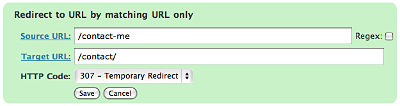
A couple of examples:
/blog/(.*) => /$1
This will match any URL that starts with /blog/, and will redirect it to the same URL but without /blog/. For example, /blog/2006/10/01/mypost will be redirected to /2006/10/01/mypost.
/2006/month_(\d+)/(.*) => /2006/$1/$2
This will match any URL that starts /2006/month_, and is then followed by a number. This will be redirected to the same URL, but without month_. For example, /2006/month_1/something will be redirected to /2006/1/something.
To replace a single dash in a URL with a space:
/tags/(.*?)-(.*?) => /tags/$1%20$2
Redirect to URL by matching user agent
This allows you to configure a redirection to occur when a specific browser (the user agent) is used:
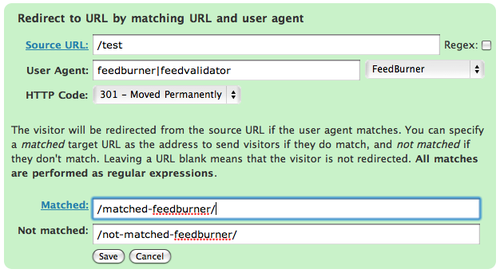
A set of pre-defined user agents is available from the drop-down menu or you can specify your own. The user agent match is always performed using a regular expression.
Two target URLs can be specified, one for if the user agent does match, and one for if it doesn’t match.
Redirect to URL by matching referrer
Similar to the user agent rule but this one looks at the referrer. That is, if a user follows a link from another site to yours, the original site is passed along by the browser (unless disabled) to your site so that you know where the user came from. Using this rule you can base your redirections upon this original site.
Redirect to URL by login status
This rule allows you to match a URL based upon the user’s WordPress login status. That is, if they are logged into your site.
Support & Bugs
Support and feature requests should be made through the Redirection support forum. You can contact me directly but I spend a very limited amount of time on direct support and you stand a better chance of being answered through the forum.
If you find the plugin useful then please do consider making a donation – it is appreciated and helps towards the maintenance of the plugin.
Thanks!
Hi John,
Working with your plugin and having a good time with it. I have a question concerning redirects in general. I also use Fucoder’s Permalink and I see by your previous comments that you do as well. Once I installed your plugin though, I noticed the 404 logs piling up with all sorts of 404’s that related to my previous permalink structure; /%category%/%postname%/. This should have been redirected over to the new structure; /%year%/%monthnum%/%postname%/. I found that my .htaccess was still chmod’d to 644 so I changed it over to 666 and re-saved the options in both WP’s Options/Permalink and Permalink Redirect. Back in your plugins 404 logs, I still had no redirect, the links still ending up at 404 page.
Bear with me here, I’ll get to the point, I swear.
I then renamed my .htaccess to 1.htaccess and upoloaded a new, blank .htaccess in it’s place and chmod’d to 666. Went in and saved all options again as above and the appropriate rules were written by WP into the new .htaccess. Going back into Redirection’s 404 logs, clicking once again on the 404 url’s brings me to a "200 OK" saying the page has been moved ‘here’. Clicking on ‘here’ of course brings me to the correct page. I have to assume this is the result of Permalink Redirect’s generated 301. Would this be correct?
If this is correct, is there a way to use your plugin to automatically redirect these old permalink structured url’s straight through to the new url (as a single, simple 301 redirect does using your plugin) and skipping the 200 OK without redirecting a couple hundred 404 one by one? Or is this the way things are suppose to work with Permalink Redirect?
I realize that Permalink Redirect isn’t your plugin but since you use it, you may have seen this.
yourself.
BTW, I’m running WordPress 2.2.2 and it was my understanding that Permalink Redirection was supposed to be included into the core of 2.2 (so the developers stated throughout the beta period), but I can’t find any info on this at all nor does anyone respond to my questions on the WP forum, as usual. Perhaps you know?
Sorry for the long comment. I tend to get wordy. 🙂
Update on above comment:
Deactivating Permalink Redirect and clicking on one of the 404 links that has the old category structure takes me directly to the correct post but the url in the address field of my browser shows the old permalink structure in the url as well. Clicking on the post’s title (permalink) takes me to the same post of course and the address field shows the correct structure.
This sounds like a direct 302 but I’ll be blasted if I know where it’s coming from and I’ll admit, I’m really light when it comes to this stuff. Any info would be appreciated.
Hi, I have been unlucky with the spam filter so far. I sent you a message via the contact page to let you know the problem I was facing.
Apparently, it could be a server setting, because the plugin activates fine in my new blog (same wordpress version and other plugins as my old blog). Too bad it is from my old blog I want to redirect 😉
But I have managed with .htaccess and a Redirect permanent instruction, as the old => new url structure was really easy to map (and my old host seemed to allow the redirect).
Thank you very much in any case. Your plugins rock.
Hello,
Was unable to get DrainHole working, but I discovered this probably related to Redirect not working at all.
I add the following redirect rule:
Source URL: /wordpress/test/
Target URL: http://www.slashdot.org
Type: Simple redirect
Method: 301
If I now enter http://myblog.com/wordpress/test/ I just get a "Not Found
The requested URL /wordpress/test/ was not found on this server."
Im using WP2.2.2 and Redirect 1.7.14. Any help greatly appreciated.
Woo…. it’s really the one I’m looking for, thank you very much!
Sunny, done!
Grasland, it’s possibly an interaction with another plugin. You could try disabling all your plugins, enabling Redirection, and then incrementally enable the other plugins until it breaks.
Frank, do you have a permalink structure defined for your site? Before Redirection will work (and hence Drain Hole) you must have saved a permalink structure at least once. This creates the necessary .htaccess file that will direct requests into WordPress and through Redirection.
Kirk, I don’t think Permalink Redirect is the ideal solution for what you want to achieve. You may be better off looking at something like Permalink Migration, or Advanced Permalinks.
Jonathon, auto-generated target URL now available in 1.7.15
Hi,
I’ve just installed the Redirect Plugin to my WordPress site. When I went to Manage->Redirect, all I saw was this…
Rendering of admin template /home/content/c/p/e/cpenner/html/blog/wp-content/plugins/redirection/view/admin/submenu.php failed
Rendering of admin template /home/content/c/p/e/cpenner/html/blog/wp-content/plugins/redirection/view/admin/redirections.php failed
Any idea on how to correct it would be welcomed with open arms.
Curtis
Awesome! Thank you so much. I’ll take a look at it shortly and see if I have any other suggestions for it. Thanks again so much!
Thanks for the info John.
I’m emailing you about a rather significant problem that occurs approximately every 24 hrs that throws errors involving several errors above my site when it’s loaded up in the browser (not logged in) that also makes logging into the admin impossible. I’m including all the info you will need in accordance with your contact page and my past troubleshooting experience. Unfortunately I’m not versed enough in php coding to go after the fix myself.
I’ll check out those other two permalink plugins.
Excuse my typos please…that should read "throws several errors above the top of my header image…etc"
Hi John,
Please disregard my previous plea for help. I’ve (along with technically gifted wife) figured out where I went wrong.
Well, now that I have it working on my WP dashboard, I’m wondering if this is the right plugin for me.
I had a traditional, non-Wordpress site at http://www.oldsite.com. All of the pages use an .html extension. My hosting is with Godaddy and it allowed me to 301 direct my old site to my new WordPress driven site and domain. So now all the old site pages show up as http://newsite.com/page.html. They don’t reflect my new WordPress theme. They look exactly as they did before, only the url has changed.
I’m wondering if I can redirect each specific page to a newly created page/post on my WordPress site. I’ve entered old urls and target urls but redirections don’t seem to be happening.
Any suggestions?
Thanks in advance for your help.
Curtis, Redirection is primarily used to redirect URLs on an existing site. If you are redirecting from an old non-WordPress site then you would be better off just having a global .htaccess rule on your old site that redirects everything to your new site. Any redirects you setup on your new site will only affect the new site.
hi there.. i might be asking some stupido thing, who knows 😉
But.. is there a way to avoid the .gif or jpg files that are "not found" appear on the log? I mean, so far im trying to get all the "pages" that are not working, but since i´ve had to remove an entire folder of images 90% of my 404 logs are .gif or .jpg files.
thanks in advance 🙂
[…] and others go to http://yourblogdomain.com/ it can cause the same problem. John Godley has a redirection plugin that lets you manage all kinds of cool redirections from your dashboard. One of the configuration […]
Mariano, there’s currently no way to ignore a particular 404 error. You could create a redirection for the missing images (which you should do anyway, if you’ve removed something that used to exist)
What is the Regex tickbox for?
I have just activated the plugin but i cannot add redirection. Everytime i press the Add Redirection button, nothing shows up like yrs in colorful list
It’s the best plugin I’ve ever seen! Thank you so much!
And I have a suggestion that it would be better if we can turn off the Log & 404 Log functions, as I receive lots of spams requesting the unavailable url everyday.
A great plugin!
but…
Is it possible to perform a regex on the referrer URL instead of the source URL?
Example would be redirecting a 404.php and strip the post title from the referrer URL and put it after /?s= to perform a search as a 404 landing (examination of the code should be sufficient information).
I’ve been reading it but got confused with the mechanism of it halfway through. Could you please provide some pointers on how to do this? I’m not much at PHP, but I can code.
Thanks.
Kiatlc, the regex box is to enable regular expressions (see the above section on regular expressions). I don’t exactly know why you can’t add redirections, but if you read through previous comments it is probably because you have an ad-blocker that is blocking the javascript, or another plugin is interfering with the javascript
Colin, done!
Chakrit, I’ll put it on the list for a future version
Hi UG – any thoughts about adding a email notification option for the 404 log and/or publishing the list of 404 errors to an rss stream? If you included that it would make obsolete the 404 notifier plugin I’m currently using (and that would be a good thing since the fewer the plugins the better)
Keep up the great work
Before I spend time downloading and installing – quick question.
I assume, but want to be assured, that the plugin will work for pages outside of WordPress?
If I’ve got a page http://www.mysite.com/page.php?id=1 that I’m importing into WordPress as http://www.mysite.com/page1/ I can still set up a redirect for page.php?id=1 even though it’s not inside WordPress right? Your plugin is just a fancy GUI for writing to .htaccess?
If so, that’s a life saver! Thanks.
Just tried it, sadly it doesn’t do what I’m looking for.
I can redirect TO a page outside of WordPress, but not FROM a page outside WordPress.
I used my archives.php page as a test. Redirect from /archives (which doesn’t exist) to archives.php works. Redirecting from archives.php to /archives doesn’t.
I tried it again, redirecting archives.php to a page that does exist, us_vs_them.php, which also failed.
Looks like I’m out of luck, and will have to write a bunch of 301s by hand, unless you can suggest something I’m missing?
[…] Redirection By. John Godley […]
Any idea why I get this error message:
[09-Sep-2007 15:37:23] PHP Fatal error: Class a_redirector_url: Cannot inherit from undefined class redirector in /home/mattk/public_html/wp-content/plugins/redirection/redirectors/url.php on line 22 [09-Sep-2007 15:37:40] PHP Fatal error: Class redirector_login: Cannot inherit from undefined class redirector in /home/mattk/public_html/wp-content/plugins/redirection/redirectors/login.php on line 22 [09-Sep-2007 15:47:47] PHP Fatal error: Class redirector_luckydip: Cannot inherit from undefined class redirector in /home/mattk/public_html/wp-content/plugins/redirection/redirectors/lucky_dip.php on line 22 [09-Sep-2007 15:52:03] PHP Fatal error: Class redirector_random: Cannot inherit from undefined class redirector in /home/mattk/public_html/wp-content/plugins/redirection/redirectors/random_url.php on line 22 [09-Sep-2007 16:09:09] PHP Fatal error: Class redirector_referrer: Cannot inherit from undefined class redirector in /home/mattk/public_html/wp-content/plugins/redirection/redirectors/referrer.php on line 22
Mike, Redirection does work for posts outside of WordPress (otherwise there wouldn’t be much point to it!) If it didn’t work for you then it’s likely you don’t have an .htaccess file. Although this may seem counter-intuitive, Redirection stills needs a basic .htaccess file otherwise all access to outside pages will not go through Redirection. Fortunately this file is created for you by simply going to the permalinks page in WordPress and pressing ‘save’. Once that’s in place you can use Redirection to handle pages that don’t exist
Matt, no I don’t know why you get that error. A handful of others have reported the same problem and I’ve not yet been able to track it down. All I know is it’s something specific to your host. If you have the time to help me track it down then please do get in touch and I’ll send you a special debug version.
Thanks John. I just tried again, and it’s still not working.
I’ve got an .htaccess (and have been using it for years), it’s writeable, so your plugin should be able to write to it.
I again tried redirecting advertise.php to a variety of other posts, and it didn’t work.
Maybe I’m missing something:
I put in the entire URL in the source: mysite.com/advertise.php
I put in the entire URL for the target: mysite.com/example-wordpress-page
Type: Simple redirection
Method: 301
Regex: unchecked
I add it, it shows up in the "redirections" place, but the redirect itself doesn’t work. Is it because the page I’m trying to redirect FROM actually exists?
Correction, yes, I just tested it.
If you try to redirect from a page that exists, it doesn’t work.
I tried redirecting blahblahblah.php (which doesn’t exist), and it worked just fine. So there’s something presumably in the code that says if the page exists, don’t redirect. If the page doesn’t exist, redirect.
At least it’s working now.
Thanks for the plugin!
Mike,
You shouldn’t put the full URL in the source, and you don’t need it in the target unless you want to redirect offsite – every URL is assumed to be relative to your site. Redirection will redirect pages that exist, but only if they are pages inside WordPress. It can’t redirect URLs that are physical files because Apache (and .htaccess) takes control of this before Redirection gets a chance to do anything.
I am having the problem that I cant get pass through to work with other sites. My .httpaccess looks like
# BEGIN WordPress
RewriteEngine On
RewriteBase /
RewriteCond %{REQUEST_FILENAME} !-f
RewriteCond %{REQUEST_FILENAME} !-d
RewriteRule . /index.php [L]
# END WordPress
is there something missing that would prevent it from working?
[…] Redirection by Urban Giraffe shows how program extensions should be done. This is a full-fledged GUI for managing redirects on your WordPress blog, with an intuitive and comprehensive interface. Redirect using regular expressions, redirect to random pages, redirect based on the referrer page — all without mucking with .htaccess files. Not only that, but Redirection keeps a log of all 404 "page not found" errors on your site so you can create redirects quickly as needed. […]
Hello, i have got a problem.
When I tried to add a new redirect:
NEW REDIRECT SETTING:
Source URL: /kuchyneTarget URL: /kuchyne/kuchyne-top
Type: Simple Redirection
Method: 301 Permanent redirect
Regex: no
it makes error:
WordPress database error: [Out of range value adjusted for column 'regex' at row 1]INSERT INTO stadrop_redirection (url,type,regex,position,redirector) VALUES ('/kuchyne','301','','0','O:16:\"A_Redirector_URL\":1:{s:3:\"url\";s:20:\"/kuchyne/kuchyne-top\";}')
when I check Regex check box, there is not error, but when I set address (http://www.something.com/kuchyne) the result is
http://www.wp.loc/kuchyne/kuchyne-top/kuchyne-top/kuchyne-top/kuchyne-top/kuchyne-top/kuchyne-top/did you know where is problem ?
Chris, what do you mean specifically when you say you cant get pass through to work for other sites?
Palo, what version of PHP are you using?
The "auto-create target" still isn’t working as I had expected. It’s generating a new target, but the redirect doesn’t function out of the box. I will need to go change the target to the new permalink.
it auto-creates the source of where to go on my domain, but the target gets broken….
maybe try working on that to correct it and make it work, thanks!
I was wondering. I want to redirect all from a particular url to another, except if they are from a particular URL. Example, redirect all domain.com/feed to domain.com/feed2 unless the request is from feedburner. In htaccess, the code is RewriteCond %{HTTP_USER_AGENT} !^FeedBurner.*$. Os that avail here?
Also, currently my wp blog is at /blog. Is there any reason to move to top level? If so, is there an easy way so that I do not have visitors wandering around if they go to "old" page. I also have several important folders in the /blog/folders hierarchy that are now associated with the WP install that I need and do not want to screw them up… Thanks for a great plugin!
Andrew, you can achieve that using a ‘redirect based on referrer’.
Jonathon, I’m not sure I understand. Why do you need to change the target? When I use an auto-create target it generates a unique target URL, which works immediately.
does a full-site redirection (non-www to www) cause problems with search engines or not?
John,
What I’m trying to get at is this: Let’s say you have an external link, going to myothersite.com, so you set that as the target, the source is what should be auto-generated. it only partially works right now. it generates the source, but the target gets screwed up in the process.
Take a look at these two screenshots..
http://img146.imageshack.us/img146/8153/r1kz8.jpg
http://img146.imageshack.us/img146/961/r2yt7.jpg
Systech, no, it shouldn’t do. Many people do it to ensure there is only one version of their site.
Jonathon, I’m not seeing a generated source or screwed target in either of the images. Redirection only generated a target URL, but since 1.7.18 it will also generate the source.
I was wondering. I want to redirect all from a particular url to another, except if they are from a particular URL. Example, redirect all domain.com/feed to domain.com/feed2 unless the request is from feedburner. In htaccess, the code is RewriteCond %{HTTP_USER_AGENT} !^FeedBurner.*$. Os that avail here?
I see your answer is the referer condition, but I am very confused. I tried and got caught up in a loop.
Can you kindly put down who is who in the situation, referer, source etc and should it be 302? Regex?
THANKS
Hi Andrew, I’ve updated the information on this page with an example of how to use the referrer method.
I love this plugin, I do have one issue though. Pass through redirects do not work. The source URL gets rewriten as it should, but then WordPress throws a 404 for the target URL in my face, whereas a 301 or 302 redirect with the same source and target URL’s works as expected.
HELP!
okay, whenever I do this: CASE A
source:/OLDURL/(.*)/
target:/NEWURL/?kw=$1
Compared to this: CASE B
source:/OLDURL/(.*)/
target:http://www.FULLADDRESS.com/NEWURL/?kw=$1
regex set to yes, method set to pass-through
only CASE B works correctly, and passes the variable. Now, this would not be an issue, except in case B because i am listing the whole URL i guess apache does not recognize it is on my server, and creates child process, which my shared hosting environment looks at as a DOS attack whenever google trys to check my adwords ads.
I can add a redirect to a local file, but whenever I add a redirect to an external site, I get the animated wheel and then nothing. No errors but no redirects are added to the list. When I try to change an existing redirect to point to an external site, I get this message in the DIV that used to contain the edit form for that particular redirect:
Service Temporarily Unavailable
The server is temporarily unable to service your request due to maintenance downtime or capacity problems. Please try again later.
ct is added to the list. If I try to change an existing redirect to go to an external url, I get
I did as you said, turned off the same in the htaccess and now i get this:
Error getting URL: 500 – There was a problem retrieving the feed: com.burningdoor.rsspp.resource.impl.HttpConnectionException: Error getting URL: 400 – Recursive feed redirection error: Are requests for your ‘Original Feed’ address — the feed that FeedBurner is checking for updates — being redirected to your FeedBurner feed? Make sure your Original Feed is provided from a web address that isn’t redirected to FeedBurner.
John, the issue that I’m seeing is this. I want the Redirection plugin to do this…
I have an external URL, http://www.myjoebob.com, and I want to setup a redirect for it. I want to input that as the target and have it automatically create a source ID for it. Right now, if I do that, it sets the source ID as / and no one can visit my site.
The source URL is what needs to be automatically generated.
Can you do this? It would be a *huge* help.
Doesn’t work for me. It seems it doesn’t make his tables on database, so he can’t access them. 🙁
By the way, I’m using WordPress 2.3 RC 1.
Alenônimo,
This may not answer your question but just to add another side to it, I was already using Redirection when I upgraded to WP 2.3 beta 3 and then to RC1 and the plugin continued to function okay. My question to you is were you using Redirection before you upgraded at anytime? The reason I ask is that I once had a similar problem awhile back. Although the plugin installed and I could get to the plugins Admin page under "Manage", it kept throwing database errors. To solve this problem I had to use go to the Redirection options page and delete the plugin and all associated tables (whether they were there or not) using the button on the bottom of the page. I then re-installed the plugin and reactivated and everything worked fine from then on.
Hope this helps.
Jonathon, yes this is what it should do. Did you turn on auto-generated URLs in the options?
Michael, I can’t reproduce that effect – when I add an external target it is added like anything else. Is there anything non-standard about your system?
Colin, I can’t reproduce this either! The source URL should not get rewritten. A pass-thru allows you to take the contents of the target URL and make it appear at the source URL. If your URL is being rewritten then it seems to be doing a redirect.
Chris, that is a bit beyond what Redirection offers. When you specify a full URL then Redirection will open a connection to that site and feed the data back to the browser. This is certainly not something you would want to happen frequently. If you specify a relative URL then it must be a post inside WordPress, or a file (i.e. file://path/to/your/file).
Andrew, what did you enter into the redirection?
John,
the issue is that it’s not auto-generating the SOURCE. I want to set the target and then have it auto-generate the SOURCE, it’s doing the opposite right now.
If set the target, but leave the source empty, it sets it to /, even if I have a value in the auto-generated field…
John, so you are saying that redirection can’t send the variable data to the post that is inside of wordpress. I am curious as to why it doesn’t work? In my example, /NEWURL is a post in the wordpress site. Why does /NEWURL/$kw=$1 not work? Is that not also a post inside of wodpress? Thanks for taking the time to answer questions and clarify.
You forgot to include database.php. 🙂
Jonathon, are you using the very latest version?
Chris, Redirection sends the data, but something is not sitting well with WordPress when it encounters query parameters. For example, you can create a pass-through from /hello/ to /about/, and it will correctly show the contents of /about/ in /hello/. However, when query parameters are included it doesn’t work, and I haven’t had the time to dig about inside WordPress and investigate fully why – it’s on my list of things to do!
John,
Yes, I am running the latest version, maybe I need to drop the old tables and have it re-install?
John! That was it! I mistakingly was running an old version 🙁
Thanks!!!!!!!!!! this works great now!!!!
UG –
I just upgraded to 2.3 official and it seems to be that Redirection doesn’t cooperate with the native improvements made to canonical urls – specifically, when Redirection is enabled and I click on a url that has a trailing slash nothing is loaded (just a white page appears) – when I disable Redirection and reload the page it works (and removes the trailing slash) – I’ve updated my permalink structure and the site runs fine, it just doesn’t work when Redirection (version 1.7.19), so I’ve had to disable Redirection, which is bad since I have converted over from .htaccess to Redirection and that means with your plugin disabled none of my redirections will be active and I’ll be serving lots of 404s – is there anything I can do to fix this or is it a change that will have to be made to the plugin?
Also, I realize now that it would be great if there was an option in Redirection to export all your redirect rules as lines for an .htaccess file – that way, if something in the plugin breaks and you have to disable it you can still copy-paste over your redirections to an .htaccess file to not end up in the situation I’m currently facing of not managing 404s and 301s
Brian, (please forgive if I’m telling you something you already may have done or know)
I updated last night from WP 2.3 RC1 and I was using 2.3 beta 3 before that. Using the latest version of Redirection (version 1.7.19), I haven’t experienced your problem however there was another plugin I was using that caused a problem very similar to yours which made me suspect Redirection also.
Do you happen to be using the Google XML Sitemaps plugin? If you are and are not using the new version 3 (just out) or the previous version 3 beta 11, you’re going to experience the type of problem you describe. If you are indeed using an older version which is not compatible to 2.3, deactivate it and see if your problem goes away If it does, go get the latest version and install it. if you aren’t using the Google XML Sitemaps plugin, look for other plugins that depend on the old 2.2 category DB structure since these will cause all sorts of strange problems that deactivating an unrelated plugin like Redirection might seem to solve.
One sure way to find out if Redirection is causing the problem is to temporarily deactivate all your plugins with the exception of Redirection and any anti-spam plugins like Akismet or Spam Karma 2 (if you use Bad Behavior, leave that one deactivated) and see if the problem clears up. I bet it does. Then activate the plugins one by one and check to see if the problem comes back.
Hope this helps.
Hi Kirk – I did have the google sitemaps plugin running but had updated to version 3 (from version 3.0b10) – anyway, I’ve disabled ALL plugins except redirection, deleted my .htaccess file, reenabled redirection, rebuilt my permalink structure (which creates a basic .htaccess file), reloaded the offending pages and … just a blank white page – and this is with redirection the only plugin active – it definitely seems to be fighting with the canonical trailing slash issue (since without the trailing slash it works fine) and I suspect redirection is causing conflicts since 2.3 has changes to permalink handling – if anyone else is having this problem, let me know – until then, going to have to disable redirection
Here is a temporary solution: disable the new handling of canonical urls – the developer who worked on the new handling in 2.3 made a plugin to do this – post at http://markjaquith.wordpress.com/2007/09/25/wordpress-23-canonical-urls/
would like to reenable the functionality but at least for now this allows redirection to work
Brian,
You triggered something in my head here (don’t ask). I was wondering why Redirection and 2.3 works for me and not you and then I remembered something that I had to do at the very beginning once I upgraded in order to get the redirections to work again. This is entirely up to you of course.
Look, don’t ask me why this worked for me because I can’t possibly explain why but before you disable canonical urls try downloading and installing the old Permalink Redirect plugin(I used this in my previous installs before I installed Rederection). Activate this plugin, go to Options/Permalink Redirect and see if it has the original permalink structure and your current permalink structure listed and then save settings. Now, strange as it might seem, go and deactivate Permalink Redirect and then check to see if your problem is still there. I’d be interested to know if it’s gone. I had to do this same thing and everything started working properly again afterward. I haven’t had the time to figure out why yet.
I am still having problems with multiple WP installs, probably related to my host DreamHost.com. Is there anyway to turn on logging to find out what the problem might be with redirecting to external sites?
I finally found the issue!! I added some debugging to the javascript and found that for some reason, forward slashes // are not acceptable and cause a 503 error when calling ajax.php. I got around it by escaping the forward slashes. So my url now looks like http:\/\/wordpress.org I will have to look into the code to see if I can urlencode the forward slashes so that it doesn’t have to be done manually.
Brian & Kirk, thanks for all the info regarding the canonical problems. I noticed a difference between how my live site and local site were behaving. I eventually tracked it down to a fix I put into an earlier version of Redirection to make it work on sites using FastCGI. It seems that a change in WP2.3 has made the earlier change incompatible, and Redirection was sending out partial 301 headers. I’ve fixed this in 1.7.20. Let me know if it solves your problems.
Michael, this must be something specific to your host/site, as forward slashes work fine for me and (I think) most other people. Possibly your site has some security process in place that Redirection is triggering. Take a look at this thread and see if you have mod_security running.
Oh, and I forgot to mention that older versions of Redirection did actually have an .htaccess import/export. It was removed because no one seemed to use it, and it was a lot of trouble to keep up-to-date in light of other changes. I’ve always intended to return it eventually.
Urban – thanks for making the fix in 1.7.19 (although you forgot to update the version number in the file) – works like a charm – Kirk, prior to the fix, I did try the curious possible solution you offered but it didn’t work – doesn’t matter now
UG – one thing I see in this new version is a new tab under manage called ‘import/export’ – however, clicking upon it throws an error as it tries to find redirection/view/admin/import.php and fails (and I see that the file does in fact not exist)
Ah, that’s a leaked new feature that you weren’t supposed to see just yet!
Hi Brian,
What the heck…it was worth a try. 🙂
Morning John,
Thanks for the fix. Glad you found the problem! It was an elusive thing that was too intermittent to pin down(in my case I wasn’t even sure it was Redirection so I never mentioned it).
You are awesome John! Thanks for helping me with my issues! I will be sending a donation as this plugin is worth it’s weight in gold!
Also, I don’t know if this has been mentioned yet but when you click on an existing redirect to edit it in IE7, it displays the edit div for a moment and then redirects to the actual redirect. The behavior does not exist in Firefox though. I think if there is a value in the href parameter in the link, IE will actually go to that address.
Thanks again!
It’s not working on WordPress 2.3. =[
"James, regular expressions cannot be queried from the database so I need to get all those from the database. However, I can certainly optimise non-regular expressions, and will look at doing this in the next version. Depending on the nature of your 800 redirects it may be possible to reduce it using regular expressions anyway."
John, why not just load the regex strings and leave the rest to DB query?
Ok I am at a loss with the large redirect use.
I want to take a url that looks like this http://www.blahblah.com/tags/ and change it to look like http://www.blahblah.com/sometext/tags/
for the life of me I can not get this to work correctly any body willing to help out?
Ok since my last question was removed I will ask it again.
I do not understand the how to make this work for what I need it to do.
I want to take a URL that ends /tags/urltext
and change it to be /archives/tags/urltext
[…] Redirection by Urban Giraffe shows how program extensions should be done. This is a full-fledged GUI for managing redirects on your WordPress blog, with an intuitive and comprehensive interface. Redirect using regular expressions, redirect to random pages, redirect based on the referrer page — all without mucking with .htaccess files. Not only that, but Redirection keeps a log of all 404 "page not found" errors on your site so you can create redirects quickly as needed. […]
Thassius, how is not working? This site is WP 2.3 and has Redirection fully working!
James, yep, that’s how it’s working.
Dag, you need to add a 301 simple redirection and enter /tags/urltext as the source address and /archives/tags/urltext as the target address. That should be all that is necessary. Note that you must have a permalink structure and an existing .htaccess file otherwise Redirection will not work.
The problem is the urltext is the changing url of each post or tag. tags/sometag needs to be acrhives/tags/someothertag
I need to mass change all tags to a new format. I would like I would have to use Regex but I can’t get that to work correctly for what I need to do. since tag/* would catch the word tags in the target url archives/tags/* as well and end up with a never ending url.
I just want to do one simple thing. To redirect to affiliate urls from basic urls… but can’t seem to figure out how I should do it..
for example, lets say I have simple url links spread throughout my blog (within post entries text) of:
http://www.netpicks.com
but now when people click on those links I want them to be redirected to the affiliate link of :
http://wetrack.it/netpicks/a/trc4949
can you tell me if this is possible and exactly what I need to fill in where and which options need to select?
thanks in advance if you have time to help!
tom
Same to me John, not working on WP 2.3, until I upgrade it was running perfectly
Forget it, I had some problems copying and pasting and the system add some strange characters, now is full working
When looking at the main Redirection page where the rules are set up, the delete links for each rule do not appear to be fully implemented. Also, the ‘save order’ link doesn’t appear to be implemented.
Both of those link types have a link location of: /wp-admin/edit.php?page=redirection.php#
Not that it’s all that big of a deal for me as I can edit the records directly from MySQL, but if anyone else has seen the problem it might be rather confounding.
Nevermind. I’ve been unable to duplicate it on other boxes, so maybe it’s something screwy with the work laptop. The other laptops and XP machines here are fine.