Due to time constraints I am no longer able to offer support on this plugin. Please do not contact me regarding any problems you may have. The plugin fulfils my own requirements and unless anything else is required then development is unlikely to continue. You are, of course, still able to download and use as you see fit.
Thanks for your interest.
John

| Download: | Advanced Permalinks |
|---|---|
| Version: | 2.9.2 |
| Supports: | WordPress 2.1 – 3.0 |
| Other: | WordPress.org | SVN |
Advanced Permalinks is a WordPress plugin that extends the default permalink functionality and allows you to create different permalink structures for each post on your site. This is particularly useful when migrating an old permalink structure to a new one.
For example, your site currently displays posts like
/2007/05/06/this-is-my-post
But you’d like to make it:
/reviews/this-is-my-post
Your only choice here is to create 301 redirections for each existing post and change the permalinks for everything. With Advanced Permalinks you can configure your site to keep all its existing permalinks, but to use a different permalink structure for new posts.
/2007/05/06/this-is-my-old-post
/reviews/this-is-my-post
No 301 redirections are needed and all incoming links remain exactly the same. Perfect!
Features of Advanced Permalinks:
- Create multiple permalink structures for posts
- 301 redirect old permalinks
- Create category-specific permalink structures, whereby posts in a certain category will have a different permalink structure
- Remove the requirement to have a category base
- Change author permalinks
- Allow periods in permalinks – ideal for website migration
Advanced Permalinks is available in the following languages:
- Bulgarian (thanks to Alexander Dichev)
- Belorussian (thanks to Marcis Gasuns)
- Russian (thanks to Slava Mikheev)
- Uzbekistan (thanks to Alexandra Bolshova)
- Lithuanian (thanks to Nata Strazda)
Note that much of the functionality of this plugin can now be achieved using WordPress 3.0 and custom post types.
Installation
The plugin is simple to install:
- Download advanced-permalinks.zip
- Unzip
- Upload
advanced-permalinksdirectory to your/wp-content/pluginsdirectory - Go to the plugin management page and enable the plugin
- Configure the options from the Options/Permalinks page
You can find full details of installing a plugin on the plugin installation page.
Configuring the plugin
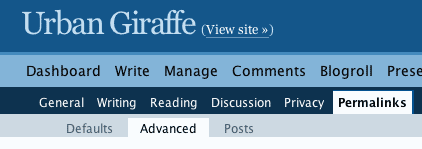
All configuration is made through the standard WordPress permalinks page. When the plugin is enabled you will see some new sub-menu options:
Advanced post permalinks
To assign a different permalink structure to posts you need to have a start and end ID. These IDs reflects that first and last post that you want the structure to apply to.
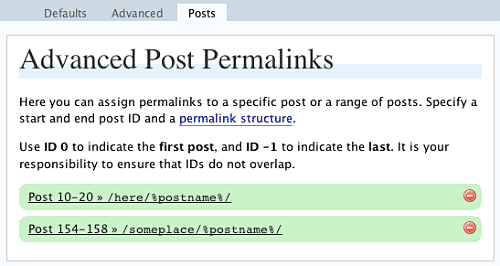
If you want the structure to apply to all existing posts then enter 0 for the start ID, and -1 for the end ID.
If you want to migrate your permalink structure then you would copy the existing permalink structure and apply this to all existing posts. You would then change the default permalink structure.
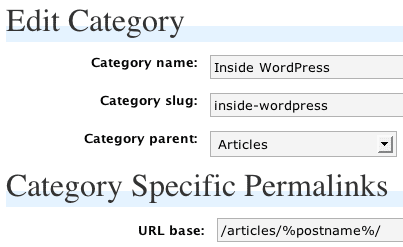
Category-specific permalinks
Category-specific permalinks allow a permalink structure to be defined for categories. Any post that belongs to that category will appear on the custom permalink. This is useful for separating different areas of your site.
Other permalinks
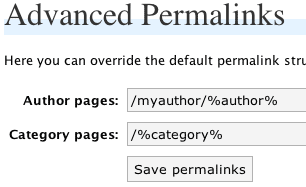
You can configure author and category permalinks:
Migration
A migration feature exists which allows you to define old permalink structures that will be redirected to the current permalink structure. You would typically use this if you decided to change your permalink structure, but wanted to have all old permalinks redirected.
Support & Bugs
Support and feature requests should be made through the Advanced Permalinks support forum. Due to time constraints I will no longer answer questions about this plugin myself. You are advised to make use of WordPress 3.0 and custom post types.
[…] Uno de ellos y el más importante es que las páginas de las categorÃas no funcionaban y en su defecto aparecÃa una pagina de error 404 (Página no encontrada). Después de estar durante toda la noche de hoy averiguando el motivo del problema, hemos descubierto que el mismo ha sido provocado por el plugin Advanced Permalinks. […]
Hi John. I just tried out AP, and I’m afraid I’m lost. Here’s what I am after.
The original permalink setup was /%postname%/
The new setup will be /%category%/%postname%/
I set up the new permalink structure and got 404 errors – to be expected
I modified the migration value to be /%postname%/ thinking that was all I had to do to get the redirection. Is that incorrect? I still got 404 errors. Do I have to specify the old and the new values in migration?
I have only just started using WordPress, at http://www.mande.co.uk
I already have about 40 posts with a post-ID# based address
But I want to change all of these to an address based on their category and post title
Will your plugin help me do this?
Or is there in fact a simpler route to this end?
with thanks, rick davies
same issue as wally below…
————–
Wally :
Apr 15, 2008 3:05 am
Hi John. I just tried out AP, and I’m afraid I’m lost. Here’s what I am after.
The original permalink setup was /%postname%/
The new setup will be /%category%/%postname%/
I set up the new permalink structure and got 404 errors – to be expected
I modified the migration value to be /%postname%/ thinking that was all I had to do to get the redirection. Is that incorrect? I still got 404 errors. Do I have to specify the old and the new values in migration?
————–
if anyone has a suggestion that would be great!
Does this work at all with WordPress 2.5?
(sorry ; the issue tracker is down – so i post here)
I CAN’T use your plugin to redirect
FROM
/%postname%/
TO
%%category%/%postname%/
please … could you debug ?
Hello John,
I’m looking for the following solution:
I wont to move a page not a post! This is especially in greater Webs a normal handling. The Web will never be stable.
The WP page permalink normally is like this:
http://www.myweb.de/masterpage1/pagename
If I now move this page to masterpage2 the new permalink will be: http://www.myweb.de/masterpage2/pagename
I would prefer a permalink without the masterpage in it:
http://www.myweb.de/pagename
Is your plugin the right solution?
first of all you make a superb work! Absolutely great help offered with your plugins! Thank you for your time and effort!
second: 502 Bad Gateway
tracker down 🙁
I have kinda strange problem and just figured it out. it must have been after wordpress version 2.5.1
the permalink strukture doesn’t alow me to place a permalink to a page. it works great with all the posts i made, but a link to a page like (domain.com/imprint) doesnt work at all.
if I deactivate permalink they are normally useable, but all the old posts are not reachable. i have to go manual in thise and save the permalink again to let them show.
any solutions planned ?
greetings from germany
[…] Advanced Permalinks […]
[…] Advanced Permalinks and Redirection. Both are perfect to sort out the problems I was having, with out braking everything 0 Comments So Far Tagged with: Bot • End Result • Google • Grate • Htaccess File • Job • Method Didn • Mod Rewrite • Plug Ins • Typo • Urls […]
[…] Kopf gestellt und nichts entsprechendes gefunden. Desweiteren habe ich auch schon z.B. das “Advanced Permalinks“-Plugin ausprobiert, welches aber den gewuenschten Effekt auch nicht brachte. Weiss jemand […]
I’ve a problem. I installed the plugin and configured a new permalink structure. The old one was /%category%/00%post_id%_%postname%/ and the new one is /00%post_id%_%postname%.html
Then i applyed a “migration” and everything seems to work fine. Now i have a problem, because the pages of the blog have disappeared and there is no way to see them. They return me 404 error…..how can i set the plugin to see them ?
I have been working for weeks trying to solve the problem of not getting a 404 error when I customized my permalinks. I just downloaded and activated Advanced Permalinks and it works great.
Thank you so much for developing this fabulous plug-in.
Awesome!!! This is what I’m looking for.
Really appreciate the hardwork. SUPERB~ 😀
Hello, My question is how do I restore wordpress to its defaults after using your plugin? I tried to deactivate/delete but it looks like the settings stayed. The issue I am having is that I cannot view multiple pages of categories, for instance http://vagary.tv/category/shows/the-multiverse/page/2/ yields a 404 error. Additionally author pages are broken and apparently are doing an infinite loop back. I’ve browsed the comments, but haven’t seemed to find any solution. A response is greatly appreciated.
Just re-save your permalinks.
Thanks John 🙂
Hi I made a french translation of the messages.po file. Are you interested to include it in the plugin ? And if yes, how can I send it to ?
In line 344 of advanced-permalinks.php need replace
if (isset ($_POST[‘cat_ID’]))
to
if (isset ($catid))
else category permalink options not saved 🙁
Googlebot shows that the redirects are 302:
HTTP/1.1 302 Moved Temporarily
How can they be changed to 301?