This page is now deprecated. Please visit the Redirection plugin website
Redirection is a WordPress plugin to manage 301 redirections, keep track of 404 errors, and generally tidy up any loose ends your site may have. This is particularly useful if you are migrating pages from an old website, or are changing the directory of your WordPress installation.
Features include:
- Supports both WordPress-based and Apache-based redirections
- 404 error monitoring – captures a log of 404 errors and allows you to easily map these to 301 redirects
- RSS feed for 404 errors
- Custom ‘pass-through’ redirections allowing you to pass a URL through to another page, file, or website.
- Full logs for all redirected URLs
- Create redirections based upon a URL, browser, referring site, or login status
- Automatically add a 301 redirection when a post’s URL changes
- Full regular expression support
- Fully localized
- Export all redirections to CSV, XML, or Apache
.htaccessfiles - Import Apache
.htaccesfiles
Redirection is available in the following languages:
- French, thanks to Oncle Tom
- Hebrew, thanks to Rami
- Spanish, thanks to Juan
- Simplified Chinese, thanks to Sha Miao
- Japanese, thanks to Naoko McCracken
- Hindi, thanks to Ashish
- Russian, thanks to Grib – with Russian manual
- Bahasa Indonesian, thanks to Septian Fujianto – with guide
- German, thanks to Fabian Schultz
- Italian, thanks to Raffaello Tesi
- Ukrainian, thanks to WordPress Plugins Ukraine
- Arabic, thanks to Jerry John
- Brazilian Portuguese, thanks to Pedro Padron
- Dutch, thanks to Marlon Navas and Pieter Carette
- Hungarian, thanks to daSSad
- Turkish, thanks to Fatih Cevik
- Romanian, thanks to Flo Bejgu @ InboxTranslation
- Greek, thanks to Stefanos Kofopoulos
- Belarusian, thanks to Alexander Ovsov
- Lithuanian, thanks to Nata Strazda
- Czech, thanks to Martin Jurica
If you can provide a language translation then please get in touch. A PO file is provided with the plugin to be used in translating with poEdit.
Installation
Installation is just like any WordPress plugin:
- Download redirection.zip
- Unzip
- Upload to
redirectiondirectory to/wp-content/pluginson your server - Activate the plugin
- Configure options from Manage – Redirection
Note that you must have a permalinks structure setup through WordPress.
You can find full details of installing a plugin on the plugin installation page.
Core Concepts
Redirection uses three core concepts:
- Modules
- Groups
- Redirects
A module consists of many groups, and each group consists of many redirections. A module determines how the redirections will be used, and a group allows you to separate redirections into logical units. A redirection represents an action performed when a particular URL is accessed.
Don’t worry, there’s more to come!
Modules
At the most basic level, a module determines how redirections are implemented. There are three types of module:
- WordPress
- Apache
- 404 errors
The WordPress module uses WordPress to implement redirections. This means it works for all permalink-enabled sites and so has the greatest compatibility.
The Apache module, as you would expect, uses Apache to implement redirections. This means that each redirection is written to an Apache .htaccess file, giving you better performance than the WordPress module, at the cost of less compatibility and less flexibility (some features, such as redirection statistics, are only available from the WordPress module).
Separate from these is the 404 error module. This uses Redirection to keep track of 404 errors.
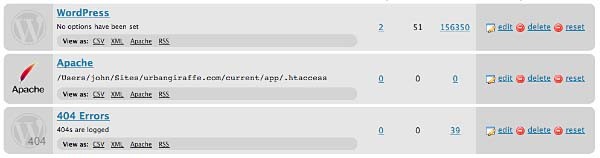
Each module can be exported to CSV, XML, or an Apache .htaccess file. You can also view logs for each module via an RSS feed
WordPress Module
The WordPress module is the default module and provides the most features. The main disadvantage of this module is that each time a URL is redirected it requires WordPress to be loaded (contrast this to the Apache module where a redirection occurs before WordPress loads).
This module is configured as follows:

These options are detailed below:
- Canonical – determine whether the
wwwshould be removed or added to your site URL. - Strip index – if enabled then any attempt to access a
index.php,index.html, orindex.aspfile will cause an automatic redirection to the same URL, minus the index file. - Time Limit – sets a site-wide PHP timeout limit. Useful if something is timing out.
- Error level – sets the PHP error reporting level. Useful for removing unwanted warnings, or for viewing hidden ones
Apache Module
Rather than using WordPress to provide redirections the Apache module writes data to an Apache .htaccess file. If you site supports these then this will give you the greatest performance, at the cost of losing a few items of functionality. For example, the Apache module provides no statistical information so it is not possible for the Redirection plugin to keep track of how many times a particular redirection has been used.
The module is configured as follows:
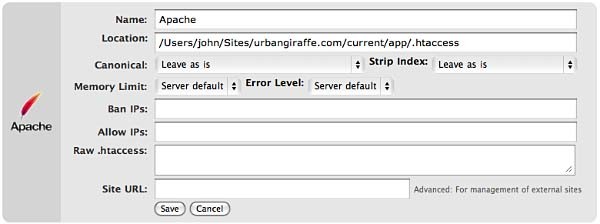
The options that differ from the WordPress module are:
- Location – the location of the .htaccess file. The default will be your site directory
- Ban IPs – prevents certain IPs from accessing your site
- Allow IPs – allow certain IPs to access your site
- Raw
.htaccess– add custom rules - Site URL – an advanced option which allows you to set the site base URL
Note that when writing to a .htaccess file the Apache module will retain any existing non-WordPress data, so you can still add custom rules.
404 Module
This module is a little different to the others in that it is designed to record 404 errors. Rather than make this a general function, as in previous versions, the power of this module comes from the fact that redirections created inside it will be ignored from the 404 log. In other words, the module records all 404 errors except the specified URLs. Combined with the RSS feed this gives you a lot of options to keep track of errors on your site.

If you do want to ignore a 404 error (for example, you site may not have a favicon.ico and you don’t want this recorded) then you should create redirections as normal, but set the action to ‘Do nothing’. As for other modules you can create redirections based upon any action or rule, or matching a particular regular expression.
Groups
A group is a logical collection of redirected URLs. You can create as many groups as you wish, and groups can be re-ordered. URLs are matched based not only on the order in which they occur within a group, but the order in which groups occur within a module.
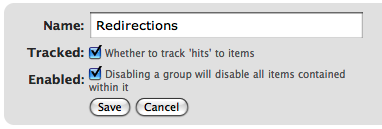
As well as allowing you to collect redirections together, you can also specify whether the redirections within a group are logged.
As an additional configuration option you can select which group an automatically generated URL is put in when a post/page or category is changed.
Using Redirection
The main idea behind Redirection is that you create several URLs that you want to redirect. These URLs are placed within a group, which in turn is placed within a module. The module determines how the URLs are redirected, and the group allows you to logically organise the URLs.
Each URL (or redirection) can be configured to behave in different ways. When creating a redirection there are several pieces of information you must provide:
- Source URL – This is the original URL that you want to redirect somewhere else
- Match – This tells the plugin how you want to match the source URL
- Action – Determines what happens if the URL is matched
- Regular expression – Tells the plugin that the source URL is a regular expression (i.e. a pattern that may match many URLs)
- Target URL – most actions have a target URL. This is typically the URL that the user will be redirected to should the pattern match

Note that items can be re-ordered and this may influence which redirection takes effect.
Matching URLs
Matching a URL is a key part of Redirection and consists of a source URL. This URL must exactly match a URL that you want to redirect. For example, your site has the page:
http://yoursite.com/oldpage/that/needs/redirecting/
The source URL for this is: /oldpage/that/needs/redirecting/. The source does not require your website address, and it is only possible to redirect a URL that exists on your website (you cannot redirect an external website, for example).
Advanced users can make use of regular expressions to reduce the number of redirections they need to create. A regular expression is basically a pattern that tells the plugin how to match. For example:
/(\d*)/(\d*)/(.*)
This pattern tells the plugin that you want to match a URL that looks like:
/2007/05/some-url/
That is, the (d*) indicates a number, and the (.*) a sequence of characters. Regular expressions are a complicated subject and this page will not attempt to give more than a passing overview of using them. If you do need more help then you should take a look at a regular expression website.
Remember that if the source URL is a regular expression then you must enable the regular expression option, otherwise Redirection will just treat you source URL as plain text.
In addition to the source URL you can also specify a match condition:
- URL only – Only matches the URL (the majority of your redirections will use this)
- URL and referrer – Matches a URL when the source and referring site matches (i.e. match the URL only when the user came from a certain website)
- URL and login status – Matches a URL when the source and user’s login status matches (i.e. match the URL only when the user is logged in)
- URL and user agent – Matches a URL when the source and user’s browser matches (i.e. when the user is using a particular type of web browser)
These special rules can be both positive and negative. For example, you can match a URL when the user is logged in (and be redirect to one URL), or when the user is not logged in (and be redirected to another URL). This makes it very easy to create custom rules where users are redirected if they are using a particular browser, or if they came from a particular website.
Actions
An action tells Redirection what to do when a source URL is matched:
- Redirect to URL – The default case and the majority of your redirections will use this
- Redirect to random post – An esoteric action that may be useful to some people
- Pass through – An advanced option that allows you to masquerade one URL as another (i.e. when the source URL is accessed it actually displays the contents of another URL without the user being aware)
- Error (404) – Causes a 404 error to be returned
- Do nothing – A dummy option that can be used if you just want to track accesses to a URL
Configuration of rules and actions
Depending on the particular combination of action and match rule you may be required to provide further details for a redirection.
Basic URL redirection
You can specify which HTTP code is used to redirect a URL (301, 302, or 307):
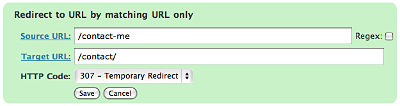
A couple of examples:
/blog/(.*) => /$1
This will match any URL that starts with /blog/, and will redirect it to the same URL but without /blog/. For example, /blog/2006/10/01/mypost will be redirected to /2006/10/01/mypost.
/2006/month_(\d+)/(.*) => /2006/$1/$2
This will match any URL that starts /2006/month_, and is then followed by a number. This will be redirected to the same URL, but without month_. For example, /2006/month_1/something will be redirected to /2006/1/something.
To replace a single dash in a URL with a space:
/tags/(.*?)-(.*?) => /tags/$1%20$2
Redirect to URL by matching user agent
This allows you to configure a redirection to occur when a specific browser (the user agent) is used:
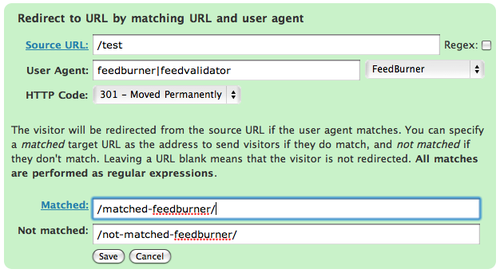
A set of pre-defined user agents is available from the drop-down menu or you can specify your own. The user agent match is always performed using a regular expression.
Two target URLs can be specified, one for if the user agent does match, and one for if it doesn’t match.
Redirect to URL by matching referrer
Similar to the user agent rule but this one looks at the referrer. That is, if a user follows a link from another site to yours, the original site is passed along by the browser (unless disabled) to your site so that you know where the user came from. Using this rule you can base your redirections upon this original site.
Redirect to URL by login status
This rule allows you to match a URL based upon the user’s WordPress login status. That is, if they are logged into your site.
Support & Bugs
Support and feature requests should be made through the Redirection support forum. You can contact me directly but I spend a very limited amount of time on direct support and you stand a better chance of being answered through the forum.
If you find the plugin useful then please do consider making a donation – it is appreciated and helps towards the maintenance of the plugin.
Thanks!
Peter, no it won’t do anything unless you configure it to do so.
Hobbsy, yes it does work, but there are some interface issues that may prevent the management of existing redirections. The plugin is next on my list of things to do so expect an update very soon.
Yes, this seems to work fine with 2.7. I had it installed before upgrading to 2.7 and after upgrade to 2.7 everything still seems fine. There’s one new bug that’s annoying. I used to click on Modules, Hits, and then the number of hits to see the relevant piece of the log, but now that takes me back to the plugin’s Redirects page. John – maybe you could look into this.
Otherwise, this is one of the most useful plugins out there, especially for people moving from blogger or rearranging a lot of posts.
WP-Admin/Categories
Warning: parse_url() expects parameter 1 to be string, object given in ….wp-content/plugins/redirection/models/monitor.php on line 30
I have same Problem with 2.7
WP-Admin/Categories
Warning: parse_url() expects parameter 1 to be string, object given in ….wp-content/plugins/redirection/models/monitor.php on line 30
error in categories :
Warning: parse_url() expects parameter 1 to be string, object given in /public_html/wp-content/plugins/redirection/models/monitor.php on line 30
Yes, I am aware there are issues with 2.7
[…] Redirection: 301é‡å®šå‘æ’件.包å«é‡å®šå‘åŽè·³è½¬åˆ°éšæœºé¡µé¢çš„功能. […]
[…] Redirection – when it absolutely, positively, must get there […]
[…] )æ ‡ç¾ã€‚ Robots.TXT – ååŠ©ä½ æ–¹ä¾¿åœ°ç¼–è¾‘robots.txt。 Redirection – […]
John,
We have been experiencing immense performance problems with our site. All pages took 1 minute or more to load or didn’t load at all.
We found that the table wp_redirection_logs was 996mb after 3 months! After emptying the table with help of the WP-DBManager plugin everything was fine, the site is running much faster now.
We did the clearance of wp_redirection_logs yesterday, and today, with only 946 hits listed under the “redirects” tab, the DB plugin says: 97,606 records, 21.7 MiB data usage, 784 KiB index usage.
We have set a total of 3 redirects only.
I am guessing this could be due to search engine crawlers, but I don’t know.
Is there a way to disable logs?
Thanks a lot for your help,
Abhilash
[…] Redirection – Un excelente plugin para no perder las visitas cuando cambias la URL de algún post. […]
Abhilash, a log expiry feature has been added.
John – thanks for pushing the latest version. That resolved my issue with not being able to see the log for a given module. However, there are a few new bugs which make this somewhat difficult to use. Please would you take a look in these. 1) When I click on a link for a given redirection, I used to be able to edit it but now it actually launches a URL and obviously returns a page cannot be found. 2) When I clicked reset to reset the log for the 404 errors, it deleted the 404 section and showed a -1. I added that section back and now have two of them and cannot delete either. Select All doesn’t select all, and toggle now has some strange behavior, it actually disabled the entries. The worst part of it was once I finally got select all to work on a bunch of redirections and tried to move them to another group, everything got erased, all groups disappeared, all redirections gone. Don’t know where to start now.
John – after an uninstall and reinstall, it all seems to be back except when I add a new redirection, it shows a new page with a few entries on it, no formatting, not bringing back to the redirections page, bizarre. This plug-in is the best, I can’t wait for a more solid version. Thanks in advance.
Legacy, I have not experienced any of the problems you described. I suspect the issue is simply that your browser cache needed clearing and you were using a cache version of the javascript files. I’ve released version 2.1.1 which forces the cache to be cleared.
Hi,
I just installed the plugin and it works great. It is exactly what I needed. Thanks alot.
But I have one question. The plugin has an import option. It says import per xml, csv. How have a csv file to look? I mean is it
first column = source url
second column = target url
or how? I really would use this feature.
Thanks again for a great plugin
J32
The import CSV format is the same as the export CSV format – export some redirections then try re-importing them.
Sometime the answers are so easy. I tried to import a csv file now. After I press the import button, I get the message “Are you sure you want to do this?” but nothing else. I mean no button says “yes” or “ok” what would start the import. It is just empty.
Fixed
Hi John,
First: I love your work. It’s a really fine plugin. 🙂
My problem now: I’ve ported a really old site with links like “releases.htm” to an WordPress. I now try to redirect this urls to the new pages.
Source URL: /releases.htm
Target URL: /releases/
Regex: No
HTTP Code: 301
But this won’t work for me. Is there something i’ve forgotten?
When i have enough time after this project. I go to translate your plugin to german. 🙂
Regards
That should work fine, although you may need to bear in mind any changes needed if wordpress is in a subdirectory). If you’re still stuck then please post more details over in the support forum.
I do have my files in a subdirectory – what changes need to be made? Thank you so much for designing this plug-in. It is a life saver for people like me who tend to make changes after the fact.
Kevin
I’m having the same problem as Flo and the same question as Kevin.
John – thank you very much! The latest version works great! It’s a great plug-in. I think you’re probably right in about the cache causing my issues initially. Again thanks for fixing the couple minor issues. Happy New Year!
Hi, I learn the best by watching a video. Do you know of any videos on this Redirction plugin and how to use it? If so please post the links; thanks!
Does anyone have a sample config for pass-through? The Regex catches the incoming URL (hit counter increases), but the redirection/pass-through does not work. Using the same config as a redirection action works fine.
Never mind, was due to the fact that the target post was Private, so you may want to note as a potential bug
Hey,
There’s seems to be a problem with all my redirections when I upgraded to the latest version, as all my redirections all end up to a blank page. Could you please repair this.
Thanks.
You’ll need to tell me what the problem is first.
Hi! I upgrade my WP to 2.7 recently and I have problems with redirection plugin.
I don’t know why is happening. If I turn On redirection plugin, WP can’t gave me access to admin 🙁
The message, then I activate the plugin is:
You do not have sufficient permissions to access this page
Hello.
I’ve got the same problem wth the same version of WP 🙁
Any idea ?
I’ve tryed to desactivate ALL ACTIVE plugins, letting only the REDIRECTION but no way: i’ve got the same error message “You do not have sufficient permissions to access this page”
Can you send me a login to the site with the problem? I cannot reproduce this
Hello,
Same problem with my wordpress 2.7, I had to rename the plugin directory to re-activate admin.
Do you have any solution?
Thanks a lot
Can you send me a login to the site with the problem? I cannot reproduce this
Thanks to Juan Diego I’ve now managed to locate the issue and fix this problem.
Excuse me but I did not understand how to configure this plugin: I now have the permalink = /% category% /% postname%. Html
and I would like to become = /% year% /% monthnum% /% day% /% category% /% postname%. html
I went to the permalink and I changed it but now when I click on a link to “old” I am not the post office but a blank page.
I make something inside panel Redirection or what?
Thank you very much
I’m not sure what you are asking, Stefano.
I may, please, say step by step what should I do to run your plugin?
Thank you very much
Stefano
It seems that the pass-through redirection doesn’t work with the latest version, it returns a blank page.
I think that the exit(); call on line 42 in actions/pass.php is the one causing the trouble 🙂
Yes, it was on the wrong line. Now fixed.
hello, I would like to localize your plugin in italian. please let me know!
Please send all localisation files to me through this website.
I read that a permanent 401 redirect if better, and recommended by Google, to ensure no loss of previous page ranking. Does this plugin offer the option for this?
There is no 401 redirect – it’s a 301 redirect. And yes, Redirection allows 301 redirects.
I tried to save you time by registering, but I still can’t log in to the feature tracker. Sorry!
I have a request for Redirection, that may actually be a separate plugin. I want to my wordpress installation, but in a way that is 1) automatic (but allows me to configure expiry times per file or per file type) 2) works with stat programs (I think this means using 302 redirection) and 3) works with wp super cache (and/or other caching plugins).
Thanks for a great plugin!
[…] Redirection Manager […]
[…] Redirection – Manage 301 redirections without modifying Apache | Urban Giraffe […]
I still have a problem with passthrough, it ends up at an empty page. What can I do about it?
Provide some more details – pass through works fine for me!
I have read through your documentation but, unless I am missing something… we have to manually enter changes? I know the add feature on the 404 console is awesome but, that is more for isolated cases and not for converting thousands of pages.
My issue is that I have 1k+ posts which I want to change from /%postname%.php to /%postname%-%post_id%.php (I need some random digits for google news) and I was under the impression that if I updated the fancy permalink structure that your plugin would handle the necessary changes? Ideally, I don’t want to change the the structure of any of my old posts, I just want to change the structure of any and all new posts.
Thanks in advance for the advice and BTW, I wish all plugins for wordpress were as slick and well formatted as this one!
Changing to /%year%/%month%/%day%/%postname%/ would probably do the trick as well. Although from what I understand you can only use regex to cut down levels… you can not have a regex which would add new levels to old posts.
Anyways, the original question stands… how can I change my permalinks moving forward while still leaving the old ones untouched? Thanks again.
Redirection must be configured – it will not figure out what you want based upon permalink structures. I do have another plugin called Advanced Permalinks which will fit the bill exactly, but it is a plugin I no longer provide support for.
Thanks for the tease!
After I updated to the version of jan. 4th, the links that used a pass through ended up at an empty (totally white) page.
After that I downgraded to a prior version, and it works again. I use WP 2.7
Please can you post more details in the support forum
John: Looked in recent comments and didn’t see this, so forgive me if this is repeat–I can’t seem to get an ID on either of the trackers–but when using the Quick Edit function from the Edit Posts panel in 2.7 to change a post slug, Redirection does not seem to catch that change and the 301 has to be added manually after. Just FYI.
Thanks, added as #390. Note that you can add bugs without requiring a login.
Full Guide to the Redirection Plugin. I just finished this guide to setting up this plugin. The instruction on this page is more in-depth, but my guide goes over basically two things that you need to do to get this plugin to start working. It is very newbie-friendly.
Thanks for the awesome plugin!
I am using the v2.1.4 with WP 2.7 which creates a file name core.*. This file is eating up my disk usage space, I have to manually remove it every couple of hours. Is there an option the admin panel to keep this plugin from creating this file? Or can you tell how (where) to comment it out in the code?
There is nothing in this plugin that creates a file called core. If this is appearing then it is likely something created by another part of your site or possibly your server.
[…] http://urbangiraffe.com/plugins/redirection/ […]
When I want to do a redirect I do as I have always done, but after the latest upgrade I am told: “Sorry, but your redirection was not created”. Any ideas?
hey, love the plugin. great work!
Hey, could you shed any light on using regexes?
A redirection like:
/blog/(\d*)/(\d*)/(.*)
Works fine, but how do I access the different parts? I have tried \\1, //1, (1), (\\1), (//1), and none work.
The correct usage is $1
Thanks!
I downloaded this after trying a dozen different ways to redirect to a new WordPress weblog after 5 years with Typepad. Unfortunately, while this looks like one ofthe best plug-ins I’ve come across, am I guessing correctly that it won’t redirect from the Typepad blog to WordPress (different urls) but rather just redirects internal, WordPress links? (All the permalinks on the WordPress weblog do now point to WordPress rather than back to Typepad, but external links will still go to Typepad I guess)
I’m not sure exactly what you are asking, but Redirection allows you to redirect any URL (not just WordPress ones) on the site where WordPress is installed. It will not change links inside text, so you should change those once the redirections are in place.
Thank you, John, I think you’ve answered my question. It will only handle links “on the WordPress site”. I’m looking for a way to redirect from Typepad (ex: http://smgct.typepad.com/spinning/2009/01/literature-nerudas-ode-to-an-aged-poet-line-breaks.html) to the new WordPress post (ex: http://www.susangibb.net/2009/01/literature-nerudas-ode-to-an-aged-poet-line-breaks/) After I exported the weblog, the permalinks on each post linked back to Typepad, but this was changed (possibly by your Redirection plugin). I need to find a way to tell Google, other weblogs, etc. to go to WordPress rather than Typepad before I delete the old TP blog. I don’t believe that your plugin will do this, right?
The only way you can do that is by putting redirections on the original domain (i.e. typepad). Creating redirections on the new domain (whether using Redirection or via another method) will have no effect. So, to answer your question, Redirection will not help in this situation (as it would live on the new domain). The only way you could achieve the redirections is by placing them on typepad.
Thanks again, John; The problem of Typepad to WordPress has been ongoing and most of the info I find to answer the question of redirection is outdated or way over my head. I appreciate your prompt response and will keep your plugin on my new weblogs and extol their virtues on the problems they do solve!
Alright, here’s a post on how to use regular expressions with this plugin. It also tries to explain regular expressions themselves (a little bit).
Redirection Plugin and Regular Expressions
Thanks – I’ve added this to the plugin page itself in case it proves useful to other people.
I can not figure out how to set up a particular redirection.
I have a url http://example.com/example1
I want all traffic to that directory to redirect, ex. http://example.com/example1/*anythinghere*
So far I have only been able to redirect all traffic except for those formatted like this: http://example.com/example/?=anythinghere
How can I include “?=” queries to still redirect?
Added as bug 424
John,
Thanks about 14 million for adding the title property to redirects. I have only one issue to report. When editing a redirection with a title, the current title is not populated in the edit form, so you need to manually re-enter this every time, or the title is lost.
.b
Added to the tracker
Hey John, I want to redirect all my posts with permalink /%category%/%postname%/ to /%postname%.html
Can you help me?
You can’t redirect WordPress permalink structures. However, you may be able to create a regular expression that achieves the same effect
Yeah, I tried that, but it was redirecting other pages with the same structure too (including wp-admin).
Any solution?
Unless you can create a regular expression that only matches the pages you want then there is nothing you can do.
This guide was helpful indeed. I just finished the redirect without any issues. Good plugin and highly recommend to anyone whom needs a 301 redirect…..Thanks
Hi,
The plugin seems very useful, thanks.
However, I am having trouble specifying a redirect using regex. I would like to specify a regular expression like this:
/(\d*)/(\d*)/(.*)and then specify the third string as the target URL, like this:
$3Even with the regex checkbox selected, Redirection is outputting the following in my htaccess file:
RewriteRule (\d*)/(\d*)/(.*) %243 [R=301,L]It looks like the plugin is changing the “$” to a hex/html entity.
I’ve tried using the redirect in the WP and Apache modules, no dice. Am I missing something that turns on Regex for the target URL? Or is everything supposed to go on one line?
Added to the bug tracker
I tried to implement the following rule:
RewriteRule ^archives/([0-9]+)/$ /?p=$1 [R=301,L]but got line below in .htaccess:
RewriteRule ^archives/([0-9]+)/$ /%3Fp%3D$1 [R=301,L]John, there’s only one thing missing from Redirection that I would love to see: Based on User Agent only. I do have a question, though. How do I use a regex to redirect requests ending with two question marks? The last time I tried (.*)\?\? it disappeared and I’m afraid to try it again.
You can specify the source URL of a user agent match as /(.*) and it will effectively be based on user agent only.
You will probably need to encode the question marks as they are special characters. The correct encoding is %3F
Dear Jhon,
I want to redirect a tag to another tag, but I doesn’t work.
Ex.
from
http://www.klinik-pajak.com/tag/pph-pasal-21
to
http://www.klinik-pajak.com/tag/spt-tahunan
Please help me solve the problem. Thanks
Check you have created the redirections correctly using the above documentation
I forget to delete all the caches created by super-cache plugin. Now it works. Thanks
Updated this plugin to latest version and faced a serious error with the permanent structure /%category%/%postname%
The url become http://www.someurl.com//category//category//category……. infinite.
So i quickly renamed the plugin directory and my wordpress is working fine.
Any idea?
Thanks!
It looks like you have created an infinite loop using regular expressions. Locate the redirection causing this and modify/delete it
I’m having the exact same issue, with the /%category%/%postname% setup for permalinks. Then I have another site using the same template that doesn’t have this issue, but that site using the Remove Parent plugin, so don’t know if that is making the difference.
Great plugin.
Backend really slick.
Does exactly what is promises (only limited testing on my part).
Compatible with WordPress MU (wpmu).
I was just looking for a way to change my permalinks structure from /%postname% to /%category%/%postname%/
I think this plugin can do it for me, but it almost seems TOO powerful.. I am not sure how I would set it up, do you have any suggestions?
This is a great plugin, and if it does what I need it to do I’ll be happy to donate 🙂
Redirection is designed to create and manage redirected URLs, not to change WordPress permalink structures.
First of all excause my bad english 😀
I tried to redirect a google search term to my internal search field but I don’t know how.
My first try looked like this:
Source: /
Referer: http://www.google.at/serarch?.*q=.*&.*
regex: true
match: /?s=$2
no match: (empty)
But it causes a redirection loop and after about 20 redirections the url looks like this:
http://…./?s=?s=?s=?s=?s=?s=?s=…
please help.. THX wischi
I don’t really see what use this redirection would be – why do you want to redirect an incoming Google search (which will already go to the right page on your site) to an internal WordPress search (causing them to double-search)?
It is easy to create loops using regular expressions unless you use the start and end tags (^ and $) to restrict the match.
why does it rewrite existing rules on to one line, this destroyed all my rules, as my orginal htaccess started with a comment, so every single rule was switched off. majpr wtf!!!! especially as i had no htaccess backup. why not do like wordpress and give the code to manually add????
It shouldn’t put rewrites on one line. If it is doing on your site then you should file a bug report with details of your host and what redirects you created to make it do that.