
| Download: | HeadSpace |
|---|---|
| Note: | This plugin is no longer actively maintained |
HeadSpace is a powerful all-in-one plugin to manage meta-data and handle a wide range of SEO tasks. With it you can tag your posts, create custom titles and descriptions that improve your page ranking, change the theme or run disabled plugins on specific pages, and a whole lot more.
Because the configuration of meta-data can be a complicated and tiresome process HeadSpace provides several shortcuts to reduce your effort:
- Meta-data nesting – data is collected not only from the page itself, but nested parent pages
- Dynamic data extracted – why repeat yourself when you can extract data from the post itself?
- Full GUI interface – data is entered alongside post content, and with a full auto-suggested AJAX interface for tags and keywords
- Mass-editing – now you can edit meta-data for all pages and posts at one go!
HeadSpace is modular in nature and provides a full set of modules that allow you to configure your site exactly as you want and without requiring several conflicting plugins – everything is contained within one consistent interface. These modules include:
- Page-specific modules that can be applied to posts, pages, categories, archives, search pages, 404 pages, and the home page!
- Page titles – SEO optimized titles
- Tags and keywords are auto-suggested using a smart algorithm or via Yahoo and work on both posts and pages (pages can also be set to appear in tag archives)
- Page-specific plugins – have plugins that run only on specific pages!
- Theme-specific plugins – change your site theme on specific pages!
- Description – what appears in search engine listing
- More text – change the ‘more text’ for each post
- JavaScript & CSS – add JavaScript or CSS files to a post
- No index – configure whether a page is indexed by search engines
- No follow – configure whether links receive a follow/nofollow attribute
- Site name & description
- RSS name & description
- Anything else you want – HeadSpace allows custom meta-data
- Site-wide modules:
- Configure auto-formatting (wpautop), auto-fancy quotes, auto-clickable links, and disable visual editing
- Tracking codes for Google Analytics (new & old code), Crazy Egg, StatCounter, 103bees, Mint, FeedBurner Stats, Yahoo! Site Explorer, HitTail, Google Webmaster, Piwik, and Apture, with the ability to not track registered users
- Google section targeting
- First Time Visitor – display a special message to visitors when they first visit your site (based upon idea by Seth Godin)
- Disable Widgets
- Change PHP memory limit, timeout, and error reporting level
Due to the number of meta-data plugins available for WordPress, HeadSpace will import data from these plugins:
- UTW (Ultimate Tag Warrior)
- SEO Title tags
- All-in-one SEO
- Jerome’s Keywords
- Simple Tagging
- lud.icro.us HeadMeta
- HeadMeta description
- More Unique
Now there’s no reason not to use it!
HeadSpace is available in the following languages (all included within the plugin):
- English
- French (thanks to Serge)
- Polish (thanks to Jacek Tyc)
- German (thanks to Mario)
- Italian (thanks to Gianni Diurno)
- Bulgarian (thanks to Alexander Dichev)
- Spanish (thanks to Juanpa Manson)
- Russian (thanks to Sergey Ryvkin)
- Danish (thanks to Strang Skov and Georg S. Adamsen)
- Japanese (thanks to Yoichi Kinoshita)
- Brazilian Portuguese (thanks to Vinicius Pinto)
- Dutch (thanks to Matthias Houwelin)
- Indonesian (thanks to Hendry Lee)
- Turkish (thanks to Omer Faruk)
- Belorussian (thanks to Marcis Gasuns)
- Ukrainian (thanks to Kirin)
- Estonian (thanks to Lembit Kivisik)
- Farsi (thanks to Amir Heydari)
- Arabic (thanks to Mouad)
If you can provide a language translation then please get in contact with the author. A PO file is provided with the plugin to be used in translating with poEdit.
People upgrading from previous versions should be aware that you must reconfigure the plugin. As much of your existing configuration will be retained, and existing custom meta data for posts should be completely safe.
Installation
The plugin is simple to install:
- Download headspace2.zip
- Unzip
- Upload
headspace2directory to your/wp-content/pluginsdirectory – the directory must be called headspace2. - Go to the plugin management page and enable the plugin
- Configure the options from the Options/HeadSpace page
- Ensure your theme calls
wp_headinheader.php(most themes do this anyway – seewp-content/themes/default/header.phpas an example)
You can find full details of installing a plugin on the plugin installation page. Note that, depending on your site configuration, you may need to increase the amount of available memory to 32MB. Details of doing this can be found here.
Concepts
It is useful to understand the process involved in generating meta-data for a WordPress page. HeadSpace allows meta-data to be both nested and dynamically generated from the page itself.
Nesting
This is a fairly simple concept, but one that requires explanation. When a page is to be displayed, HeadSpace looks at the page type and retrieves meta-data from all available sources. For example, when displaying a post, HeadSpace will first look at the post’s meta-data, then it will look at meta-data set for all posts, then it will look at global meta-data. When displaying a category page, HeadSpace will look first at the category meta-data, then at global meta-data.
The reason for this nesting is that you can configure HeadSpace as little as possible, but get the maximum effect. For example, adding a tag of ‘scuba’ to the global ‘tag’ settings will mean that every page will have the ‘scuba’ tag set, in addition to whatever specific meta-data the page may contain.
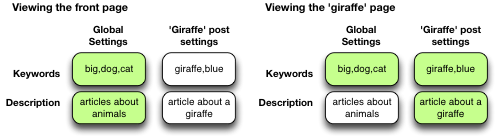
Note that nesting can be disabled.
Dynamically generated meta-data
Dynamic meta-data is simply meta-data that is taken from the post being displayed. In practical terms this means you can insert special tags into HeadSpace meta-data that are replaced when a post is to be displayed. These tags are:
| Tag | Inserts |
|---|---|
%%date%% |
Date of the current post/page |
%%title%% |
Title of the current post/page |
%%sitename%% |
The site’s name |
%%excerpt%% |
Excerpt of the current post/page (auto-generated if necessary) |
%%excerpt_only%% |
Excerpt of the current post/page (not auto-generated) |
%%modified%% |
Modified date of the current post/page |
%%id%% |
Post/page ID |
%%userid%% |
Post/page author’s ID |
%%name%% |
Post/page author’s name |
%%category%% |
List of categories the post/page belongs to |
%%category_description%% |
Category description |
%%searchphrase%% |
Search phrase |
%%currentdate%% |
Current date |
%%currenttime%% |
Current time |
%%page%% |
Current page and total pages (i.e. page 1 of 3) |
Configuration
HeadSpace has site modules and page modules. Site modules affect the site as a whole, while page modules affect individual pages. Both are configured from the Options/HeadSpace/Modules page of the administration section. Page modules appear as:
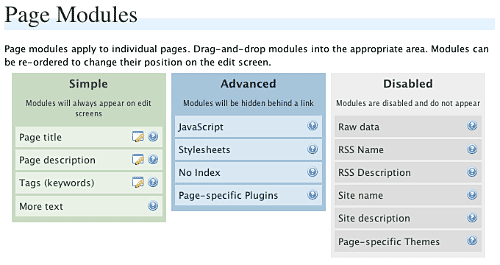
Modules can be dragged and dropped into the appropriate areas. Modules in the ‘simple’ area will always when editing meta-data. Modules in the ‘advanced’ area will only appear when a link is pressed.
Site modules appear as:
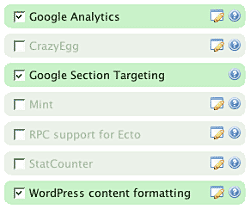
Note that some modules have an edit button allowing further configuration. Disabled modules do not run and use no resources.
Page Settings
Configuration of page settings takes place from the HeadSpace administration page:
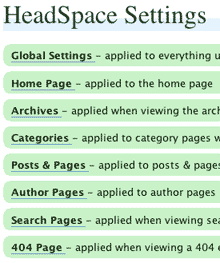
Clicking any of the sections will allow the meta-data to be configured:
The exact details and the order in which they appear is determined by your page modules. Note that advanced modules are hidden behind an ‘advanced’ link that, when clicked, will expand to show the advanced modules.
Post & Page Settings
The plugin adds an extra section to the post and page editing screen:
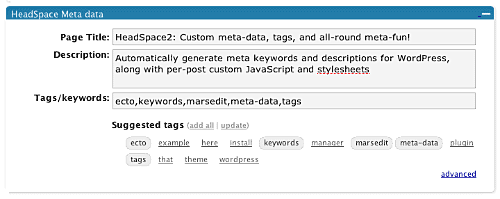
Like for page settings the exact details and order is determined by your page modules. The settings defined here always take precedence over settings defined elsewhere.
Category Settings
You can also configure HeadSpace settings when editing a category from the Category Management page.
Category settings are applied when viewing a category page, and will inherit settings from the general category settings, as well as the global settings.
Mass-Editing
HeadSpace provides a mass-editing interface which allows you to change meta-data across all posts and pages. The interface is found in the Manage/Meta-data administration page:
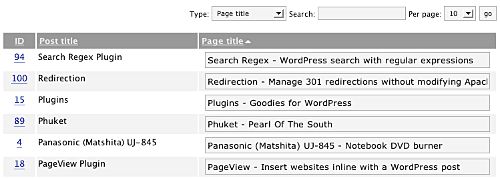
You can select the type of meta-data from the drop-down menu.
Tags or keywords
If the tag module is enabled then HeadSpace will automatically suggest tags for posts based upon previous tags. A smart-matching algorithm is used so that matches will be made when words have the same root. For example, if you previously defined the tag ‘elevate’ then the smart-matching algorithm will detect ‘elevator’, ‘elevated’, ‘elevating’, and ‘elevates’.
Tags are added with a special interface:

You can either manually enter tags in the input box, or you can click on a tag to have it added. Tags can be suggested using a smart HeadSpace algorithm, or you can enable a Yahoo option to have Yahoo suggest tags.
Support & Bugs
If you need further information then these are good guides and introductions to HeadSpace:
- HeadSpace FAQ – please read before asking for further support
- Scott Frangos over at WebHelperMagazine.com has written a detailed walkthrough (part 1 and part 2) for using HeadSpace
- Zain Bodor of Knowledge Constructs has written a fight-based knockout and a HeadSpace guide.
- NoFollow guide.
- Andrew Kolyvas has created a HeadSpace Guide and some SEO Tips that detail HeadSpace.
This plugin is no longer actively maintained.
[…] HeadSpace2: 这个æ’件会在Write页é¢æ·»åŠ 一处æ 目,å…è®¸ä½ æŽ§åˆ¶æ¯ä¸€ä¸ªé¡µé¢çš„关键å—å’Œæ述,éžå¸¸å¼ºå¤§ã€‚ […]
I had to replace backward slashes with forward slashes in the function “url” in the “plugin.php” file, because the links on the settings page weren’t working (I was getting JavaScript errors when clicking any Ajax-powered link). I’m using Apache 2 and PHP 5 under Windows.
On WP 2.2, when the “Custom themes” option is enabled, the pages are being displayed with the “single.php” template, instead of “page.php”.
I am using WordPress 2.1.3 and just uploaded headspace2. But can’t locate this plugin in the my WordPress control panel to activate it. Is this plugin compatible to WordPress 2.1.3? Pls advise. Thanks.
Vinicius: That’s a Windows/Unix issue. I’ve now fixed it in 3.1.2. I can’t reproduce the custom themes problem, and a page is always displayed with page.php for me. What theme are you using?
SC: Did you upload the directory as headspace2?
Hi John, yes..i’ve uploaded the directory as headspace2 in \wp-content\plugins\. I have also tried to delete the plugin and reuploaded it to the same folder. But it’s still the same…I still didn’t see the Subsribe Me under the Plugins menu.
SC: HeadSpace2 will appear under the plugins menu as HeadSpace2, not Subscribe Me!
Hi John !
Sorry i’m french and my english is very bad ! 🙂
HeadSpace don’t work with the news WP 2.2 !
I have a website with a home page who is a model page (accueil.php) … with headspace actived the accueil.php is not loading !?
🙁
You can help me !?
Nice day !
Regards,
John: yeah..it should be Headspace2, hehe..sorry typo error. i’ve cleared my browser’s cache, but Headspace2 has still not appeared under the plugins menu.
MoiMM: HeadSpace has been tested with WordPress 2.2 and I’ve not seen any problems so far. I don’t understand what you mean by accueil.php – is this a page template?
SC: Weird. So, just to double-check. You have the file /wp-content/plugins/headspace2/headspace.php on your site? Clutching at straws, but does the directory and all files have the correct read permissions? (it should at least have ‘r’ for user/group/other)
John, thanks a bunch! I’ve managed to activate the plugin now. 🙂
MoiMM: HeadSpace has been tested with WordPress 2.2 and I’ve not seen any problems so far. I don’t understand what you mean by accueil.php – is this a page template?
Yes … i think that is a page template … her name is “accueil.php”.
This page template is use for my home page.
>> configuration :
Options > Reading > Front Page
A static page selectioned > Front page : my page with the template for home page.
Screenshots :
>> My home page with HeadSpace actived
>> My home page with HeadSpace desactived
i don’t know if is more comprehensible !?
🙂
MoiMM: Yep, that’s enough. I’ve fixed this problem in 3.1.3
MoiMM: Yep, that’s enough. I’ve fixed this problem in 3.1.3
Yes ! Thanks a lot John ! … it’s ok now !
…
i’m happy ! LOL 😀 😉
Good day !
🙂
You’re a Godsend!
I need to customize my header, 1 headline and 2 sub-headlines. How hard is it to add a second sub-headline that can be customized from “Write Post”?
Marie, that’s something beyond what WordPress usually provides. You may be able to insert an HTML break into the standard tagline (<br/>) and make it look like two lines, otherwise you’ll need to use a custom plugin with a custom theme.
Hi! Great plugin! Using your latest version 3.1.3 – and WP 2.1.3. I am able to use it no problem, but I get an annoying error on my dashboard: Fatal error: Allowed memory size of 8388608 bytes exhausted (tried to allocate 98304 bytes) in D:\Inetpub\hairextensioninfo\wp-includes\class-snoopy.php on line 871
I’ve narrowed it down to the headspace2 plugin, but I should have more than enough memory, so I’m not sure what the issue is 🙁
THoughts?
Thanks
update:
Not sure why I didn’t think of this before crying for help 🙂 but I replaced the class-snoopy.php file with a “fresh” one from my backup – and it works fine. It must have been corrupted some how! Thanks for a great plugin.
Love your stuff! Just gave you a good plug on my blog and endorsed your directly to John Reese.
Go here: http://www.howimademyfirstdollar.com/blogger/?p=53
This plugin is fantastic. I am having a problem though and would like some help. Everytime I change or update a post, the category inherits the headspace settings (title and meta tags) then I have to go back and re-write the correct category information and save it. How can i fix this?
Hey, i love the plugin but after upgrading my blog to 2.2.1 i got a problem: my homepage is a static page and the blogpostings are on an extra site. after the update my homepage is still the static page, but it looks like a blog article with links to previous and next post and comments. thats weird. and when I deactivate headspace everything is allright.
so i guess it is something with headspace 2
regrads
Max
Thanks again for this great plugin. I have one question about the title. Is it possible to get rid of blog name from title? What I want is the all pages will show only the title that I write to title field.
Thanks for help
Patrick: I’ve not seen this before and no one else has reported it, and it sounds a serious problem! Can you tell me what other plugins you are using as there may be a clash. Also the version of WP you are using will help.
Max: If you disable the ‘Custom themes and plugins’ HeadSpace option, does the problem stop?
Oktay: You need to modify the file
header.phpin your theme to do thatHi,
I have nearly finished setting up my first blog site. I have filled in the Headspace boxes, but now when I read the source of my site I see 2 lots of meta tags for "description" and "keywords". The extra meta tags were obviously placed there by the Headspace plugin. Won’t this cause a problem with the search engines? I can’t see search engines liking the fact that you have 2 lots of meta tags as it would look like overoptimisation or keyword spamming.
Paul
Paul, another plugin or even your theme is adding in the existing set of meta tags. Headspace cannot remove existing tags so you should disable the other plugin or remove the tags from your theme.
I have the 2 meta tag issue also- always have. There are my main meta tags and then those that Headspace adds for each post.
However, it is another problem that I am having that has brought me here. I have set options for several of my categories that won’t stick. Eventually those options will change mysteriously and pick up the options I have set for a post in that category- usually the last one. Is there a way to stop this from happening?
🙂
Btw, I went back and read the last page. I am reporting the same problem as commenter #178, Patrick. I am basically saying what he is saying in my post below.
Sista, can you send me a list of all plugins, the name of the theme, and the version of WordPress you are using. I’ll have a look and see if I can recreate the problem.
Hi John 🙂
I am using the Drunkey Love theme version 1.7 and WordPress 2.2. This problem has existed through many versions and themes though. A screenshot of all my plugins can be seen below.
http://img201.imageshack.us/my.php?image=pluginsel2.jpg
I’m using the original Headspace (not headspace 2)on a WP 2.0.07 install. I wish to upgrade to the latest WP version and see that the original Headspace is not compatible. So, I’ll need to upgrade to Headspace 2, and I want to do it before I upgrade the WP version.
My question is, can I simply install the new Headspace 2, and will everything I have set up with the original Headspace continue to work? Or will I have to redo all sorts of things? Will I need to uninstall Heaspace (1) first, or will Headspace 2 just takeover in the Plugins page?
Hi!
I am running Headspace2 v.2.8 on WP 2.0.4 with K2. Works great. I am looking at upgrading to Headspace v.3. However, I have some issues:
1. In the field "Global Raw Data" under Options->Headspace->Options->General Options, when I put anything in that field, it shows up as text on my site, on top of my header. This is very ugly and I don’t think it is supposed to happen, so I have been leaving that field empty just so it won’t show up on my site. Do you know why that happens? What can I do to fix it? Does v.3 fix that?
2. I tried installing UTW, but ended up uninstalling it because it clashed with Headspace. Can these be used together with v.3? Has anyone written anything about how to adjust the settings so they play well? If so, can you point me to it?
Thanks!
In Global Raw Data I put the code to my banners there. I also have UTW on my site and I see what conflict. What conflict do you get?
Urban Giraffe sounds great! I got here from a post on John Chow’s site; one of the commenters there recommended this plug in. But what I REALLY want to know is how you corralled all the pings/trackbacks to the bottom of the page. Is that a seperate plugin?
Thanks for all the hard work.
[…] HeadSpace ensures a minimum of Search Engine Optimization across my site […]
It’s late, I give up… 🙂
Running WordPress 2.2.1 on PHP 5.1.4 with HeadSpace2 3.1.4
I have wp_head(); in my header.php, other plugins are finding it (ie. Democracy Plugin)
I don’t get any errors, but the meta tags are nowhere to be found in my html; what could I be missing?
The only change I made was deselecting the Custom Themes option and added a test description for the Home Page meta description.
Hi John, I have a serious problem with 3.1.4 and I wanted to see if you could explain this:
For my individual category pages, I have specific settings for the description and keywords – which also shows on the cat pages, once set. However, when I post a new blog post in a category, the descriptions and keywords from this most recent post are inherited to the category page, overwriting what I had initially set for the cat.
I am now trying to disable inheritance on the options page and will observe if this occurs again.
I wanted to add that this also occurs if I go in and edit a post and re-save it. The current category kw /desc that were edited on the Manage Categories interface are overwritten. Thanks in advance!
Sista: do you get duplicate meta data with HeadSpace disabled? Do you get any meta-data with HeadSpace disabled? If you do, where is the meta-data coming from?
Mark: I would first disable the old HeadSpace, then upgrade WordPress, then install the new HeadSpace and activate that. The plugin should detect your old HeadSpace settings and try and upgrade as much as possible. As with any other upgrade process you should definitely make a backup of your database before attempting anything.
ms.angel: Global raw data is working as it should. The field basically allows you to enter any meta-data you want which will appear exactly as typed. If you enter normal text then this will appear also. Unless you want to enter specific custom meta-data then there is no need to use this field, and it is left for advanced customisation. For example, Sista in post 190 adds banner code there
I’ve not noticed any clashes with HeadSpace and UTW. What version of UTW are you using, and how is it clashing?
KimBoo: I’ll be writing an article about that subject soon – check back later!
Josh: Does post specific meta-data show up?
The category saving bug is now fixed in version 3.1.5
Thank you very much for the fix, John. Works seamlessly now.
Hey great- thank you. Will try it out now. I so know Google will love me to death once I get this to work…lol 🙂
"Show Technorati Tags on Posts" also shows the same tags on pages. Is it supposed to? I’d prefer them not on pages, only on posts. How can I disable this on pages?
Also, I’m confused about that option. If I choose to not "show" them, are they still there internally, not showing? And still updating technorati? Or do I have to Show them to make them effective?
If I have to show them, can I make the color blend with the background?
And finally, is there a way to place them manually in the post where I want them?
[…] Meta çš„ WordPrss æ’件,如:Head META Descriptionã€HeadSpace 2ã€Add Your Own Headers,但 Jim å´ä¸æŽ¨è这么åšï¼Œå› 为 Keywords 属性目å‰åœ¨ Pagerank […]
[…] 大约下载了预览上看比较满æ„çš„å多个主题包,然åŽä»Žä¸æŒ‘选了五ã€å…个进行调试。幸得事先安装了Headspaceçš„æ’件,é¿å…了æ¯æ¬¡æ›´æ¢è¦ä¿®æ”¹Header.phpæ–‡ä»¶çš„éº»çƒ¦ã€‚è¯•äº†å‡ ä¸ªï¼Œè¦ä¹ˆå‘现对ä¸æ–‡ä¸å‹å¥½ï¼Œè¦ä¹ˆå°±æ˜¯è½½å…¥çš„时间还是过长,本æ¥éƒ½å·²ç»æ‰“算放弃了,毕竟相当的耗时间,æ£å¥½æ˜¨æ™šä»Žæµ·è±šé‚£é‡Œçœ‹åˆ°åˆ€æžªçš„新作,比较符åˆæˆ‘的欣èµå£å‘³ï¼Œè€Œä¸”关键是侧边æ 设置得比较宽裕,适åˆæ”¾æ¥è‡ªæˆ‘çš„Social Networks的微内容。整个模版比较干净,简å•ï¼Œæ‰€ä»¥è½½å…¥çš„速度比较ç†æƒ³ï¼Œä¹Ÿé€‚åˆè±¡æˆ‘è¿™ç§æ‰˜ç®¡åœ¨å›½å¤–主机的站点。 […]
I have a similar issue that was mentioned by Sista (#184) and Patrick.. But the bug is slighty different..
The Second page and the rest of the pages of a category except the first page, inherits the Page title from the first post (i.e on the particular page)
The first page is fine.. e.g
http://www.mysite.com/category/personal/page/2/ – Inherits the Page title, Description and Keywords from the first post on the page..
http://www.mysite.com/category/personal/ – This page has no issues..
I am on WordPress 2.2 and have installed the latest version of Headspace 3.1.5
[…] HeadSpace 2ï¼Œåœ¨æ’°å†™æ–‡ç« æ—¶å‘布按钮下方会看到有多出â€meta […]
I’ve released version 3.2 which is a major update and adds a lot more functionality. The majority of your settings will stay the same, but you should visit the HeadSpace options to configure the new modules.
Mark, there is a new option to chose posts or pages. Tags are always embedded in meta keywords, but if you do not show Technorati tags there is no way for it to update Technorati
Vinod, fixed in the new version
Hi John
I installed the Headspace 3.2.. It just doesnt work.. Right from page titles to meta tags.. Right now i have restored back to the previous version..
Am i doing something wrong or any issues with the plugin?
I backed up my Database, Copied the Headspace2 folder to plugins folder, deactivated and activated the plugin in admin panel.
Also when i click on Any settings in Headspace settings.. No dropdown appears in Opera.. in Firefox though, i get this error
Warning: Invalid argument supplied for foreach() in /home/site/public_html/blog/wp-content/plugins/headspace2/ajax.php on line 66
Ok, All is fine now. I just had to update the settings in Options.
One question. The second page of a category, how do i change the page title to "Category Name – Page 2"? Is it possible?
I’ve added the
%%page%%tag into HeadSpace 3.2.3 which will be replaced with the current page – you can use this in the category section.hello,
I am a little unsure about how your plugin works, as I ahve tested a lot of other plugins and some need you to take out the title from the header.php some don’t.
Before using your plugin, I had this inside my header.php:
shall I leave it, replace it or delete it?
Your code didn’t make it through the filters, but you shouldn’t need to make any changes to your theme (other than adding wp_head if it does not exist)
Thanks John
Waiting for 3.2.3 🙂 Great updates so far..
btw whats new in 3.2.2? I currently have 3.2.1 installed
I love the new functionality but I just finished reading a bit about the upcoming changes to WordPress 2.3. Any thoughts/concerns about how these two will play together? Thanks so much for the great plugins!
I meant: does there need to be a call to the title? I have a strage php if fuction exist then call title and combine it with the blogtitle code inside my head, if I complletely remove the call to the title, it displays nothing… how do you call your title inside your head?
What about showing enabled plugins on specific pages? If I disable plugins I can’t get to them via the admin panel. For instance, I have a forum setup, but I only want that header code to show on the plugin page – can I do that?
Vinod, 3.2.2 just removed a warning message, 3.2.3 has the new tag
Robert, when 2.3 is out I intend to release a new version of HeadSpace that allows you to migrate all the HeadSpace tags/keywords over to the new tagging functionality of WordPress. Everything else should work exactly the same
Ovidiu, yes you need to call
wp_titleif you intend to change the page title.Jeromy, I’ve added an option to 3.2.4 to allow disabled plugins to appear in the administration section when enabled on specific pages.
Just downloaded the new plugin- will take a bit of getting used to. However the "Pgae Settings" page doesn’t work in IE7. When I click the options they don’t drop down and allow you to fill i n any options. It does however work in Firefox.
Sista, Page settings dont work in Opera either.
I asked about how to call the title because my page titles alwys appear like this: blogname followed by post/page title and I want it the other way round – can your plugin also adjust this? I did not find this option yet.
also I experience some problems with category title/description/tags – my blog picked up the specific settings I had entered for my only category, but after I entered the settings for: Categories – applied to category pages without specific settings thsoe were applied although I had not even checked: Inherit settings – Inherit from global settings.
also tags like % % searchphrase % % don’t work if I use a plugin called nice search which makes my permalink like this for searches: mydomain.com/search/searchphrase try and do a search here: http://www.web-designerz.de/search/job
and sorry to flood your comments but I am simply posting all strange things I ran into with your plugin 🙂
also if I enter something into the keywords field when writing a post but enter nothing into the description field, it should inherit the general description I set up in its options field, right now in the described scenario, it just skips the description meta data instead of inheriting it, if I delete the keywords it uses both the general description as well as the general keywords.
next problem i that I installed simple tagging, imported my utw tags (53) but when trying to import from utw or simple tagging into headmeta2 is always say 0 items were imported from Simple Tagging/UTW.
[…] Headspace manages meta-data and handles a wide range of SEO tasks. […]
[…] Headspace manages meta-data and handles a wide range of SEO tasks. […]
IE7 now works.
Ovidiu, HeadSpace can change what appears for blogname and page title, but it cannot change the order in which they appear – that is decided by your theme. The searchphrase and category issue are now solved, but I can’t see anything wrong with the keywords/description (you would need inherit to be enabled for this to work). Imports from Simple Tagging will only work if you actually have posts with [tag] inside them. Imports from UTW seem to work fine for me. I’m not sure how you imported from UTW to Simple Tagging as there is no such facility in Simple Tagging.
you are the only person whose wp plugin supports SEO properly.
thank you,
also you should know that I found a free wp blog host that has your plugin available on MU
nada
http://kingdomofgod.wpbloghost.net/
and
http://heartdaughter.wpbloghost.net/
May I request that you do not drop tagging support for bloggers who do NOT upgrade to the latest wordpress? I plan to stay at wp 2.1.3 for quite a while.
thanks for any consideration,
nada
thx for all your help John. I’ll try out the new version immediately and see if the incorporated fixes work for me.
Here are some responses:
– Simple Tagging 1.6.8.1 has import from UTW support built in
– there are SEo plugins out there that allow to change the order, aka BLOGNAME – BLOGTITEL or the other way round
regarding the issue I talked about inheriting and stuff, I think its best to give you two examples:
1)I have filled out "Posts & Pages – applied to posts & pages without specific settings" so all pages and posts that do not have anything special defined should get these settings.
###EDIT###
I noticed my mistake. The plugi nwas functioning right, I had tried using: %% category %% as keywords inside the "Posts & Pages – applied to posts & pages without specific settings" but what I was complaining about was that a PAGE did not have any keywords. Just noticed pages are not inside categories, so your plugin just did not set any keywords for it 🙂
Hi John .. Seems like a nice plugin ..I tested it on my localhost and it seems to be working nice… I was using %%category%% in Keyword section and it populates category slug in keyword instead of category name … So ‘Access Gmail’ becomes access-gmail .. I was using UTW before this for the same effect and it was populating the keywords allright … Please see to it ..
And btw .. Thanx for such a great plugin ..!
Hi,
It works almost everything. The only thing I can’t make "html mata tags" to be outputed. I have wp_head() in my template so It must be something else I missed.
regards
Another quick question about the per post Description option. I notice that my description never shows up in search engine results. Instead random info taken from the post and even comments will show up instead. Am I doing something wrong?
Shahab, the %%category%% tag will show the category names, not the category slugs. If you’re not seeing this then send me a screenshot of one of your category edit pages
sekundenk, if you have wp_head in your theme, have correctly configured headspace, and have meta-data for posts then you should definitely see something. Do you have any other plugins running that may affect things?
Sista, it’s another of those ‘black hat’ search engine mysteries. The meta description is a suggestion, but a search engine may decide to create its own summary based upon the exact search terms. If you look at the Google results for ‘headspace2’ then you will see it definitely uses the description, but a search for ‘headspace2 wordpress plugin’ shows a generated description. I believe that if your search phrase matches the page title or URL then you will get your description, otherwise you will get a generated one.
Ovidiu, it seems I meant Simple Tags instead of Simple Tagging! I’ve updated the plugin to import both of these plugins. Plugins that swap the sitename and page title around do so by saving a page to the server memory and then replacing strings. This is a very inefficient way of doing something that will take a few minutes to change in the theme.
Thx for also importing from Simple Tagging and yes yo uare definitely right. I will change my theme to display the way I want, maybe even with a "if is_home" – kind-of code, so I can have it one way on the homepage and another way on all other pages and posts.
John, Is it now compatible with WordPress 2.3 Beta?
Thank you for the explanation John. It’s something I won’t worry about now 🙂
Hi there, maybe a stupid question, but is this an addition to or a replacement of the Simple Tagging plugin? I know your plugin has much more features, but can they live side by side or do I have to choose?
Also, does this work for WPMU?
Thanks in advance,
Bike
Bike, it is aimed as a replacement to Simple Tagging, although you can use them side-by-side. I’ve not tried it with WPMU
Vinod, as far as I know it’s not incompatible with WP 2.3!
I hope I set it up correctly. I add title, description and keywords when editing my posts. But nothing in in html in meta description. I add %%excerpt%% in page/post module options and with this in description is only excerpt but not text from description field of the post.
Maybe I’m doing something wrong?
Can you enable this plugin to customize how many posts are on a page and if summaries are shown? For example, the default is 5 on my blog. However, I want the default to be 20 and just the summaries if someone pokes into my monthly archives.
Jessica, you can configure how many posts appear on a page from the WordPress administration page Options/Reading
Sekundek, I don’t know what to suggest. With the plugin enabled, wp_head in your theme, and meta-data added to pages then it will appear. Maybe another plugin is preventing it from running – try disabling all your other plugins and seeing if HeadSpace works then.
I disable all plugins and add meta data for some specific post. I also add in options for HeadSpace title, description and keywords. And I see this data in my head, not the one I add with my post. So plugin works in some way, the only problem is that it does not get any info from post itself (if I remove entry from options, there is no meta tags at all).
I think I found my problem. I looks instalation process is problematic. There was no options for inherit and because of that post specific data was removed. I need to go in options and unchek this option and then check it again. Now it works ok.
Loving your plugin so far.
There is one bug though (not sure, i might have messed something up). The ‘More Text’ works perfectly on the Main Index Page but does not work on the Archives page.
Hi John,
I know you can configure how many posts appear on a page through the WordPress admin panel. The thing is, I want the main index to have five full posts and the archives to have 20 summaries. There must be a way to hack through the WordPress loop, but it’s probably complicated for me. It would be great if that could be an option on a plugin.
@ Jessica:use custom query string from here: http://drunkenmonkey.org/user/archive/ it allows you to chose how many posts you display for home, category, archive view, atc, etc. – very easy to use…. btw. I start to hate my keyboard, last week my TAB key was not working but this morning my ENTER key stopped working, the TAB works fine now – so excuse the strange format of my comment…
Vinod, fixed.
Jessica, a new module ‘Page counts’ has been added which allows you to do this
Hi, what happened to the automated keyword-insertion from a corresponding list, if the keywords were found in the post text? I considered it a very useful feature and it does not seem to be included in the current version any more…
[…] HeadSpace2 – SEO 優化æ’件 一個功能強大åˆæ˜“用的æœå°‹å™¨å„ªåŒ–æ’件,å¯ä»¥è®“ä½ è‡ªå®šç¾©æ¯ä¸€é çš„ Meta ﹑ Title æ¨™ç±¤ã€‚æœ‰äº†å®ƒä½ æ‰å¯ä»¥å„ªåŒ– Blog çš„ Meta åŠ Title,SEO 必備。 […]
Hi,
I am using different headers for different posts in my site and the wp-head is not working for headspace, the title shows right but not the meta tags,
how do i fix that?