
| Download: | HeadSpace |
|---|---|
| Note: | This plugin is no longer actively maintained |
HeadSpace is a powerful all-in-one plugin to manage meta-data and handle a wide range of SEO tasks. With it you can tag your posts, create custom titles and descriptions that improve your page ranking, change the theme or run disabled plugins on specific pages, and a whole lot more.
Because the configuration of meta-data can be a complicated and tiresome process HeadSpace provides several shortcuts to reduce your effort:
- Meta-data nesting – data is collected not only from the page itself, but nested parent pages
- Dynamic data extracted – why repeat yourself when you can extract data from the post itself?
- Full GUI interface – data is entered alongside post content, and with a full auto-suggested AJAX interface for tags and keywords
- Mass-editing – now you can edit meta-data for all pages and posts at one go!
HeadSpace is modular in nature and provides a full set of modules that allow you to configure your site exactly as you want and without requiring several conflicting plugins – everything is contained within one consistent interface. These modules include:
- Page-specific modules that can be applied to posts, pages, categories, archives, search pages, 404 pages, and the home page!
- Page titles – SEO optimized titles
- Tags and keywords are auto-suggested using a smart algorithm or via Yahoo and work on both posts and pages (pages can also be set to appear in tag archives)
- Page-specific plugins – have plugins that run only on specific pages!
- Theme-specific plugins – change your site theme on specific pages!
- Description – what appears in search engine listing
- More text – change the ‘more text’ for each post
- JavaScript & CSS – add JavaScript or CSS files to a post
- No index – configure whether a page is indexed by search engines
- No follow – configure whether links receive a follow/nofollow attribute
- Site name & description
- RSS name & description
- Anything else you want – HeadSpace allows custom meta-data
- Site-wide modules:
- Configure auto-formatting (wpautop), auto-fancy quotes, auto-clickable links, and disable visual editing
- Tracking codes for Google Analytics (new & old code), Crazy Egg, StatCounter, 103bees, Mint, FeedBurner Stats, Yahoo! Site Explorer, HitTail, Google Webmaster, Piwik, and Apture, with the ability to not track registered users
- Google section targeting
- First Time Visitor – display a special message to visitors when they first visit your site (based upon idea by Seth Godin)
- Disable Widgets
- Change PHP memory limit, timeout, and error reporting level
Due to the number of meta-data plugins available for WordPress, HeadSpace will import data from these plugins:
- UTW (Ultimate Tag Warrior)
- SEO Title tags
- All-in-one SEO
- Jerome’s Keywords
- Simple Tagging
- lud.icro.us HeadMeta
- HeadMeta description
- More Unique
Now there’s no reason not to use it!
HeadSpace is available in the following languages (all included within the plugin):
- English
- French (thanks to Serge)
- Polish (thanks to Jacek Tyc)
- German (thanks to Mario)
- Italian (thanks to Gianni Diurno)
- Bulgarian (thanks to Alexander Dichev)
- Spanish (thanks to Juanpa Manson)
- Russian (thanks to Sergey Ryvkin)
- Danish (thanks to Strang Skov and Georg S. Adamsen)
- Japanese (thanks to Yoichi Kinoshita)
- Brazilian Portuguese (thanks to Vinicius Pinto)
- Dutch (thanks to Matthias Houwelin)
- Indonesian (thanks to Hendry Lee)
- Turkish (thanks to Omer Faruk)
- Belorussian (thanks to Marcis Gasuns)
- Ukrainian (thanks to Kirin)
- Estonian (thanks to Lembit Kivisik)
- Farsi (thanks to Amir Heydari)
- Arabic (thanks to Mouad)
If you can provide a language translation then please get in contact with the author. A PO file is provided with the plugin to be used in translating with poEdit.
People upgrading from previous versions should be aware that you must reconfigure the plugin. As much of your existing configuration will be retained, and existing custom meta data for posts should be completely safe.
Installation
The plugin is simple to install:
- Download headspace2.zip
- Unzip
- Upload
headspace2directory to your/wp-content/pluginsdirectory – the directory must be called headspace2. - Go to the plugin management page and enable the plugin
- Configure the options from the Options/HeadSpace page
- Ensure your theme calls
wp_headinheader.php(most themes do this anyway – seewp-content/themes/default/header.phpas an example)
You can find full details of installing a plugin on the plugin installation page. Note that, depending on your site configuration, you may need to increase the amount of available memory to 32MB. Details of doing this can be found here.
Concepts
It is useful to understand the process involved in generating meta-data for a WordPress page. HeadSpace allows meta-data to be both nested and dynamically generated from the page itself.
Nesting
This is a fairly simple concept, but one that requires explanation. When a page is to be displayed, HeadSpace looks at the page type and retrieves meta-data from all available sources. For example, when displaying a post, HeadSpace will first look at the post’s meta-data, then it will look at meta-data set for all posts, then it will look at global meta-data. When displaying a category page, HeadSpace will look first at the category meta-data, then at global meta-data.
The reason for this nesting is that you can configure HeadSpace as little as possible, but get the maximum effect. For example, adding a tag of ‘scuba’ to the global ‘tag’ settings will mean that every page will have the ‘scuba’ tag set, in addition to whatever specific meta-data the page may contain.
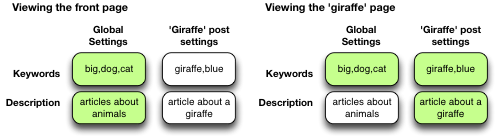
Note that nesting can be disabled.
Dynamically generated meta-data
Dynamic meta-data is simply meta-data that is taken from the post being displayed. In practical terms this means you can insert special tags into HeadSpace meta-data that are replaced when a post is to be displayed. These tags are:
| Tag | Inserts |
|---|---|
%%date%% |
Date of the current post/page |
%%title%% |
Title of the current post/page |
%%sitename%% |
The site’s name |
%%excerpt%% |
Excerpt of the current post/page (auto-generated if necessary) |
%%excerpt_only%% |
Excerpt of the current post/page (not auto-generated) |
%%modified%% |
Modified date of the current post/page |
%%id%% |
Post/page ID |
%%userid%% |
Post/page author’s ID |
%%name%% |
Post/page author’s name |
%%category%% |
List of categories the post/page belongs to |
%%category_description%% |
Category description |
%%searchphrase%% |
Search phrase |
%%currentdate%% |
Current date |
%%currenttime%% |
Current time |
%%page%% |
Current page and total pages (i.e. page 1 of 3) |
Configuration
HeadSpace has site modules and page modules. Site modules affect the site as a whole, while page modules affect individual pages. Both are configured from the Options/HeadSpace/Modules page of the administration section. Page modules appear as:
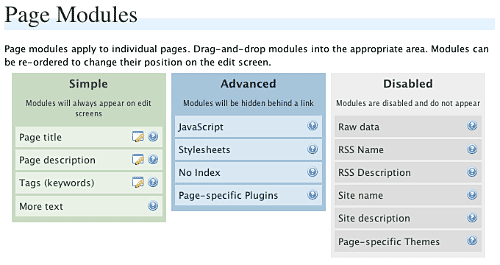
Modules can be dragged and dropped into the appropriate areas. Modules in the ‘simple’ area will always when editing meta-data. Modules in the ‘advanced’ area will only appear when a link is pressed.
Site modules appear as:
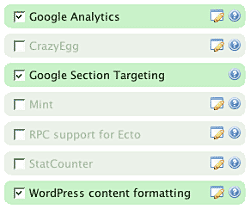
Note that some modules have an edit button allowing further configuration. Disabled modules do not run and use no resources.
Page Settings
Configuration of page settings takes place from the HeadSpace administration page:
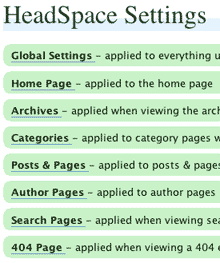
Clicking any of the sections will allow the meta-data to be configured:
The exact details and the order in which they appear is determined by your page modules. Note that advanced modules are hidden behind an ‘advanced’ link that, when clicked, will expand to show the advanced modules.
Post & Page Settings
The plugin adds an extra section to the post and page editing screen:
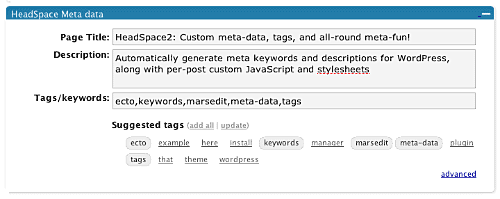
Like for page settings the exact details and order is determined by your page modules. The settings defined here always take precedence over settings defined elsewhere.
Category Settings
You can also configure HeadSpace settings when editing a category from the Category Management page.
Category settings are applied when viewing a category page, and will inherit settings from the general category settings, as well as the global settings.
Mass-Editing
HeadSpace provides a mass-editing interface which allows you to change meta-data across all posts and pages. The interface is found in the Manage/Meta-data administration page:
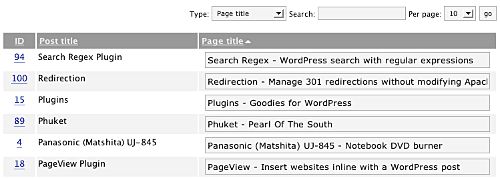
You can select the type of meta-data from the drop-down menu.
Tags or keywords
If the tag module is enabled then HeadSpace will automatically suggest tags for posts based upon previous tags. A smart-matching algorithm is used so that matches will be made when words have the same root. For example, if you previously defined the tag ‘elevate’ then the smart-matching algorithm will detect ‘elevator’, ‘elevated’, ‘elevating’, and ‘elevates’.
Tags are added with a special interface:

You can either manually enter tags in the input box, or you can click on a tag to have it added. Tags can be suggested using a smart HeadSpace algorithm, or you can enable a Yahoo option to have Yahoo suggest tags.
Support & Bugs
If you need further information then these are good guides and introductions to HeadSpace:
- HeadSpace FAQ – please read before asking for further support
- Scott Frangos over at WebHelperMagazine.com has written a detailed walkthrough (part 1 and part 2) for using HeadSpace
- Zain Bodor of Knowledge Constructs has written a fight-based knockout and a HeadSpace guide.
- NoFollow guide.
- Andrew Kolyvas has created a HeadSpace Guide and some SEO Tips that detail HeadSpace.
This plugin is no longer actively maintained.
Richard, I uploaded the contents of the headspace2 folder to the plugins dir and it seems to work, except for the bug I described earlier.
Having problems with the plugin. In the option settings, I selected “Add special meta-data fields to edit page”, but when I go to write a post, under the “Meta data” tab, the fields for descriptions and keywords are not showing as seen in your screen grab above.
It’s just showing the default one where you can upload a file with title and description.
How can I fix this?
I found the problem. In your instruction above, you should have said upload the headspace2 folder into the plugins folder, not just the headspace.php.
John,
Great plugin… however, ever sine I upgraded I can’t seem to get it to work. I just updated the plugin from 2.6 to 2.7, and when I activate it, and go to any page other than my home page I get this error instead:
Fatal error: Call to undefined function: stripos() in /home/ryaneric/public_html/uscg/wp-content/plugins/headspace2/headspace_class.php on line 99
Any ideas?
just updated to wp 2.1 and also updated headspace. all is working fine, except:
i dont see where i can set all the functions for headspace. the headspace options tab only lets me choose 2 things:
Enable GUI on edit post/pages
Default CSS for tags
thats it. i still have custom field s for keywords and descriptions for every post but now i only see the standard ones on each page. headspace doesnt read the custom descriptions and keywords.
what am i doing wrong?
Sorry Ryan, that was a PHP5 function. I’ve removed that to make it work on PHP4, and also fixed the problem that Vlad reported.
Robert, you can choose the other options from the menu bar, just underneath the normal WordPress menu bar.
[…] HeadSpace2 es un módulo que te ayuda a generar las cabeceras de cada artÃculo y zona de tu bitácora, generando listados de palabras para la zona de “keywords” y una descripción corta del artÃculo o zona. En una interesante utilidad para mejorar la posiciones en buscadores y Technorati, optimizando las palabras por las que debes ser encontrado en cada caso. (Actualizado el 4-Febrero-2007) […]
Thanks for the great work John, we appreciate it greatly!
ok. thanks. the problem was that when the plugin “Admin Dropdown” is activated you cannot see the top menu from headspace.
Hi,
somewhy special tags do not work after upgrade from WP 2.0.xx to 2.1, and upgrading your plugin from 2.6 to 2.8 :((
Have a look at my website (Warning – adult content inside.)
Can you give me some more details, Andrius? What special tags and how are they not working?
Hello John,
meta-description does not appear at all in posts, it is gone.
And have a look at meta-keywords: for example at http://www.mergytes.com/met-art-iveta-4.html,
Hi John,
sorry to bother you with an inscript/Wp 2.1 problem on your headspace page. I decribe the inscript/Wp 2.1 problem I have at your Inscript page. Can you please give me a hint how to solve it?
I have a suggestion.
1.
Integrate in head space … the utw tags. 😉 only for tag page, this will be great.
2.
A little more documentation, examples to be more exact. Sry by I’m a little noob.
Search Results for "" - '%tagdisplay%','first'=>'%tagdisplay%', 'default'=>', %tagdisplay%', 'last'=>' %operatortext% %tagdisplay%')); echo ' · Tag Archive · '; } ?>this is my title code with utw included
I’m not sure if this is a problem with the plugin or with my environment, but when I use special characters in the meta fields (like ã, á, é, ç, etc.), they’re not displayed properly in the pages. Two things that I did to make it work:
1) In every call to htmlspecialchars or htmlentities, added the parameters “ENT_COMPAT” and “UTF-8”.
2) Use the mb_string functions to treat strings, like mb_strtolower($str, “UTF-8”), instead of the strtolower.
Thanks for the great plugin!
Thanks for the plugin. One suggestion on line 274 of headspace.php you have:
$link = '/?s=';Would this be better as:
$link = get_settings('siteurl').'/?s=';for people whose blogs aren’t in the root directory?
hi…
why are the metadescription only 100 characters long?
i have wrote 900 in the options menu but it doesnt work..:-(
regards and maybe thanks for help
stefan
No Special Tags on Keywords page ?????
Version 3 brings fixes to the remaining problems and adds a lot of new features. Please feel free to add suggestions here
I get this error on my single pages:
Warning: strpos() [function.strpos]: Empty delimiter. in /mnt/cr1/01/609/00000013/htdocs/wp-content/plugins/headspace2/headspace_class.php on line 7
Tried already to install it again, but the error still exists. What can i do?
When I click anything from Options/headspace/page settings, it’s show:
Fatal error: Class headspace2_ajax: Cannot inherit from undefined class filled_in_plugin in /home/.fielder/xxxxxx/wp-content/plugins/headspace2/ajax.php on line 5
Plugin updated with some small fixes. Try this new version.
When I save a post, I get this…
Warning: assert() [function.assert]: Assertion failed in /…/public_html/wp-content/plugins/headspace2/headspace.php on line 179
Warning: Cannot modify header information – headers already sent by (output started at /…/public_html/wp-content/plugins/headspace2/headspace.php:179) in /…/public_html/wp-includes/pluggable.php on line 275
any ideas?
Try version 3.0.1 and let me know
3.0.1 fixed my errors, thanks.
3.0.1 is ok.
Options/headspace is ok, but when WP auto save post, I get these:
Error:
Warning: Invalid argument supplied for foreach() in /home/.fielder/kdolphin/wordpresscn.com/wp-content/plugins/headspace2/headspace_class.php on line 101
Warning: Invalid argument supplied for foreach() in /home/.fielder/kdolphin/wordpresscn.com/wp-content/plugins/headspace2/headspace_class.php on line 107
Hi
Love the plugin and the hard work you put into it is much appreciated!
I’m having a problem with this plugin so deactivated it….would you be able to assist me with this error please? I would very much appreciate this.
Warning: assert() [function.assert]: Assertion failed in /home/hairloss/public_html/covers/wp-content/plugins/headspace2/headspace.php on line 179
Warning: assert() [function.assert]: Assertion failed in /home/hairloss/public_html/covers/wp-content/plugins/headspace2/headspace.php on line 179
Warning: assert() [function.assert]: Assertion failed in /home/hairloss/public_html/covers/wp-content/plugins/headspace2/headspace.php on line 179
Warning: assert() [function.assert]: Assertion failed in /home/hairloss/public_html/covers/wp-content/plugins/headspace2/headspace.php on line 179
Warning: assert() [function.assert]: Assertion failed in /home/hairloss/public_html/covers/wp-content/plugins/headspace2/headspace.php on line 179
Warning: assert() [function.assert]: Assertion failed in /home/hairloss/public_html/covers/wp-content/plugins/headspace2/headspace.php on line 179
Warning: assert() [function.assert]: Assertion failed in /home/hairloss/public_html/covers/wp-content/plugins/headspace2/headspace.php on line 179
Warning: assert() [function.assert]: Assertion failed in /home/hairloss/public_html/covers/wp-content/plugins/headspace2/headspace.php on line 179
Warning: assert() [function.assert]: Assertion failed in /home/hairloss/public_html/covers/wp-content/plugins/headspace2/headspace.php on line 179
Warning: Cannot modify header information – headers already sent by (output started at /home/hairloss/public_html/covers/wp-content/plugins/headspace2/headspace.php:179) in /home/hairloss/public_html/covers/wp-includes/pluggable.php on line 275
Thank you
Just installed HeadSpace. All went well with the activation. When I attempt to mod any of the setting in the admin panel I receive the following message.
Fatal error: Call to a member function get_post_rank() on a non-object in C:\Apache2\htdocs\wp_genesiswebdesign\wp-content\plugins\popularity-contest.php on line 1624
Yes, I do have the Popularity Contest plugin installed for tracking and it works fine. Also I have the Add Meta Tags plugin installed, but no conflict with it. When I deactivate the Pop Contest plug in Headspace works fine. Any ideas.
Thanks for a GREAT plugin…
[…] HeadSpace2 The first one I will be reviewing is a plugin that was just updated for WP 2.0 (and 2.1) called HeadSpace2 from Urban Giraffe. […]
Mike, it looks like a bug with the Popularity Contest plugin stepping in when it shouldn’t. I’ve put a hack in place in 3.0.2 to keep it quiet.
Tina & kDolphin, try 3.0.2 as well.
It’s working now.
Thanks for a GREAT plugin.
Thanks John. That fixed the backend admin problem, but the front end (main site) has the same problems as well…
Fatal error: Call to a member function get_post_rank() on a non-object in C:\Apache2\htdocs\wp_genesiswebdesign\wp-content\plugins\popularity-contest.php on line 1624
That is the only thing that come up when I go to the site. I had to deactivate the plugin to get the site back up.
Thanks for you previous quick response.
Mike, try disabling custom themes in HeadSpace – that seems to cause the clash. I’ll have a look into it in more detail later.
Hi,
I’ve just installed headspace on my new blog (webee. the bee design).
and it’s working fine until now. i have only one question:
it seems that some “
… sorry it seems that my message was truncated.
i was telling you about the fact that some kind of script is inserted between the title tag and the other meta data on my blog.
and i was asking if this was a problem i should be concerned about.
thank you.
What script in particular are you referring to, webee? Your theme will contain a lot of meta-data and scripts itself, and HeadSpace will only insert the data you tell it to. If you think something is being inserted that shouldn’t be that tell me which line of the HTML its on and I’ll have a look.
thanks for your prompt response john.
if you have a look an my website, you will find that between line 8 and 37 there is some code inserted between the title tag and the meta description tag.
i don’t really know if this is the answer to your question, if you want, i can send you the code via email.
once again, thank you.
I following errors popped up when I installed headspace2. How do I fix them? Thanks a lot.
Rendering of admin template /home/wirefire/public_html/wp-content/plugins/view/admin/head_admin.php failed
Rendering of admin template /home/wirefire/public_html/wp-content/plugins/view/admin/submenu.php failed
Rendering of admin template /home/wirefire/public_html/wp-content/plugins/view/admin/settings.php failed
webee, that looks like stuff from your theme so nothing to worry about.
Zach, did you upload the entire headspace2 directory? Inside the zip is a directory which must be uploaded into plugins. Just uploading the files inside that directory will not work.
Disabling custom themes worked.
Thank you.
It works now.
Thanks John.
I have a 2 line description. Upon viewing the source the description is cropped to just what fits on the first line in the entry area of the admin panel.
Mike, the description gets cropped to whatever is set as the maximum length in the HeadSpace ‘options’ page
I’m having problems with the latest release v3.0.3. When you go to Options -> Headspace -> Page Settings there are a bunch of setting links listed, but none of them work. They all point to …domain/news/wp-admin/options-general.php?page=headspace.php#
I’m running the latest version of WordPress 2.1 with Microsoft IIS 2003 server. The plugin was working correctly under v2.8.
I have been trying to download Headspace, but the link doesn’t work.
It gives me a “HTTP 400 – Bad Request” message.
Hi,
HeadSpace cancels the WP 2.1.1 built-in static page for home option.
Can you advise if I can fix it or is it a bug?
Thanks!
[…] Urban Giraffe | HeadSpace2: Custom meta-data, tags, and all-round meta-fun! (tags: plugin wordpress) […]
Your site will not let me download the plugin…can you send a zip file in an email?
I’m having this same problem :
#
Francois says:
Added on March 2nd, 2007 at 6:16 am
I’m having problems with the latest release v3.0.3. When you go to Options -> Headspace -> Page Settings there are a bunch of setting links listed, but none of them work. They all point to …domain/news/wp-admin/options-general.php?page=headspace.php#
I’m running the latest version of WordPress 2.1 with Microsoft IIS 2003 server. The plugin was working correctly under v2.8.
I have the same problem as Chris: all the links under “Head Space settings” (general… 404) do not work. Headspace2 Version 3.0.3, WordPress 2.0.9
I tried this in IE7, Firefox and Opera.
The source of the page looks like this:
“…href=”#” onclick=”edit_head(‘global’);return false”>…”
When I copy the link it goes to …wp-admin/options-general.php?page=headspace.php#, so the onclick simply doesn’t seem to work
Francois, Chris, and Laurenz: The links all work fine in every browser I’ve tried. Can you confirm for me that you have javascript enabled? Can you also confirm whether headspace.js appears in the source for the page and that the URL exists?
Scott & Nimsy: The download appears to work so maybe it was a server glitch – try again
Don, there’s a new version 3.0.4 that fixes that problem.
Nice plugin. Very thorough.
However…
My site isn’t very complex. Has a static front page and a small blog page, so I’m using mostly global settings with some per page tweaks.
The problem is that the titles of the pages are being displayed without any spaces between the words. I looked over the documentation, but can’t find any reason for this scrunching. I’m letting each page inherit its existing title, so Headspace isn’t set to overwrite them with something else.
Any explanations?
Thanks in advance.
[…] von 2.0 aufwärts benutzt… Finden kann man das Headspace2-Plugin unter folgendem Link Ich werde mal ein wenig herumexperimentieren und hier eventuell mal ein paar […]
Francois, Chris, and Laurenz: The links all work fine in every browser I’ve tried. Can you confirm for me that you have javascript enabled? Can you also confirm whether headspace.js appears in the source for the page and that the URL exists?
John – I have found the problem. I renamed the plugin directory of v3.0.4 to “headspace3” to have both versions 2.8 and 3.0.4 installed at the same time for testing purposes. But the directory is hardcoded to “headspace2/..” in the source file “/view/admin/head_admin.php”. Can you change this file so that a hardcoded main folder name is not needed.
Thanks for the fix! You’re a Gentleman and a Scholar 🙂
I’ve added a css file and 3 javascript files to one of my pages but now I’m unable to undo those additions! I’ve tried emptying the fields but when I go back to the same page the references to the files are back again 🙁
[…]   HeadSpace 2,更好的管ç†WordPress站点的metaä¿¡æ¯ï¼Œè®©æ¯ç¯‡æ–‡ç« æ¯ä¸€ä¸ªé¡µé¢éƒ½èƒ½åŒ¹é…上更åˆé€‚çš„metaä¿¡æ¯ï¼Œè¿™æ ·æœ‰åˆ©äºŽæœç´¢å¼•æ“Žçš„索引。 ã€€ã€€ä¸Šä¼ æ¿€æ´»ã€‚Options => HeadSpaceä¸åšå„ç±»é¢„è®¾ç½®ï¼Œåœ¨æ’°å†™æ–‡ç« æ—¶å‘布按钮下方会看到有多出”meta data”项目,其ä¸å¯ä»¥å¡«å…¥ç›¸å…³æè¿°å’Œmetaä¿¡æ¯ã€‚ […]
Can anyone please answer why my titles are losing all their spaces? (See my comment a few comments back.)
Thanks!
[…] e sul funzionamento, nel dettaglio, del plugin vi rimando alla pagina dell’autore: HeadSpace 2 Tag:No Tags These icons link to social bookmarking sites where readers can share and discover new […]
I have the same problem as Keith. I have added some wrong codes to JavaScript textbox for a post but I can not delete it, and having problem in page display.
Any Help,
Thank you
Hi John,
I’m using a modification of the Blix theme. My problem is that I’m getting two sets of description and keyword meta lines in the header. The first set displays only the dividing symbol and the page name in the Title, Description and Keyword lines. This is also what displays at the top of the page. Then the second set correctly displays the keywords, but a global site description on the Description line instead of the page description. Any ideas of what might be happening? Thanks much!
DLE, I’ve not seen this happening and no one else has reported the problem so it must be some clash between HeadSpace and your theme or other plugins. If you send me an email (contact form at top of page) with more details I’ll take a look.
Keith, Otkay: Fixed in 3.0.5
Rod, could you send me a copy of header.php from the theme directory? Contact details at top of page
1.One bad thing is the alphabetical order in keywords and description. Can you remove that ? Can you tell me how to remove that ?
2.”HeadSpace2 is a plugin to manage meta data for your WordPress site.” 😐
This was to be a meta tag plugin. Why don’t you develop a separate plugin with the other futures ?
3.By the way … I still like hspace2 2.8 .. but I love the hot keywords option from the new version.
4. Whats with the excerpt option ? Show pictures tags, flash tags…
Bloggero, why is alphabetical ordering of keywords bad? The description is not ordered at all.
The other features of HeadSpace seem logically consistent with it’s purpose, and a seperate plugin just to manage things like post-specific themes would be an unnecessary overhead. In all aspects the latest version should be an improvement over 2.8
“why is alphabetical ordering of keywords bad?”
1.From my SEO experience I know that is bad.
2.It’s a unnecessary restriction for users.
[…] thing I am trying is Ultimate Tag Warrior and Head Space 2. These I am led to believe will help in terms of promoting my blog and therefore my site and my […]
Hello, John,
i spotted, that headspace does not work somewhy with “ImageManager 2.4.1”, simply when i enable image manager i cannot configure Headspace – when i click on Headspace options they do not expand.
Thanks John for the correction.
hi there,
i have installed the plugin and it’s quite useful. so thanks! 😉
i have one question though:
– i’ve noticed that the category descriptions are inherited from the description set up in the last post in each category. is this because i hadn’t yet set up the categories’ description tags?
thanks for clearing that up,
webee
For some reason mine never inserts a title tag into the code. So for the time being I have to run the SEO Title Tag plugin to compensate. I’ve tried adding titles to global, home page, pages, posts… nothing. Not even so much as generating a in the sourcecode from where is.
I’ve even turned off all plugins but this one. I am in WordPress 2.1.2.
I do get description and keywords tags but no title.
Does anyone else have this problem?? I’ve tried everything.
Nevermind. lol. I’m an idiot. Figured it out…
How can I make the separater come after the title text instead of before it?
Hi. I was having a bit of trouble with my description and keywords not showing up in the header. It turns out that (in my theme/plugin configuration at least)
option_blognamewas being called before wordpress setis_single()to true. Sinceget_headspaceonly checks foris_singlethe first time it is called this meant that headspace didn’t know it was on a post page and none of the post-specific meta data could be loaded. I’m not using the blog name feature so the easy/lazy fix in my case was to comment out$this->add_filter ('option_blogname');.[…] HeadSpace 2,更好的管ç†WordPress站点的metaä¿¡æ¯ï¼Œè®©æ¯ç¯‡æ–‡ç« æ¯ä¸€ä¸ªé¡µé¢éƒ½èƒ½åŒ¹é…上更åˆé€‚çš„metaä¿¡æ¯ï¼Œè¿™æ ·æœ‰åˆ©äºŽæœç´¢å¼•æ“Žçš„索引。 ä¸Šä¼ æ¿€æ´»ã€‚Options => HeadSpaceä¸åšå„ç±»é¢„è®¾ç½®ï¼Œåœ¨æ’°å†™æ–‡ç« æ—¶å‘布按钮下方会看到有多出”meta data”项目,其ä¸å¯ä»¥å¡«å…¥ç›¸å…³æè¿°å’Œmetaä¿¡æ¯ã€‚ […]
3.0.7 adds options to disable keyword sorting, as well as changing the position of the title seperator.
Scott: I’d be interested to know what combination of plugins/theme you have.
this plugin is great! I trying on my blog!!!!!
Warning: Missing argument 2 for HeadSpace2::from_edit(), called in /home/.niven/moonswamp/cashooter.com/wp-content/plugins/headspace2/ajax.php on line 52 and defined in /home/.niven/moonswamp/cashooter.com/wp-content/plugins/headspace2/headspace_class.php on line 90
test the latest version on wordpress2.13 adn php 5 , errors happend!!!
any ideas???
OK,
i try to modify the ajax.php
add “, $_options” after $_POST on line 52
and the line look like this: $headspace->from_edit ($_POST, $_options);
and it’s ok now, but i don’t know wether there is a hangover!!!!!
[…] HeadSpace 2ï¼Œåœ¨æ’°å†™æ–‡ç« æ—¶å‘布按钮下方会看到有多出â€meta […]
I successful upload the headspace2 to the smartFTP.
When go to wp at plugin, the headspace2 is not there
for me to activate.
What happen.
please advise.
Thanks.
Richard
Hi,
thank for this good bplugin, i get this error when i update some plugins settings
Warning: Missing argument 2 for from_edit() in /home/content/s/e/s/html/wp-content/plugins/headspace2/headspace_class.php on line 90
My wordpress version is 2.1.3
Headspace 3.0.7
Enrico: Fixed in 3.0.8.
Richard, you need to upload the headspace2 directory
Andrius: ImageManager is including it’s JavaScript files even when it shouldn’t be. I’ve put a hack in place so that HeadSpace prevents this.
Hi, just downloaded latest plugin and after uploading and trying to activate the plugin I get the following error. I have tried to find an answer in the blog but being a complete newbie I probably missed it:
Warning: include(/home/registr2/public_html/wordpress/wp-content/plugins/headspace2/plugin.php) [function.include]: failed to open stream: No such file or directory in /home/registr2/public_html/wordpress/wp-content/plugins/headspace2/headspace.php on line 26
Warning: include() [function.include]: Failed opening ‘/home/registr2/public_html/wordpress/wp-content/plugins/headspace2/plugin.php’ for inclusion (include_path=’.:/usr/lib/php:/usr/local/lib/php’) in /home/registr2/public_html/wordpress/wp-content/plugins/headspace2/headspace.php on line 26
Fatal error: Class ‘HeadSpace2_Plugin’ not found in /home/registr2/public_html/wordpress/wp-content/plugins/headspace2/headspace.php on line 29
Can some one help pse?
Thanks
Terry, did you upload all the files into the headspace2 directory? It looks like the file plugin.php doesnt exist.
I added the latest Headspace 2 today and deleted my old Headspace 2. However, I don’t have the save/cancel buttons showing other than in the global settings area. The Home, Archive, etc sections don’t have the save/cancel buttons.
Also, I notice the “Plugins” word show at bottom of each section, just below the “themes” dropdown box. But the “Plugins” don’t do anything?
What do I do to fix this? Thanks in advance!
My blog is based on a modification of your excellent Giraffe2 theme. I’m trying implement Headspace2. In Headspace Settings, for everything but Global Settings, I get the following error message:
Fatal error: Call to undefined function: get_plugins() in /home/artword/public_html/wordpress/wp-content/plugins/headspace2/view/admin/edit.php on line 92
Can you help?
Thank you,
Ron Weihs
Bug fixed in 3.1.1
[…] Meta çš„ WordPrss æ’件,如:Head META Descriptionã€HeadSpace 2ã€Add Your Own Headers,但 Jim å´ä¸æŽ¨è这么åšï¼Œå› 为 Keywords 属性目å‰åœ¨ Pagerank […]