
| Download: | HeadSpace |
|---|---|
| Note: | This plugin is no longer actively maintained |
HeadSpace is a powerful all-in-one plugin to manage meta-data and handle a wide range of SEO tasks. With it you can tag your posts, create custom titles and descriptions that improve your page ranking, change the theme or run disabled plugins on specific pages, and a whole lot more.
Because the configuration of meta-data can be a complicated and tiresome process HeadSpace provides several shortcuts to reduce your effort:
- Meta-data nesting – data is collected not only from the page itself, but nested parent pages
- Dynamic data extracted – why repeat yourself when you can extract data from the post itself?
- Full GUI interface – data is entered alongside post content, and with a full auto-suggested AJAX interface for tags and keywords
- Mass-editing – now you can edit meta-data for all pages and posts at one go!
HeadSpace is modular in nature and provides a full set of modules that allow you to configure your site exactly as you want and without requiring several conflicting plugins – everything is contained within one consistent interface. These modules include:
- Page-specific modules that can be applied to posts, pages, categories, archives, search pages, 404 pages, and the home page!
- Page titles – SEO optimized titles
- Tags and keywords are auto-suggested using a smart algorithm or via Yahoo and work on both posts and pages (pages can also be set to appear in tag archives)
- Page-specific plugins – have plugins that run only on specific pages!
- Theme-specific plugins – change your site theme on specific pages!
- Description – what appears in search engine listing
- More text – change the ‘more text’ for each post
- JavaScript & CSS – add JavaScript or CSS files to a post
- No index – configure whether a page is indexed by search engines
- No follow – configure whether links receive a follow/nofollow attribute
- Site name & description
- RSS name & description
- Anything else you want – HeadSpace allows custom meta-data
- Site-wide modules:
- Configure auto-formatting (wpautop), auto-fancy quotes, auto-clickable links, and disable visual editing
- Tracking codes for Google Analytics (new & old code), Crazy Egg, StatCounter, 103bees, Mint, FeedBurner Stats, Yahoo! Site Explorer, HitTail, Google Webmaster, Piwik, and Apture, with the ability to not track registered users
- Google section targeting
- First Time Visitor – display a special message to visitors when they first visit your site (based upon idea by Seth Godin)
- Disable Widgets
- Change PHP memory limit, timeout, and error reporting level
Due to the number of meta-data plugins available for WordPress, HeadSpace will import data from these plugins:
- UTW (Ultimate Tag Warrior)
- SEO Title tags
- All-in-one SEO
- Jerome’s Keywords
- Simple Tagging
- lud.icro.us HeadMeta
- HeadMeta description
- More Unique
Now there’s no reason not to use it!
HeadSpace is available in the following languages (all included within the plugin):
- English
- French (thanks to Serge)
- Polish (thanks to Jacek Tyc)
- German (thanks to Mario)
- Italian (thanks to Gianni Diurno)
- Bulgarian (thanks to Alexander Dichev)
- Spanish (thanks to Juanpa Manson)
- Russian (thanks to Sergey Ryvkin)
- Danish (thanks to Strang Skov and Georg S. Adamsen)
- Japanese (thanks to Yoichi Kinoshita)
- Brazilian Portuguese (thanks to Vinicius Pinto)
- Dutch (thanks to Matthias Houwelin)
- Indonesian (thanks to Hendry Lee)
- Turkish (thanks to Omer Faruk)
- Belorussian (thanks to Marcis Gasuns)
- Ukrainian (thanks to Kirin)
- Estonian (thanks to Lembit Kivisik)
- Farsi (thanks to Amir Heydari)
- Arabic (thanks to Mouad)
If you can provide a language translation then please get in contact with the author. A PO file is provided with the plugin to be used in translating with poEdit.
People upgrading from previous versions should be aware that you must reconfigure the plugin. As much of your existing configuration will be retained, and existing custom meta data for posts should be completely safe.
Installation
The plugin is simple to install:
- Download headspace2.zip
- Unzip
- Upload
headspace2directory to your/wp-content/pluginsdirectory – the directory must be called headspace2. - Go to the plugin management page and enable the plugin
- Configure the options from the Options/HeadSpace page
- Ensure your theme calls
wp_headinheader.php(most themes do this anyway – seewp-content/themes/default/header.phpas an example)
You can find full details of installing a plugin on the plugin installation page. Note that, depending on your site configuration, you may need to increase the amount of available memory to 32MB. Details of doing this can be found here.
Concepts
It is useful to understand the process involved in generating meta-data for a WordPress page. HeadSpace allows meta-data to be both nested and dynamically generated from the page itself.
Nesting
This is a fairly simple concept, but one that requires explanation. When a page is to be displayed, HeadSpace looks at the page type and retrieves meta-data from all available sources. For example, when displaying a post, HeadSpace will first look at the post’s meta-data, then it will look at meta-data set for all posts, then it will look at global meta-data. When displaying a category page, HeadSpace will look first at the category meta-data, then at global meta-data.
The reason for this nesting is that you can configure HeadSpace as little as possible, but get the maximum effect. For example, adding a tag of ‘scuba’ to the global ‘tag’ settings will mean that every page will have the ‘scuba’ tag set, in addition to whatever specific meta-data the page may contain.
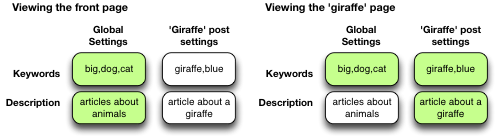
Note that nesting can be disabled.
Dynamically generated meta-data
Dynamic meta-data is simply meta-data that is taken from the post being displayed. In practical terms this means you can insert special tags into HeadSpace meta-data that are replaced when a post is to be displayed. These tags are:
| Tag | Inserts |
|---|---|
%%date%% |
Date of the current post/page |
%%title%% |
Title of the current post/page |
%%sitename%% |
The site’s name |
%%excerpt%% |
Excerpt of the current post/page (auto-generated if necessary) |
%%excerpt_only%% |
Excerpt of the current post/page (not auto-generated) |
%%modified%% |
Modified date of the current post/page |
%%id%% |
Post/page ID |
%%userid%% |
Post/page author’s ID |
%%name%% |
Post/page author’s name |
%%category%% |
List of categories the post/page belongs to |
%%category_description%% |
Category description |
%%searchphrase%% |
Search phrase |
%%currentdate%% |
Current date |
%%currenttime%% |
Current time |
%%page%% |
Current page and total pages (i.e. page 1 of 3) |
Configuration
HeadSpace has site modules and page modules. Site modules affect the site as a whole, while page modules affect individual pages. Both are configured from the Options/HeadSpace/Modules page of the administration section. Page modules appear as:
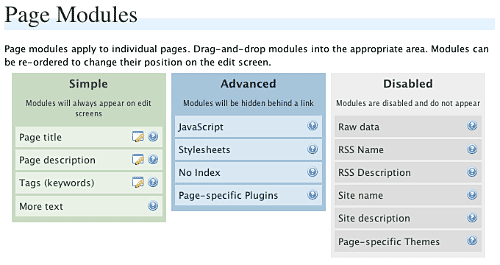
Modules can be dragged and dropped into the appropriate areas. Modules in the ‘simple’ area will always when editing meta-data. Modules in the ‘advanced’ area will only appear when a link is pressed.
Site modules appear as:
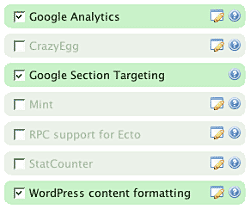
Note that some modules have an edit button allowing further configuration. Disabled modules do not run and use no resources.
Page Settings
Configuration of page settings takes place from the HeadSpace administration page:
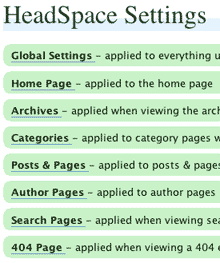
Clicking any of the sections will allow the meta-data to be configured:
The exact details and the order in which they appear is determined by your page modules. Note that advanced modules are hidden behind an ‘advanced’ link that, when clicked, will expand to show the advanced modules.
Post & Page Settings
The plugin adds an extra section to the post and page editing screen:
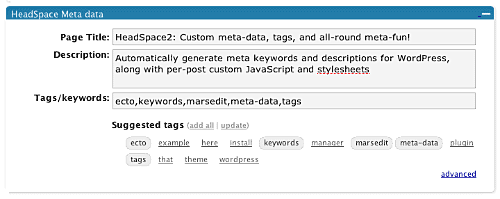
Like for page settings the exact details and order is determined by your page modules. The settings defined here always take precedence over settings defined elsewhere.
Category Settings
You can also configure HeadSpace settings when editing a category from the Category Management page.
Category settings are applied when viewing a category page, and will inherit settings from the general category settings, as well as the global settings.
Mass-Editing
HeadSpace provides a mass-editing interface which allows you to change meta-data across all posts and pages. The interface is found in the Manage/Meta-data administration page:
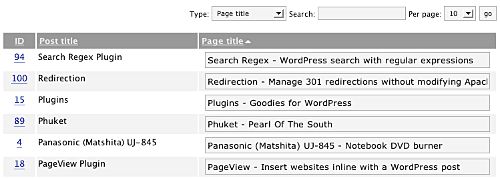
You can select the type of meta-data from the drop-down menu.
Tags or keywords
If the tag module is enabled then HeadSpace will automatically suggest tags for posts based upon previous tags. A smart-matching algorithm is used so that matches will be made when words have the same root. For example, if you previously defined the tag ‘elevate’ then the smart-matching algorithm will detect ‘elevator’, ‘elevated’, ‘elevating’, and ‘elevates’.
Tags are added with a special interface:

You can either manually enter tags in the input box, or you can click on a tag to have it added. Tags can be suggested using a smart HeadSpace algorithm, or you can enable a Yahoo option to have Yahoo suggest tags.
Support & Bugs
If you need further information then these are good guides and introductions to HeadSpace:
- HeadSpace FAQ – please read before asking for further support
- Scott Frangos over at WebHelperMagazine.com has written a detailed walkthrough (part 1 and part 2) for using HeadSpace
- Zain Bodor of Knowledge Constructs has written a fight-based knockout and a HeadSpace guide.
- NoFollow guide.
- Andrew Kolyvas has created a HeadSpace Guide and some SEO Tips that detail HeadSpace.
This plugin is no longer actively maintained.
Hello! Thank you for great plugin! I have a problem, can you go to my website (www.praviput.me) and look the source code? It duplicates the meta tags, it have a empty one and the one that this plugin created. Can I fix this somehow?
Either another plugin is adding them, or your theme is.
Thanks! I will try to delete meta from theme or uninstal other plugin and let you know if I fix it.
just trying on this plugin hope it proves to be helpful to pull me some extra SE traffic