Testing the style
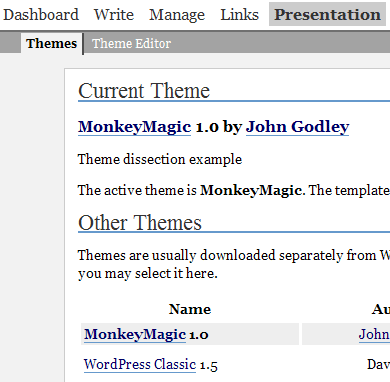
Go to the WordPress administration screen, and bring up the presentation option. You should now see the MonkeyMagic theme. Activate it.
Now lets take a look at the website (note the scissors represent where I have cut out a section to shrink the picture):
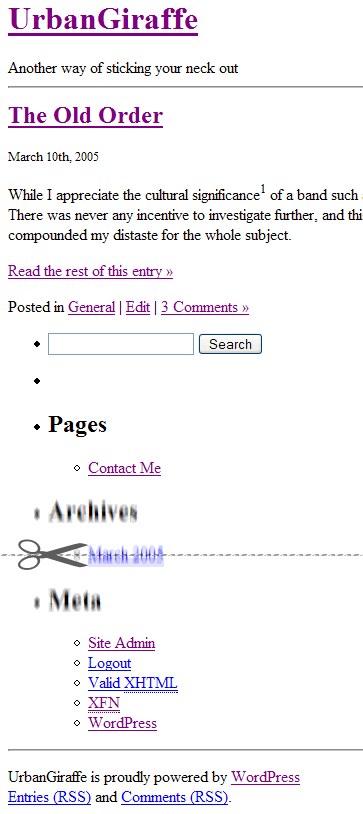
Pretty ugly, but this is exactly what we want. This will form the base design, and we can now create our theme without getting lost in too many details.
Step 2: Making sense of the mess
So we’ve stripped the theme of all style, and now were left with the content. Actually, this is not entirely true as the theme still contains elements of basic layout construction. Looking at the current theme you can see that the site still retains this structure:
- Title
- Posts, with excerpt and comment section
- Sidebar
- Footer section
This structure is defined by the rest of the files in the themes directory. The starting point for all this is index.php – this is what WordPress runs every time it needs to display a page.
<?php get_header(); ?>
<div id="content" class="narrowcolumn">
<?php if (have_posts()) : ?>
<?php while (have_posts()) : the_post(); ?>
<div class="post">
<h2 id="post-<?php the_ID(); ?>"><a href="<?php the_permalink() ?>" rel="bookmark" title="Permanent Link to <?php the_title(); ?>"><?php the_title(); ?></a></h2>
<small><?php the_time('F jS, Y') ?> <!-- by <?php the_author() ?> --></small>
<div class="entry">
<?php the_content('Read the rest of this entry »'); ?>
</div>
<p class="postmetadata">Posted in <?php the_category(', ') ?> <strong>|</strong> <?php edit_post_link('Edit','','<strong>|</strong>'); ?> <?php comments_popup_link('No Comments »', '1 Comment »', '% Comments »'); ?></p>
<!--
<?php trackback_rdf(); ?>
-->
</div>
<?php endwhile; ?>
<div class="navigation">
<div class="alignleft"><?php posts_nav_link('','','« Previous Entries') ?></div>
<div class="alignright"><?php posts_nav_link('','Next Entries »','') ?></div>
</div>
<?php else : ?>
<h2 class="center">Not Found</h2>
<p class="center"><?php _e("Sorry, but you are looking for something that isn't here."); ?></p>
<?php include (TEMPLATEPATH . "/searchform.php"); ?>
<?php endif; ?>
</div>
<?php get_sidebar(); ?>
<?php get_footer();
I’ve split this into the four basic sections, as shown. Ignoring the details of the posts part, it is a straightforward design. Note that whenever you see <?php … ?>, this is a PHP function. When a user views the page, a PHP interpreter on the web server will compile anything between these tags. The user never gets to see the PHP code itself, only the output from the compiled code, if any.
In reference to the code, lets look at parts 1, 3, and 4, and come back to 2 another day.
get_header ()– loadsheader.phpget_sidebar ()– loadssidebar.phpget_footer ()– loadsfooter.php
These functions are self-explanatory, and they are used to allow us to split the design into smaller units. This lets us concentrate fully on the appropriate part, without anything else complicating the situation. Note that we don’t have to follow this, and we can in fact put all the code in index.php, but its a nice method and so well stick to it.
Awesome resource! Just invaluable! Thanks so much for sharing it!
Not sure if anybody else had to do this, but to clear the style completely, I had to remove the at the end of the header.php file otherwise you would get rendered borders. this happened in safari 4.0.1 and firefox… whatever version I have installed. I don’t know, I never use it.
putting it back in, the break comes back but without the strange borders on either side. Don’t know why it was happening in the first place. Thanks a bunch for such a great tutorial.
Hi jonh,
i tried to do part 1 but if i notice a fault that i’m gonna to talking about.
In Italian version of this guide at the bottom of each page , there is your two MonkeyMoney : one with style and other without.
So i uploaded your themes and i turn one with no-style, i clear style.css leaving only “header” you suggest to add to style.css( not style at all… ), and i copy header of theme from these page where i’m posting and i add it to MonkeyMoney witout style.
So, even i clear-up every style from header.php, if i mantein header.php in the theme, layout is not the same displayed here : stage1finalthumb.png; but eliminating header.php layout is displayd in a right way…
In my opinion this is not explain clearly.
Regards
Not sure if anybody else had to do this, but to clear the style completely, I had to remove the at the end of the header.php file otherwise you would get rendered borders. this happened in safari 4.0.1 and firefox… whatever version I have installed. I don’t know, I never use it.
this is the most straight forward and clearest guide word wordpress beginners i’ve so far seen. thanks.
this is a great help thanks! I’m using Lubith to generate my themes which is a lot easier and faster than starting from scratch but I will use this information to manipulate the code behind and get the best results. thanks again