
| Download: | Search Unleashed |
|---|---|
| Version: | 1.0.6 |
| Supports: | WordPress 2.9.2 – 3.0 |
| Other: | WordPress.org | SVN |
| Support: | This plugin is no longer actively maintained |
Search Unleashed extends the standard WordPress search with customisable search engines, including MySQL’s full text and Zend’s Lucene, as well as word highlighting and the ability to search across posts, pages, comments, titles, URLs, and meta-data.
The plugin also ensures that a search is performed against what a web browser sees, not what is contained within the database. For example, a lot of plugins will insert data into posts using shortcodes. Because this data is inserted run-time it is not included in any search results – the data is invisible. Search Unleashed performs searches across all data, including that added by plugins.
Some features of this plugin are:
- Customisable search engines (default WordPress, indexed WordPress, MySQL fulltext, Zend Lucene)
- Optional wildcards and logical search operations
- Optional prioritisation of fields – you decide what is more important
- Search posts, pages, comments, titles, URLs, tags, and meta-data (all configurable)
- Search data after it has been processed by plugins, not before
- Search highlighting of all searches, including titles and comments
- Search highlighting of incoming searches from external search engines (such as Google)
- Search results show contextual search information, not just a post excerpt
- Record search phrases and display in a log
- Exclude specific posts and pages from results
- No changes required to your theme
- No changes made to standard WordPress database tables
- Advanced search widget (WP 2.8+)
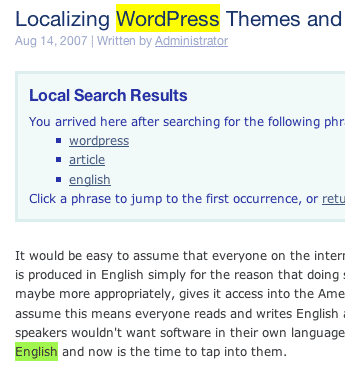
Search Unleashed is available in the following languages (included in the plugin):
- English
- Deutsch, thanks to Frank Bueltge, Gerhard Lehnhoff, and Andre
- Swedish, thanks to Olle Hellgren
- Russian, thanks to lecactus
- Italiano, thanks to Dario
- Dutch, thanks to Evert Jan van Ramselaar
- French, thanks to Vincent Granger
- Polish, thanks to Krzysztof Kowalik
- Spanish, thanks to Ivan Garcia
- Turkish, thanks to Mehmet Karaca
- Japanese, thanks to Hiroaki Miyashita
- Simplified Chinese, thanks to Yunfang Shang
- Brazilian Portuguese, thanks to Joao Miguel Aliano
- Danish, thanks to Georg S. Adamsen
- Czech, thanks Pavel Soukenik
- Slovenian, thanks to Rok
- Bahasa Indonesion, thanks to Dhany
Installation
Full installation details can be found in How to Install a WordPress Plugin.
How it works
Search Unleashed works by maintaining a search index that includes all processed information from your site. This is unlike the default WordPress search and most other search plugins, which directly use post data. Although maintaining a separate index is initially more work, the benefits are that a search is faster (it is only looking through relevant information) and can be made on data after processing by plugins. This last point is a key feature of Search Unleashed, and an example is given below.
A lot of plugins provide the ability to insert or modify data dynamically. This is typically achieved by inserting special shortcodes into posts. For example, Sniplets is a plugin to insert data into a post:
[sniplet some processed data]
This is fine when displaying the page, but when it comes to searching, the default search only sees the shortcode and not the end result. This means that any dynamically added data is invisible to the search, making the search itself somewhat less useful.
Search Unleashed indexes data after it has been processed by plugins, making all dynamically modified data visible to searches. The index is maintained separately to core WordPress data, so there is no worry of any corruption or incompatibilities caused by future upgrades.
Configuring the plugin
So you’ve installed the plugin, tried a search, and nothing happened. What’s wrong? First you need to configure the plugin. Don’t worry, this stage is painless and only needs be done once.
Configuration of the plugin takes place from the Search Unleashed administration page:
There are several sub-pages, each accessible from the menu at the top of the page:

Modules
Modules determine what data Search Unleashed indexes. For example, you can configure Search Unleashed to index post content, title, and URL.
Modules are enabled or disabled by checking the box on the left:
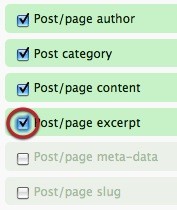
Modules can be configured by clicking the edit icon on the right:

Note that although a priority is provided in each module, only the Lucene and MySQL fulltext search engines use this. Details on prioritisation can be found in the Search Engine section.
The following modules are provided:
- Post content
- Post excerpt
- Post category
- Post author
- Post meta-data
- Post slug (URL)
- Post title
- Tags
- Comment author URL
- Comment content
- Comment author
Note that ‘post’ includes pages.
Options
The options page is split into several sections.
General Options
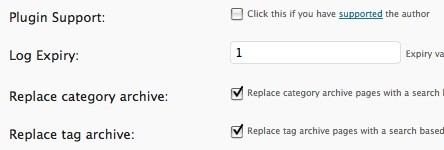
- Log expiry – Configure how many days worth of log data to retain. Enter 0 for no expiry, or -1 for no logs
- Replace category archive – Replace the category archive with a search based on the category name. That is, replace the ‘WordPress’ category archive with search results for ‘WordPress’
- Replace tag archive – As above, but replaces a tag archive page with search results
Spider Options
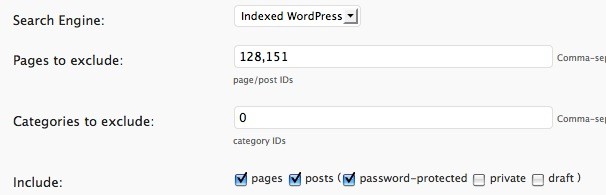
- Search Engine – Select which search engine to use (see Search Engines below)
- Pages to exclude – Post/page IDs that will not be included in search results
- Categories to exclude – Category IDs where posts in that category will not be include in search results
- Include – Specify whether to include pages, posts, password-protected posts, private posts, or draft posts
Theme Options
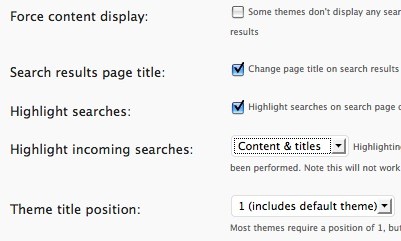
- Force content display – Some themes, such as the ‘default’ theme, do not show any post content when displaying search results. This option tries to force the display of post content so that it can be highlighted.
- Search results page title – Change the title of the search results page to reflect the search conditions (i.e. includes the search phrase and number of result pages in the page title)
- Highlight searches – Highlight search results
- Highlight incoming searches – Incoming searches are from external search pages such as Google. Note that this may interfere with WP Cache and WP Super Cache
- Theme title position – Modify this if your title is not highlighted correctly
Search Style
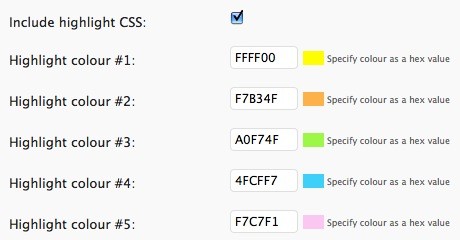
- Include highlight CSS – Include the CSS for highlighting search results. Disabling this will require you to use your own CSS
- Highlight colour – Select CSS colour values for highlighted phrases
Filters
Search Unleashed allows you to perform searches across the results of all plugins. Sometimes you may have a plugin that adds data that you do not want included in your search results. To achieve this you can use the filters page to disable WordPress filters when data is being indexed. This does not affect the plugin at any other time.
The list of filters will vary according to the theme and plugins you have installed:
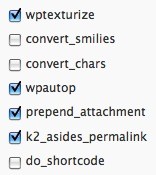
Note that this is an advanced feature – do not use unless you understand the effects.
Search Engines
A search engine provides search functionality. Search Unleashed has four search engines, each of which has advantages and disadvantages:
- Default WordPress
- Indexed WordPress
- MySQL Fulltext
- Lucene
A comparison of the engines is shown below:
| Needs Indexing | Include Plugins | Logical Search | Prioritization | Medium | |
|---|---|---|---|---|---|
| Default WordPress | No | — | — | — | DB |
| Indexed WordPress | Yes | Yes | — | — | DB |
| MySQL Fulltext | Yes | Yes | Yes | Yes | DB |
| Lucene | Yes | Yes | Yes | Yes | File |
You should select a search engine that provides features appropriate to your blog. The Lucene engine requires write access to your wp-content/cache directory and is file-based, whereas all other engines work directly from your database. All search engines will allow highlighting of search phrases.
Prioritization allows you to assign more weight to certain modules, which in turn affects the order of results – posts with more weight appear higher in results, posts with less weight appear later.
For example, you may decide that the title and URL should be more important than meta-data. In this instance you could change the priority of the title and URL module to have a higher priority than the standard 1.0. Setting a priority less than 1.0 will give it less weight.
Indexing
Depending on your choice of search engine you may need to index your database. This process runs through all your posts and stores the plugin-processed data in a separate search index. This process only needs to be performed once. Future modifications to posts will be automatically included in the index.
The default WordPress engine requires no indexing.
Indexing consists of visiting the search index page and pressing re-index button. Your database will then be indexed and a progress bar will show the state of this operation.

Search Log
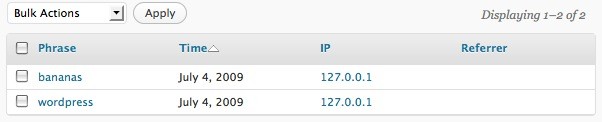
Search Unleashed can be configured to record a log of searched phrases. This can be viewed from the log sub menu.
Logical Searching
Search Unleashed tries to be as simple as possible for users performing searches and does not present a complicated set of search options. Instead a search is performed across all indexed data, and can be made using a similar syntax to what is used in popular search engines like Google or Yahoo.
Wildcards are supported through a *, but only when ‘full text’ searching is enabled:
head*
This will find all words that start with head.
Words can marked as required or not required using + and -:
+headspace - the word 'headspace' must exist
-headspace - the word 'headspace' must not exist
An exact phrase can be included by wrapping the phrase in quotes:
'exact search phrase'
Logical inclusion also works:
headspace AND plugin = +headspace +plugin
Here both headspace and plugin must exist.
Unlike some other plugins, Search Unleashed allows you to search for words smaller than four characters in length.
Incoming Results Template
Incoming results are highlighted using a default template. It is possible to change this template by performing the following steps:
- Create a directory
view/search-unleashedinside your theme - Copy the file
wp-content/plugins/search-unleashed/view/search-unleashed/incoming_local.phpto the newly created directory in your theme - Modify the copied file as appropriate
Note that the template file is separate from the plugin so you can update the plugin without needing to update the template.
Support & Bugs
This plugin is no longer actively maintained
Thank you for Search Unleashed. It’s great work and I appreciate the hard work put into it.
Hey John! I just upgraded to version 1.0 and so far I am positively delighted. I translated the plugin to Turkish a while back and did want to do an update on the translation file. However, when I try to open the messages.po which comes with this version POEDIT tells me the file is corrupt. Tried a couple of times…
Is there way you can email me a version 1.0 po file which contains the already translated strings and blanks for new strings that got introduced (missing from the Turkish translation?) since I translated? That way I can update the translation really quickly. If not you can email me a translation catalog file that works with POEDIT maybe?
Great work and thanks again!
Or… Can you tell me where to find the POT file for this version?
dear john, thank you for the efficient plugin.
last week i updated to the recent wordpress release 2.8.1 and today i updated to the search unleashed release 1. After that i have been getting a database error that i had to deactivate the plugin:
wordpress database error: [unknown column ‘comment_approve’ in ‘where clause’]
The same error is described here by another user:
http://urbangiraffe.com/support/topic/281-wordpress-database-error
Please check and let us know the appropriate solutions.
ciao,
Should now be fixed
Thanks a lot john. It works fine now. and the update is an improvement 🙂 Just to mention, i lost the log of the earlier searches, after the update..
Danish translation for Search Unleashed 1.0 available at WordPress.Blogos.DK. Enjoy!
Thanks Georg, included in the plugin
How come the reindex option is not appearing on the search index page? I have made changes to the options and need to reindex but cannot?
hi josh, you might have selected the default wordpress search engine instead of the indexed one on your options page.. cheers, philipp
Is it possible to download a pre-1.0 Version of your Plugin? The version 1.0(.1) just DOES NOT WORK. The configuration page does not show up. The index is broken (no results can be found for ANY search query). Etc. Etc.
Just because something does not work for you does not mean it does not work at all – the plugin is in use on the website and works just fine.
Thanks, I found it myself and reverted to 0.2.27 now. Will stay with that version until the major problems got solved.
What a pity – even after the update, the re-index button is not available.
Returning back to Version 0.2.27 (which worked perfectly while downgrading from 1.0) now brings up a totally new error:
Fatal error: Call to undefined method SearchSpider::_weak_escape() in /some/path/here/wp-includes/wp-db.php on line 487Hope there will be a fix available soon, cause your plugin really rocks!
If you have the default search engine enabled then you will not have a re-index button.
If you are experiencing that error you should delete and re-install the plugin.
Wonderful plugin! Sorry if this has been answered previously, but I was wondering if there is a way to adjust the length of the excerpt?
Thanks!
Dave
Yes, if you edit the configuration for the post content module you can set how many characters before and after a highlighted word should appear.
Hi John,
I’d like to add an onsite blog to an older site (as subfolder). Is there a way to use Search Unleashed for the whole site, i.e., for all pages outside the blog? Or will you “doom” me to use Google customized search? According to the FAQ, there is none, but may be there is a workaround or any way in the future? Many sites have onsite blogs…
Does the index need rebuilding after updating WordPress?
IS there any way to have search unleashed search and index documents or other html files not in wordpress, but in a directory within wordpress?
hi john, i get a lot of traffic through bing, but i don’t see them in SU log. could it be that they are not logged?
Now that is a plugin i will never forget. And what load of code you have been dreaming up. Hurray. Gladly donate equivalent to a case of beer.
I have just submitted the Czech translation. This is a great search plugin, with a very polished presentation and documentation too! Thank you
Hi,
Just installed it now, it’s a very good plugin, but still I have some problems using it.
I use the Full MySQL engine and checked the options to search also inside the meta data also, ofcourse also in titles, content, etc.
Then I created the index again.
Now, the search doesn’t find pages correctly, even not on some page titles.
Look for example in this page in a site I build –
http://www.biosearch.co.il/companies/life-sciences/biotechnology/omrix-biopharmaceuticals-ltd
This page’s content is being displayed with several custom fields in it.
* If I try to search for the term “Omrix” for example, which is in the page title – I get no results.
* If I try to search for any term that appears inside the page, such as for example “requirements” or “Latin” or “Biotechnology” etc., I get no results.
I use the latest WordPress 2.8.4.
I really hope there will be fixes soon for that, since this is just *THE* search plugin I needed. If it will wordk well for me I’d be also happy to translate the terms also for Hebrew and send you the .pot file. I really need this kind of search capabilities, since I use some modules with custom fields in that site.
Thank you very much,
Maor.
Seems like a powerful plug in. but
I have tried all ways, but cant seem to find a way to search custom field values.
Ie, I have a custom field called bed_value. I want to search for all post containing “1 bed”, so I have tried, 1+Bed, “1 AND Bed”, bed_value=1, bed_value AND 1, bed_value 1,1 Bed, and get completely irrelevant results.
What would be the correct syntax to search custom fields?
Using the MySql Full Text Engine.
Thank you.
Hi,
How can I make tables created with wp-table reloaded searchable?
Thanks
Hello John,
This is a great plugin and it works great on wordpress 2.8.4.
One problem for me is the local searches are logged twice.
Searches from Google, Yahoo and other search engines are just logged once that is fine.
Is there a way to fix this?
Thanks! for the great plugin.
ditto for me.
WP Super Cache,
Not sure if this is the right place to ask.. but is there anyone out there who uses WP Super Cache with Search Unleashed? I cant get those two plugins to cooperate. “WP Super Cache” caches pages and post highlighted even for visitors that have not searched.. Or is there a better cache plugin? 🙂
This is a great plugin! I’m having a small problem, though. The search highlighting does not appear on the post excerpts that appear on the results page. If I click through to the pull post, though, the highlighting does work. I’ve tried tinkering with the options, but haven’t found one that enables the initial result page to have highlighting. Is there a setting I’ve missed. Thanks.
There seems to be a bug with the number of words you use on pages. I have created two pages, one with 300 words and another with 500 words and when I search for a word say Office it gives me both pages in the search results which is correct but when I click on the 500 word page it does not display any of the text. I go back and click on the 300 word page and it displays the text with the highlighted word results.
Can this be fixed?
Hi – is it possible to use this plugin to search WP links (rather than posts, pages etc)? Thanks.
Is there a way to make Search Unleashed search through Blogroll Links and Link Categories? Would need a custom results page perhaps. Thoughts?
Hello,
When I come from the search engine on one of page on my site there is an inscription:
Warning: preg_match () [function.preg-match]: Unknown modifier ‘) ‘ in /home/*****/public_html/******.com/wp-content/plugins/search-unleashed/models/highlighter.php on line 48
Tell me please how to solve this problem?
Best Regards, Konstantin.
I discovered a bug in your plugin. Every time someone looks for a word that contains a slash “/”, the plugin breaks the page and the following error gets logged:
preg_match() [function.preg-match]: Unknown modifier ‘4’ in /wp-content/plugins/search-unleashed/models/highlighter.php on line 53
To fix the problem, simply insert “$word = preg_quote($word, ‘/’);” right above the preg_match statement in file “highlighter.php”, line 48. What it does, is it escapes the forward slash character and prevents the program from being able to execute preg_match.
Hopefully this will be fixed in the next release.
Thank you!
Very nice plugin.
When used together with Justin Tadlock’s, Query Posts, there are some errors shown in the widgets generated by Query Posts.
Warning: Invalid argument supplied for foreach() in /var/www/domain.com/public_html/wp-content/plugins/search-unleashed/engines/default.php on line 119
Warning: implode() [function.implode]: Invalid arguments passed in /var/www/domain.com/public_html/wp-content/plugins/search-unleashed/engines/default.php on line 143
Warning: Invalid argument supplied for foreach() in /var/www/domain.com/public_html/wp-content/plugins/search-unleashed/engines/default.php on line 119
Warning: implode() [function.implode]: Invalid arguments passed in /var/www/domain.com/public_html/wp-content/plugins/search-unleashed/engines/default.php on line 143
Hi,
Love your plugin but recently just found this error message occurring:
———–
Warning: Invalid argument supplied for foreach() in /home/freshlyn/public_html/themes/wp-content/plugins/search-unleashed/engines/default.php on line 119
———–
I have searched high and low for an answer to the problem but getting nowhere fast.
Have you come across this problem before and if so, can you point me to the solution?
Thanks again for the great plugin.
I don’t know what happened. I have installed this summer the plugin on a client’s blog. A few weeks ago, suddendly, the search form I had put on the right sidebar disappeared and I don’t remember how I did to reactivate it. So now I have this blog with the plugin and no way to use it.
How can I reactivate the sidebar search form (it seems there is no widget installed anymore)?
Where can I find a step-by-step explanation?
I supported the script because I liked it and it did the job. Now, however I am with a not working plugin and no idea how to make it work again.
Please help!
Help! How do you select a search engine !??
Sorry, I’m an idiot. I thought I was going mad.
Actually.. I got here looking for a way to include the links table in search.. but this plugin doesn’t search the links table does it?
I have always been Search Unleashed fan. I’d be very happy if you can also give a few styles to the search widget itself. It is just plain simple like one in WP.
The widget can be styled by your theme
As detailed on the WordPress Support forum for this plugin [found here: http://wordpress.org/support/topic/295253%5D there seems to be a major problem with the plugin ‘timing out’ on the search results page. I had this problem months ago but have recently installed the plugin again on a fresh install of WordPress [latest version 2.9] and am experiencing the same problem again:
Fatal error: Maximum execution time of 30 seconds exceeded in /home/—-/public_html/wp-includes/plugin.php on line 302
No matter what options I set or change, the same error is shown on the search results page.
If I then have a look at the search index in the admin area, it tells me there have been over 700 searches when I have only made 1!
A couple of other people have reported the same error on their own blogs, any thoughts as to why this is happening?
Thanks, Gemma
Hi, i have in the results the trashed posts (WordPress 2.9)
I’m having the same problem as Gemma. I’ve searched for several days through the forums here and on wordpress and can’t find an answer.
It only seems to happen with certain words. For instance, on my site, I can search word “babies” or “fitness” and have no problems. But every time I search the word cupcakes, I get the fatal error timed out.
Any ideas?
Thanks a lot for this plugin, I use it at my site and it rocks!!
The read me and tutorials that are included are realy helpfull.
This is by far the best search plugin for wordpress. And believe me I tried many search plugins.
I guess if you are getting errors check your file permissions via filezilla or maybe you have a plugin conflict.
Strange thing, the search results are showing draft posts.
My settings:
Search Engine: Indexed WordPress
Include: Only pages and posts
Why the draft posts are appearing?
I’m using version 1.0.6.
Thanks
Hey there. I like this plugin, but can I disable this function? http://www.fotos-hochladen.net/ololols2vyxq8z.png
Every time, when a visitor gets on my site over google, yahoo or some else search engines he first sees the blue window. I don’t want to have this on my site.
Best regards
Robert
Found the solution! Yo may remove my question.
You’ll get a payment next days.
Bests
Robert
Hello, I have installed the plugin and now I am using it. It is great. When I go to the plugin settings, and check the log, I see that most of the searches has referrer Google. What does that mean?
Great plugin! With pleasure and with the need to use this plugin. At the beginning of a long deal with the choice of search engine…
Nooo! It doesn’t work with WP 3.0.
Well… I deactivated and reactived the plugin and then I performed a re-index.. and now it works.
Hi-
I’ve installed the plugin everything seems to work fine except for the reindex button.
I am using wp 3.0 and have tried it with all major browsers (IE, Firefox, Chrome) and ideas?
Thanks
Hi! Just to say Thanks for your great work on this plugin. You should add to FAQ a better explanation of the Priority in MySQL/Lucene Databases.
Everything worked fine!!
Search Unleashed seems to be case sensitive. Is there a way to make it case insensitive? Thanks, The plugin is very nice and killed two birds with one stone. Search improvement and landing pages!
The plugin should not be case-sensitive
Great plugin. I noticed that by default the plugin seems to index posts with a status “auto-draft” . I’m not sure if the auto-draft feature is something new to wp3.0, but I added the following line to spider.php to resolve the issue: $this->post_sql .= ” AND {$wpdb->posts}.post_status!=’auto-draft'”; . Thanks for the plugin.
Oops…. forgot to include the line number: spider.php line 73.
Great plugin! But there are some issues with WP 3.0 Please add support for http://codex.wordpress.org/Custom_Post_Types
Changing existing articles in WP 3.0 is impossible due to a fatal error.
Fix:
In /engines/default.php Line 118 change
if ( isset( $modules[‘search_post_excerpt’] ) ) {
to
if ( isset( $modules[‘search_post_excerpt’] ) && is_array($this->terms) ) {
and in /models/spider.php Line 20 change
include dirname( __FILE__ ).’/search-module.php’;
to
include_once dirname( __FILE__ ).’/search-module.php’;
Can you make it search blogroll?
I am about to install Search Unleashed the first time for one of our partners. I translated the plugin to hu_HU, but I do not know how to send it to the plugin writer, so the translation might be included in future plugin updates / releases.
Could someone help me to send the translation?
Thank you in advance.
Send it using the contact page on this site
Brillant – having looked at the code within “search-everything” and recognised it didn’t support full-text searches nor ordering by relevence, I was JUST about to begin designing my own WordPress search plugin.
Thank goodness I searched Google one more time using a very particular phrase.
Installed, indexed, worked.
Very intelligent design – simple – and obvious – and it works.
I’ve just sent you some money – I’m THAT pleased 😀
Dean Richardson
Hi – would it be possible to add support for custom types? – i have 2 custom types on the site that need indexing? – is there a hack you could suggest? amazing plugin otherwise?
A future version should support them
i was able to include custom post types in the search by editing
this file: /models/spider.php right after this line (line 83):
$this->blog_url = get_option( 'home' );add a linefor each post type that looks like this:
$this->post_sqlhope that helps!.= " OR {$wpdb->posts}.post_type='customname1'";
$this->post_sql .= " OR
{$wpdb->posts}.post_type='customname2'";
That seems to work with the spider, but not when automatically adding new posts to the listings… Any ideas?
is there anyway to show the last 50 search terms and those go get stored on static page of my blog in the footer area is there something like a code i could paste there ? and those to be indexed by google and when the user comes still if he doesn’t find what he searched for to get the nearest results in a page?
I don’t think that would be a good idea – it would be easy for someone to add inappropriate words onto your site.
Hi,
I installed search unleashed, and now it spiders successfully some thrid party plugins I have installed. Thats great !
On the other hand I does not find anything in some simple plugins i wrote myself.
If i make a plugin like:
Hello World
<?php
}
add_shortcode('helloworld', 'showContent');
And call it with a shortcode:
[helloworld]
It won't find the string 'hello'
Has anyone an Idea ?
Your plugin does not appear to output anything?
Great plugin, I shall be using it on my site.
Is it possible to index and search data in a DB table that contains data (such as a list of books/reviews) that does not appear as a page.
I guess this comes under the heading of custom modules.
Ian
@bookmeme
No, the data must be in a page/post/
Hello, is there anyway to return some special result for some pre-selected keyword. Like, if someone search for “wordpress”, I want to show 3 sticky post from “wordpress” category and then search result. Is it possible?
No that’s not possible.
My blog has about 70,000 posts, and I install this plugin. I choose “Lucense” or even “MySQL” but when I click Re-index it runs about 2% then the message pop up “There is an error”. Can you help me to fix it?
Thank you.
You may have a plugin installed that is not behaving properly. Try disabling all other plugins.
Great plugin, this really is the best solution for WordPress search.
My question is can an auto-complete option be included while the visitor is typing his search, as most search engines have?
Good plugin! Thank you for your work
Is Search Unleashed is available in Urainian languages?
Not yet it isn’t.
Nice plugin, congratulations. Does it can do seach over the Midia text contents, like Description, Title, Legend?? Seems to me that it is able just to seach Posts and Pages, am I right or my dream could came true?
No, it doesn’t search media at the moment