
| Download: | Search Regex |
|---|---|
| Version: | 1.4.11 |
| Supports: | WordPress 2.9.2 – 3.1.1 |
| Other: | WordPress.org | SVN |
| Support: | Forum |
Search Regex adds a powerful set of search and replace functions to WordPress. These go beyond the standard searching capabilities, and allow you to search and replace almost any data stored on your site. In addition to simple searches you have the full power of PHP’s regular expressions at your disposal.
The driving force behind this plugin is to aid in website migration and upgrading. If you’ve ever done either of these then you know the pain of having to go back through all your data, changing URL paths and fixing things. With this plugin you can reduce this work to a search and replace pattern and the job is finished in seconds.
Why would you want this? The primary reason for the plugin was to aid in relocating directories. It’s a real pain to manually go through every post and change image directory names. With this plugin all that was required was a simple search and replace pattern, and the job was finished in a few seconds.
Features include:
- Simple search and replace
- Advanced regular expression search and replaces, including back references and capture groups
- Search previews with inline replacing
- Perform searches in post & page content, excerpt, titles, URL, and meta-data, as well as comment content and author data
- Full support for WordPress roles. You can only search and replace in posts you have access to
- Fully localized
Get the Flash Player to see this movie.
Installation
Installation is just like any WordPress plugin:
- Download Search Regex
- Unzip
- Upload directory to
/wp-content/pluginson your server - Activate the plugin
- Use
Search Regexfrom theManage/Search Regexmenu
You can find full details of installing a plugin on the plugin installation page.
Usage
Searches can be performed from the Search Regex submenu, contained within the main Manage menu of the administration interface. Once there you will be presented with the following interface:
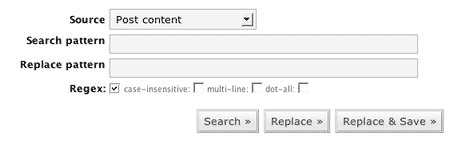
The search and replace patterns are, as you would expect, where you enter what you want to search for and what you want to replace it with. Several options exist to refine the searching capabilities, which will be explained later. You can also chose the data source.
When you have entered your patterns you need to press one of the search buttons:
- Search – Just do a search and show the results
- Replace – Perform a search and replace, but only show the results. The database is not changed.
- Replace & Save – As Replace, but the replacements are saved back into the database.
It should be noted that while you can enter any search pattern in a simple search, you must adhere to regular expression syntax when the regular expression mode is enabled. The plugin will detect any regular expression errors and warn you.
If you wish to remove a search pattern (i.e. search for ‘cheese’ and delete the any occurrences) then you can leave the replacement pattern empty.
Search Options
The following options modify the search:
- Regex – Enable regular expressions. Note that the search pattern can now only contained properly escaped characters. The @ character is used as a delimiter and also needs escaping.
- Case-less – Case insensitive search
- Multi-line – Enables multi-line mode (see PHP’s pattern modifiers page)
- Dot-all – Enables the dot-all mode (see PHP’s pattern modifiers page)
Results
Search results as presented as a list of found occurrences. Each result is shown in context with the surrounding data and, if enabled, the replacement context is also shown.
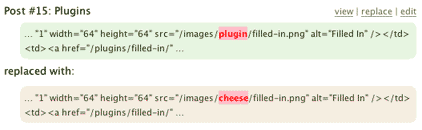
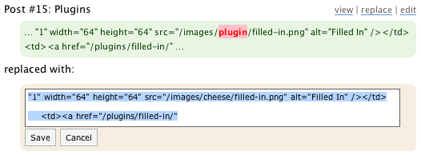
Depending upon the data source you have options to view, edit, or replace the data. Additionally, if you double-click on the highlighted search or replace patterns then an inline edit box will appear allowing you to directly edit the data.
Examples
The simplest case is changing paths:
/wp-images/
to
/images/
A more complicated regular expression version to only move PNG images:
/wp-images/(.*?).png
to
/images/png/$1.png
Warning
You should always use the Search & Replace preview before saving to the database. I will accept no responsibility for any damage caused to your data. If you are in any doubt then backup your database first.
Support & Bugs
Support and feature requests should be made through the Search Regex support forum. You can contact me directly but I spend a very limited amount of time on direct support and you stand a better chance of being answered through the forum.
If you find the plugin useful then please do consider making a donation – it is appreciated and helps towards the maintenance of the plugin.
Thanks!
seems that after the update to 2.8 of wordpress, the replace as well as replace and save functions no longer work properly. Any ideas?
The plugin is not 2.8 compatible yet
Note: it is now
is it possible to search post meta key for posts?
Thanks for this plug-in!
Can this search admin pages? I want to replace simple text such as the word “post” to the word “tribute”.
Thanks.
What do you mean by admin pages?
I’m anxious to try this one out, as I just moved a bunch of files around on my site.
This plugin totally rocks. We used to replace some youtube plugins machine tags. It was so quick and painless, but we still backed up the database. 😉
Hi, please I can see you used this plugin well. Can u please help me with effectively using it. look at my case below.
I actually want to replace a text in the footer area of my theme and that text is not present in the database but it keeps showing on the theme when I preview.
How do use this tool to find its location because in the regex options there . You have the source : none of the source options describe the location of these text i want to search ?
I don’t want to replace it, I just want to be able to track its specific location and as such I left it blank.
And when i even try to use the “dot-all†check box, I don’t know how best to react to this instruction “— remember to surround your regex with a delimiter! â€
Take for example : I want to search for a text “Sponsored byâ€
Please use my example to describe your answer.
Thanks so so much.
Search Regex is not designed for that. It may be in your theme or widgets.
nice plugin
arabic lang file v.1.4.9 :
http://www.r-sn.com/wp/wp-content/plugins/download-monitor/download.php?id=search-regex-1.4.9-ar.zip
thanks
Added to the plugin, thanks!
Sir, thank you. Nice little interface. Saved me hours.
jm
Great plugin, thanks!
I’ve translated it into German. http://wemaflo.net/downloads/
Last entry (Search Regex de_DE (ZIP))
I just wanted to thank your for making this tool available. It worked wonderfully and saved me from a lot of tedious, time consuming work. Thank you!
Thanks for the plugin….worked perfect the first time!!
Hi is this plugin compatible with 3.0.1?
Yep
Thanks a million! You seriously saved me a days mind-destroying work!
great plugin but it doen’t always work with blogs with thousands of posts.I always get error
"Fatal error: Allowed memory size of 67108864 bytes exhausted (tried to allocate 35 bytes) in /home/fooddehy/public_html/wp-content/plugins/search-regex/searches/post_content.php on line 20"I use expression :/I’m sure the plugin does have limits, yes
My self hosted wordpress website must have been hacked. Someone inserted a link to a drug selling site into each one of my posts. Each link has the same URL but different link text. Is there a way to set up a Regular Expressions to find all of these links.
Example links:
different textdifferent text in each linkThanks for any help on this.
By the way, I went and changed my wordpress sign in password. Do you think that is how they got into my site, by guessing my password?
John,
I recently switched to WP from Movable Type, where I wrote all my posts in Textile-2. I am now using a plugin in WP to display these posts properly. It works fine EXCEPT: somehow my posts lost their double spacing, and so paragraphs are running together.
What I *want* to do with your plugin is:
search for: @\r@
replace with: \r\r
The search part works fine. But the replacing does NOT work.
Instead of replacing one line break with two line breaks, it inserts literal “\r\r.”
What am I doing wrong?
The plugin doesn’t currently support line breaks in the replace.
sorry but i getting error like that,
Fatal error: Class ‘stripslashes’ not found in /home/hater/public_html/wp-content/plugins/search-regex/search-regex.php on line 51
what wrong? any idea to solve it, thanks
It is something to do with your PHP setup. stripslashes is a standard PHP function
Hello John, this is a fantastic plugin and I use it for years already. One of the standard plugins I install on every new WordPress. 🙂
I got a problem however, I am trying to replace all Flash players with HTML5 compatible ones. When I use
$1, Search Regex gives me an error as soon as there is a first>in the replacement string.Can you help me, please?
Andreas
Can you give me the full search/replace phrases you are using?
Great plugin, but i’m trying to replace carriage return line feeds, and I find them but they get replaced literally with the \r\n. I checked the earlier comments, and someone else had the same problem but no solution. Can you help please?
For example I’m searching for:
{\r\n\}
i.e. followed by on the next line. I find that fine (regex, multi-line, dot-all options all checked).
I want to replace with:
{\r\n\r\n}
and put a blank line in between the and but what gets put in is **exactly** this string, curly brackets and all. It seems like regular expressions are not interpreted in the replacement pattern. Using WordPress 3.0.1 and regex 1.4.11.
Thanks
There’s no support for carriage returns in the plugin at the moment, but it seems a sensible idea.
I want to remove the bold parts from all my posts! Is there any other way to solve this issue !
i m not able to get the right expression for search and replace !
search = “<a rel=\”(.*?)><img(.*?)<\/a>”
replace = “<img$2”
what will be the right expression?
I would use a regex testing tool to see if the pattern you’ve created matches some text. If you are on an Apple then Reggy is a very good tool. Something similar probably exists for Windows too.
Hi,
Thanks for the plugin, it has already saved me hours and hours of tedious work.
But now i need to use the inline save feature – but it doesn’t work. The interface works as it should, the spinner shows, after that the entry in the search results is faded. But when i look at the post or do a new search, the cahnge hasn’t been saved.
Am i doing anything wrong?
Do you have Firebug? If you can repeat the problem and take a look at the data being transferred on the console in Firebug then I might be able to track down the problem.
John, this plugin is great! But it needs to be extended to the wp_options table during site migrations as well.
is it possible to use in the front end design cause seems its only tor the admin side use
Admin only
Massive time saver! Over 700 posts modified in 5 seconds, many thanks! 🙂
It would be nice to have some working examples of Regex, because I tried a bazillion things, with delimeters and escape characters, and nothing is working.
Help?
There’s a bazillion ways of using regex!
I get that. But nothing is working. Regex is not working in Search Regex. I followed your instructions, and like I said, it would be nice to have some working examples.
John, first let me thank you for this plugin. A few weeks ago I used it to correct around 1,500 posts with a very simple search and replace, worked a treat, but now I need to replace another thousand or so posts with a search that I can’t seem to get right.
Chitka, has recently made changes to their scripts that may violate Google’s TOS, so I want to replace all of links to Chitika.
Now here is my problem…below you will see what I am trying to replace.
<!–
ch_client = "Nevis1";
ch_type = "mpu";
ch_width = 300;
ch_height = 250;
ch_color_title = "0000ff";
ch_color_text = "000000";
ch_non_contextual = 4;
ch_vertical ="premium";
ch_sid = "Chitika Premium";
var ch_queries = new Array( );
var ch_selected=Math.floor((Math.random()*ch_queries.length));
if ( ch_selected
When I try and enter this in the search line I only get the first line. I have tried using notepad++ to have the whole section of text come up on one line, but then the plugin does not seem to find anything.
Any ideas on what I should try?
BTW your latest version of your plugin works just fine with the Tiga theme and WP 3.3.2
Cheers Mate!
It’s not really suited for multi-line searches. You’ll need to use another method I’m afraid.
Thanks John…however I was afraid you were going to tell me that the plugin was not going to work for my purposes. Who knows, amybe I will ge lucky and somebody else will see this and point out a tool to do this….better yet in your LOADS of free time maybe you can write another plugin. LOL.
Cheers!
hey thanks for the plugin. I used it to do the following. I wanted to add rel=”nofollow” to all my masked affiliate links that use the domain.com/go/whatever link structure
i did the following, and wanted to know if this was a good way and if not if you had a perferred way as it seemed to work
I searched for @/go/(.*?)”@
and replaced it with /go/$1″ rel=”nofollow”
good format?
Hi,
Just successfully moved a site local to server and and wanted to fix a link so installed Search Regex, but I can’t find it anywhere in WP (3.4.2)
You mention “Searches can be performed from the Search Regex submenu, contained within the main Manage menu of the administration interface.” I’ve looked through all with a fine combed retina, but to no avail… cannot find SR anywhere but in the plugins
Just a quick shout out; thank you for this, it’s a great time saver, especially when I can’t get into a db.
For the googlers: I just tried on WP 3.5.1 on a debian lamp stack w/ php5.3, with a variety of regex commands, and it worked perfectly, although your results may vary depending on environment.
Nice work!
Does your plugin handle serialised arrays?
And does it search through all the WP tables, in all the fields?
Thanks
Search for meta value is not working, how can I fix it?
Multisite support, as well as support for menus and widgets.
I would pay for pro version of that.
Excellent plugin. Feature request: only replace matches within a certain category, or tag.
A great tool.
It seems that (1.4.15) doesn’t find stuff in the titles (WP4.1).
It would be handy if that worked, and even handier if the user could select by tick boxes to search one or more of those target areas.
Thanks for your fine work.
Owen