This page is now deprecated. Please visit the Redirection plugin website
Redirection is a WordPress plugin to manage 301 redirections, keep track of 404 errors, and generally tidy up any loose ends your site may have. This is particularly useful if you are migrating pages from an old website, or are changing the directory of your WordPress installation.
Features include:
- Supports both WordPress-based and Apache-based redirections
- 404 error monitoring – captures a log of 404 errors and allows you to easily map these to 301 redirects
- RSS feed for 404 errors
- Custom ‘pass-through’ redirections allowing you to pass a URL through to another page, file, or website.
- Full logs for all redirected URLs
- Create redirections based upon a URL, browser, referring site, or login status
- Automatically add a 301 redirection when a post’s URL changes
- Full regular expression support
- Fully localized
- Export all redirections to CSV, XML, or Apache
.htaccessfiles - Import Apache
.htaccesfiles
Redirection is available in the following languages:
- French, thanks to Oncle Tom
- Hebrew, thanks to Rami
- Spanish, thanks to Juan
- Simplified Chinese, thanks to Sha Miao
- Japanese, thanks to Naoko McCracken
- Hindi, thanks to Ashish
- Russian, thanks to Grib – with Russian manual
- Bahasa Indonesian, thanks to Septian Fujianto – with guide
- German, thanks to Fabian Schultz
- Italian, thanks to Raffaello Tesi
- Ukrainian, thanks to WordPress Plugins Ukraine
- Arabic, thanks to Jerry John
- Brazilian Portuguese, thanks to Pedro Padron
- Dutch, thanks to Marlon Navas and Pieter Carette
- Hungarian, thanks to daSSad
- Turkish, thanks to Fatih Cevik
- Romanian, thanks to Flo Bejgu @ InboxTranslation
- Greek, thanks to Stefanos Kofopoulos
- Belarusian, thanks to Alexander Ovsov
- Lithuanian, thanks to Nata Strazda
- Czech, thanks to Martin Jurica
If you can provide a language translation then please get in touch. A PO file is provided with the plugin to be used in translating with poEdit.
Installation
Installation is just like any WordPress plugin:
- Download redirection.zip
- Unzip
- Upload to
redirectiondirectory to/wp-content/pluginson your server - Activate the plugin
- Configure options from Manage – Redirection
Note that you must have a permalinks structure setup through WordPress.
You can find full details of installing a plugin on the plugin installation page.
Core Concepts
Redirection uses three core concepts:
- Modules
- Groups
- Redirects
A module consists of many groups, and each group consists of many redirections. A module determines how the redirections will be used, and a group allows you to separate redirections into logical units. A redirection represents an action performed when a particular URL is accessed.
Don’t worry, there’s more to come!
Modules
At the most basic level, a module determines how redirections are implemented. There are three types of module:
- WordPress
- Apache
- 404 errors
The WordPress module uses WordPress to implement redirections. This means it works for all permalink-enabled sites and so has the greatest compatibility.
The Apache module, as you would expect, uses Apache to implement redirections. This means that each redirection is written to an Apache .htaccess file, giving you better performance than the WordPress module, at the cost of less compatibility and less flexibility (some features, such as redirection statistics, are only available from the WordPress module).
Separate from these is the 404 error module. This uses Redirection to keep track of 404 errors.
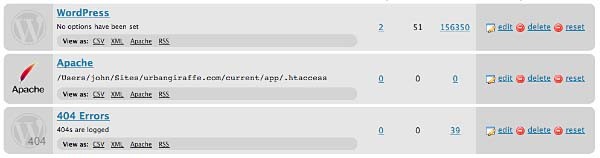
Each module can be exported to CSV, XML, or an Apache .htaccess file. You can also view logs for each module via an RSS feed
WordPress Module
The WordPress module is the default module and provides the most features. The main disadvantage of this module is that each time a URL is redirected it requires WordPress to be loaded (contrast this to the Apache module where a redirection occurs before WordPress loads).
This module is configured as follows:

These options are detailed below:
- Canonical – determine whether the
wwwshould be removed or added to your site URL. - Strip index – if enabled then any attempt to access a
index.php,index.html, orindex.aspfile will cause an automatic redirection to the same URL, minus the index file. - Time Limit – sets a site-wide PHP timeout limit. Useful if something is timing out.
- Error level – sets the PHP error reporting level. Useful for removing unwanted warnings, or for viewing hidden ones
Apache Module
Rather than using WordPress to provide redirections the Apache module writes data to an Apache .htaccess file. If you site supports these then this will give you the greatest performance, at the cost of losing a few items of functionality. For example, the Apache module provides no statistical information so it is not possible for the Redirection plugin to keep track of how many times a particular redirection has been used.
The module is configured as follows:
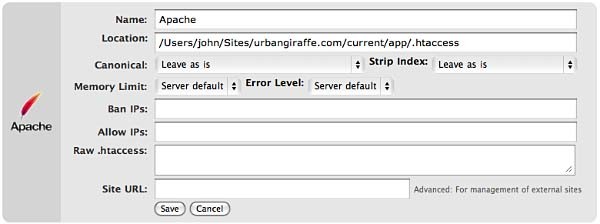
The options that differ from the WordPress module are:
- Location – the location of the .htaccess file. The default will be your site directory
- Ban IPs – prevents certain IPs from accessing your site
- Allow IPs – allow certain IPs to access your site
- Raw
.htaccess– add custom rules - Site URL – an advanced option which allows you to set the site base URL
Note that when writing to a .htaccess file the Apache module will retain any existing non-WordPress data, so you can still add custom rules.
404 Module
This module is a little different to the others in that it is designed to record 404 errors. Rather than make this a general function, as in previous versions, the power of this module comes from the fact that redirections created inside it will be ignored from the 404 log. In other words, the module records all 404 errors except the specified URLs. Combined with the RSS feed this gives you a lot of options to keep track of errors on your site.

If you do want to ignore a 404 error (for example, you site may not have a favicon.ico and you don’t want this recorded) then you should create redirections as normal, but set the action to ‘Do nothing’. As for other modules you can create redirections based upon any action or rule, or matching a particular regular expression.
Groups
A group is a logical collection of redirected URLs. You can create as many groups as you wish, and groups can be re-ordered. URLs are matched based not only on the order in which they occur within a group, but the order in which groups occur within a module.
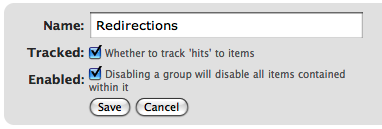
As well as allowing you to collect redirections together, you can also specify whether the redirections within a group are logged.
As an additional configuration option you can select which group an automatically generated URL is put in when a post/page or category is changed.
Using Redirection
The main idea behind Redirection is that you create several URLs that you want to redirect. These URLs are placed within a group, which in turn is placed within a module. The module determines how the URLs are redirected, and the group allows you to logically organise the URLs.
Each URL (or redirection) can be configured to behave in different ways. When creating a redirection there are several pieces of information you must provide:
- Source URL – This is the original URL that you want to redirect somewhere else
- Match – This tells the plugin how you want to match the source URL
- Action – Determines what happens if the URL is matched
- Regular expression – Tells the plugin that the source URL is a regular expression (i.e. a pattern that may match many URLs)
- Target URL – most actions have a target URL. This is typically the URL that the user will be redirected to should the pattern match

Note that items can be re-ordered and this may influence which redirection takes effect.
Matching URLs
Matching a URL is a key part of Redirection and consists of a source URL. This URL must exactly match a URL that you want to redirect. For example, your site has the page:
http://yoursite.com/oldpage/that/needs/redirecting/
The source URL for this is: /oldpage/that/needs/redirecting/. The source does not require your website address, and it is only possible to redirect a URL that exists on your website (you cannot redirect an external website, for example).
Advanced users can make use of regular expressions to reduce the number of redirections they need to create. A regular expression is basically a pattern that tells the plugin how to match. For example:
/(\d*)/(\d*)/(.*)
This pattern tells the plugin that you want to match a URL that looks like:
/2007/05/some-url/
That is, the (d*) indicates a number, and the (.*) a sequence of characters. Regular expressions are a complicated subject and this page will not attempt to give more than a passing overview of using them. If you do need more help then you should take a look at a regular expression website.
Remember that if the source URL is a regular expression then you must enable the regular expression option, otherwise Redirection will just treat you source URL as plain text.
In addition to the source URL you can also specify a match condition:
- URL only – Only matches the URL (the majority of your redirections will use this)
- URL and referrer – Matches a URL when the source and referring site matches (i.e. match the URL only when the user came from a certain website)
- URL and login status – Matches a URL when the source and user’s login status matches (i.e. match the URL only when the user is logged in)
- URL and user agent – Matches a URL when the source and user’s browser matches (i.e. when the user is using a particular type of web browser)
These special rules can be both positive and negative. For example, you can match a URL when the user is logged in (and be redirect to one URL), or when the user is not logged in (and be redirected to another URL). This makes it very easy to create custom rules where users are redirected if they are using a particular browser, or if they came from a particular website.
Actions
An action tells Redirection what to do when a source URL is matched:
- Redirect to URL – The default case and the majority of your redirections will use this
- Redirect to random post – An esoteric action that may be useful to some people
- Pass through – An advanced option that allows you to masquerade one URL as another (i.e. when the source URL is accessed it actually displays the contents of another URL without the user being aware)
- Error (404) – Causes a 404 error to be returned
- Do nothing – A dummy option that can be used if you just want to track accesses to a URL
Configuration of rules and actions
Depending on the particular combination of action and match rule you may be required to provide further details for a redirection.
Basic URL redirection
You can specify which HTTP code is used to redirect a URL (301, 302, or 307):
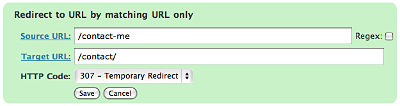
A couple of examples:
/blog/(.*) => /$1
This will match any URL that starts with /blog/, and will redirect it to the same URL but without /blog/. For example, /blog/2006/10/01/mypost will be redirected to /2006/10/01/mypost.
/2006/month_(\d+)/(.*) => /2006/$1/$2
This will match any URL that starts /2006/month_, and is then followed by a number. This will be redirected to the same URL, but without month_. For example, /2006/month_1/something will be redirected to /2006/1/something.
To replace a single dash in a URL with a space:
/tags/(.*?)-(.*?) => /tags/$1%20$2
Redirect to URL by matching user agent
This allows you to configure a redirection to occur when a specific browser (the user agent) is used:
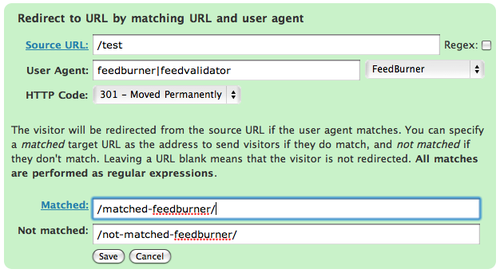
A set of pre-defined user agents is available from the drop-down menu or you can specify your own. The user agent match is always performed using a regular expression.
Two target URLs can be specified, one for if the user agent does match, and one for if it doesn’t match.
Redirect to URL by matching referrer
Similar to the user agent rule but this one looks at the referrer. That is, if a user follows a link from another site to yours, the original site is passed along by the browser (unless disabled) to your site so that you know where the user came from. Using this rule you can base your redirections upon this original site.
Redirect to URL by login status
This rule allows you to match a URL based upon the user’s WordPress login status. That is, if they are logged into your site.
Support & Bugs
Support and feature requests should be made through the Redirection support forum. You can contact me directly but I spend a very limited amount of time on direct support and you stand a better chance of being answered through the forum.
If you find the plugin useful then please do consider making a donation – it is appreciated and helps towards the maintenance of the plugin.
Thanks!
I just lost every redirection on my blog. They are all gone, and there is no log of them. Is this a known bug?
[…] å¦‚æžœæ˜¯å› ä¸ºä¿®æ”¹äº†slug或者其它更å¤æ‚çš„åŽŸå› ï¼Œä½ å¯ä»¥ä½¿ç”¨å¼ºå¤§çš„æ’件Redirection plugin,é‡å®šå‘(redirectï¼‰ä½ çš„é“¾æŽ¥ï¼ŒçŽ°åœ¨è¿™ä¸ªåŠŸèƒ½å¾ˆå¼ºå¤§ï¼Œç”šè‡³å¯ä»¥æ›¿ä»£ä¸Šæ–‡æ到的404 Notifier pluginæ’件。 […]
Dan, no its not a known bug.
Bigsend, if simurl can export URLs then maybe, otherwise no.
I’ve read alot of good things about this plugin and was excited about getting it setup, however, it does not seem t work in WP Version 2.5.1
Is there a fix in the pipeline?
Worked fine in wordpress 2.3.
Does not seem to work in wordpress 2.5.
Interferes with Admin Login too.
Gives error message:
Fatal error: Cannot redeclare class RE_Database in /home/mqute/public_html/wp-content/plugins/redirection/models/database.php on line 4
What do you suggest? Thanks!
[…] 7ã€Redirection […]
@kelly/ToastTeacake: I am running Redirection succesfully on WordPress version 2.5.1 on my SEO website, it doesn’t seem to have any problems and redirects work as they should.
Great plugin.
Thanks, urbangiraffe.com!
[…] Simple Tags: 强大的Wordpress Tagæ ‡ç¾æ’件. å«éšæœºæ ‡ç¾äº‘功能. Redirection: 301é‡å®šå‘æ’件.包å«é‡å®šå‘åŽè·³è½¬åˆ°éšæœºé¡µé¢çš„功能. All in One Adsense and […]
[…] Redirection: 301é‡å®šå‘æ’件.包å«é‡å®šå‘åŽè·³è½¬åˆ°éšæœºé¡µé¢çš„功能. […]
This is weird.
One blog install of WP 2.5.1, Redirection works flawlessly. (note: this is a *new* install)
Another site which I’ve been using Redirection on for quite some time, after upgrading to 2.5.1, it completely fails. I tried deleting the plugin through the interface, going in and dropping anything from the _options table related to Redirection, even tried deleting the plugin and then re-uploading the plugin.
Problem? It loads just fine, but when I try to Add a new redirect, it tries to adds it, then just fails. It doesn’t give an error, it just doesn’t add it. It continues to say “You have no redirections” even after trying to add new ones.
thoughts?
Sigh. I just updated to this redirection and now new redirections do not work. Website is http://garlinggauge.com
Trying to redirect:
http://garlinggauge.com/2008/07/15/obamas-global-strategy/
to
http://www.realclearpolitics.com/articles/2008/07/a_new_strategy_for_a_new_world.html
Politics aside, this is frustrating, as no new redirects work. Any ideas?
Thank you.
[…] Redirection – 这个æ’件基于Ajax,æ“作æžä¸ºæ–¹ä¾¿ã€‚æ’件å¯ä»¥è®©ä½ 自如地管ç†åšå®¢é… […]
This has replaced a complicated htaccess file i was using to redirect pages many thanks 😀
Hi,
Thanks for your plugin. It gives me hope that maybe with a little guidance I can get through this! :-/
I’m just moving to a new host. Formerly my WP was a blog off my main directory like this: http://domain.com/blog/
I set it up the same way at my new host. Then I moved index.php and .htaccess into my root directory to access WP from my domain address http://tsiyon.org. That all worked.
HOWEVER, I’m needing to redirect a million urls from domain.com/blog/whatever to domain.com/whatever
This is overwhelming. Above I noticed this code can solve the problem: /blog/(.*) => /$1
This is all over my head. Can you please give me the version for dummies on how exactly I enter that into your plugin to get the desired result?
Any other suggestions are more than welcome.
Thanks, Eliyahu
http://www.tsiyon.org
Thank you so much for building this plugin. I’m developing a blog to mirror the design of a website I am building. I’ve spent at least 3 hours prior to finding your tool, trying to match the navigation bar of the blog to the main site. Finally I came across your plug-in, and in conjunction with the “ShiftThis | Order Pages” plug-in, i’ve done it. You can check it out at http://livingwallspdx.com/blog/
Many thanks!
[…] 它最近的一个版本是07å¹´3月æ供的0.6.3版,支æŒåˆ°ç›®å‰æœ€é«˜çš„WordPress 2.1.2。但在URL网å€è§„范化ä¸æ到的一个é‡è¦çš„问题,就是有没有WWW的问题,它å´æ²¡æœ‰è¿™ä¸ªåŠŸèƒ½ã€‚å¦‚æžœå› ä¸ºè¿™ä¸ªé—®é¢˜å†å®‰è£…一个Redirection或者WWW-Redirectæ’件,就显得有些å°æ大作了,而且这2个æ’件都ä¸èƒ½å®Œç¾Žæžå®šWWW问题,Mattè€å¤§çš„no-wwwæ’件也åªèƒ½åŽ»WWW。我的åšæ³•æ˜¯æ‰‹åŠ¨ä¿®æ”¹.htaccess,把下é¢ä¸€æ®µåŠ 在# BEGIN WordPress上é¢ã€‚ <ifmodule mod_rewrite.c> RewriteEngine On RewriteCond %{HTTP_HOST} !^www.osxcn.com$ [NC] RewriteRule ^(.*)$ http://www.osxcn.com/$1 [R=301,L] </ifmodule> […]
Your mileage may vary when using version 1.7.26 with WP 2.5+ – some people report no problems, others just cannot get it to work. Version 2 has been created which removes all of these issues and adds a bunch more functionality. Right now it is still in beta has worked for me across half a dozen websites. If you do want to try this version then it can be downloaded from this website by registering, logging in, and then clicking on the link from the dashboard. Once I’ve updated the documentation I will release it officially.
Eliyahu, you’ve almost got it sorted with that one code – if you install the plugin, add a new redirection with the code you described, and mark it as a ‘regex’ (regular expression) then that should redirect everything for you.
[…] 工具箱 17fav Bookmark & Share Akismet Articles Google XML Sitemaps Popularity Contest Redirection Simple Tags WordPress Related Posts WP-PageNavi WP Ajax Edit Comments WP […]
[…] Redirection – Manage 301 redirections without modifying Apache | Urban Giraffe […]
I am moving my blog from the root directory to a subdomain. My structure will go from http://www.nextlevelexecutives.com/blog to blog.nextlevelexecutives.com. I have tried several times to get the redirect tool to work but I’m stumped. Any advice?
Mike
The new version broke my site. Threw an SQL error and it wouldn’t load. Had to revert to the next most recent version.
Same problem — seems that I get just text on the screen. After checking the source code, I see that it’s trying to pull from the redirection plugin directory, but it’s doing both the URL and the path together for some reason. Such as:
http://www.domain.com/usr/www/~folder/wp-content/plugins/redirection/etc…
Upgrading to 2.0.2 also produces SQL errors on my WordPress sites. I’ve raised a bug report.
Michel Fortin and Hopeful Spirit: are these the same SQL errors that you’ve encountered?
Very great Plugin. Now I can use the plugin with Opera, too. In the earlier versions I wasn’t able to see the interface while browsing with Opera (with Firefox it worked perfect, but firefox looks not that good and is verly slow while having 15+ Tabs opened at once). Anyway, Great Job !
I had to disable Zend Optimizer, because Redirection v2.0.2 was crashing Apache.
Any ideas why that would be happening?
I’m using Apache 2.2.4 with PHP 5.2.1 on Windows.
Thanks for this lifesaving plugin 🙂
Sorry for jumping the gun in my previous comment, here’s what happened:
First, I just pasted the new files over the old version (1.7.6) and tried accessing the options page – Apache crashed.
Then I deleted everything from the ‘plugins/redirection’ folder and pasted the new files into it – same thing happened. I’m pretty sure that I deactivated and reactived the plugin in this step.
I checked the Apache crash log and noticed that zend optimizer dll was the one causing problems.
I commented out the zend lines from php.ini and renamed the ‘php/zendOptimizer’ folder to something else, restarted Apache and managed to get into manage->redirection, but nothing worked. I checked the database and I noticed that no new tables have been created.
Then I used your uninstall option to delete all traces of the previous version, and reinstalled.
It worked. I then re-enabled the zend optimizer and now everything works just fine.
I know this is probably all my own fault because I just pasted the new files over the old ones, but I thought that someone else might run into similar problems, so here’s what I did.
And it’s good to see that + works in regexp now, thank you 🙂
I’ve released 2.0.3 which should remove the SQL errors (defining something twice is never good) as well as including a fix from another plugin that I hadn’t included (this should take care of your directory problem, Michael – I think you have a tilde in your directory path?)
Mike, if you want to redirect everything from your old site to the sub-domain you could create one redirection:
(.*) => http://blog.nextlevelexecutives.com/$1
Make sure regex support is enabled.
I recently upgraded to 2.0.3 and it took my site down with following message.
Fatal error: Call to undefined function get_home_path() in /home/digitbc0/public_html/wp-content/plugins/redirection/models/database.php on line 87
I have currently deactivated the plugin. I have been using this for some time and it was working wonderfully so far.
Any idea what happened?
I updated to the latest version and once the plugin was reactivated 99% of the content was gone. The update did not remove the content, it just did not show.
I have tried it on several custom themed wordpress websites with the same result and I run WordPress 2.6 on all sites.
I’m afraid that I, too, must add my voice to the “fatal error” crowd.
And as for the bug #252 where the submitter speculates that it’s due to MySQL below 4.1, nope. I’m using 5.0.27 and having the database problem.
And as for the bug #252 where the submitter speculates that it’s due to MySQL below 4.1, nope. I’m using 5.0.27 and having the database problem.
To all the people who wrote the same error message here I’ve condensed your comments into one. I don’t know why that error occurs on some sites and not others (specifically none of my sites), but 2.0.4 should remove it. I’ve made it extra clear in the text above that upgrading to version 2 may cause some problems and you are advised to backup your database. I’ve done about a dozen upgrades and not had a single problem, but alas it seems other people are not so lucky.
John, you are awesome, and this is an awesome plugin, infrequent hiccups like this one notwithstanding. The fix works!
Hi John,
The new 2.0.4 works perfect for me.
Thanks!
[…] Redirection – 这个æ’件基于Ajax,æ“作æžä¸ºæ–¹ä¾¿ã€‚æ’件å¯ä»¥è®©ä½ 自如地管ç†åšå®¢é‡Œçš„301转å‘,包括创建和修改。在新版本里,ä¸ä½†å¯ä»¥è®¾ç½®301转å‘,302å’Œ307都是å…许的。 […]
Hello,
Previous versions worked perfectly but neither 203 nor 204 works for me.
Is there a place where I can download a old version ?
Thanks
Very nice plugin! Good Job!! 🙂
…but do you know if it has some bug? For example: does it ruin the ability of WP to send emails to the admin?? (it’s happening to me…)
Hey, If i have a “*” in my Target URL, it looks like the Redirection plugin strips it out .. can this be fixed?
thanks
David, I can’t see any problem putting a * character in either the source or target URL?
Luc, the old versions are available from this page. However, rather than sticking to an old version maybe you can tell me what the problem is and then I can fix it?
DoZ, I can think of no reason why Redirection would affect your ability to send admin emails – emails are emails, and Redirection handles URLs
RSS feed for 404 errors doesn’t seem to be working since I have upgraded to new version. what happened?
When I install this plugin for my blog using wordpress and I unzip this plugin into the directory wp-content/plugins/, I have an error 500.
Why ? How correct this error ? (sorry for my english..)
Thanks for your answer.
[…] ‘/usr/local/nginx/sites-available/mydomain.com‘ file. – This also works just fine with John Godley’s excellent redirection plugin that supports flexible custom redirects with regular […]
Any chance you can restore a link to the 404 log on the main redirection page? That is definitely my most clicked part of the plugin and the starting point for determining redirects need manual creation – since the update, I always click around a few times lost to find the 404 log
[…] I just used a wordpress plugin called Redirection, which sets up the 301 redirects for […]
John:
Thank you for this plugin, it’s been extremely useful for me.
Since I’ve upgraded to the latest version, everything has continued to work just fine, except that many old URLs started appearing in the 404 log (these are URLs I’ve made redirections for and the redirections ARE working)
Also, I will soon have to redirect about 200 URLs in my site due to restructuring the hierarchy of categories. Do you know if there might be an easier way than adding all of those manually via the plugin?
Thanks
This plugin doesn’t seam to work with IE on IIS hosts. And it is just for IE. In all other browsers works just fine.
If you set up the redirection from one WP page to another, or anything else, when you click on the page that should be redirected, IE gives the JavaScript error and display the “The page cannot be displayed” page.
I’ve tried with non existing page/URL, to redirect that one to some existing page, and still the same error occurs.
Does anybody have any idea why this is happening.
It is probably some server setup, but where can be the problem, I have no idea.
I’m not using the IE at all, except for testing purposes, but I have to make this working. Site I’m building must be on Windows, since half of it is VPASP shopping chart and other half is WP.
Hey John, great plugin.
I’m using this to redirect some affiliate links and it works great. My only problem is that when I look at the stats I get a lot of listings from the same IP addresses.
IP address xxxx will show as having clicked the link 12 times
the next day a different IP Address shows as having clicked the link 22 times.
Is this a bug anyone else has come across?
Thanks John,
wave
[…] Redirection: 301é‡å®šå‘æ’件.包å«é‡å®šå‘åŽè·³è½¬åˆ°éšæœºé¡µé¢çš„功能. […]
Hi John,
looks like in 2.0.4 the redirection of changed post-urls doesn’t work anymore. They don’t get created in all tested blogs (5). There’s no error or something. Any idea?
Thanks,
Frank
David, I don’t know why you get a 500 error.
Catsandbeer, the 404 log is one extra click away. Alternatively use the RSS feed
Ana, if your 200 URLs follow some patterns then you should try and create some regular expressions. This will greatly reduce the number of manual redirections.
Moles, it is possible that the same IP address follows a URL more than once.
Thanks! I had been searching this for age. This is definitely one of the best wordpress plugin that helped me to manage my blog with ease.
John — got a hard one for you
I changed my permalinks recently and used your plugin for 301’s — works great
Now, what I want to do is move another blog into that blog using 301 redirects to bring the old links and searches to the new blog. The problem is the old blog has an entirely different permalink structure than either the old or new structure of the main blog.
How can I bring the old blog over to the new blog?
Great plugin – thanks!
One issue I have though is that the apache “strip index” option redirects from http://www.xyz.com/index.php to http://www.xyz.com/hp and …/index.html redirects to …/tml. Any idea what causes this?
Thanks for the great plugin. I recently changed my domain name, and I am in the process of moving my website and blog to the new domain. Your plugin will come very handy for me.