This page is now deprecated. Please visit the Redirection plugin website
Redirection is a WordPress plugin to manage 301 redirections, keep track of 404 errors, and generally tidy up any loose ends your site may have. This is particularly useful if you are migrating pages from an old website, or are changing the directory of your WordPress installation.
Features include:
- Supports both WordPress-based and Apache-based redirections
- 404 error monitoring – captures a log of 404 errors and allows you to easily map these to 301 redirects
- RSS feed for 404 errors
- Custom ‘pass-through’ redirections allowing you to pass a URL through to another page, file, or website.
- Full logs for all redirected URLs
- Create redirections based upon a URL, browser, referring site, or login status
- Automatically add a 301 redirection when a post’s URL changes
- Full regular expression support
- Fully localized
- Export all redirections to CSV, XML, or Apache
.htaccessfiles - Import Apache
.htaccesfiles
Redirection is available in the following languages:
- French, thanks to Oncle Tom
- Hebrew, thanks to Rami
- Spanish, thanks to Juan
- Simplified Chinese, thanks to Sha Miao
- Japanese, thanks to Naoko McCracken
- Hindi, thanks to Ashish
- Russian, thanks to Grib – with Russian manual
- Bahasa Indonesian, thanks to Septian Fujianto – with guide
- German, thanks to Fabian Schultz
- Italian, thanks to Raffaello Tesi
- Ukrainian, thanks to WordPress Plugins Ukraine
- Arabic, thanks to Jerry John
- Brazilian Portuguese, thanks to Pedro Padron
- Dutch, thanks to Marlon Navas and Pieter Carette
- Hungarian, thanks to daSSad
- Turkish, thanks to Fatih Cevik
- Romanian, thanks to Flo Bejgu @ InboxTranslation
- Greek, thanks to Stefanos Kofopoulos
- Belarusian, thanks to Alexander Ovsov
- Lithuanian, thanks to Nata Strazda
- Czech, thanks to Martin Jurica
If you can provide a language translation then please get in touch. A PO file is provided with the plugin to be used in translating with poEdit.
Installation
Installation is just like any WordPress plugin:
- Download redirection.zip
- Unzip
- Upload to
redirectiondirectory to/wp-content/pluginson your server - Activate the plugin
- Configure options from Manage – Redirection
Note that you must have a permalinks structure setup through WordPress.
You can find full details of installing a plugin on the plugin installation page.
Core Concepts
Redirection uses three core concepts:
- Modules
- Groups
- Redirects
A module consists of many groups, and each group consists of many redirections. A module determines how the redirections will be used, and a group allows you to separate redirections into logical units. A redirection represents an action performed when a particular URL is accessed.
Don’t worry, there’s more to come!
Modules
At the most basic level, a module determines how redirections are implemented. There are three types of module:
- WordPress
- Apache
- 404 errors
The WordPress module uses WordPress to implement redirections. This means it works for all permalink-enabled sites and so has the greatest compatibility.
The Apache module, as you would expect, uses Apache to implement redirections. This means that each redirection is written to an Apache .htaccess file, giving you better performance than the WordPress module, at the cost of less compatibility and less flexibility (some features, such as redirection statistics, are only available from the WordPress module).
Separate from these is the 404 error module. This uses Redirection to keep track of 404 errors.
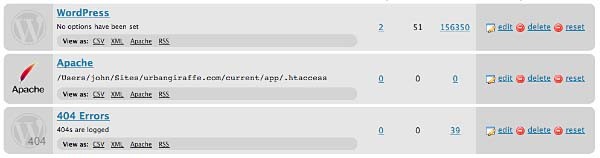
Each module can be exported to CSV, XML, or an Apache .htaccess file. You can also view logs for each module via an RSS feed
WordPress Module
The WordPress module is the default module and provides the most features. The main disadvantage of this module is that each time a URL is redirected it requires WordPress to be loaded (contrast this to the Apache module where a redirection occurs before WordPress loads).
This module is configured as follows:

These options are detailed below:
- Canonical – determine whether the
wwwshould be removed or added to your site URL. - Strip index – if enabled then any attempt to access a
index.php,index.html, orindex.aspfile will cause an automatic redirection to the same URL, minus the index file. - Time Limit – sets a site-wide PHP timeout limit. Useful if something is timing out.
- Error level – sets the PHP error reporting level. Useful for removing unwanted warnings, or for viewing hidden ones
Apache Module
Rather than using WordPress to provide redirections the Apache module writes data to an Apache .htaccess file. If you site supports these then this will give you the greatest performance, at the cost of losing a few items of functionality. For example, the Apache module provides no statistical information so it is not possible for the Redirection plugin to keep track of how many times a particular redirection has been used.
The module is configured as follows:
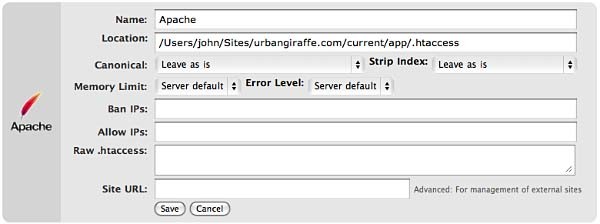
The options that differ from the WordPress module are:
- Location – the location of the .htaccess file. The default will be your site directory
- Ban IPs – prevents certain IPs from accessing your site
- Allow IPs – allow certain IPs to access your site
- Raw
.htaccess– add custom rules - Site URL – an advanced option which allows you to set the site base URL
Note that when writing to a .htaccess file the Apache module will retain any existing non-WordPress data, so you can still add custom rules.
404 Module
This module is a little different to the others in that it is designed to record 404 errors. Rather than make this a general function, as in previous versions, the power of this module comes from the fact that redirections created inside it will be ignored from the 404 log. In other words, the module records all 404 errors except the specified URLs. Combined with the RSS feed this gives you a lot of options to keep track of errors on your site.

If you do want to ignore a 404 error (for example, you site may not have a favicon.ico and you don’t want this recorded) then you should create redirections as normal, but set the action to ‘Do nothing’. As for other modules you can create redirections based upon any action or rule, or matching a particular regular expression.
Groups
A group is a logical collection of redirected URLs. You can create as many groups as you wish, and groups can be re-ordered. URLs are matched based not only on the order in which they occur within a group, but the order in which groups occur within a module.
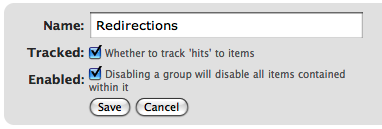
As well as allowing you to collect redirections together, you can also specify whether the redirections within a group are logged.
As an additional configuration option you can select which group an automatically generated URL is put in when a post/page or category is changed.
Using Redirection
The main idea behind Redirection is that you create several URLs that you want to redirect. These URLs are placed within a group, which in turn is placed within a module. The module determines how the URLs are redirected, and the group allows you to logically organise the URLs.
Each URL (or redirection) can be configured to behave in different ways. When creating a redirection there are several pieces of information you must provide:
- Source URL – This is the original URL that you want to redirect somewhere else
- Match – This tells the plugin how you want to match the source URL
- Action – Determines what happens if the URL is matched
- Regular expression – Tells the plugin that the source URL is a regular expression (i.e. a pattern that may match many URLs)
- Target URL – most actions have a target URL. This is typically the URL that the user will be redirected to should the pattern match

Note that items can be re-ordered and this may influence which redirection takes effect.
Matching URLs
Matching a URL is a key part of Redirection and consists of a source URL. This URL must exactly match a URL that you want to redirect. For example, your site has the page:
http://yoursite.com/oldpage/that/needs/redirecting/
The source URL for this is: /oldpage/that/needs/redirecting/. The source does not require your website address, and it is only possible to redirect a URL that exists on your website (you cannot redirect an external website, for example).
Advanced users can make use of regular expressions to reduce the number of redirections they need to create. A regular expression is basically a pattern that tells the plugin how to match. For example:
/(\d*)/(\d*)/(.*)
This pattern tells the plugin that you want to match a URL that looks like:
/2007/05/some-url/
That is, the (d*) indicates a number, and the (.*) a sequence of characters. Regular expressions are a complicated subject and this page will not attempt to give more than a passing overview of using them. If you do need more help then you should take a look at a regular expression website.
Remember that if the source URL is a regular expression then you must enable the regular expression option, otherwise Redirection will just treat you source URL as plain text.
In addition to the source URL you can also specify a match condition:
- URL only – Only matches the URL (the majority of your redirections will use this)
- URL and referrer – Matches a URL when the source and referring site matches (i.e. match the URL only when the user came from a certain website)
- URL and login status – Matches a URL when the source and user’s login status matches (i.e. match the URL only when the user is logged in)
- URL and user agent – Matches a URL when the source and user’s browser matches (i.e. when the user is using a particular type of web browser)
These special rules can be both positive and negative. For example, you can match a URL when the user is logged in (and be redirect to one URL), or when the user is not logged in (and be redirected to another URL). This makes it very easy to create custom rules where users are redirected if they are using a particular browser, or if they came from a particular website.
Actions
An action tells Redirection what to do when a source URL is matched:
- Redirect to URL – The default case and the majority of your redirections will use this
- Redirect to random post – An esoteric action that may be useful to some people
- Pass through – An advanced option that allows you to masquerade one URL as another (i.e. when the source URL is accessed it actually displays the contents of another URL without the user being aware)
- Error (404) – Causes a 404 error to be returned
- Do nothing – A dummy option that can be used if you just want to track accesses to a URL
Configuration of rules and actions
Depending on the particular combination of action and match rule you may be required to provide further details for a redirection.
Basic URL redirection
You can specify which HTTP code is used to redirect a URL (301, 302, or 307):
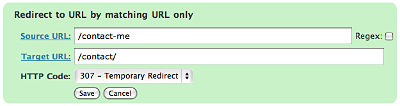
A couple of examples:
/blog/(.*) => /$1
This will match any URL that starts with /blog/, and will redirect it to the same URL but without /blog/. For example, /blog/2006/10/01/mypost will be redirected to /2006/10/01/mypost.
/2006/month_(\d+)/(.*) => /2006/$1/$2
This will match any URL that starts /2006/month_, and is then followed by a number. This will be redirected to the same URL, but without month_. For example, /2006/month_1/something will be redirected to /2006/1/something.
To replace a single dash in a URL with a space:
/tags/(.*?)-(.*?) => /tags/$1%20$2
Redirect to URL by matching user agent
This allows you to configure a redirection to occur when a specific browser (the user agent) is used:
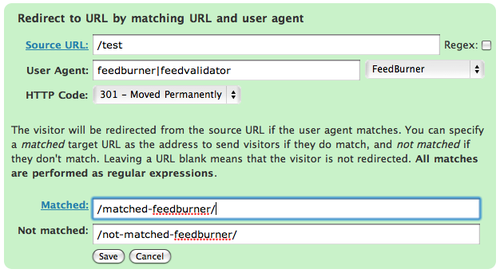
A set of pre-defined user agents is available from the drop-down menu or you can specify your own. The user agent match is always performed using a regular expression.
Two target URLs can be specified, one for if the user agent does match, and one for if it doesn’t match.
Redirect to URL by matching referrer
Similar to the user agent rule but this one looks at the referrer. That is, if a user follows a link from another site to yours, the original site is passed along by the browser (unless disabled) to your site so that you know where the user came from. Using this rule you can base your redirections upon this original site.
Redirect to URL by login status
This rule allows you to match a URL based upon the user’s WordPress login status. That is, if they are logged into your site.
Support & Bugs
Support and feature requests should be made through the Redirection support forum. You can contact me directly but I spend a very limited amount of time on direct support and you stand a better chance of being answered through the forum.
If you find the plugin useful then please do consider making a donation – it is appreciated and helps towards the maintenance of the plugin.
Thanks!
Doh! I’m a victim of the comment form translating (percent)5C when posting…
4) Small cosmetic issue related to 3 above. The 404 log displays the offending url as /tag​/Pickett​/\’s Charge. If I click on the plus to add a new redirection, you fill in the source url as /tag/Pickett/(percent)5C’s Charge.
3) A while ago we fixed the single quote stuff in the urls. I’m still having issues with it though, but having a hard time get my hands fully around the exact issue.
I have a tag set up as Pickett’s Charge. The incoming url rightfully escapes the single quote with a source url of /tag/Pickett/(percent)5C’s Charge. I have a rule set up to translate to /tag/Pickett’s Charge, which correctly handles the mapping.
Yesterday Google used the referrer url http://www.google.com/search?q=pickett(percent)27s charge, which is correct but I got a 404 error, with redirection logging it as /tag​/Pickett​/\’s Charge, which should have been picked up by the above redirection, but it isn’t.
I’ve also seen an incoming source url of ​/tag​/Pickett(percent)5C\’s Charge, /tag/Pickett\’s Charge, and /tag​/Pickett(percent)5C(percent)5C’s Charge.
a) There seems to still be an issue on how redirection is detecting single quoted url’s when searching for rules (\’, (percent)5C’, and just (percent)27)
b) I think there may also an issue on how redirection reports back the 301s for single quotes. I believe the offender url is caught with the /’, my rule changes to just ‘, but redirection my still be reporting back as /’ to the site. The reason I believe this is that I have a few 404 logged (for a different ‘ tag) with 404 of ​/tag​/Wilson\\\’s Creek and then a later one of /tag​/Wilson\\\\\’s Creek. So given a redirection rule of \’, the 301 going back becomes \\\’ to escape the single slash and then escape the single quote.
Hi Mike,
That’s great, a lot of useful info to work with.
1) Per page settings are now stored on a user basis.
2) It’s something to do with the regex. If you have
/library/(.*?)/page/(.*)then it works fine. Redirection is just passing the regex to the standard PHP regex functions, so whatever the reasons why (.*?) isnt working is happening inside there.3) I’ve cleaned up how the URLs are displayed in the logs. Give the new version (1.7.8) a try and see if this changes anything. If there’s still a problem send me the details in an email so that WordPress doesnt munch or mangle things.
Hi John,
I wanted to let 1.7.8 soak in a little before I got back to you.
1) Page settings are working great.
2) This seems to be working correctly now in 1.7.8. 🙂
3) The one item remaining with this, is that it show as a \’ in the log display, but on the 404 page when I go to add a new redirection, it gets plopped into the old url field as \’
On a positive note (and not sure if you did anything with the single quote in 1.7.8), is that this is working much better. I haven’t seen any issues so far. The escaped single quotes are correctly getting redirected according to the log. I’ll keep watching this.
Thanks for the quick reply and changes. Redirection is definitely one of those must-have plugins and is becoming very rock solid.
Mike
Thanks again Mike. That last extra slash has been removed in 1.7.9
John,
Is there a way to use your plugin to redirect all URLs without a trailing slash, to the exact same URL with a trailing slash?
Or vice-versa, I suppose?
I gave it a shot with what little I know of RegEx, but couldn’t get it to work myself.
Does this work with WordPress 2.2?
Brian,
Yes it does. I have the latest 1.7.9 running on my WP 2.2 site.
Mike
Dan, you can do that with Permalink Redirect.
funny, I jsut came here to post a link to this permalink plugin and ask if you could include that feature into your plugin 🙂 and just saw you mentioned it in your last post 😉
I wanted to ask you this because I don’t want to have too many plugins active that offer the same features, and if the permalink redirection plugin offered only that I would have used it… BUT it offers some more features that your plugin offers too, so I thought it wuld make sense to incorporate the permalink redirection solution to your plugin too…
anyway just a suggestion.
Hi Ovidiu, the Permalinks plugin works very well and is a great combination with Redirection. I didn’t include it’s functionality in Redirection as that would mean duplicating someones effort for no reason.
well, the thing is this permalink redirect plugin does a lot more than its name suggests:
– old permalink structure => not needed as I use your redirection plugin
– feedburner redirect => don’t use it as I have a dedicated feedburner plugin that does much more
– hostname redirect => not needed, handled by your plugin
But like I said, just a suggestion and I will keep using both plugins although I don’t need 3/4 of the permalink plugin 🙂 btw. nice suite of plugins you offer on your site, I use several of them.
Hi…
When i start to do active this plugin.. its showing this error.
"Fatal error: Call to undefined function: wp_enqueue_script()"
Pls tell me what do i do to solve this error
Wow! Cool plugin. But how could I use it to redirect a Google ad to another site? Google appends "?gclid=…" to the incoming URL. Everything works OK as long as the URL matches exactly. If this requires a regular expression, it’s beyond me to write. Also, is it possible to insert the Google Analytics JavaScript tracking code?
nakul: The plugin requires WordPress 2.1+
Alex: I haven’t used the plugin specifically with Google but it should be possible to construct an expression that will do what you want:
(.*)\?gclid=XXXShould match any URL with
gclid=XXX.By insert the tracking code do you mean insert it into redirected URLs?
Thanks!
What I really meant was a) can I use redirection to redirect everchanging URLs to the same place. With your suggestion, I think I can. And b). I want to add some JavaScript to the page that redirects, not the target page. Is that possible?
[…] Redirection – By John Godley Redirect visitors from an old URL to a new one. Very useful for bloggers who migrate their blogs to PressHarbor from another non-WordPress platform […]
Hi.
Great plugin !
Yet, I have a BUG:
when trying to redirect:
http://www.humus101.com/EN
to
humus101.com/EN
And it didn’t work. (using WP 2.1.3) – for some reason – no page was loaded…
(It is currently turned off)
Any Idea what to check or how to solve ?
Tal.
Tal, if you want to remove the www from a URL then you’ll need to use the ‘root domain’ option from the Options menu.
John, can you help me once again?
Is there a way to convert WordPress default "?p=xxx" links to permalink structure?
I think I had that on my last WordPress installation but now I don’t see it working… Is it possible with your plugin?
Thank you John, it worked 🙂
John, I don’t think I realized what a powerful and well-designed tool I was getting when I installed it … I just wanted to redirect an index.html … but then your 404 log showed me I was having many other problems which I was then able to address with Redirect. Sweet.
One bug I noticed: when I set the "Redirect index.php/index.html" preference it was only stripping "htm" and leaving an "l" in my urls.
I’m using version 1.7.10 which I downloaded from your site on 7/20/07.
Jose, Redirection doesn’t provide that facility but you can do it with Permalink Redirect
Mel, bug fixed in 1.7.11
Great job, It just what I needed
This plugin is an amazing feature to have on your own WordPress blog and I will definately be reviewing and recommending it on my blog in the near future (when I start to review the WordPress plugins that I think are a must-have, this will be one of them)!
However, there does seem to be a bug at the moment though (for me, at least); when I use the source url: "/blog/(.*)" and the target url: "/$1" the redirect does not seem to work. When I go to: "http://blog.bull3t.me.uk/blog/testing/" in my browser it just displays the 404 error page. Am I doing something wrong or is there a bug in the coding?
Thanks in advance.
Philip Hughes (Bull3t)
Philip, did you mark the redirection as being regex?
Ahh, no I hadn’t, my mistake then – that was a little stupid of me. Thanks!
Your plugin works great to redirect individual pages. Works better than link cloaking.
However, the www/no www redirect is 302 rather than 301. The redirect index.php/index.html appears to work but fails SEO tools test for duplicate pages.
For these two issues, I have gone back to using the Enforce www. Preference plugin.
I’ll check back for updates.
Robert, what SEO tests fail?
Under new features for 1.7.11 it says:
WordPress 2.1+ only
Am I understanding that correctly to mean that this won’t work on an earlier version, such as what I have? 2.0.5
Joe, yes that’s correct, it will only work in WP 2.1+
Is there a previous version available that will work for version 2.0.5? I hope? I can’t upgrade WP because the theme I use (and paid good money for) won’t work on 2.1 or 2.2.
Thanks
hello UG – first off great site/plugins – quick question: does this program slow down general webpage-serving? I haven’t looked at the code to get a sense of how Redirection accomplishes what it does, just have the inclination to believe that it would given what/all that it can do – ditching htaccess for a more user-friendly interface plus logging is very appealing, but I don’t want to do it at the expense of making my site slower – I activated your plugin and did a quick regex example (^index\.php\?tag=([a-zA-Z0-9-]+) tag/$1 – one I would actually like to use on the site) and it *seemed* like pages were loading slower, but that might just be built in and biased suspicions – I haven’t done any actual load/speed tests
a brief explanation of HOW Redirectin works would be great
thanks,
Brian
I like this plugin but unfortunately, it does not seem to scale. When I tried to import over 800 links, my wordpress run out of memory.
Is there a reason you need to load every redirection link instead of just querying the database for the specific one?
Sorry for my (maby) stupid question: i know that the redirection plugin is usefull for files the are not on a public folder, but what if i have files for download from a public folder? what must i config in redirect options? what must i do for counting the downloads from the public folder ?
🙂
How can I make the redirection pop up in a new window?
Want to redirect the links to gallery and guestbook to a window, that pops up in a new window.
Is it even possible?
Louise, that’s not something that Redirection can do. If you want to create popup links then add target=”_blank” on the links. If you add this onto a link that points to a URL that is handled by Redirection then it will still be redirected.
Tomsn, Redirection cannot keep track of file accesses to files that do exist (it is impossible for it to do so). If you want to have some download statistics then take a look at Drain Hole
James, regular expressions cannot be queried from the database so I need to get all those from the database. However, I can certainly optimise non-regular expressions, and will look at doing this in the next version. Depending on the nature of your 800 redirects it may be possible to reduce it using regular expressions anyway.
Brian, the plugin will have an affect on performance (as will most plugins), but it shouldn’t be particularly noticeable and will not be a big factor in page load times. WordPress has to decide what a URL should do by going through a list of all pages, and Redirection just extends this process.
[…] Redirection […]
If I have a WordPress page at http://www.showbits.net/about/ and I want people accessing http://www.showbits.net/about.shtml to be redirected, that should be easy to do: redirect /(.*).shtml to /$1 . But that doesn’t seem to work. Any idea why?
Hi John,
I’ve just downloaded and installed the redirection plugin. The plugin looks great, but I think it doesn’t send the correct headers.
I created a 301 permanent redirect from http://www.promo-code.net/lunarpages-vpn-coupon-code/ to http://www.promo-code.net/lunarpages-vps-coupon-code/.
When I check the headers actually sent (with the Firefox Live HTTP headers plugin) it shows that a 302 header is sent. The same happens regardless of which of the redirect headers (301, 302, 307) I select, while the not found headers (404, 410) both gives a 404 header.
Any idea why it’s not working as expected?
James, the new version should be a lot less heavy on database requests. See if it fixes your problem with the 800 redirects.
Ken, did you enable regular expressions for that redirection?
Promo, the link you created does indeed send a 302. However, I’ve tested Redirection and am certain it sends a 301. Is it possible that something else is causing the redirection, such as another plugin or WordPress itself? If Redirection is redirecting the page then an entry will be logged.
That seems to have worked – thanks!
(Funny, I had just figured out how to do this with .htaccess, too!)
I’m getting a weird error with this plugin. Sometimes this error will appear on install or randomly after some time.
[28-Jul-2007 05:09:12] PHP Fatal error: Class redirector_referrer: Cannot inherit from undefined class redirector in /public_html/wordpress/wp-content/plugins/redirection/redirectors/referrer.php on line 3
[28-Jul-2007 05:09:31] PHP Fatal error: Class a_redirector_url: Cannot inherit from undefined class redirector in /public_html/wordpress/wp-content/plugins/redirection/redirectors/url.php on line 3
[04-Aug-2007 23:20:37] PHP Fatal error: Class redirector_referrer: Cannot inherit from undefined class redirector in /public_html/wordpress/wp-content/plugins/redirection/redirectors/referrer.php on line 3
[04-Aug-2007 23:25:42] PHP Fatal error: Class a_redirector_url: Cannot inherit from undefined class redirector in /public_html/wordpress/wp-content/plugins/redirection/redirectors/url.php on line 3
Warning: Cannot modify header information - headers already sent by (output started at /public_html/wordpress/wp-content/plugins/redirection/redirectors/error_log:2) in /public_html/wordpress/wp-includes/pluggable.php on line 329
Any ideas?
Hi John,
The plugin is fantastic!
I have two questions:
Is it possible that after redirection the url of the current page be shown rather than the refering page?
As I have problems with mod_rewrite how can i strip "index.php" from this sample url: "http://someblog.com/index.php/category/something/"
I tried the option u put in the plugin to strip "index.php/index.html" but it did not work and sloso stripped the domain name!
Thanx a lot
Jeremy, right now I don’t know what is causing the error. Someone else reported an identical issue and I’m currently trying to locate the problem. If you can send me your site configuration details (as detailed in the contact page) then that might help.
Lukadium, the URL of the target page will always be shown in your browser after redirection. The index.php/index.html will only strip it from the end of a URL (i.e. yoursite.com/index.php), any other position will result in an undefined effect. If you want to redirect all yoursite.com/index.php/something then you can use a regular expression rule:
index.php/(.*) => /$1Just want to say thank you for the nice plug in!
Thanks for the plugin..
I will try just now 🙂
Fantastic plugin! It’s been a life saver. I’d like to explore the use of regular expressions further so I was wondering if you might have any suggested resources that might relate to their use with URLs.
Hi John,
I finaly found the solution.
The error is caused by a FastCGI/PHP bug: FastCGI requires a header(‘Status: 301 Moved Permanently’) instead of the standard header(‘HTTP/1.1 301 Moved Permanently’).
The bug has already been reported to WordPress, but the problem seems to persist.
Thanks for your help!
[…] WordPress Pluginï¼Œä»¥å¾€å¿…é ˆå¯«åœ¨ .htaccess 寫 mod_rewrite 的工作,ç¾åœ¨å¯ä»¥ç”¨ Redirection 這套 Plugin […]
Well I installed this hoping it would help with some other redirect issues I have been having with WP and it seems things went awry. This is what I see when I go to Manage > Redirects
And this is on a blog that’s never had redirection installed before.
Great plugin! It works like a chime and does solve my problem after changing the blog address.
But I also got a problem while get it working with Extended Live Archive (ELA) plugin (http://www.sonsofskadi.net/extended-live-archive/). If I set a regular expression to redirect /blog/(.*) => /$1, just like what’s in your example, the ELA plugin just stops working. I checked the log of Redirection and there’s one log for this, the "Source URL" is "http://mydomain.com/blog/wp-content/plugins/af-extended-live-archive/includes/af-ela.php?". The URL is correct except the question mark at the end. Plus, I can not delete this newly created redirection so I have to do that in phpmyadmin and delete it manually from the database. So, I have to create redirections one by one for different kinds, e.g., posts, pages, archive, etc. I have no idea why this happened. It would be great if there’s a solution for this.
Anyway it’s really a nice plugin. Thank you very much!
This is an awesome plugin! This is exactly what I’ve been looking for, for quite a while … well, almost exactly.
Is there going to be a feature added so all you have to do is add the target URL and it will auto-generate a source URL?
Something like….
domain.com/?exit=4 or whatever, even something that you can modify the query out would be great..something that’s automated though, so I don’t have to add the query every time…
please let me know, thanks.
Is this useful if one has a permanent address at "blah blaha dot net" and an another domain name which a "blah blah dot com" in order to redirect all the dot com queries to the dot net site and have google understand they are actually the same site? The dot com already goes to the dot net site but google does not see it as the same site.
Cooper,
This is not the tool you want to be using probably. It would be better if you create a custom regex redirect and put it in the .htaccess file instead.
Please can you remove me vom subsciption Manager? when i did it myself i always got this Errormessage: my email is not subscribed to any posts on this site.
Doesn’t support WordPress 2.0.2, bad luck.
Robert, there’s a lot of info about regular expressions over here. It’s not specifically related to URLs, but it’s a good introduction. The main thing to think about when it comes to URLs is to escape any special characters. For example, a period in a regular expression is a special character and if you want an actual period you would need to put a backslash in front of it.
Promo, I’ve put a workaround in 1.7.13, see if that helps.
Scud, a code typo – fixed in 1.7.13
Jonathon, I’m not understanding the auto-generation! How is the source URL being generated?
Cooper, Jonathon is correct. Using this plugin to do that would mean you would need WordPress to be installed on your other site along with a database and this plugin. Meanwhile a single line in a .htaccess file would achieve the same effect without anything else.
Tomsn, as far as I can tell you’re not on the subscription list. Are you getting notifications from anything?
MT Herald, try 1.7.13
gqshen, it sounds like some kind of configuration problem. If you create an entry to redirect /blog/(.*) to /$1 then you should also update your WordPress blog to be at http://mydomain.com and not http://mydomain.com/blog/. If you don’t do this then it’s possible that Redirection will try to redirect access to your javascript files, which would explain why the ELA plugin doesnt work and why Redirection won’t allow you to delete an entry.
Something along the lines of….
X.com will auto-generate and go to exit.php?out=9×01492
X2.com will auto-generate and go to exit.php?out=ioux924
something where it creates a random exit point rather than creating the link manually, such as /exit/xdotcom/ or something of that nature….something so you can mask affiliate links kind of thing.
John – Just updated and off the bat noticed you didn’t change the version number in redirection.php which might throw some people off.
But I’m still getting the error, or well it’s slightly different now.
So it’s not throwing all the errors it was before, but still obviously not working right.
John – Thanks for your incredibel fast response.
I had fixed the problem by an ugly hack in the core WordPress files, but wanted to try out your bug fix.
Initially it didn’t work, since status_header() is not called for cgi-fcgi (WordPress’ attempt to solve the problem), but when I removed WordPress’ hack it worked like a charm.
I’ve changed the following in wp-includes/pluggable.php (line 329):
[pre]
if ( php_sapi_name() != ‘cgi-fcgi’ )
status_header($status); // This causes problems on IIS and some FastCGI setups
header("Location: $location");
[/pre]
to
[pre]
// if ( php_sapi_name() != ‘cgi-fcgi’ ) // Fixed in Urban Giraffes’ Redirection plugin
status_header($status); // This causes problems on IIS and some FastCGI setups
header("Location: $location");
[/pre]
I think the best solution would be to fix the problem entirely in WordPress. I’ve tried to change the following in wp_includes/functions.php (line 930) (which makes your fix obsolute) and it appears to work (at least for my case):
[pre]
if ( php_sapi_name() != ‘cgi-fcgi’ ) {
$status_header = "$protocol $header $text";
} else {
$status_header = "Status: $header $text";
}
[/pre]
Once again – Thanks for your help!
Yea, I’m having the same problem as Scud:
Using 2.2.
The plugin looks great – I really look forward to using it.
Hi John,
Thanks for your reply. I think you are right but I feel strange why only that plugin has problem to run.
My situation is I install WordPress in /blog/ but my blog is at / the root. So when I login, the admin panel is still at /blog/wp-admin and that’s not a problem. After I create the redirection /blog/(.*) => /$1, I can still enter /blog/wp-admin (that confuses me too) but that plugin calls /wp-content/plugins/… and that apparently doesn’t exist, that’s the problem I think. So I think it only works if I physically move all WordPress installation to / the root.
Anyway it’s not a very big problem for me. I can create several different redirections though that’s not so elegant. 😉
I just installed your plugin and used the regular expression
Source URL: /blog/(.*)
Target URL: => /$1
and check the Regex box.
It did not work for me. I then tried to delete it, but could not. I 777 the blog folder, but I received a 403. I closed my browser and now cannot login to the admin.php because it is in the blog folder. I am locked out of my site. Is there anything I can do? Your help is greatly appreciated!!!
Jonathan
Hi John,
Quick question here. I’m currently running WordPress 2.3 beta 1and with basic permalink redirection built into the core which basically eliminates my need for Fucoder’s Permalink Redirect plugin. Wondering if you’ve done any testing with WP 2.3 and if it’s compatible?
I’d like to have as an option that when the plugin founds an 404 error or similar for example – to display a search about the keyword used on the URL…
god……… so awesome!!!!!
Kirk, I’ve not tried it yet with 2.3, but there should be no reason it won’t work (as far as I can tell I’m not using any deprecated functions).
Vernal, Scud, I think the problem is that Redirection thinks it is installed, but because of the previous bug it actually isnt. Try 1.7.14 and use the ‘delete’ function (options page). This will completely remove Redirection, allowing you to then activate it again and start from fresh.
gqshen, what exactly are you trying to achieve with the redirection from /blog/ to /? If you have your blog in / then there is no need for a redirection. The only time you’d want to redirect this if if you originally had your blog at /blog/, and then decided you wanted it at /.
Jonathon, it sounds like you’ve redirected yourself out of a site! I’ve put some special protection into Redirection 1.7.14 so Redirection will still work in this eventuality. If any plugin locks you out of your site you can fix it by deleting the plugin directory. If you delete Redirection then your site will return to normal. What are you trying to achieve with that redirection? It is similar to gqshen’s above.
I’d love to try the plugin, but after installing and activating it, the site goes blank. And I can’t get into the admin pages anymore. Everything blank. I remember having this problem with some other plugin, but I don’t know what causes this problem. Could it be an interaction with another plugin? I rolled back a backup of the database and the site works again, but I still would love to use this.
John, Just wanted to say that the 3rd time was the charm. It gave the same errors, ran the delete option in the options section and then re-enabled the plugin and now everything works like a champ. Thanks so much both for making the plugin and then fixing it so quickly.
Yea John – Nice work. I hit delete, then re-activated the plugin and it worked like a charm. Now I get to play with it! Great work and thanks a million.
Best,
Vernal
[…] a little help. I could edit many lines in an .htaccess file, or I could use the plugin called Redirection by Urban […]
Your plugin is great :)) i like it :))
[…] Sitio web oficial En inglés. […]