This page is now deprecated. Please visit the Redirection plugin website
Redirection is a WordPress plugin to manage 301 redirections, keep track of 404 errors, and generally tidy up any loose ends your site may have. This is particularly useful if you are migrating pages from an old website, or are changing the directory of your WordPress installation.
Features include:
- Supports both WordPress-based and Apache-based redirections
- 404 error monitoring – captures a log of 404 errors and allows you to easily map these to 301 redirects
- RSS feed for 404 errors
- Custom ‘pass-through’ redirections allowing you to pass a URL through to another page, file, or website.
- Full logs for all redirected URLs
- Create redirections based upon a URL, browser, referring site, or login status
- Automatically add a 301 redirection when a post’s URL changes
- Full regular expression support
- Fully localized
- Export all redirections to CSV, XML, or Apache
.htaccessfiles - Import Apache
.htaccesfiles
Redirection is available in the following languages:
- French, thanks to Oncle Tom
- Hebrew, thanks to Rami
- Spanish, thanks to Juan
- Simplified Chinese, thanks to Sha Miao
- Japanese, thanks to Naoko McCracken
- Hindi, thanks to Ashish
- Russian, thanks to Grib – with Russian manual
- Bahasa Indonesian, thanks to Septian Fujianto – with guide
- German, thanks to Fabian Schultz
- Italian, thanks to Raffaello Tesi
- Ukrainian, thanks to WordPress Plugins Ukraine
- Arabic, thanks to Jerry John
- Brazilian Portuguese, thanks to Pedro Padron
- Dutch, thanks to Marlon Navas and Pieter Carette
- Hungarian, thanks to daSSad
- Turkish, thanks to Fatih Cevik
- Romanian, thanks to Flo Bejgu @ InboxTranslation
- Greek, thanks to Stefanos Kofopoulos
- Belarusian, thanks to Alexander Ovsov
- Lithuanian, thanks to Nata Strazda
- Czech, thanks to Martin Jurica
If you can provide a language translation then please get in touch. A PO file is provided with the plugin to be used in translating with poEdit.
Installation
Installation is just like any WordPress plugin:
- Download redirection.zip
- Unzip
- Upload to
redirectiondirectory to/wp-content/pluginson your server - Activate the plugin
- Configure options from Manage – Redirection
Note that you must have a permalinks structure setup through WordPress.
You can find full details of installing a plugin on the plugin installation page.
Core Concepts
Redirection uses three core concepts:
- Modules
- Groups
- Redirects
A module consists of many groups, and each group consists of many redirections. A module determines how the redirections will be used, and a group allows you to separate redirections into logical units. A redirection represents an action performed when a particular URL is accessed.
Don’t worry, there’s more to come!
Modules
At the most basic level, a module determines how redirections are implemented. There are three types of module:
- WordPress
- Apache
- 404 errors
The WordPress module uses WordPress to implement redirections. This means it works for all permalink-enabled sites and so has the greatest compatibility.
The Apache module, as you would expect, uses Apache to implement redirections. This means that each redirection is written to an Apache .htaccess file, giving you better performance than the WordPress module, at the cost of less compatibility and less flexibility (some features, such as redirection statistics, are only available from the WordPress module).
Separate from these is the 404 error module. This uses Redirection to keep track of 404 errors.
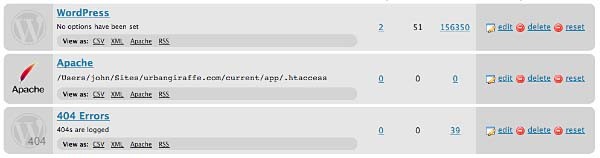
Each module can be exported to CSV, XML, or an Apache .htaccess file. You can also view logs for each module via an RSS feed
WordPress Module
The WordPress module is the default module and provides the most features. The main disadvantage of this module is that each time a URL is redirected it requires WordPress to be loaded (contrast this to the Apache module where a redirection occurs before WordPress loads).
This module is configured as follows:

These options are detailed below:
- Canonical – determine whether the
wwwshould be removed or added to your site URL. - Strip index – if enabled then any attempt to access a
index.php,index.html, orindex.aspfile will cause an automatic redirection to the same URL, minus the index file. - Time Limit – sets a site-wide PHP timeout limit. Useful if something is timing out.
- Error level – sets the PHP error reporting level. Useful for removing unwanted warnings, or for viewing hidden ones
Apache Module
Rather than using WordPress to provide redirections the Apache module writes data to an Apache .htaccess file. If you site supports these then this will give you the greatest performance, at the cost of losing a few items of functionality. For example, the Apache module provides no statistical information so it is not possible for the Redirection plugin to keep track of how many times a particular redirection has been used.
The module is configured as follows:
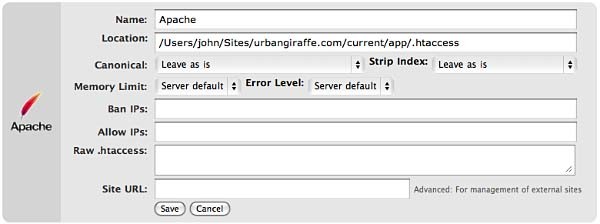
The options that differ from the WordPress module are:
- Location – the location of the .htaccess file. The default will be your site directory
- Ban IPs – prevents certain IPs from accessing your site
- Allow IPs – allow certain IPs to access your site
- Raw
.htaccess– add custom rules - Site URL – an advanced option which allows you to set the site base URL
Note that when writing to a .htaccess file the Apache module will retain any existing non-WordPress data, so you can still add custom rules.
404 Module
This module is a little different to the others in that it is designed to record 404 errors. Rather than make this a general function, as in previous versions, the power of this module comes from the fact that redirections created inside it will be ignored from the 404 log. In other words, the module records all 404 errors except the specified URLs. Combined with the RSS feed this gives you a lot of options to keep track of errors on your site.

If you do want to ignore a 404 error (for example, you site may not have a favicon.ico and you don’t want this recorded) then you should create redirections as normal, but set the action to ‘Do nothing’. As for other modules you can create redirections based upon any action or rule, or matching a particular regular expression.
Groups
A group is a logical collection of redirected URLs. You can create as many groups as you wish, and groups can be re-ordered. URLs are matched based not only on the order in which they occur within a group, but the order in which groups occur within a module.
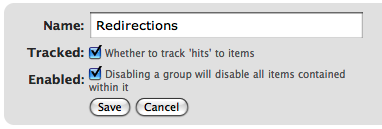
As well as allowing you to collect redirections together, you can also specify whether the redirections within a group are logged.
As an additional configuration option you can select which group an automatically generated URL is put in when a post/page or category is changed.
Using Redirection
The main idea behind Redirection is that you create several URLs that you want to redirect. These URLs are placed within a group, which in turn is placed within a module. The module determines how the URLs are redirected, and the group allows you to logically organise the URLs.
Each URL (or redirection) can be configured to behave in different ways. When creating a redirection there are several pieces of information you must provide:
- Source URL – This is the original URL that you want to redirect somewhere else
- Match – This tells the plugin how you want to match the source URL
- Action – Determines what happens if the URL is matched
- Regular expression – Tells the plugin that the source URL is a regular expression (i.e. a pattern that may match many URLs)
- Target URL – most actions have a target URL. This is typically the URL that the user will be redirected to should the pattern match

Note that items can be re-ordered and this may influence which redirection takes effect.
Matching URLs
Matching a URL is a key part of Redirection and consists of a source URL. This URL must exactly match a URL that you want to redirect. For example, your site has the page:
http://yoursite.com/oldpage/that/needs/redirecting/
The source URL for this is: /oldpage/that/needs/redirecting/. The source does not require your website address, and it is only possible to redirect a URL that exists on your website (you cannot redirect an external website, for example).
Advanced users can make use of regular expressions to reduce the number of redirections they need to create. A regular expression is basically a pattern that tells the plugin how to match. For example:
/(\d*)/(\d*)/(.*)
This pattern tells the plugin that you want to match a URL that looks like:
/2007/05/some-url/
That is, the (d*) indicates a number, and the (.*) a sequence of characters. Regular expressions are a complicated subject and this page will not attempt to give more than a passing overview of using them. If you do need more help then you should take a look at a regular expression website.
Remember that if the source URL is a regular expression then you must enable the regular expression option, otherwise Redirection will just treat you source URL as plain text.
In addition to the source URL you can also specify a match condition:
- URL only – Only matches the URL (the majority of your redirections will use this)
- URL and referrer – Matches a URL when the source and referring site matches (i.e. match the URL only when the user came from a certain website)
- URL and login status – Matches a URL when the source and user’s login status matches (i.e. match the URL only when the user is logged in)
- URL and user agent – Matches a URL when the source and user’s browser matches (i.e. when the user is using a particular type of web browser)
These special rules can be both positive and negative. For example, you can match a URL when the user is logged in (and be redirect to one URL), or when the user is not logged in (and be redirected to another URL). This makes it very easy to create custom rules where users are redirected if they are using a particular browser, or if they came from a particular website.
Actions
An action tells Redirection what to do when a source URL is matched:
- Redirect to URL – The default case and the majority of your redirections will use this
- Redirect to random post – An esoteric action that may be useful to some people
- Pass through – An advanced option that allows you to masquerade one URL as another (i.e. when the source URL is accessed it actually displays the contents of another URL without the user being aware)
- Error (404) – Causes a 404 error to be returned
- Do nothing – A dummy option that can be used if you just want to track accesses to a URL
Configuration of rules and actions
Depending on the particular combination of action and match rule you may be required to provide further details for a redirection.
Basic URL redirection
You can specify which HTTP code is used to redirect a URL (301, 302, or 307):
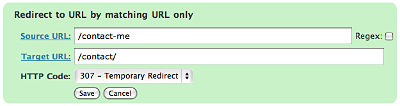
A couple of examples:
/blog/(.*) => /$1
This will match any URL that starts with /blog/, and will redirect it to the same URL but without /blog/. For example, /blog/2006/10/01/mypost will be redirected to /2006/10/01/mypost.
/2006/month_(\d+)/(.*) => /2006/$1/$2
This will match any URL that starts /2006/month_, and is then followed by a number. This will be redirected to the same URL, but without month_. For example, /2006/month_1/something will be redirected to /2006/1/something.
To replace a single dash in a URL with a space:
/tags/(.*?)-(.*?) => /tags/$1%20$2
Redirect to URL by matching user agent
This allows you to configure a redirection to occur when a specific browser (the user agent) is used:
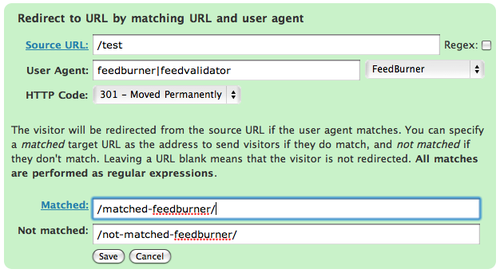
A set of pre-defined user agents is available from the drop-down menu or you can specify your own. The user agent match is always performed using a regular expression.
Two target URLs can be specified, one for if the user agent does match, and one for if it doesn’t match.
Redirect to URL by matching referrer
Similar to the user agent rule but this one looks at the referrer. That is, if a user follows a link from another site to yours, the original site is passed along by the browser (unless disabled) to your site so that you know where the user came from. Using this rule you can base your redirections upon this original site.
Redirect to URL by login status
This rule allows you to match a URL based upon the user’s WordPress login status. That is, if they are logged into your site.
Support & Bugs
Support and feature requests should be made through the Redirection support forum. You can contact me directly but I spend a very limited amount of time on direct support and you stand a better chance of being answered through the forum.
If you find the plugin useful then please do consider making a donation – it is appreciated and helps towards the maintenance of the plugin.
Thanks!
[…] Je viens de mettre la main sur un super plugin (en Anglais) qui redirige de vilaines adresses vers les bonnes. Très pratique pour les erreurs 301 (document déplacé de façon permanente).Le plugin Redirection, bien qu’en Anglais, est très simple d’emploi. Pour une erreur de type 301, vous indiquez l’adresse erronée et vous mettez la bonne. C’est tout. […]
This plugin doesn’t work correctly for me. It gives back a 302 instead of a 301, i’m also using the “permalink redirect” plugin, which can be found here: http://fucoder.com/code/permalink-redirect/
have you got any idea what can be the problem?
Not showing up in admin cp after enabling.
Running WP 1.5 here.
Sorry, I should have made it clear that the plugin is WP 2 only!
Roy, there’s a new version, try that and see how it goes. I’m also using it with fucoder’s permalink plugin.
bug report for the redirection.zip file with 21.900 byte filesize (the plugin says it’s version 1.0, but according to this web page I’ve downloaded v1.2): the redirects don’t work for changed page slugs, due to one small but silly error.
[technical details removed now it’s fixed!]
only due to these changes I was able to get your plugin to work correctly, so I suppose you should update your download zip 😉
Yep, somehow I uploaded an old version of 1.0 from SVN. Updated to the real 1.2 now
I get a recursion error with this plug-in when accessing any URL on my blog. Any chance that this plug-in won’t work right with IIS-based hosting? I’ve had other WordPress plug-in problems related to my host using IIS.
Hey, i’ve tried to update the version, but now i miss some files and the edit function doesn’t work at all…
I’ve had the same problem with edit not working.
Additionally you need to change the include directives in redirection.php lines 23 and 461 to
include dirname(__FILE__) . ‘/redirection_item.php’);
Without the directory pathing php5 servers give an open_basedir error.
Zip updated again (3rd time’s the trick, right?)
Mike, that sounds like a server issue as I’m developing on PHP5 with no errors. Could you possibly send me the output from phpinfo on your server so I can look at the PHP settings and try and replicate it? Thanks
The 3rd time was the charm.
The open_basedir error results from PHP attempting to run the included file in the tmp directory instead of the current directory. I’ve tried mucking around with the apache files to set the basedir, but I have found that retrieving the the current path and appending the included plugin name gets around this issue. Most other plugins use this approach as not al Apache installations are the same.
Mike
Nice plugin. It works well on my blog.
John,
The plugin works great. One tiny issue I have found is with the automatic 301 creation. If I have a post in draft state and then publish it using a different title and slug, Redirection will create a 301 redirect entry.
I don’t know if it is possible to detect, but I think that the 301 entries should only be created when a published post’s slug is changed. This way you don’t end of with extra unnecessary rules.
Mike
Please can you provide some examples of how to use the regex functionality?
For example, how would I point people heading for /weblog/2005/12/index.php to /2005/12/? That is, people heading for /weblog/NNNN/BB/index.php to /NNNN/BB/?
Two questions:-
1. If the method with the plugin is separate from the .htaccess method, how does it work? And should I delete my .htaccess 301 redirects?
2. I am migrating my Movable Type blog, with 360 posts, to WordPress, but changing the url structure (from /weblog/2005/12/audience_relati.php, whereby MT takes the first 15 characters of a post title, to /2005/12/15/audience-relationships-threat-or-opportunity/). I had started using .htaccess to set up redirects individually, but I have hundreds of posts – is it possible to enlist this plugin to intitiate some regex-based (?) method of automatic redirection? Ideally, for posts; if not, then, as above, for monthly archives.
Thanks
I’m moving by Movable Type blog to WordPress, changing the URL form – and so, location – of all 360 of my posts (from the form http://www.domain.com/weblog/2005/12/audience_relati.php to http://www.domain.com/2005/12/audience-relationships-threat-or-opportunity/).
I had hoped to set up individual redirects for each post, but that would be a nightmare, so I deployed your Redirection plugin, using a regex filter, to at least refer people from a dated post like http://www.domain.com/weblog/2005/12/audience_relati.php to the new monthly archive page of http://www.domain.com/2005/12/ (from weblog/(.*)/(.*)/index.php to /$1/$2).
This was when I discovered the Related Posts for Your 404 plugin (www.w-a-s-a-b-i.com/archives/2006/02/20/related-posts-for-your-404/), which is almost exactly what I’ve been looking for – it applied related posts functionality (based on the slug) to your 404 page – ideal..
But I hit a snag because these two plugins appear to overlap. That is, when a user comes to the former URL http://www.domain.com/weblog/2005/12/audience_relati.php, they are redirected to http://www.domain.com/weblog/2005/12/ (which doesn’t exist; should be http://www.domain.com/2005/12/) – and the 404 template kicks in and searches for likely posts… not the desired effect.
Do you have any ideas please?
Thanks
Mike: Good idea, I’ll implement that one.
Rob: Regex is a BIG topic so I can only scratch the surface. For the example you gave you could try something like:
/weblog/(\d )/(\d )/index.php => $1/$2
This is matching anything that starts with ‘/weblog/’, ends with ‘index.php’, and has two groups of digits. \d represents a digit, the means ‘1 or more’, and the brackets indicate that the values should be captured and can then be used in the replacement string ($1 is the first set of digits, and $2 is the second).
Note that I haven’t tested this regex pattern so it may not work exactly as you want.
To answer your questions
1. The plugin works because WordPress 2 has a generic .htaccess rule which pushes every URL access through WordPress. This means that a plugin can hook into the URL translation stage before WordPress takes over.
2. I think something like that won’t be possible or, at the very least, will be a very complex regex pattern
Small update in 1.3 to stop draft posts getting picked up
Hi,
The plugin seemed to work – until I changes my WP directory (which was why I thought I needed redirection in the first place). Now, when I activate the plugin (without touching any options) and request my frontpage, the browser goes “Problem loading page – Flock has detected that the server is redirecting the request for this address in a way that will never complete.”
Any ideas?
Thx.
297: if($item){298:= foreach ($items AS $key => $item)
299:= $items[$key]->id = $x ;
300: }
😛
[…] In my wordpress I use the Redirection plugin for wordpress. The author’s website gives a nice and simple intruction on installation and usage. Here is my screenshot of it. […]
Hello,
First of all, thanks a lot for this very efficient plugin 🙂
Nevertheless, I had to modify redirection.php to make it work fine with my installation:
483: if ($newurl != $url && $newurl == preg_replace ('@'.$pattern.'@', $item->url_new, $newurl))change to:
if ($newurl != $url && $url == $pattern)This checks that the page has to be redirected
505: header ("HTTP/1.1 $type".$types[$type]);506: header ("Location: $newurl");
507: exit ();
change to:
header ("HTTP/1.1 $type ". $types[$type]);header ("Location: $newurl");
header("Status: $type ". $types[$type]);
exit();
To avoid errors from Apache…
Questions:
To redirect not only 404 pages but also others, I had to withdraw this test:
460: if (is_404 ())Do you have any other solution?!
Thanks by advance!
You are my hero! – this is exactly how I imagined such a plugin in my wildest dreams.
I am your hero too: found and fixed a bug:
in redirection_item.php and in redirection.php (and maybe elsewhere?) you need to replace bloginfo (‘home’) with bloginfo (‘wpurl’) to make it work for people who installed wordpress into a directory but make it appear at their document root.
ALSO: do you have an email list (or a feed) for just product update announcements? [-your blog is fun but I am suffering from information overload 🙁
oXfoZ, did your trick with 404 work? – It did not for me…
Generally, it is important to understand that this plugin ONLY redirects from URLs that are NOT THERE and therefore generate the 404 error.
If you need to redirect away from something that DOES exist… use other tools.
John, may I humbly request such a feature? – Sometimes it is important to redirect away without moving the content (for maintenance reasons for example). Please?
Thanks!
[…] Comes from the author of my beloved Redirection plug-in. […]
This page sais Ver 1.4, but the downloaded file is marked 1.3 – am I getting the wrong version?
anyone use it for wpmu ? i want to redirect http://www.sub.domain.com/blog to http://www.sub.domain.com
is it possible ? if so how ?
John,
I think all you need to do is
Old: /blog
New: /
John (author).
Redirection has an issue redirecting to URL’s with a ‘ in them.
For example:
old: /tag/Mikes
New: /tag/Mike’s
It is saved as /tag/Mike\’s
When you get a redirect it cannot resolved Mike\’s and I get a 404/not found error. I tried editing the wp-option to changes Mike\’s to Mike’s but when I bring up Manage->Redirection I get a message that no redirections have been defined.
Mike
hi there,
I really like your plugin but now I need a more complex redirect and I do not know how to do it.
I am using wpmu not plain and simple wp. still the plugin works if I only coudl get it it going 🙁
currently wpmu adds /blog/ to the url of posts which I want to strip…
i.e. my site is here: http://zice.ro here is one testpost: http://zice.ro/blog/2006/12/01/featured-month/ I want all posts redirected from http://zice.ro/blog/whatever… to http://zice.ro/whatever…
how could I manage this with your plugin?
It works if you manually enter http://zice.ro/2006/12/01/featured-month/ with teh blog portion already striped.
sorry for my last post, what I was trying to do was to get rid of the blog portion, I just realized this cannot be done by this plugin as the posts do give an error without the /blog/ portion in the url, and this plugin does not do url rewriting anyway, does it?
I got this error on the “Manage >> Redirects” page:
Warning: Invalid argument supplied for foreach() in /home/mysite/public_html/wp-content/plugins/redirection.php on line 297
D’oh… fixed it. I had all the redirection plugin files in the main plugins directory, instead of their own directory. Sorry!
any chance of getting the ‘ in urls fixed?
Mike
The “strip www” option does not appear to be working for me.
0. My host is yahoo small business hosting, which does not allow for .htaccess files (I hoped that your pluging worked around that issue somehow), running WP 2.0
1. I installed v1.3. (uploaded folder and activated).
2. I selected the “strip-www” option under the ‘options’ tab.
3. I navigated to a page with the www prefix (http://www.tynerblain.com/blog/2006/03/06/top-ten-tips-for-preventing-innovation/) and the page was displayed, without redirecting (or at least without updating the URL in the address bar (firefox 1.5.0.9, in case that matters)
Right now, my only hope seems to be finding a new host. Thanks in advance for any suggestions.
Am I SOL? If so – I would suggest a feature – have your awesome maint UI include a “could not create .htaccess file” message or whatever, if the wordpress instance is on a server that will not support it.
Scott,
Try Matt’s no-www plugin (http://photomatt.net/2006/06/13/wordpress-no-www/).
hi i use your plugin and redirect some pages through main categories,
nut now example :http://www.luxury-global-hotels.com/design-hotels/ doesn’t show correctly
on old url i put the http://www.luxury-global-hotels.com/design-hotels/
and on new url: http://www.luxury-global-hotels.com/hotels/design-hotels/
but doesn’t work is possible to help me fix this one?
thnaks
[…] Redirection. A simple plugin that is incredibly powerful, it lets you identify a “broken” URL and provide it with a good replacement, select which kind of redirect you want (301/302/307) and then it will implement the redirect and log stats on how many times the redirect has been hit. Between the two of these, I’ve been able to identify and correct the handful of pages that didn’t get seamlessly handled last night. Just more evidence of how powerful and flexible the WordPress CMS is. (It should go without saying, but just in case: if you see anything out of the ordinary, just shoot me a note and let me know.) if(!window.feedburner_FANAdDisplayed && window.feedburner_currPost == window.feedburner_startPostOverride) { document.write(“google_ad_client = “pub-8387837098061388”;google_ad_width = 300;google_ad_height = 250;google_ad_format = “300x250_as”;google_ad_type = “text_image”;google_ad_channel = “4469223540”;google_color_border = “658DB5”;google_color_bg = “FFFFFF”;google_color_link = “658DB5”;google_color_url = “507AA5”;google_color_text = “FFFFFF”;”); } […]
Thanks! I’m trying it out. Redirects from pages that don’t exist work fine (ie
http://www.whelp.nl/4-stappenplan-test redirects to http://www.whelp.nl/4-stappenplan
), but redirects for existing pages not.
http://www.whelp.nl/4-stappenplan/stap-1-plannen should redirect to
http://www.whelp.nl/4-stappenplan
Any ideas?
By the way: I found a small error in your redirection.php on line 101: you missed a ; after endforeach – this is what Jordan is referring to.
Regards, Theo
John, can I achieve this with the above plugin?
a. I have a site at abc.com.
b. I also have another at abc.com/def
c. I book the url def.com
d. Considering I’ve a lot of space left at abc’s server, I want to start using def.com as the main URL for abc.com/def
Most important point here is that abc.com/def is a wordpress blog.
Action 1:
When I use URL forwarding at def.com’s end, it sure opens up abc.com/def with no problems but all links in the page don’t work properly…goes into a page not found error. Obvious, since I’ve not made any change at abc.com/def’s end.
Action 2:
I need to do something at abc.com/def wordpress installation folder so that def.com becomes the default url. What should this be?
Kay
Scott,
Are you still supporting this plugin?
Mike
[…] for those that want to automate the whole thing, I suggest you use the Redirection Plug-in for WordPress. I haven’t tried it for myself yet (and hopefully, I won’t have to), but […]
[…] for those that want to automate the whole thing, I suggest you use the Redirection Plug-in for WordPress. I haven’t tried it for myself yet (and hopefully, I won’t have to), but […]
I don’t know about Scott, but yes, I still am! A new version has walked out the door and hopefully that addresses a lot of problems people have had.
John. You rock!
I’ve tested this plugin and it’s awesome. The pass-through feature is extremely powerful. Black or white hat SEO techniques – this plugin is a must for any serious WordPress user that’s serious about search engine optimisation and ensuring their pages don’t 404.
The possibility to “pass-through” is open to both black and white hat uses. I’d just to point out to people considering using this plugin: “With great power comes great responsibility” – use this plugin wisely!
Also, I would actively encourage people to support John and make a small donation where possible. Do you realise that John doesn’t even have a PayPal donation form anywhere on this site? I’d hate to come here one day and not be able to find a these plugins!
[…] you’re looking for a truly awesome WordPress redirection plugin, then I’ve found it for you. While this WordPress Redirection Plugin has been around for […]
John,
Sorry about that.
This new version works extremely well. 1.7 is such a vast improvement!
Thanks for all the hard work.
Mike
John,
I really like the new version. There 404 functionality is very useful. A do have 2 usability improvements for it though.
1) The 404 page shows the offending link as relative url. If I click the plus to add a redirect, the source URL is filled in but with a fully qualified URL instead of the relative one from above.
2) When I click the of the 404 page, the Source URL gets filled in. From a usability standpoint I have to scroll down to the Add new redirection section. It would be great if when I hit plus, the page focus is now the Target URL field.
Mike
Looks like just what I need…but I just tried to activate in WP, and got an immediate error message, saying “call to undefined function wp_enqueue_script on line 39” Any idea why that would happen? I don’t know where to find that script, is it part of WP? Thanks…
Sorry, I see it now. This plugin is 2.1 only. That must be it — I am running 2.0.2. Thanks anyway!
You have absolutely saved my a**! This is plugin is a godsend. Great work. Great plugin. Thank You!Thank You!Thank You!Thank You!Thank You!
Mike, I’ve included your suggestions in 1.7.2, as well as adding a search function
John,
2 more suggestions related to the 404 functionality.
1 When adding a new redirect from 404 and clicking Add Redirection, there isn’t a clear indication the action was performed. Perhaps a pop up message “Redirection Added” or just clearing the redirection fields would be fine.
2) After adding a new 404 redirection, it would be great if that 404 link was then removed from the 404 list. It would then allow a user to work through the list. I would make this a configurable option though (Options)
Bonus suggestion) When creating a new redirection link, it would be great if there was a preview button which showed (popup or new window) the effect of this redirection. Usually I need to create a new one for the 404, then click on the 404 link to see if my redirection fixed the issue.
Mike
John,
Gotta say – great plugin. I’ve been using it about a week after a site move and it’s great. Thanks.
I guess it’s a great plugin, but it doesn’t work for me: When I want to add a new redirection and click the “Add Redirection”-button nothing happens. Does anybody know, how I can solve this?
Mike, some good suggestions and included in 1.7.3
Stefan: Are you using WordPress 2.1?
Yes, I’m using WordPress 2.1.3.
Maybe this is relevant for my problem: my index.php and my .htaccess aren’t in the WordPress-folder.
Very nice plugin! Installed it and everything seems to work great! 🙂 Now I’ll just have to add all the redirects and oldpages to WP…
Stefan, that shouldn’t affect the plugin. Do you have JavaScript enabled? What browser and version are you using?
JavaScript is enabled and I tested it with Firefox 2.0.0.3 on Windows XP and OS X and Safari 419.3. The result is the same problem…
(By the way: Thank you for your help, John!)
[…] 3. Redirection […]
great plugin!
i really really need it!
i’ve moved the blogs wordpress url from the site/blogdirectory to site.
and it’s really doing a great job with redirecting all those old links.
i’m havin one major problem though!
it redirects also urls that i wouldn’t want to be redirected. like the url of the “comment this article”. i think that’s because the wordpress directory and blog url are not the same in my case…
i would really appreciate your help with this. i really need the plugin’s functionallity.
thanks again!
Hi John,
Thanks so much for the plugin. I face the same problem though as Stefan. After adding a redirect nothing happens. Logging of 404’s works just fine.
I work on MacOS X with Firefox 1.5.0.11 and Safari 2.0.4 (419.3). My WP version is 2.1.2.
thanks again!
Great plugin John and yes works like a charm. All my google 404 search results are now being redirected to an existing page.
Thanks
Stefan & Remco: I don’t know what to suggest. Without seeing the problem in action and being able to debug I’m somewhat blind. Could you mail me the output from phpinfo on your server? My development system is a Mac too, so there should be no problem there. Try 1.7.4 as I spotted a typo in a field name, which could be affecting you.
Webee: I don’t know what you mean with ‘comment this article’ URL?
hi john,
here’s what i mean:
– because i moved my blog i want to create a redirect of all urls like:
www. webee .ro / webeeblog / posts to www. webee .ro / posts
– so i tried creating a redirect (using regex) like this:
/(.*)/webeeblog/(.*) to /($1)/($2)
– and this also creates a redirect for the page:
www. webee .ro / webeeblog / wp-admin / … which is a non existing page…
i hope this is more clear than the first explanation…
thanks again,
webee.ro is a design blog
Webee,
Redirection will redirect any pattern that matches the regular expression, regardless of whether that URL exists or not. If /webeelog/wp-admin is being redirected to /wp-admin and you don’t want this to happen, then you’ll need to either make the regex more specific, or you can add another item to redirection for /webeelog/wp-admin/(.*) that results in a 404 (not a 301).
Hello John,
1 question and 1 suggestion,
Question: When I want to add a redirection rule, it does not work. I saw log of apache shows “POST /wpwp-contentpluginsedirection/ajax.php?cmd=add_redirect&id=0 HTTP/1.1”, apparently the path is not correct. I install my wordpress under directory “wp”.
Suggestion: Can you add a new code 410 for GONE for a certain URL? It is useful and should be easy to implement.
Mark, 410 added to version 1.7.5. Can you tell me a little more about your setup? No one else has reported the same problem as you, so it may be a configuration setting that isnt being handled.
Hi John. I had a question. I’ve been looking at Permalink Redirect which as per its description “ensures that pages and entries are always accessed via the permalink. Otherwise, a 301 redirect will be issued.” It appears to be a zero config plugin. Is there a way to accomplish the same with Redirection? And btw, great plugin!
Hello John,
I download 1.7.5, but did not see new code 410? and still have the same add new redirection problem “POST /wpwp-contentpluginsedirec
tion/ajax.php?cmd=add_redirect&id=0 HTTP/1.1” 404 286 “http://ying.homedns.org/wp/wp-admin/edit.php?page=redirection.php”
Regarding the setup, I run install wordpress 2.1.3 under /wp/ directory, apache 2.2.4 for win32, php 5.2.0.
Hi John,
I’ve encountered exactly the same problem as Stefan and Remco has. 404 logging works fine, however adding a new redirection results only in a page refresh.
Have you already looked into this problem, or maybe I could help you somehow to resolve it?
I’m running WordPress 2.1.3, all other plugins disabled, on Apache/2.2.4 (Win32) with PHP 5.2.2 (extensions loaded: bcmath, calendar, com_dotnet, ctype, session, filter, ftp, hash, iconv, json, odbc, pcre, Reflection, date, libxml, standard, tokenizer, zlib, SimpleXML, dom, SPL, wddx, xml, xmlreader, xmlwriter, apache2handler, mbstring, mysql, mysqli, PDO, pdo_sqlite, SQLite) and MySQL 5.0.37-community-nt. (It’s a WAMP5 installation: http://www.wampserver.com/en/)
On the screencast the plugin looks great!
All the best,
Stanislaw
John,
As my ongoing input to improvements to redirection, it would be create to have a global option to redirect 404 errors to a specific url. Basically I see the logic, applying any redirections first then if a 404 error is hit, still log the error, but replace with a global 404 url (it could be the site url, an index page, etc.).
Mike
John,
False positive on 404 error. Given the url http://www.mikekoepke.com/2006/08/07/john-bachelder-documents-gettysburg-for-posterity/#comments
This is a valid url that brings up a single page jumping to the comments section (the anchor). (default WP behavior)
Redirection is flagging this a 404 error, which is incorrect. Clicking on the above links takes you exactly where it should on the blog.
Mike
John,
On your Regular Expressions example above, here is a scenario you might want to add:
Replacing a character with another.
For example, I have an image with spaces in the name: My Image.jpg. Some “stupid” sites seem to want to hit my blog as http:\www.site.com\wp-content\uploads\My Image.jpg rather than http:\www.site.com\wp-content\uploads\My Image.jpg. The image link gets correctly handled by wordpress when it renders the post (it translates to http:\www.site.com\wp-content\uploads\My Image.jpg)
Another example:
http://www.site.com/tags/my tag
Once again since there isn’t universal standard on how to handle multiword keywords you can get a site hitting you as http://www.site.com/tags/my-tag.
Obviously both these bad urls can be fixed with a simple character regex substitution in redirection.
I have to say this plugin has really come along way and is becoming an essential WP plugin. 🙂
Mike
In my last comment it should read
http:\www.site.com\wp-content\uploads\My(percentsign20)Image.jpg as the right url with the bad site not using percentsign20, but a blank space in the url.
Mike
Can I use this plugin to redirect http://axistive.com to http://www.axistive.com ?
Sorry found out that there is a www redirect module for that. Now http://axistive.com if forwarded. Dowoad it here http://www.justinshattuck.com/wordpress-www-redirect-plugin/
John, each time I clear my logs (regular logs, not the 404 logs), I get this:
Rendering of admin template [path to blog]/wp-content/plugins/redirection/view/admin/Your logs have been deleted.php failed
I get this will all my blogs. Is there a bug?
Hi, John
Thanks for providing us this powerful plugin!
I have installed this plugin. But it doesn’t work same as Stefan, Remco and Stanislaw Malolepszy.
But only “404 Log” function is working like them.
I’m running WP 2.1.3ME.
Do you have any solution about this problem?
Please any response us about this plugin.
(Anyway, thank you for this!)
***
Sorry, my poor English.
***
Robert: Permalink Redirect is a great plugin and I use it myself. It does a different job to Redirection.
Masterkey, Stefan, Remco, Stanislaw: I think I’ve located the problem as being due to a difference between Windows and Unix. Should be fixed in 1.7.6
Mike: Not sure I understand your global 404 suggestion. By definition a 404 cannot redirect (if it did it would be a 301!). I tried recreating the false 404 on my test site but the #comments did not cause a 404 log message. Could you tell me what pattern matched the 404 in your logs? (press on the date in the 404 log to expand the full details). I’ve added an example for single-character substitution.
Michel: Ooops, a code typo. Fixed in 1.7.6
can it in 1.76 not work in wordpress 2.2?
Redirection does work in WordPress 2.2, yes
John,
What I meant is that under Redirection option being able to specify a URL to redirect to if the blog gets a 404 error, but there are no redirections defined.
Mike
Ah, I understand. I’ve added a ‘global redirect on unknown 404’ option. A 404 will still appear in the log as a 404, but the user will be redirected to the URL if nothing else matches. Note that it’s important that the 404 URL exists otherwise you’ll get stuck in a redirection loop! Also note that by using this option you are hiding the 404 from the user, so a search engine will never know that a URL is incorrect (they will just think it has moved)
John,
Thanks.
Here is a small quirk. I have 2 pages of redirect rules. How do I move a rule from page 2 to page 1? I can move the redirect to the top of page 2, but there is no way to move it past position 26 to page 1. (I’m trying to move the \tag\- => \tag\ regex to the top of the list.
Finally, thanks for the example /tags/(.*?)-(.*?) => /tags/$1 $2
What does the regex look like to replace all dashes in a url to spaces (or )? Given a tag such as: here-is-my-tag, the rule above recursively goes through and you get:
here is-my-tag
here is my-tag
here is my tag
according to the redirection log. Ultimately it gets it right, but it takes 4 passes to resolve.
Mike
Perfect. Thanks, John. Works fine, now. By the way, I love your plugins. This one is so helpful — I used to use 404 Notifier by Alex King and modded the htaccess file each time.
Regex is a bit of beast to tame, and some of my code were too greedy or wrong. Often, I wouldn’t know where my redirects were wrong. With your plugin, and the logs it creates, I can more easily deduce where the problems are.
Bottom line, I can safely say this plugin shaved off at least 70% from the time it takes me to fix my redirects. It’s an incredibly useful plugin, and I highly recommend it to every WP install.
Thanks Michel, that’s a great recommendation!
Mike: Yeah, that’s a tricky one and I was hoping no one would notice! Right now the only way to move the items across pages is to change the ‘per page’ dropdown so that the boundary between the two pages moves, drag the item across, and then change the per page back. Messy I know
As for replacing all dashes, this too is tricky. It wouldn’t be a problem if it was replacing all dashes, globally, but you only want it within the
/tags/directory. I can’t think of a single line regex to do this. A manual workaround would be to repeat the regex with more dashes, up to an arbitrary maximum (say 10 dashes). You would need to put the regex in reverse order so the largest pattern matched first:/tags/(.*?)-(.*?)-(.*?)-(.*?) => /tags/$1 $2 $3 $4/tags/(.*?)-(.*?)-(.*?) => /tags/$1 $2 $3/tags/(.*?)-(.*?) => /tags/$1 $2This way everything would get matched by exactly one redirection. Again messy.
John,
Thanks for the reply. In terms of the dragging and order, I didn’t realize the Per Page option was there. Doh! Setting to a larger # fixes the issue.
I agree the regex stuff on the substitution is a little ugly. I wish these serach engines didn’t decide to their own things with separators.
Mike
John,
It looks like I’ve found a new set of weird issues and requests. At least I’m giving it a good workout. 🙂
1) Now that I know the Per Page ability is there, can we add an option for the default setting? 25, 50, 100, 250? What happens is that I go to the Redirection tab and display 100 per page. If I jump over to the 404 log, it resets to 25. I’d like to set the default to 100 and be done with it instead of changing for every tab.
2) I think I found a regex bug. I’m trying to correct a url bug from the past that incorrectly appending some page numbers. The url being /library/book-author/page/2/. If I set up the source url with /library/(.*?)/page/(.*?) and regex enabled with a target url of /library/$1, the source url is getting detected, but what is being generated is /library/book-author2/. I’m trying to discard the $2 variable, but it looks like you’re still adding it on. Did I get the regex stuff wrong?
3) A while ago we fixed the single quote stuff in the urls. I’m still having issues with it though, but having a hard time get my hands fully around the exact issue.
I have a tag set up as Pickett’s Charge. The incoming url rightfully escapes the single quote with a source url of /tag/Pickett/\’s Charge. I have a rule set up to translate to /tag/Pickett’s Charge, which correctly handles the mapping.
Yesterday Google used the referrer url http://www.google.com/search?q=pickett's charge, which is correct but I got a 404 error, with redirection logging it as /tag​/Pickett​/\’s Charge, which should have been picked up by the above redirection, but it isn’t.
I’ve also seen an incoming url of ​/tag​/Pickett\\’s Charge and /tag/Pickett\’s Charge.
a) There seems to still be an issue on how redirection is detecting single quoted url’s when searching for rules
b) I think there may also an issue on how redirection reports back the 301s for single quotes. I believe the offender url is caught with the /’, my rule changes to just ‘, but redirection my still be reporting back as /’ to the site. The reason I believe this is that I have a few 404 logged (for a different ‘ tag) with 404 of ​/tag​/Wilson\\\’s Creek and then a later one of /tag​/Wilson\\\\\’s Creek. So given a redirection rule of \’, the 301 going back becomes \\\’ to escape the single slash and then escape the single quote.
Like I said I’m trying to get my handles around the issue.
4) Small cosmetic issue related to 3 above. The 404 log displays the offending url as /tag​/Pickett​/\’s Charge. If I click on the plus to add a new redirection, you file in the source url as /tag/Pickett/\’s Charge.
Thanks for all the hard work on this John. Hopefully I gave you enough info on these problems.
Mike