This page contains details on specific extensions that may not be obvious to use.
CAPTCHA Filter
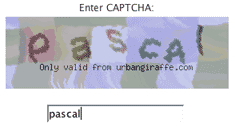
In order to use a CAPTCHA you must create one text field in your form to receive the CAPTCHA data. You can then attach a CAPTCHA filter to that field from the Filled In interface and a CAPTCHA image will be automatically added to your form above the field.

The CAPTCHA configuration page has a lot of options where you can tune how the CAPTCHA appears and how complex it is.
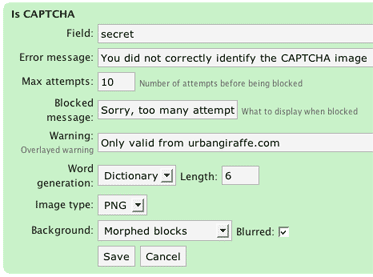
Note that a CAPTCHA can only be applied to a text input field.
Hi, great plug-in here! I’m trying to use the CAPTCHA feature but every time I click save in the box pictured above, the settings are not saved and no captcha shows up in my form. Any hint? Thanks and keep up the good work!
Are you using the latest version, Giorgio? (1.6.5) I have no problems saving the options
I can only find version 1.6.4 on the site.
Hi, everything works great on this plugin except it won’t show the captcha image. I set the captcha options, added the filter linked to a “secret” input field, but the image doesn’t show. The validation works on the captcha, but obviously if you can’t see it, you won’t get it right.
Is there a specific image library needed or specific directory(s) that need to be writeable? I appreciate the help.
I’d like to congratulate myself on being the biggest idiot on the internet. I didn’t have my tags closed. Works great now. Sorry for wasting your time.
Hmmm… I had the same problem. Fixed the tag close failure. But it still doesn’t show the image but a blue boxed ? instead. When I open the image in a new tab (in Safari), it shows the code $max_attempts) { $_SESSION[‘freecap_word_hash’] = false; …
See http://aardbron.nl/workshops-coaching/wereldcafe/ for example
Martien, the page you provided doesn’t have the input tags closed. Filled In requires XHTML in order to pre-fill forms
Hi there, Awesome plug-in – however I’m having trouble with the captcha . . . everything displays fine. It just won’t accept the input text for the captcha phrase. I’m stuck. Any ideas?
What do you mean by ‘it wont accept the input text’? Is there an error?
I mean that it always rejects the captcha phrase – the only error is the one telling me that the phrase was not entered correctly.
Gotcha. Can you create a bug report for this and upload some screenshots of your forms configuration (e.g settings you have for the captcha, HTML for the form). This should save a bit of time asking questions back and forth.
I wrote an extension for TC KIMLIK NO validation.
Download:
http://code.google.com/p/wordpress-turkce/downloads/detail?name=is_tcno.php&can=2&q=
Hey John
I have setup the captcha exacty the way you instructed above, however, no image displays above the text input field. Any ideas on this?
Thanks
Has anyone taking for data they have captured and displayed it back on the WP page. I use FilledIn for membership sign up. I now want to display that data on a WP page listing all our members.
Thoughts?
Hi there.
i’m using this script in http://www.cyqlrsoftware.com but when i try to add extension “result processor”, nothing happens after pressing update button.. do i have to change CHMOD of any folders to do that?
I’m trying to use captcha with your plugin on WP 3.8. On my local testing machine, I get a php error that says that the start_session() in freecap.php is happening after headers have already been sent.
On my host (a unix system at rackspace), I don’t see any php errors (probably have the error reporting level set to not see it), but I also don’t get any image back from freecap.php.
In the javascript console, I see a warning that the mimetype for what freecap.php sends is text (interpreted as an image since it’s the src attribute of an img tag), so I assume that it might be the error text coming back rather than a captcha image.
Any ideas?