Notebooks are not usually big on upgrade potential. The parts are difficult to obtain, are generally more expensive, and people are nervous about opening up an expensive piece of equipment.
One of the few upgrades paths is the optical drive. Typically a notebook will have a CD burner, possibly with DVD reading capabilities. The latest notebooks will undoubtedly contain a DVD burner, but the great majority will be lacking this feature. Enter the Panasonic UJ-845!
Marketed as an OEM drive, the UJ-845 is unlikely to be found in retail stores. However it is easily purchased from any number of websites, and for a surprisingly reasonable cost, especially considering that is dual-layer, slot-loading, and supports DVD-RAM. That’s good going even by desktop standards.
For the purposes of this review, an Acer Travelmate 800 was used as the test notebook, replacing its standard QSI CD-RW/DVD-ROM drive.
Description & capabilities
The drive is a standard 12.7mm notebook unit that should fit most notebooks. It is also suitable for appropriate SFF PCs, and could be used in conjunction with the right housing to provide a slim line external DVD burner.
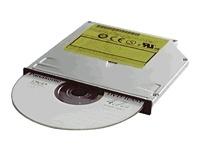
The official capabilities of the drive are:
- 5X Speed DVD-RAM Writing
- 8X Speed DVD-R Writing
- 4X Speed DVD-RW Writing
- 24X Speed CD-R Writing
- 16X Speed CD-RW Writing
- 8X Speed DVD+R Writing
- 4X Speed DVD+RW Writing
- 24X Speed CD-ROM Reading
- 8X Speed DVD-ROM Reading
- Buffer Under Run Protection
- +R Dual Layer Writing
Nero InfoTool gives the following report on the capabilities of the drive:
| Drive: | MATSHITA DVD-RAM UJ-845S |
|---|---|
| Type: | DVD-RAM Recorder |
| Firmware Version: | D100 |
| Buffer Size: | 2 MB |
| Date: | 01-11-05 |
| Location: | 1:0 |
| Read Speed: | 6.0 X |
| Write Speed: | 4.0 , 2.4 X |
| Read CD Text: | Yes |
| Return C2 Pointers: | Yes |
| Read CD-R: | Yes |
| Read CD-RW: | Yes |
| Read DVD-ROM: | Yes |
| Read DVD-RAM: | Yes |
| Read DVD-R: | Yes |
| Read DVD-RW: | Yes |
| Read DVD+R: | Yes |
| Read DVD+RW: | Yes |
| Read DVD+R DL: | Yes |
| Read Digital Audio: | Yes |
| Read CD+G: | No |
| Read VideoCD: | Yes |
| Write CD-R: | Yes |
| Write CD-RW: | Yes |
| Write DVD-R: | Yes |
| Write DVD-RW: | Yes |
| Write DVD+R: | Yes |
| Write DVD+RW: | Yes |
| Write DVD+R DL: | Yes |
| Write DVD-RAM: | Yes |
| Buffer Underrun Protection: | Yes |
| Mount Rainier: | No |
| Modes: | Packet, TAO, DAO, SAO, RAW SAO |
| Region Protection Control: | RPC II |
Basically, the drive supports almost every format you could possible want! Note the difference in what Panasonic believe is the drive speed, and what Nero reports.
Tried different media today……Datawrite 8X….Burned disc at 8X….so its got to be down to the media. I suggest everyone tries different brands of media because I’m sure that will solve most peoples problems with this drive.
daniel says:
Added on September 18th, 2006 at 5:31 am
My Matshita UJ-845S came with Acer Aspire 5590. I have to say that it sucked a lot. The drive worked fine until it’s 4th day that I had been using it. I inserted a CD as usual, but this time I heard a weird “crack†noise came from the drive. When I want to eject the CD, the drive was trying to push the CD out, but it was blocked by some kind of metal part. As a result, the drive sucked in the CD again as the metal part blocked the way, so the CD stuck inside.
I pulled the drive’s front panel off. I found out that the metal part performs as a machanical gate that will shut (block the way) soon after you’ve inserted a CD, and will move away when you want the CD to be ejected.
The drive now performs incorrectly after only four days of use, good job!
dan
—————————————————————————————
i have a same promblem… sumbody help me…
hi… i own a acer aspire 1692 with matshita uj-845D ..with factory firmware…
first it worked fine ..8x writing of DVD R and 24x CD R… Then it only wrote at 2x …
IF YOU HAVE STARFORCE DRIVERS INSTALLED THEN UNINSTALL IT..u may not be aware of it being on you system… u can get the utility by googling..now it writes dvd’s at 8x… but…cd writing gives me a power calibration error….some times dvd tooo…
wat do i do??
USE DATAWRITE TITANIUMS 8X
You muppets
FFS!
I just bought an Acer Aspire 5680, which comes with a MATSHITA UJ-85JS
From the first time I used it , it hasn’t been able to eject the drive. I’ve tried to eject it already in a dozen different ways but however I try, it just makes some silly buzzing noises at most. As I’m browsing the net I found a lot of other people who got the same issues with similar cd/dvd drives, do we just got a stroke of badluck or is this just a terrible brand for cd drives :-/
So do I, like Desperate, just bought an Acer Aspire 5680 with Mathsita UJ-85JS, but my problem is different. One day I open up my laptop and I discovered that was losen drive’s drivers.
I can’t reiinstall them, because I haven’t any cd and they don’t exist on Internet.
Unic solution is download drivers from the Japanese website, but unfortunately, i can’t read Japanese!!!
Why this brand haven’t a website all it own?
P.S. Maybe Desperate can help me, if he has a driver’s disk… Can you?
P.S. Lucudity in July, wrote a similar thing…
The code of the error is “39”: Driver inexistent or corrupt.
PLEASE HELP ME!
Someone could tell me to call ACER assistance, but it’s not possible…
So, another anecdotal tale:
I have an Ferrari 4005, UJ 845S which after about 13 months became dead. To be precise it seemed to work mechanically receiving and ejecting discs (of any type), but always reported the disc as blank, and was inaccessible from any software (NERO, NTI, Explorer, etc.)
So I flashed it to D102 and it seems to work – only did this last night so time will tell.
Does this suggest that the UJ 845S problems we see are related to loss/corruption of firmware ?- perhaps. Anyway its working at the moment…
hi..I have a ferrari 4000 with a matshita dvd-ram uj-845s in it and I have the same problem as yuo wrote,,,receiving and ejecting discs (of any type), but always reported the disc as blank, and can not read any cd,,I scaned my drivers and everything seems 2 be ok but the thing does not read cd..
I dont know what 2 do,,,where can I buy a new one and replace it??
hope u have a anwser
best regards
birdy
Actually I’ve noticed one small change – the activity indicator LED by the eject button no longer works.
Perhaps this is a ‘feature’ of the new D102 or symptomatic of faulty hardware
Finally (honest!) the XP driver software
http://panasonic.co.jp/psec/support/dvdram/lim/eoem/sw9573drvxp.html
referred to above does not work, it dates from 2003 and renders the drive useless
and the firmware at http://forum.rpc1.org/dl_firmware.php?download_id=2094
is Toshiba OEM, but works on my Ferrari 4005
HI,
My UJ 845S on Ferrari 4000 has stopped reading/burning anything just after 12 months too (corrupted or missing driver eror code 39). I tried to put up with it for a while and eventually decided to take it to laptop repair centres here in Israel, but Laptop repair people are asking over 200$ just for a new drive, same slop-in model!!!! Another alternative I have is to try Acer e-recovery: Acer has e-recovery settings, which deletes everything and restores factory settings, but I want to know if anyone tried it? I am really relactunt to delete everything from my laptop.
HELP! any suggestions? or if I have to buy a new drive may be I should just buy a different/better drive to avoid this problem reocurring? Any suggestions will be very much appreciated. Rusikoko
Check out this microsoft link for that error code.
http://support.microsoft.com/default.aspx?scid=kb;en-us;314060&Product=winxp
I have a Sony PCG-FRV37 laptop with a Matshita UJ-810 thats took a dumped and needs to be replaced.
Anybody have any suggestions on what drive would be a good replacement?
Thanks for your help
Thanks ebracr for the tip! Now my drive works correctly! Now I have to fix my bluetooth and my pc will be perfect!
Anyone know how to make the UJ-845S region-free? A lot of talk but not one answer to that question.
Thanks.
I have a Ferrari 4000 with a 845c that suddenly quit responding. When I insert a disc it will spin and the read light on the ROM itself lights as though it is reading it. Also, the processor light on the pc lights as well… After about 10 seconds everything stops and nothing comes up on the screen. The other recent change that happened is there are now three drive letters (D,E and H) that all refer to the drive where it use to just be the D drive. With a disc still in the drive I checked all three directories and they are all empty (not seeing the disc). I have removed the drive from “device manager” in safe mode and rebooted. The OS sees the drive and loads it back but still the same prob. Does anyone have any solution for this?
Thanks
As Jon posted in http://www.urbangiraffe.com/2005/03/08/panasonic-845/4/#comment-778 I also cannot burn DVD-R with with my UJ-845 in an Acer Aspire WLMI 1694. Originally it did work even some weeks ago but I do not know what could have changed. Also trying to install the DVD-RAM driver only results in an error “Cannot get drive (071)”. Reinstalling the pre-installed NTI CD&DVD Maker 7 (as mentioned in another posting here) did not help, too. I also tried removing Upper/LowerFilters (http://support.microsoft.com/kb/314060) but it did not help. As I did neither find the UJ-845 default drivers nor a firmware update, reinstalling those was not an option for me. Has anybody another idea for me?
Thanks
Hi,
I’ve got a Toshiba A105 with the damn Matshita DVD-RAM UJ-841s drive. My computer is one month old and when attempting to install a program got the message “I/O Device Error..” (error code 11). Does anyone have suggestions for me? Still have not called Toshiba, bu will do so tomorrow.
Thanks
well folks … I just bought a toshiba satellite A100 less than 4months old … And same pbs with UJ-841S. THat means my computer does not even see the CD-rom drive, and therefore I can not read nor write any cd or dvd…
ANd the device manager tells me there s a problem with that driver but it is unable to update it and I have found little information …
I have posted on the toshiba forum, I advise you all to do the same, may be toshiba ll do something if only to avoid having all computers brought back for repair.
I bought the Aspire 9810.
It comes with a Matshita UJ-85JS. It did work good for 2 days. Then the next day I wanted to use it the slot was flipped out it’s case for about 1 cm. It clicked it back in and from then on the speed of this thing is very poor. Ik reads CD at 5x and DVD at 1,5x and it doesn’t go higher. Is it broke? Is it some safety thing that I can change or should i buy another brand.
Bought a Toshiba Tecra A7 in December with the UJ-841S. Drive will read and play DVDs OK but will not read or play Audio CDs – it just whirrs abd clicks and when you click on Properties for the drive, it reports “Device I/O error”??????
Hey guys, I have a Acer 4000 with the MATSHITA UJ-845S drive in it too, the drive reguarly dissapears from My Computer and cuts out half-way through playing DVD’s. Anyway to fix this?
I do have ANYDVD running the drive so maybe is it this?? it gets rather annoying…maybe im just better buying another DVD drive that actually plays DVDS!
I bought a Acer1692 2 years ago that came with the Mashita uj-845d drive and it started to give that “power calibration error” on nero some weeks ago. i kind of ignore it, but now when i put a empty dvd into the drive it doesn’t even recognize it! it acts as if there were no dvd at in the drive! i’m getting bored with this, since i can’t play or burn cds and dvds anymore, and that sucks! is there anyway i can fix it? or maybe just buy a new one? how much would it cost to get a new drive with the same features as this one?
MATSHITA UJ-845D….Can this burner not read the graphics on a Cd-g? I apparently can’t copy with it.
Have been reading all your posts and seems all having problems with matshita ddrives UJ 845.
I had a similar issues, the drive would not read cd-r. I have an Acer 1692 and UJ-845D D100 firmware. I did manage to Flash the drive to UJ-845S D100 using firware from rpc1 using the slave setting. Managed to get the DVD RAM function working but did not solve the issue with Reading CD-Rs. The only solution I found was to remove the drive and its cover and take a blower to it. This worked. It seems these drives are very sensitive to dust hence the reason why all experiance problems just after a few months. Hope this helps
I bought at november 2005 acer aspire 5024 which had the 845D drive with D100.it didn’t write DVD-R,it said “dynamic alignment error”(it’s a translation of what greek nero showed, so i’m not sure about how accurate it is) and it wrote DVD R at 2.4x true speed,although nero said 8x.a few days ago it started not writing DVD Rs too,showing the same error message.I used tdk before and now.As i understood, there is no firmware update available.So the only thing i can do is buying a new drive?
Sheez – what a bunch of whiners! Here’s the scoop: if you cheap out and buy a crappy Windows PC like an Acer, don’t complain it it’s a piece of crap. DUH! Do you buy a Hyundai and cry becuiase it’s not a Lexus too.?!Ya get what u pay for – Windows SUCKS! BTW – i have one of these drives in my Mac and it works just fine thank you.
I have the matshita dvd ram UJ-845S and I popped in a game disc today and nothing happens,I went into device manager and its showing this message now,
Windows cannot load the device driver for this hardware. The driver may be corrupted or missing. (Code 39)
Does anyone know where to get the driver for this model from as I have looked everywhere and cannot find it and I cant find my support cd either to see if it is on there,
Any help much appreciated,
Thanks
Toshiba Satellite M115-S3094, fussy about what audio cds (factory) it wants to read. Two months old. Have not tested DVDs, speed etc lately. See a pattern here.
oops, Toshiba Satellite M115 with Matshita UJ-841S fussy on factory audio CDs
I need a firware for my DVD-RAM UJ841S, I can play and burn CDMusic, but not play and burn DVD of speed 8x at 16x.
May be help me?I’m really preocupated because my Laptop is new.
If the model of laptop is used. It is SATELLITE M115-S3094.
please help me!
‘Thank you’
If you need the firmware for Matshita UJ-841S, you may want to have a look at the link below:
Matshita DVD RAM UJ-841S Update
Oh, sorry to mention that the link Matshita DVD RAM UJ-841S Update is meant for Sony VAIO UJ841 drive, but as the firmware updater will check before flashing your Matshita UJ 841S, I think its no harm download and try this updater.
Just my 2 cents.
I can´t burn dvd-r (TCL trademark) in my matshita dvd-ram uj-841s. i´ve tried with a verbatin dvd-r and it worked.
please send me some help.
i have an acer 1691 wlmi with a UJ-845D slot loading drive….it reads some dvd’s while it fails to read some which i burned using the same drive…it just cannot burn cd’s and can read very few cd’s too…im an amateur and cant understand what to do..the customer care guys just expect me to spend around 200 USD to replace it…im an indian resident and cannot avail of the warranty..can anyone help me out pleeeeezzz….
Do NOT buy any Panasonic/Matshita drive: they do not allow you to read different zone DVDs (no matter what the software is). IMHO, manufacturers like this should definitely be boycotted!
i have a matshitaDVD-RAM UJ-845S. on my acer ferrari..now it says its not working.where can i download this driver from?
I have an Acer Aspire 5672WLMi, i haven’t seen the problems with the 845s burning disks. However when i play games, the music will never play, some games it won’t even play at all!
I have a Toshiba Qosmio G25. I never needed to burn any DVD’s or CD’s until the past couple of weeks. I am having all kinds of trouble with this drive. I have jumped through hoops to get DVD’s to burn, but still can’t get a CD to burn. I’m sure this computer is out of warranty and I guess it’s my fault for not testing the burner out when I first got it…. but why should I HAVE to test it? IT SHOULD WORK.
I was able to get a Memorex DVD+R to work, but have had no luck with Memorex CD’s. I’ve used compressed air on the drive. I guess my next step is to buy a cleaning disk.
Such a pain.
I’m also going to look into buying a new burner.
i spent all my regions changes in my uj845d. i cant find the current firmware.
What can i do?
I bought a ACER ASPIRE 1692 WLMI, the day i bought it is giving me some problems. Its DVD ram uj-845D was giving problems since begining, but now it even do not recognize cds and dvds, nor can i write: p+l suggest??
Same problems here with Satellite A100 model, "burn process failed" on cd and dvd. I dont have any solution! How is this possible?
ok, i have the same problem with my drive (error 11) it wont even recognize it , but its listed under device manager as installed but a hardware issue… now i also dual boot on my pc with linux ubuntu and it works perfectly under linux so now I’m stuck with making ISO’s of my cd’s then virtual drive them on my windows partition, this may be an issue with windows xp the drivers or something but its definatly not the hardware, it works top notch in linux… who knows when this happened i was angry but when I saw the linux used it perfects I was confused t no end!
as far as a fix I have no idea if the drive company should be the one to fix or Microsoft, either one should be able to fix the problem.
~clayon
When I Try to Burn in IDVD, massage says (you need a super drive to burn) and I have it (Matshita UJ-85JS) I can’t find DVD Rom in my Mac.
Thanks and Happy New Year
Dear Sir!
I have a Matshita DVD-Ram UJ-830S, but it don’t work
now. It need a Driver, but I don’t have. Because I
need your help!
Please send me a driver for it or show me the link to
find it! I looked it a lot on Internet but I don’t see
any thing about this.
Thanks your help sir!
quoctuan
i have matshita dvd ram uj841S. it can read files but it cannot burn cd or dvd. can you give me driver for this type. thanks.
Dear Support,
I have recently bought a Lenovo Y 500 series of laptop which has internal MATSHITA DVD-RAM UJ-85JS ATA device.
Unknowingly I have changed the region code of this drive to the maximum limited number of times and thus I am now not able to run any DVD for my region.
i shall really be obliged if you Can please let me know of any way through which I could unlock this region code from my DVD drive "MATSHITA DVD-RAM UJ-85JS ATA device".
thanks and regards,
Abhishek kumar
Hyderabad, India
According to Matshita’s website, the 845S is an OEM product. Therefore, they do not issue firmware updates for that drive. Any updates come from the computer maker as needed. This explains why Toshiba’s firmware is at 200 vs the standard 100. Since these are vendor specific, it doesn’t seem like a good idea to install the firmware from another computer maker. This is also likely the reason why the drive seems to support more than is officially recognized and why some vendors may support different options
As for region locking, this is a scheme created by the motion picture industry, not the drive maker. Therefore, since the drive maker or OEM reseller does not want to create ill will with their customers, they can reset the locking counter. While they may state an official limit to the unlocks, it isn’t likely that this limit really exists. Remember, the region locking was at the request of the major film studios, the drive makers develop their own locking system, not the studios. There is a limit however, to the drive vendors’ willingness to reset the counter. Unless you have a good reason for this and find a helpful service rep. In the case of a company like Acer, that wont reset the counter and suggests buying a new drive, be sure that you are speaking with the appropriate service rep, which is often not the first person that answers the phone or works the sales floor all day. If you are speaking with the appropriate service rep, be sure to inform them that this will weigh HEAVILY when you purchase your next computer
Cheers !
I am having problems with UJ-841s in my Toshiba M115-s3094 laptop. It does not work most of the time. Funny part is that it used to work when I first got it, burnt about 50 DVDs with no problems and now it does not work at all.
1. The windows has been changed from Media Center to XP, would that cause an issue? It does read all the first set of DVDs I burnt with it but cannot read the DVDs it burns itself lately.
2. What is compatible with this drive? is the UJ-850 really compatible and can be swapped or will it cause Master Slave issues?
I cant pay $199 on eBay for a used UJ-841s I might as well just buy a complete laptop!
Any comments will be appreciated!
Same problem as Moi.
A friend in South America that has a Aspire 5610 laptop computer, has asked me to look for a DVD burner drive that is unlocked and will play all zones. Can you please tell me if there is such a thing and if so, where I could find it? I would like to help him out, but want to make sure that I get the right stuff and that it will work. Unfortunatelly, I am totally out of my league when it comes to computer knowledge so, I hope that you guys can help….
Thanks
TC very simple. Just install SlySoft’s AnyDVD and there is no need to change drives or anything. Play any region DVD and enjoy.
Not true. SlySoft AnyDVD does not work for every DVD player, and unfortunately it does not work with the Matshita UJ845. 🙁