
| Download: | giraffe2.zip |
|---|---|
| Version: | 2.6.1 |
Giraffe2 is an evolution of the previous Giraffe theme that adds:
- WordPress 2 support
- WordPress Widgets
- AJAX comments (kudos to Zeo and K2 for this)
- Colour scheme plugins
- A choice of 1, 2, or 3 columns
- A live header management tool
- Cleaner look
- Show author link, for sites with multiple authors
- Configurable navigation menu and footer
This is in addition to:
- Fixed or fluid width page size
- Full localization (nearly ten languages currently supported)
- Many configuration options
Installation
Like most themes, installation is a straightforward process:
- If Giraffe is installed, disable or delete the Giraffe plugin – this is very important!
- Download giraffe2.zip
- Unzip
- Upload the
giraffe2directory to /wp-content/themes - Enable theme from Presentation part of the WordPress administration section
- Ensure that the giraffe2 theme directory has suitable write permissions
- Configure as appropriate (see below)
Note that unlike the previous Giraffe theme, you do not need a seperate plugin. Everything is contained within the theme itself.
Configuration
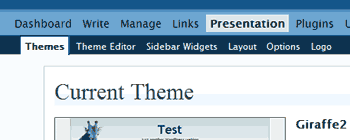
All configuration of the Giraffe2 theme takes place in the Presentation part of the WordPress administration pages. When the Giraffe2 theme is enabled you should see several other options:
Layout
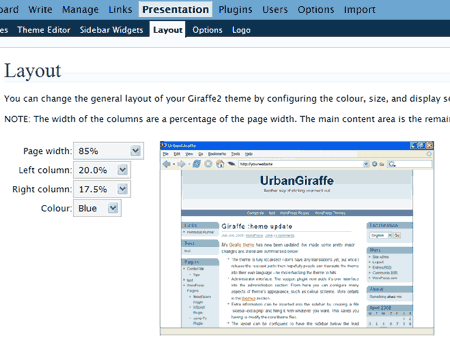
This section contains the basic layout configuration for your theme. From here you can:
- Change page width
- Change left column width (or disable)
- Change right column width (or disable)
- Change theme colour scheme
With a JavaScript enabled browser these changes will cause the preview image to update in real-time. Once you have chosen your desired options you must save.
Note that the middle column will contain all your site’s content, and automatically expands to fill the space left by the two other columns.
Options
Here you can configure the majority of the Giraffe2 options.
- General
- Font
- Bar – enable or disable a bar that contains older content (this option only allowed with 1 right column)
- Curved corners – enable or disable curved corners, where appropriate
- Show author – display a link to the authors page, for each post
- AJAX comments – enable or disable AJAX comments
- Posts
- Lead posts – Number of wide posts, shown at the start of the blog
- Recent posts – Number of recent posts, shown smaller beneath the lead
- Full width lead & single posts – If enabled then lead and single posts are displayed at full page width, with recent posts, comments, and columns shown indented underneath. This gives more emphasis to the content, rather than columns.
- Comments
- Inset items – The number of items to inset underneath the recent and single post. On the front page this contains recent comments, and on single post pages it contains random posts.
- Comment order
- Gravatars – Display Gravatar images next to each comment, if the Gravatar plugin is enabled
- Top menu – change what the top navigation contains:
- Footer – The contents of the footer. Change this to include your name, or whatever other details you want to show
Logo
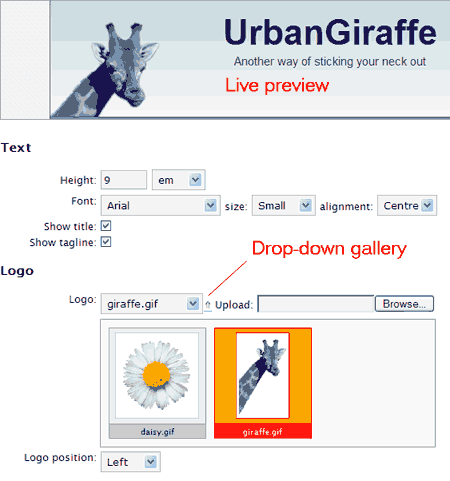
This section is entirely devoted to changing the header and logo at the top of your blog. At the top of the screen is a live-preview area which will show you what your changes will look like, without needing to save them.
You can:
- Change fonts, sizes, heights, and alignments
- Enable or disable the title and tagline
- Upload new logos and backgrounds
A selection of backgrounds, gradients, and logos are included with the theme. A gallery browser is available by pressing the down arrow next to the selection box.
Widgets
Details of how to use widgets can be found at the WordPress Widget website. The Giraffe2 theme contains some special widgets, as well as modifications to existing widgets. You can also define widgets for either (or both) of the two available side columns.
Other
As before, if you have some custom CSS styles, you can define them in styles-extra.css. You can modify any of the theme files, with the exception of options.css, which is generated everytime you save new configuration options.
Images can be aligned in your posts by assigning them the class ‘alignright’, ‘alignleft’, or ‘centered’. This will indent the text appropriatley, as well as giving the image a border.
For example:
<img src=”myimage.jpg” class=”alignright” alt=”text”/>
Localizations
The following localizations exist from the previous Giraffe theme. They still work with Giraffe2, although they may not be 100% translated.
- English – default, no installation required
- Italiano – provided by Stefano Aglietti
- Español – provided by Mario Núñez Molina
- Simplified Chinese (雅虎中国) – provided by Carmen Xu
- Greek – provided by Simos Xenitellis
- Japanese – provided by Tai
- Deutsch – provided by Erik Pöhler, updated by Carsten Thiem
- Nynorsk – provided by Eivind Ødegård
- Dutch – provided by Gerard Konning
- Russian – provided by Doctor Cells
- Malay – provided by Ameyr Pippo
- Slovenian – provided by Vid Kosir
- Esperanto – provided by Kalle Kniivilä
To install a translation, download the .MO file and upload it to the theme directory. You should ensure that the setting of the WPLANG value in the wp-config.php file matches the translation.
The theme contains a .PO so anyone can translate the words using a tool such as poEdit. I would greatly appreciate if translations could be sent to me so that I can include them here for everyone else.
How to include giraffe.mo file in website. I translated giraffe.po into my own language, how can i see my translation
[…] Giraffe2这个wordpress模版的外观,详细使用说明以åŠä¸‹è½½ç‚¹è¿™é‡Œã€‚ […]
I’m looking for a way to keep the left and right sidebars fixed-width and the center content area as a percentage of the rest of the window. I think I’ve read that this is extremely difficult or impossible. I’ve been editing the options.css by hand and I’m close, if it’s possible at all.
[…] I’m trying SiteGround hosting with WordPress and shortly, Drupal. Found a nice easy-to-use theme called Giraffe2, ajax-ified for the blogger. […]
What do I have to change so that when I click an archived post it will show the links and pics from that post…
Thanks! I love this template!!!
Hi John!
Ich really like your Giraffe2-Theme and use ist for my new blog. I like to customize it, but all the plugins and your configuration-tools couldn’t help me.
What I want to do: In my pages and single articles the sidebar is under the text. But I’d like to have the sidebar always right on top, under the header, as in the archive and the categories-pages, but without the FWD/Back-Buttons.
Where do I have to change this? Sorry, I’m really new in blogging, I know HTML, but almost nothing about php and css. I’d be happy, if you could help me.
Thank you in advance and greetings from munich, germany, Bjoern
Hi John,
I have a problem that I hope you can help with. What I want to do, is to change the link color of the links in posts from red to blue. I think that the code that I need to change is in the skin.css?, but I can’t edit the skin.css file. Is there some code that I could put into the stylesheet.css to accomplish my goal? I’ve already tried changing all ‘color: red;’ to ‘color: blue;’ and, as far as I could tell, it did nothing. Hope you can help, Matthew
Another question that you might be able to help me with sometime. I think it should be simpler that the last question. Can height of the Top Menu be changed? If so, how? Thanks, Matthew
links to translations are broken, they point to a 404 page… i need italian translation, can someone tell me where can i find it?
Mathhew, you can put additional CSS into ‘extra.css’, which will override any other CSS. In your case something like ‘a { color: blue; }’ should do the trick.
Bjoern, there is an option in the Giraffe menu to put the sidebar at the top.
Why can’t I download Giraffe2? I’m told website is unavailable or can’t be found?
Download works fine, so may be a connection problem. Try again
Giraffe2 is a terrific product, esp. as I’m a novice in blog design and find the task daunting.
Re layout: I’m not certain what page width means; I see see it defaults to 85%. I notice though that there is a gray area between the sides of the browser window and the borders framing the blog. Can the size of that dead space be altered, say, reduced a little, so as to give a little more room for the content sidebar?
Just to recap from an earlier question — is there any way to remove the “Recent Posts†and “Older Posts†section on the _main_ page (not the widgetised sidebar) so that the main page follows the more conventional format of just having a bunch of posts with PREVIOUS and/or NEXT links at the bottom of the page which take you to a set of earlier or later posts?
Actually the problem is that I can’t add categories at all. I just upgaded two blogs to Wp 2.1.2. One words fine; with the other I have the category problem. The problem then is not with the widget.
Thanks for the help John. However, I can’t create another CSS file, extra.css, since I don’t have access to the installation of WordPress. If you know of something else… Otherwise, I’ll just live with it the way it is. Kinda growing tired of trying to find workarounds for everything.
Thanks again,
Matthew
At first I found the huge quotation mark that prefaces indented paragraphs (blockquote) attractive. But as I wish to indent paragraphs that are not quotations, I’m finding it a hindrance. How do I take out the huge quote mark? Ideally, it would be nice just to do this selectively, but I don’t really need the quote mark, so I guess the simplest solution is just to get rid of it entirely. How do I accomplish this?
Okay, I unzipped/copied the giraffe2 into the proper place in my test server at home, I made sure permissions were set correctly, (well, actually wide open, but it is a test server in my own home), and I went to the admin panel and started playing with stuff to see what all could be done.
The problem I am having is this:
After attempting to upload custom tiles on the logo page not only are the tiles not used, but the logo page itself no longer displays properly?
More precisely:
I clicked the browse button to upload a custom logo, also the browse buttons for logo background and page tile, (at least I think this was what they were called?), when I clicked the button to save my changes the page just went blank. Refreshing it has no effect, and leaving/returning to the page causes it to be redrawn, but only up to the point just before the form used to upload the custom logo image.
Also:
Though the first image appears to have uploaded, it is only a fraction of the proper size and is not a valid image, the second and third image did not upload at all. I am clueless about this, but would like to get it working so that I can maybe use it on my site…
Thanks for any and all help with this.
Hmmm… After a bit of playing around I have found that if I make an *_thumb.png file for the pictures I have uploaded then the admin page starts displaying properly again, though I don’t actually get the thumbnail menu that is depicted in the above instructions, I was also wrong about the file not being fully uploaded, and the second and third files were also uploaded. It turns out that they went into different directories, one in logo, one in background, and one in gradient. I had to make matching *_thumb.png files for the ones in background and gradient, but not the one in logo?
I don’t understand it, but that’s what made it start working again.
Thanks again for any info that may help me figure this out and get it going properly, ’till then I’ll just hand make the graphics, and the matching *_thumb.png files and use ftp or other means to upload them.
I attempted to learn more about css, but I’m as confused as ever. I need advice on modifying the style for blockquotes. I would like to eliminate that big quotation mark that prefaces indented paragraphs, and I want to eliminate the italicization of the indented paragraphs. How do I accomplish all this?
I just loaded giraffe2 into WAMP as I am looking for a three column theme for my site with the option of 1 or 2 columns on pages. It says Giraffe has that option but I don’t see that in my “create pages” area. I don’t even see it on the “layout” page. I assume it is possible to “mix and match?” Thanks for your help.
I am in process of resurrecting an old blog and transferring it to my current site. I would like to use G2 plain with only a colored header of some kind. Still trying to get the graphic together. In the meantime, I am just using the logo background.png with the Title and Tagline right justified. This seems to work ok in firefox and netscape but IE puts and extra break after the Title so it double spaces. How do I get rid of this? Thanks much for your input.
Gerry
RD: The page width refers to the width of the white page. If you set it at 85% then the grey area will be 15%. If you want less grey then make the page width larger. Also, you shouldn’t use blockquote to indent paragraphs. The purpose of blockquote is only to highlight a quoteable section of text, not as a general purpose ‘tab’. If you want to control the indentation on something then you should wrap it inside a
preordivtag.David: You can set the number of recent posts to 0 and that should remove it from the front page. You can also set the WordPress option ‘Show at most’ to 1 (from Admin/Options/Reading)
Vella: The option is in the Presentation menu, not when creating a page.
I am so thrilled to have found a template that I can adjust easily. Thank you so much!
I am having one difficulty though, with Wonky 4. When I or my visitors click to make comments on the current post, the comments are left for the first post I wrote days before. I’m not sure if I messed something up, but I’ve only tweaked the colors and graphics.
Please take a look so you understand: http://jenniferbianco.com/wordpress/
All the comments for May 3rd’s Thursday Thirteen are listed under May 1st’s Lost Blog.
I’d appreciate help figuring out what is wrong. 🙂
Thanks so much!
Ah, I just reread all the above comments and followed Annie’s advice. Hopefully it will work right now. Thanks!
Hello,
I have been playing with this theme for a while and learning wordpress as I go, however just recently when you click the post title on the main index page you get taken to a post page with a correct ttle but the wrong body. Actually, all posts share the same body text (though show the correct title text). I don’t think I changed anything to cause this.. any ideas?
ok, I narrowed it down a bit. When you uncheck “full body width” to make the first post go in the middle column that is when all the links for each category are the same.
There seems to be a little quirk with the top nav bar just under the header. When the browser window is made smaller the navigation disappears and is replaced with a scroll bar (you can see the problem at my blog). Any idea how I might fix this?
Brian: do you have the “recent posts” widget in your left sidebar? If so, moving it to the right sidebar should solve the problem. This seems to be related to the problems referred to above with comments and pages – see John’s comment from October 29.
Hi Brian, Mike is right. If you have a recent posts widget in the left sidebar then it interferes with WordPress and when the theme comes to display the content everything is in a mess. Moving the widget over to the right fixes this (as the theme content has already been displayed)
I’m having some problems with the ‘full body width’ check box. When I uncheck it, all my stories mess up. It looks like it is still displaying the story in the ‘top’ but nothing appears on the page.
For now, I’ve re-enabled it, but if you’d like me to turn it off for a test, let me know.
Great job btw.
Your theme is impressive. I don’t know why your theme (or something derived from it) is not already the default theme of WordPress… just a note: why my old “links” and “archive” don’t work with it? Thank you so much.
I’ve moved the “ol” with class commentlist (comments.php) inside the “if count” to avoid empty “ol” when comments are missing. I can give you the trivial patch if you wish.
I have dowloaded, unzipped and uploaded Giraffe2 but when I go to the
Presentation page I get this error message:
"Broken themes
The following themes are installed but incomplete. Themes must have a stylesheet and a template.
Stylesheet is missing"
I put the files in a directory called "giraffe2" under "themes". Did I need to do something else?
Thankyou
There is nothing else you need to do, Amanda. The directory should look like this:
wp-content/themes/giraffe2/wp-content/themes/giraffe2/style.css
wp-content/themes/giraffe2/index.php
etc
I did install the theme today but got the following issue with it with the display of it.
When i set page width to 100% with both sidebar at 20% and try to view my blog, it’s all compressed in the middle of the screen.
if i set page width to 95% it’s fine.
Gonzo & Casey, that problem is now fixed in version 2.6
Carlo, thanks for the pointer – I’ve included the change in the latest version
My favorite theme! But please help me! If I’m using my own image that I uploaded for my logo, I had to get rid of/leave blank the Weblog title and tagline under general options, otherwise they would write right over my image.
But my problem is I now don’t have any title tag for my blog (at top of browser it just says Mozilla Firefox) so this killed my search engine ranking. So to sum that up, How do I add a title to my blog without it also printing on my page over my image I uploaded?
And is there anyway to add alt tags to my logo image that I uploaded? To also help with search engines…
THANKS!!!
Palmer, the theme doesn’t allow you to do that and you’ll have to modify the theme yourself. For the title you will need to reposition it into a more appropriate place, or stop it appearing (e.g. add h1 { display: none } to style.css)
The logo image is not displayed with an
imgelement so there is no place to add alt text.I got an updated Greek translation, at
http://simos.info/files/giraffe2-el.po
Could you please rename the existing Greek translation from "el_SX.po" to "el.po".
Thanks!
I just installed version 2.6, and I think there is a problem with Top Menu under Options. I have it set to display pages, but it is showing all of my links.
Thanks for the great theme!
Thanks Simos, updated and renamed!
Richard, try 2.6.1
Many thanks John!
Could you also please rename the link on this page, under the section name Localisations? It points to el_SX.po while it should be el.po (thus making it common for both Greece and Cyprus).
I was wondering if I could use this theme to put on my blog as I only plan to blog with the web version?
Any input?
Krish: It’s not clear what you want to do. You need to have a WordPress blog (hosted by youself somewhere, not at wordpress.com), and then you follow the typical procedure to install a new WordPress theme.
Thanks I got my answer, I am only having the blog at wordpress.com
Just installed giraffe2, wonderful! But I get these errors when trying to access the presentation/layout (and also options and logo):
Warning: call_user_func_array() [function.call-user-func-array]: First argumented is expected to be a valid callback, ‘giraffe_layout’ was given in D:\Inetpub\vhosts\internationalbookseller.com\httpdocs\new\wp-includes\plugin.php on line 160
I must admit I understand quite nothing of php, but I’m quite sure I followed the instruction carefully!
Any hint?
Thanks!
Nicola, what version of PHP are you using?
How do you get the archive pages to display full teasers instead of links?
In the Giraffe2 theme you should always get content in archives pages
Not quite sure what you mean. At the moment the Giraffe2 theme displays everything as a one line summary. I want it to display full teaser and picture information on category pages.
In that case you’ll need to put content into the ‘excerpt’ section of your posts. WordPress displays this, if it exists, otherwise it generates it’s own teaser which is almost always not very good.
Huh? I just migrated from Drupal, so all of my content intro info is in the Teaser field, is there a workaround? I really like your theme and would like to use it, but I can’t if I can’t get it to display category pages (like it does the home page)
Hi Michelle,
I’m not sure what the teaser field is. WordPress has two text areas, the content and the excerpt (both available from the edit page). In the Giraffe theme it uses the excerpt on category pages. If a particular post has no excerpt then WordPress will generate it by taking a ‘guess’ at what it thinks the excerpt should be.
great themes, thanks.
The download link doesn’t work anymore.
Hi, I am not getting the options in administrator, what can be wrong? When I click presentation I only get "Themes", "Widgets" and "Theme Editor".
Are you using WP 2 ? Do you have the Giraffe theme running?
Hi John, great theme; wonderful with all the options 🙂
Would it be possible to have both sidebars on the same side?
WP 2.3.2 with multiuser.
A couple of what seems like bugs:
– When I go to widgets or theme editor with the theme installed the additional menu options for the plugin disappear.
– The sidebars stay at the bottom of the post…
(installed at a non public blog so write if you want to see how it appears)
-kjell
The theme hasn’t been tested at all with WPMU so I’m not surprised there are issues. Thanks for letting me know about them.
Hi John,
The only missing feature to Giraffe2 is the possibility to have a rotating header image (it should change by itself anytime you connect to the site). My idea is to be able to define a directory fot the header images, so G2 can pick one randomly at any login.
Are you thinking to ad -maybe- this, or other features, to G2?
Ciao, Max.
First, thank you, John, for Giraffe. I love the flexibility – you did an amazing job!
My question is I think a weird one. Since I have applied Giraffe2, when I go to Manage: Pages: Edit I cannot make changes in the edit box of the screen. Is this something other people have experienced?
Also, if you decide to share your Guangzou theme, let me know!!! It’s beautiful.
I want to thank you for the wonky edition too. It’s the best I’ve found.But like everyone else I have a question too (that I hope isn’t too basic) and I bet someone has the answer 🙂
When I make static Pages I get the same content no matter what content I put on the page. Is there a default page somewhere, or a setting that needs to be changed to be able to make static Pages?
I tested to see if it was theme related (by changing the theme) and it definitely is (Static Pages work fine with the other theme)
Miss Media, I’ve not heard anyone report that problem and there shouldn’t be anything in the theme with the power to have such an effect! It’s possible that a combination of another plugin the giraffe theme may be the problem.
Dave, what do you mean by static pages? Are you referring to the ‘front page display static page’, or a WordPress page (as in, the option next to a WordPress post)? Giraffe should work with both without any modifications.
Mac, I’ll put that onto my list for a future version!
[…] Website […]
Hello John,
Future version: what about a rolling header like the on in http://www.alpi365.it/ . COOL!
[…] Website […]
[…] Website […]
Hi,
thanks for a lovely theme.
It seems that I have exactly the same problem as Abimanyu
http://urbangiraffe.com/themes/giraffe2/#comment-3207
and cannot change the logo and layout, with these strange
error messages appearing, except that I use WP 2.3.2. and Urban Giraffe 2 wonky4
Thank you very much for your theme and help.
P
PFCS, I’ve created a bug report for your problem
[…] Website […]
Fantastic theme, and I really appreciate the work you’ve put into it.
I have a question for you regarding having the “full length single and lead post” turned on. It looks great in that mode, and is how I would prefer my blog to appear.
Unfortunately, when I visit any other page (such as an “About Us” page)… the two sidebars appear below that article. On longer articles this gives it a rather awkward look.
Is there a way to designate a few pages as to NOT have that setting?
Again, thank you for your work, and your help.
-Chuck
I love your theme! I have been using it for 3 years now. I just wanted to say thanks.
[…] mes lectures s’arrêtent au code source de WordPress ou de certains thèmes comme Sandbox, Giraffe2 ou K2.Ces lectures sont toujours extrêmement […]
dear john
Many thanks for this wondrful theme, Howerver i have this massage when instll it
Warning: include(../wp-content/themes/giraffe2/admin/admin.php) [function.include]: failed to open stream: No such file or directory in /home/content/h/a/j/hajerim/html/wp-content/themes/giraffe2/giraffe2/functions.php on line 358
Warning: include() [function.include]: Failed opening ‘../wp-content/themes/giraffe2/admin/admin.php’ for inclusion (include_path=’.:/usr/local/php5/lib/php’) in /home/content/h/a/j/hajerim/html/wp-content/themes/giraffe2/giraffe2/functions.php on line 358
I am having a problem where the permalink for each post changes the header but not the body of the post. And it all defaults to a single post when viewed. Even my pages.
Take a look and if you have a chance, maybe you can see what’s going on?
Fixed. Never mind.
Since i updated my local WordPress Version 2.6 to the new Version 2.7.1 my left navigation column moved to the top.
Do you know this problem and have an idea how i can fix this ?
Greetings,
trady
Hi,
i install the giraffe theme on wordpress mu 2.7 but i have some problems with header of my sites.
The color i choose in the appearence changes and is not the same as the rest of the page. I try to configure all my blogs to get well. But the bug still exists.
Can you help me please ?
Thanks
Philippe
Hi, just two small comments here: the tool poEdit is located at http://www.poedit.net and not at http://www.poedit.org.
Also, on this page, I practically doesn’t see at all the menu at the top (under the logo). Maybe it’s because I’m displaying my screen at 120 dpi instead of 96 dpi.
Thanks
Sylvain Lafontaine
Some years ago I installed the giraffe2 theme, when I was using WordPress 2.1.2. I haven’t updated my blog for a couple of years. I just upgraded my WordPress installation on my web site to version 3.0.1. The blog functions fine, except that my two link lists on the sidebar column don’t show up on my blog, though they remain in the database. I’m wondering if I made a mistake in backing up or deleting files from previous versions of WordPress, but presumably there’s a way to getting those link lists to appear again.
It looks like what I needed to do was to rearrange the widgets on WordPress. The upgrade moved all the widgets to the left column, which messed up the display. Moving them all to the right column made all the elements reappear.
I used this theme many moons ago and loved it. I might have to give it another whirl soon because I #%^$# hate every new theme I’ve tried. 😀