
User Permissions Plugin

Nov 1, 2006 | Tags: , , | Written by Administrator

User Permissions is a plugin that takes the simple WordPress permissions models one step further and allows you to assign permissions to specific posts that restrict users or roles from reading or editing it.

To summarize:

  • Restrict reading or writing of post or page according to the user's role (i.e. prevent non-registered users reading a post)
  • Allow specific users to read or write a post or page
  • Permissions are assigned directly inside the post itself - there is no additional interface
  • Fully localized

This plugin works very well with Red Alt's excellent Role Manager plugin. If you are interested in using permissions then you will probably be interested in that too.

Installation

The plugin is simple to install:

  1. Download user-permissions.zip
  2. Unzip
  3. Upload user-permissions directory to your /wp-content/plugins directory

You can find full details of installing a plugin on the plugin installation page.

Usage

Using the User Permissions is very simple. When you are editing a post or page a new form will appear to the right of the content:
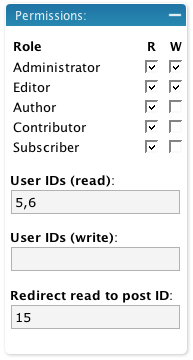
Edit Box

When a role is enabled, all other roles are restricted. That is, if you give the administrator read and write access to a post then all other roles that are not enabled are restricted. If no roles are restricted then access is determined by the WordPress defaults.

The user section allows you to additionally specify user IDs (comma-separated) that are specifically allowed access. Any user listed here is allowed access, even if they are otherwise denied by their role.

If you restrict read access to a post then it is removed from the home page, search results, and archives, for anyone who does not have permissions. You can additionally define a post ID which will a restricted user will be redirected to should they attempt to view the post.

An administrator cannot be restricted.

Support

Please direct all support questions to the User Permissions support forum. Any support questions left on this page may not be answered.

Bugs & New Features

A full list of all bugs can be found in the User Permissions issue tracker.

A full list of all requested features can be found in the User Permissions feature tracker.

Share This

Comments (page 6 of 8)

  1. John (author) :

    Mar 16, 2008 12:26 pm

    Write permissions on pages is now fixed.

  2. TimOOn :

    Mar 16, 2008 7:53 am

    Thanks Giraffe for this plugin ! After spending hours to find one who fits for my registered users needs, yours is exactly the perfect one ! Lots of plugins don'nt work good with latest versions of WP or make trouble when accessing "registered" page. I hope you will follow this plugin and make new update with new features !
    Nice Job.

  3. Foliovision :

    Mar 3, 2008 5:58 am

    Same problem we are having Jeromy.

    Apparently John is working on it. In the meantime, we are rolling our own, but it's based on some edit templates we are using already.

  4. author
    Jeromy :

    Mar 3, 2008 12:26 am

    I was mistaken - it's not working at all. Activating it and setting both R/W permissions removes all pages from non-admin users no matter what. I'm running WP 2.3.3 with php5.

  5. author
    Jeromy :

    Mar 2, 2008 4:37 pm

    Great plugin man! One problem, I want to restrict a parent page from being edited, but allow all the subpages. Right now, restricting a page also restricts it's subpages. Or am I missing something?

  6. Jeanette Cates :

    Feb 5, 2008 12:45 am

    You said an admininstrator cannot be restricted.

    I limited a post to Module02 read only. Now I can see it when I log in as Module02 user - but cannot see it as Admin and cannot edit it as Admin.

    Any cure for "losing" a post?

    Thanks - this looks to be working fine with 2.3.2 so far.

    Jeanette

  7. Jeanette Cates :

    Feb 4, 2008 10:51 pm

    Support forum is not working.

    Can you give me a timeline for compatibility with 2.3.2?

    Thanks!

  8. Foliovision :

    Jan 25, 2008 4:43 pm

    Hello John,

    I hope you are well.

    This plugin looks perfect these days. The interface looks great now.

    [bug report moved here]

    In the meantime, we'd love to nail that one down so that our clients can't break it.

    Have a good weekend, Alec

  9. John (author) :

    Jan 10, 2008 2:23 am

    Daniel, if you don't assign any read permissions to a post then non-subscribers can read it

    Mike, what version of WP are you using? Do you have any other plugins installed that might be interfering with this one?

    Walid, you may have some luck using this plugin to remove read capability from the posts, but otherwise set them to published. You'll then need to modify your theme so that only you can see the category.

  10. author
    walid :

    Jan 5, 2008 6:16 am

    Hi,

    Thanks for your plugin! It seems to be exactly what I have been looking for.
    There is one issue with the categories:
    I have a lot of private posts in many categories. So nobody can“t see the links to these categories.
    But I would like to see them myself as soon as I log in. But Even as admin I only see links to the three categories containing published posts. I assume this is because the posts are "private" and I would need to publish them in wordpress in order to make
    wp_list_cats('sort_column=name&optioncount=1&hierarchical=0');
    display all the categories.
    But doing so will open the posts to everyone.
    Is there a way around this?

    Many thanks,
    Walid

Home | Software | Terms & Conditions | Sitemap | John Godley © 2008