
User Permissions Plugin

Nov 1, 2006 | Tags: , , | Written by Administrator

User Permissions is a plugin that takes the simple WordPress permissions models one step further and allows you to assign permissions to specific posts that restrict users or roles from reading or editing it.

To summarize:

  • Restrict reading or writing of post or page according to the user's role (i.e. prevent non-registered users reading a post)
  • Allow specific users to read or write a post or page
  • Permissions are assigned directly inside the post itself - there is no additional interface
  • Fully localized

This plugin works very well with Red Alt's excellent Role Manager plugin. If you are interested in using permissions then you will probably be interested in that too.

Installation

The plugin is simple to install:

  1. Download user-permissions.zip
  2. Unzip
  3. Upload user-permissions directory to your /wp-content/plugins directory

You can find full details of installing a plugin on the plugin installation page.

Usage

Using the User Permissions is very simple. When you are editing a post or page a new form will appear to the right of the content:
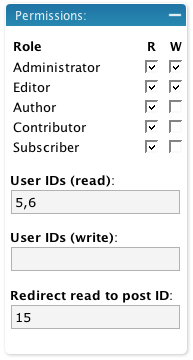
Edit Box

When a role is enabled, all other roles are restricted. That is, if you give the administrator read and write access to a post then all other roles that are not enabled are restricted. If no roles are restricted then access is determined by the WordPress defaults.

The user section allows you to additionally specify user IDs (comma-separated) that are specifically allowed access. Any user listed here is allowed access, even if they are otherwise denied by their role.

If you restrict read access to a post then it is removed from the home page, search results, and archives, for anyone who does not have permissions. You can additionally define a post ID which will a restricted user will be redirected to should they attempt to view the post.

An administrator cannot be restricted.

Support

Please direct all support questions to the User Permissions support forum. Any support questions left on this page may not be answered.

Bugs & New Features

A full list of all bugs can be found in the User Permissions issue tracker.

A full list of all requested features can be found in the User Permissions feature tracker.

Share This

Comments (page 5 of 8)

  1. author
    Mike Peasley :

    Jan 5, 2008 1:36 am

    Hi, This plugin is exactly what I need,

    I have not tried to edit it in any way, but I can't get it to work.

    When I am editing a post or page a new form does not appear to the right of the content at all.

    I have role-Manager plugin installed and working.

  2. author
    Daniel :

    Jan 4, 2008 3:16 pm

    Great plugin... But now none of my pages can be seen by unregistered users.

    How do you set the permissions of normal visitors? If I allow every role to read a certain post/page, no normal visitors can access it. I've tried everything with the role manager plugin, but there is no way to specify the role of a non-subscriber. No one can view any of my pages! =S

    Thanks for any help,
    Daniel.

  3. John (author) :

    Dec 19, 2007 12:32 am

    Steve, I can't recreate that problem. Do you have any more details?

    Dave, I also can't recreate this problem. I am using the default theme with the recent posts widget and everything is displayed as expected. It's possible your problem is caused by another plugin or something in your theme. You could try changing theme, or disabling other plugins.

  4. Dave :

    Dec 14, 2007 2:56 am

    Bug found:

    Flagged a post to be restricted to R/W by Admin and Editor and to be R only by Author. Guest, Subscriber and Contributer have no access. UserIDs (read and write) ar left blank.

    If the "Recent Posts" widget is in a sidebar it will display the contect in the sidebar(s) until it get's to th "Recent Posts" widget then ends in an error rather then displaying the titles of the any of the recents posts and also does not display any content in your target frame 9until you navigate to a different page or category. Remove the "Recent Posts" widget from your Theme and everything works.

    We are displaying a Static home Page for a welcome.

    WordPress 2.3.1, mySQL 4.0.18-nt, PHP 4.4.2

  5. author
    stephan35 :

    Dec 6, 2007 1:07 pm

    Hi,

    Is it possible to set all right to try by default / as défault value ?????

    Thanks

    (french user)

  6. author
    alias :

    Nov 12, 2007 4:40 pm

    Using Role Manager with this is major over-kill, not to mention using that plugin can mess up default permissions, I would like to see the User-Permissions be merged with the Group Restriction which is outstanding only it doesnt protect posts, just static pages but does it quite well.

    Personally I absoutely hate the wordpress user setup ;)) would be nice to see this plugin not rely on the built in groups but instead have the ability to create new groups similiar to the group restriction plugin. How frustrating it is to have two great plugins but both missing what the other has Doh!!

  7. Steve :

    Nov 9, 2007 3:56 pm

    I've noticed a major bug. If the last entry has permissions applied you'll get a 404 until a user is logged. As soon as turn off all on the last entry, all's well.

  8. author
    Guy :

    Nov 9, 2007 1:46 pm

    Hi

    if you were struggling with the issue of implementing pages that you wanted to restrict viewing access to, primarilly for non-subscribers of any sort, this worked for me:
    1) Download Role Manager : http://www.im-web-gefunden.de/wordpress-plugins/role-manager/
    2) Install & Activate plugin
    3) Under users set up a new role called Non Subscribers
    4) Under their capabilities don't select anything but just alllow role to be built
    5) Set up a new page or sub-page ( I wanted to restrict reading of a sub-page)
    6) In the permissions box select the permissions checking R or W against all the various roles accept for Non-Subscriber
    7) Insert post to link to if someone clicks on the page - make the post friendly 8) Publish the page

    and voila, although the sub-page heading maybe visible, if someone clicks on it that doesn't meet your criteria they can't see it. The sub-page can be hidden as well using http://codex.wordpress.org/Template_Tags/wp_list_pages#Exclude_Pages_from_List

    Now working on posts

  9. John (author) :

    Nov 7, 2007 9:30 pm

    Mikko, currently there is no way to set a default set of permissions, nor a default redirection. I'll add this on to the list of new features for the future.

  10. Mikko :

    Oct 30, 2007 2:09 am

    Just what I needed. Back to Ming's earlier question, more granularly - if I wanted to have this (redirection to the registration page) as the default behaviour, what would I need to change in the code? Also, how would I set default access levels for posts in the code (say - all as 'read', and 'write' up from Editor-level)?

    Much appreciated!

Home | Software | Terms & Conditions | Sitemap | John Godley © 2008