
User Permissions Plugin

Nov 1, 2006 | Tags: , , | Written by Administrator

User Permissions is a plugin that takes the simple WordPress permissions models one step further and allows you to assign permissions to specific posts that restrict users or roles from reading or editing it.

To summarize:

  • Restrict reading or writing of post or page according to the user's role (i.e. prevent non-registered users reading a post)
  • Allow specific users to read or write a post or page
  • Permissions are assigned directly inside the post itself - there is no additional interface
  • Fully localized

This plugin works very well with Red Alt's excellent Role Manager plugin. If you are interested in using permissions then you will probably be interested in that too.

Installation

The plugin is simple to install:

  1. Download user-permissions.zip
  2. Unzip
  3. Upload user-permissions directory to your /wp-content/plugins directory

You can find full details of installing a plugin on the plugin installation page.

Usage

Using the User Permissions is very simple. When you are editing a post or page a new form will appear to the right of the content:
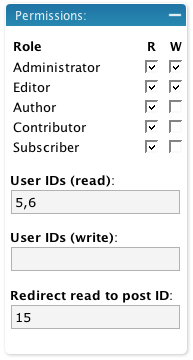
Edit Box

When a role is enabled, all other roles are restricted. That is, if you give the administrator read and write access to a post then all other roles that are not enabled are restricted. If no roles are restricted then access is determined by the WordPress defaults.

The user section allows you to additionally specify user IDs (comma-separated) that are specifically allowed access. Any user listed here is allowed access, even if they are otherwise denied by their role.

If you restrict read access to a post then it is removed from the home page, search results, and archives, for anyone who does not have permissions. You can additionally define a post ID which will a restricted user will be redirected to should they attempt to view the post.

An administrator cannot be restricted.

Support

Please direct all support questions to the User Permissions support forum. Any support questions left on this page may not be answered.

Bugs & New Features

A full list of all bugs can be found in the User Permissions issue tracker.

A full list of all requested features can be found in the User Permissions feature tracker.

Share This

Comments (page 4 of 8)

  1. John (author) :

    Oct 23, 2007 10:20 pm

    Alias, a role is effectively a group and you should be able to implement most grouping just by creating your own roles.

    Chris, send me the login and I'll have a look

  2. Chris Chaudruc :

    Oct 18, 2007 3:25 pm

    Hi,
    I have installed your plugin on WP 2.3 and it seems to be set up but I cannot get it to restrict editing of specific posts. I want to have one person assigned to edit one post and another assigned to edit another post. But they can both view / edit the others posts under manage.

    I have admin checked as 'W' write. The two users are 'editors' and I have nothing checked there. Then I have their respective USERID entered into the 'User IDs (write):' box below.

    When I login under their accounts I can still see the other accounts post for editing.

    I can send you login / pw if you want to check it out.

    Maybe I am not implementing it correctly?

    Thanks for your help - this seems to be a very useful plugin.

    Regards,
    Chris C.

  3. author
    alias :

    Oct 17, 2007 7:52 pm

    Any thoughts on making this plugin like the group restriction plugin ? i recently got rid of role manager and found that with group restriction, there's no need to use the user permissions plugin, but i like your plugin better unfortunately it doesn't create user groups :) would be nice to combine al the best features from userpermissions, disclose secret and group restriction since they all are very similiar

  4. John (author) :

    Oct 8, 2007 2:54 am

    Alias, the redirect section is needed so that you can determine what happens when someone does try to access a restricted page (for example, redirect them to a login page).

    LostInNetwork, you can create any role you want using the Role Manager plugin (detailed above).

    Ming, enter the login page URL in the 'redirect' field

    Martin, what permissions did you create to restrict the administrator?

  5. author
    alias :

    Oct 5, 2007 3:24 pm

    I dont understanad the redirect section, why would one need this when the restricted pages are not viewable by specified user, if they can see the menu then there's no need to worry about them attempting to access it, this plugins makes the page visible only to the user defined

  6. author
    ming :

    Sep 26, 2007 5:45 pm

    hi, thank u your for great plugin...i wonder how can change the page redirection to login page when user click on my restricted page...or just to put message "This page required user login" instead of redirect page to my homepage...thank u...=)

  7. author
    LostInNetwork :

    Sep 26, 2007 2:19 am

    But it lacks non-subscriber!

  8. author
    martin :

    Sep 25, 2007 12:35 pm

    First of all, very nice plugin, that's exactly what I was looking for. Setting permissions works fine, but it seems that an administrator is still restricted when the role is not enabled.
    I'm using Wordpress 2.2.2.

  9. John (author) :

    Sep 17, 2007 12:57 am

    Read permissions problem now fixed

  10. Eric :

    Sep 14, 2007 3:34 pm

    Like the last poster, the plugin doesn't seem to work at all. It is activated, and I can set permissions and they are retained with a page or post, but even if I am not logged at all, I can still see and view pages / posts that are marked restricted as read for subscriber, etc...

Home | Software | Terms & Conditions | Sitemap | John Godley © 2008