
User Permissions Plugin

Nov 1, 2006 | Tags: , , | Written by Administrator

User Permissions is a plugin that takes the simple WordPress permissions models one step further and allows you to assign permissions to specific posts that restrict users or roles from reading or editing it.

To summarize:

  • Restrict reading or writing of post or page according to the user's role (i.e. prevent non-registered users reading a post)
  • Allow specific users to read or write a post or page
  • Permissions are assigned directly inside the post itself - there is no additional interface
  • Fully localized

This plugin works very well with Red Alt's excellent Role Manager plugin. If you are interested in using permissions then you will probably be interested in that too.

Installation

The plugin is simple to install:

  1. Download user-permissions.zip
  2. Unzip
  3. Upload user-permissions directory to your /wp-content/plugins directory

You can find full details of installing a plugin on the plugin installation page.

Usage

Using the User Permissions is very simple. When you are editing a post or page a new form will appear to the right of the content:
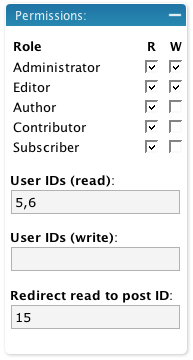
Edit Box

When a role is enabled, all other roles are restricted. That is, if you give the administrator read and write access to a post then all other roles that are not enabled are restricted. If no roles are restricted then access is determined by the WordPress defaults.

The user section allows you to additionally specify user IDs (comma-separated) that are specifically allowed access. Any user listed here is allowed access, even if they are otherwise denied by their role.

If you restrict read access to a post then it is removed from the home page, search results, and archives, for anyone who does not have permissions. You can additionally define a post ID which will a restricted user will be redirected to should they attempt to view the post.

An administrator cannot be restricted.

Support

Please direct all support questions to the User Permissions support forum. Any support questions left on this page may not be answered.

Bugs & New Features

Date Current outstanding bugs Status
23 Jul 2008 Error when going to manage pages

A full list of all bugs can be found in the User Permissions issue tracker.

A full list of all requested features can be found in the User Permissions feature tracker.

Share This

Comments (page 3 of 8)

  1. author
    alias :

    Sep 8, 2007 9:01 am

    tested the 05 version and none of the permissions are working, any page with a permission selected can be access publicly

  2. author
    alias :

    Sep 8, 2007 8:46 am

    I'm curious as to the difference between User-Permissions and Disclose-Secret and if we are using User-Permissions do we even need Disclose-Secret ?

  3. Richard Friendlich :

    Sep 3, 2007 10:52 pm

    Sent! Please let me know if you don't get it.

  4. John (author) :

    Sep 3, 2007 9:21 pm

    Rich,

    I've tested and retested version 0.5 but everything works fine for me. If you have a sandbox then send the details in an email and I'll take a look at what's happening

  5. Rich :

    Aug 28, 2007 1:11 pm

    Marcus- I tried your changes to the previous version of user-permissions but did not see any change in performance. I tried
    $results = unserialize($row->meta_value);
    $results = unserialize($results);
    return $results;
    both with and without surrounding {} (I assumed you meant to include them).

    John- version .5 does not behave correctly. The only settings that took were to supply a user with both read and write. However, the result of this operation was to block ALL users from reading or editing the post... including the admin. I can give you access to my sandbox if you would like to see/test for yourself.

    WP version 2.2.2
    PHP version 4.4.7
    MySQL version 5.0.27-standard

  6. John (author) :

    Aug 27, 2007 12:12 am

    Version 0.5 has been released which fixes all known problems and adds the ability to restrict reading of posts. Note that the way the plugin works has changed. Existing permissions will be automatically migrated

  7. Marcus :

    Aug 24, 2007 4:30 pm

    Alright, I think I've fixed it. Still have to test to make sure the actual restrictions work, but I can see the form and the data saves correctly!

    Fix #1 (aka why the sidebar box wouldn't show)
    Line 111: Remove the space between can_restrict and the () like so:
    if (Permissions::can_restrict() && ($authors = get_editable_authors ($current_user->id)))

    Fix #2 (aka why the data doesn't seem to save - it's actually saving but it's being read back incorrectly)
    Line 190 Replace this:
    return unserialize ($row->meta_value);
    With this:
    $results = unserialize($row->meta_value);
    $results = unserialize($results);
    return $results;

    That should do it! Now to make sure the plugin actually does it's job!

  8. Rich :

    Aug 24, 2007 3:58 pm

    Marcus. You can contact me through http://wordpress.obeidlab.com/contact-us . I'll let you see what is going on with our site... and maybe even help with a solution.

  9. author
    Marcus :

    Aug 24, 2007 3:50 pm

    I seem to have the opposite problem, I can't see the fields, but it is creating a _permissions metakey and metavalue in the postmeta table, so it definitely can save data. I'm going to try and figure out how to fix it up so we can use it, I'll let you know if I get anywhere.

  10. Rich :

    Aug 24, 2007 1:20 pm

    Marcus... I think this project is dead. While the plugin module appeared for me (on the actual 'post edit' page), the plugin isn't attached to any database. So I don't know how it is expected to work.

    In both WP2.2.1 and 2.2.1 I can check the fields, but without a table, check selections are obviously not remembered.

    I welcome anyone to show me the error in my ways... because I'd really like it to work.

Leave a comment


XHTML: You can use these tags: <a href="" title=""> <abbr title=""> <acronym title=""> <b> <blockquote cite=""> <cite> <code> <del datetime=""> <em> <i> <q cite=""> <strike> <strong>

Home | Software | Terms & Conditions | Sitemap | John Godley © 2008
Close
E-mail It