
| Download: | Tidy Up |
|---|---|
| Version: | 1.3 |
| Supports: | WordPress 2.5-2.9.2 |
| Other: | WordPress.org | SVN |
| Support: | This plugin is no longer actively maintained |
This plugin provides the ability to run HTML Tidy through all your posts, pages, and comments, generating a report on just how dirty your code is. Should you want to, the plugin can also automatically update your database with the cleansed data.
If you are unaware of its existence, HTML Tidy is a wonderful little tool that is embedded into almost everything nowadays. Its purpose is to take potentially malformed HTML code and produce clean XHTML.
Tidy Up does not require any special PHP configuration. As long as you have the ability to run executables then the plugin will work. Currently the plugin contains Tidy executables for:
- Linux
- Windows
- Mac OS X
- FreeBSD
It is likely that your web host runs one of these.
Installation
Installation is just like any WordPress plugin:
- Download Tidy Up
- Unzip
- Upload to
/wp-content/pluginson your server - Activate the plugin
- Give tidy.linux, tidy.osx, tidy.exe, or tidy.freebsd execute permissions for the web server (generally means giving ‘x’ permission to group/other)
- Use Tidy Up from the Manage/Tidy Up menu
You can find full details of installing a plugin on the plugin installation page.
Usage
To produce a report of all your posts or comments you need to go to the Tidy Up page of the Manage menu. Here you will be presented with the following interface:
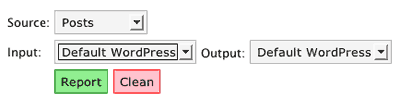
Choose your source (posts/pages or comments) and select your input and output formats. Then press either the ‘Report’ or ‘Clean’ button – report will just generate a report without making any modifications, while clean will save all modifications back to the database.
Input Format
When you write a post in WordPress you generally don’t need to think about HTML formatting. You type your text, enter a blank line for a new paragraph, and write as you would normally. WordPress, being the clever chappy that it is, is aware of this and will automatically reformat your writing when it comes to viewing your blog, and everything displays correctly.
What’s happening behind the scenes is that WordPress is adding HTML paragraph markers around your sections of plain text. While this is great for you (no need to think about HTML), it is a nuisance for am HTML verifier.
To get around this, the plugin allows you to specify the input and output formats. The input format is the current format of your data:
- Default WordPress – Posts are stored without HTML paragraph formatting
- Raw XHTML – Posts are stored with HTML paragraph formatting
Output Format
As an extension to the input format, this allows you to tell the plugin whether you want the cleaned code to be stored with HTML paragraph formatting or without.
Why bother with all this input/output formatting malarky?
Flexibility. You may want your data to be cleaned, but you want it stored in the paragraph-less WordPress format. You may want to convert from HTML paragraphs into WordPress format. It’s up to you.
Tidy Up Single Post
As well as bulk-reporting on all posts, you can individually clean a single post. When the plugin is enabled, a new column will appear in the Post management screen. Clicking on this will produce a Tidy report on that post, with the capability of then saving it back to the database.
Report
A report will contain entries for each post that was checked:
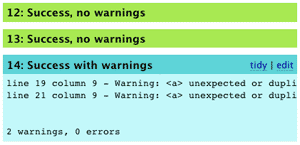
Clicking on ‘tidy’ will clean that item (saving to the database). Clicking on ‘edit’ will open an edit box above the messages where you can update the text directly.
Configuration
Some people may want their data cleansed in different ways. HTML Tidy has many configuration options, and these are provided to you through two files located in the plugin directory:
wordpress.config– Tidy options when converting to WordPress formatxhtml.config– Tidy options when converting to XHTML format
You are free to modify these according to your own preferences and the HTML Tidy documentation.
Console Version
Due to the nature of the plugin it’s possible that a scan of your HTML will result in a PHP timeout error. If your webserver is so configured then there is now around this other than using the command line version of the plugin. For this you will need SSH access to your web account:
- Change to the
/wp-content/plugins/tidy-updirectory - Run
php tidy_console.php source input [output] >report.html
Where source is:
- posts
- comments
And input is:
wordpressxhtml
output is optional and will cause the cleaned data to be written back to the database in the format specified (‘wordpress’ or ‘xhtml’).
The console version will output an HTML report to the screen. If you want, you can redirect this to a file (>report.html), and can then view it in your web browser at:
http://yoursite.com/wp-content/plugins/tidy-up/report.html
For example:
php tidy_console.php wordpress xhtml >report.html
Warning
I will accept no responsibility for any damage caused to your data. It is possible that the cleansed HTML code breaks existing formatting, corrupts your posts, or starts a feedback loop leading to the breakdown of the universe. You have been warned.
Support & Bugs
This plugin is no longer actively maintained