
| Download: | Tidy Up |
|---|---|
| Version: | 1.3 |
| Supports: | WordPress 2.5-2.9.2 |
| Other: | WordPress.org | SVN |
| Support: | This plugin is no longer actively maintained |
This plugin provides the ability to run HTML Tidy through all your posts, pages, and comments, generating a report on just how dirty your code is. Should you want to, the plugin can also automatically update your database with the cleansed data.
If you are unaware of its existence, HTML Tidy is a wonderful little tool that is embedded into almost everything nowadays. Its purpose is to take potentially malformed HTML code and produce clean XHTML.
Tidy Up does not require any special PHP configuration. As long as you have the ability to run executables then the plugin will work. Currently the plugin contains Tidy executables for:
- Linux
- Windows
- Mac OS X
- FreeBSD
It is likely that your web host runs one of these.
Installation
Installation is just like any WordPress plugin:
- Download Tidy Up
- Unzip
- Upload to
/wp-content/pluginson your server - Activate the plugin
- Give tidy.linux, tidy.osx, tidy.exe, or tidy.freebsd execute permissions for the web server (generally means giving ‘x’ permission to group/other)
- Use Tidy Up from the Manage/Tidy Up menu
You can find full details of installing a plugin on the plugin installation page.
Usage
To produce a report of all your posts or comments you need to go to the Tidy Up page of the Manage menu. Here you will be presented with the following interface:
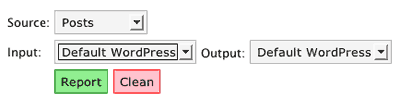
Choose your source (posts/pages or comments) and select your input and output formats. Then press either the ‘Report’ or ‘Clean’ button – report will just generate a report without making any modifications, while clean will save all modifications back to the database.
Input Format
When you write a post in WordPress you generally don’t need to think about HTML formatting. You type your text, enter a blank line for a new paragraph, and write as you would normally. WordPress, being the clever chappy that it is, is aware of this and will automatically reformat your writing when it comes to viewing your blog, and everything displays correctly.
What’s happening behind the scenes is that WordPress is adding HTML paragraph markers around your sections of plain text. While this is great for you (no need to think about HTML), it is a nuisance for am HTML verifier.
To get around this, the plugin allows you to specify the input and output formats. The input format is the current format of your data:
- Default WordPress – Posts are stored without HTML paragraph formatting
- Raw XHTML – Posts are stored with HTML paragraph formatting
Output Format
As an extension to the input format, this allows you to tell the plugin whether you want the cleaned code to be stored with HTML paragraph formatting or without.
Why bother with all this input/output formatting malarky?
Flexibility. You may want your data to be cleaned, but you want it stored in the paragraph-less WordPress format. You may want to convert from HTML paragraphs into WordPress format. It’s up to you.
Tidy Up Single Post
As well as bulk-reporting on all posts, you can individually clean a single post. When the plugin is enabled, a new column will appear in the Post management screen. Clicking on this will produce a Tidy report on that post, with the capability of then saving it back to the database.
Report
A report will contain entries for each post that was checked:
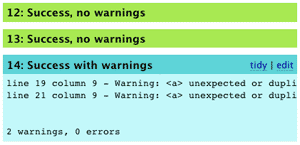
Clicking on ‘tidy’ will clean that item (saving to the database). Clicking on ‘edit’ will open an edit box above the messages where you can update the text directly.
Configuration
Some people may want their data cleansed in different ways. HTML Tidy has many configuration options, and these are provided to you through two files located in the plugin directory:
wordpress.config– Tidy options when converting to WordPress formatxhtml.config– Tidy options when converting to XHTML format
You are free to modify these according to your own preferences and the HTML Tidy documentation.
Console Version
Due to the nature of the plugin it’s possible that a scan of your HTML will result in a PHP timeout error. If your webserver is so configured then there is now around this other than using the command line version of the plugin. For this you will need SSH access to your web account:
- Change to the
/wp-content/plugins/tidy-updirectory - Run
php tidy_console.php source input [output] >report.html
Where source is:
- posts
- comments
And input is:
wordpressxhtml
output is optional and will cause the cleaned data to be written back to the database in the format specified (‘wordpress’ or ‘xhtml’).
The console version will output an HTML report to the screen. If you want, you can redirect this to a file (>report.html), and can then view it in your web browser at:
http://yoursite.com/wp-content/plugins/tidy-up/report.html
For example:
php tidy_console.php wordpress xhtml >report.html
Warning
I will accept no responsibility for any damage caused to your data. It is possible that the cleansed HTML code breaks existing formatting, corrupts your posts, or starts a feedback loop leading to the breakdown of the universe. You have been warned.
Support & Bugs
This plugin is no longer actively maintained
[…] æ’件页é¢: http://www.urbangiraffe.com/plugins/tidy-up/ […]
In the instructions you might want to add them to change the file permissions appropriately. I had to chmod the files before any reports could be generated.
Thanks for the plugin 🙂
This plugin is excellent.
One problem I have is with the ampersand charactor & &, if I have a properly escaped ampersand in the xhtml of the post, then tidy throws an error, but the w3 validator does not (as it is correct). If I ask tidy to clean the post, it does not appear to change anything, and then does not show an error. However, if I edit the post, the error returns.
Is anyone else seeing behaviour like this?
Further to what I wrote, turning off rich text editing solves the problem.
aJ: You are correct. Documentation changed
David: Curious. Looks like WordPress is somehow changing things with the rich text editing. I’ll look into it
John,
A couple of other (pretty unimportant points). The CSS refers to a folder tidy-up rather than tidy_up (I renamed the folder to avoid 404 errors in my stats) and the link on the plugin page links to this page as http://www.urbangiraffe.com/plugins/tidy_up/ rather than http://www.urbangiraffe.com/plugins/tidy-up/. You may want to check this.
Cheers. The plugin works great.
Great stuff. Very useful. I used to to clean up a client site from the invalid mark-up. It’d be great if you could run it on the excerpts too!
Thanks for that David, I had underscores and dashes all over the place. I’ve released version 1.1 which fixes those as well as adding support for excerpts, and some AJAX goodness thrown in as well.
I receive the following error
Warning: proc_open() has been disabled for security reasons
I have CHMOD the files to 777.
Does this mean my host does not let me execute exe files?
Yes, it appears that your host has prevented executables from running. Possibly you could ask them to enable it for you, otherwise you’re out of luck I’m afraid!
It would be very useful if this plugin checks the integrity of the post also only before <!– more –> tag, not only on the entire tag, because also the first part of the post will be shown lonely on the summary posts page.
And you should change all wp_ occurrences from the SQL queries to ‘$table_prefix’ global variable, because “wp_” is only the default value of a variable that it’s possible to change.
Not sure I understand you about the more tag, Alessandro. The plugin checks the entire post, which includes both what is before and after the more tag
Hi,
I installed your plugin but when I check a post the test invariably fails. When I press on clean, go back to post management and test the same post it fails again and again.
Could this have to do with the fact I am writing this blog in Korean language? Or because there are many errors on my page, outside the post?
Hi, i did everything accordingly to the instructions, but when i try to tidy up single posts, it displays this error:
#816: Failed
sh: line 1: /usr/local/safe/tidy.linux: No such file or directory
Has this anything to do with the php safe mode? because my hosting service has enabled safe mode :/
WordPress Plugin List…
Often, I come across other blogs/websites built using WordPress. On a few occasions, I’ve seen a really cool or unique feature on their site which I want to have on mine. More often than not, the plugin is something freely and publicly available…
Kuratkull, yes with safe mode enabled you’ll only be able to execute programs in the ‘safe’ directory (it seems ‘/usr/local/safe’)
Sebastien: It could very well be the Korean text. I’ll investigate this further
[…] æ’件页é¢: http://www.urbangiraffe.com/plugins/tidy-up/ […]
Hi John,
is it possible to modify the plugin
so that you can validate the drafts,
at the moment only validates the published post.
Great plugin by the way and thank you very very much
for writing it, I tried others but didn’t work,
yours works very well.
Thanks again,
Ezio.
Tidying of drafts now enabled.
Sebastien, I tried tidying some Korean text and got no errors or warnings. I suspect the error may be elsewhere, or maybe you are using the wrong input and output settings for your blog.
I am getting all – 1: Failed
sh: /home/roadless/public_html/wp-content/plugins/tidy-up/tidy.linux: Permission denied
@Robin: make sure you set the file permissions to 755, not just the permission of the folder. @ John: Thanks for the awesome plugin!
Hi Robin, it looks like you need to give the file execute permissions – do this for the ‘group’ and ‘other’ permissions.
Hi,
Awesome plug-in! Thanks a lot!
I was just wondering if it is possible to have Tidy Up ignore certain tags (warnings).
For example:
35: Failedline 4 column 4 - Error: is not recognized!
line 4 column 4 - Warning: discarding unexpected
line 4 column 96 - Warning: discarding unexpected
2 warnings, 1 error
It would just be nice to get rid of “bogus” warnings. Since the code itself does produce 100% valid xhtml.
Take Care,
Will
Hi,
My site is in iso-8859-1. Can I use this plugin without problem or what changes do you suggest?
you say it works with pages too, but the dropdown only gives me: posts, comments, drafts… or are pages considered posts after 2.1 ?
Pages are basically posts without a category, so selecting posts from the dropdown will give you access to both posts and pages.
Cool plugin. But please note that tidy is precompiled and may or may not work with your specific linux box. On mine (AMD64/Ubuntu 6.06) it didn’t work until I used the one from the repository.
Hi,
Anyway you could please clean this up to play nice with wp-tiger:
http://orderedlist.com/wordpress-plugins/wp-tiger-administration/
Thanks a lot,
Will
I`m Getting this error while generating report.
Warning: proc_open() has been disabled for security reasons in /home/techpk/public_html/wp-content/plugins/tidy-up/tidy_class.php on line 251
any idea what to do?
Mohsin, your host has prevented the plugin from running Tidy. Unless you can convince them to change their security policy then there is nothing you can do about this.
[…] documentation can be found on the Tidy Up Page […]
I’ve tried every possible combo of input/output and yet it always fails for every post when I click clean. No errors are thrown that I can tell. All posts are in English. Any ideas?
nevermind – it was a permissions error – my bad!
Great Great Great!
I like to have clean code on my blog 🙂
The configuration doesnt me work, I have only small traffic, is this the problem?
Thank you very much for this excellent and nifty plugin.
Super fast, super efficient and awesome!
Hi,
I get this error when i try to generate a report
sh: /tidy.linux: No such file or directory
the permissions are set and the file is uploaded in the correct place “wp-content/plugins/tidy-up/tidy.linux”
can i manually edit the plugin to add the full path to the tidy.linux file?
cheers
craig
couple of items.
The FreeBSD version is linked against a 4.11 system, while the current release is 6.4 and is very different. I found the linux version worked, since I have the linux ABI installed.
How can I just check one post at time in WP 2.7? I seem to only be able to do them all.
The version update for the Tidy Up Plugin Update I received today completely removes all plugins from the WordPress Plugin Manage List page. I discovered this after my main blog experienced this problem. Later I tried to update a subdomain with the new Tidy Up version and it also removed all list of all plugins. Fortunately I was able to back out of the screen and the I completely removed the Tidy Up plugin and the list of all plugins under Manage Plugins returned. Obviously there is an error in the recent Tidy Up version.
Tidy Up hasn’t been updated in a long while now. I suspect this may be a WP issue.
Hi John,
Does Tidy Up clean only errors or does it also clean warnings?
I get the report fine, and I never see errors, but I get all the same warnings every time I clean. How can I verify if anything actually gets cleaned?
I ran the tidy up plugin and cleanup. The reports say there are not warnings, however when I run the Ws3 Markup Validator I receive 45 errors! What am I doing wrong?
Here’s just one example
Validation Output: 45 Errors
1. Warning Line 103, Column 219: cannot generate system identifier for general entity “url”
Hi John,
Great plugin, it is alway important to have clean W3C compliant content/web pages, so your plugin is a god sense, especially for us who add the few HTML code in our posts.
I have several posts in Chinese and mixed English and Chinese. I also believe my site and my database are set to UTF-8. When I ran Tidy Up it reported some Warnings in my post correctly, but when I click to Edit the post in question the HTML shown contains strange characters. Then when I corrected the warning reported and went back to look at the post, there are now strange characters in the post.
Could this be the result of Tidy Up assuming a certain character encoding for the database and display them incorrectly and then after an Edit save these content in the wrong character set into the database?
Hi John,
I have installed Tidy Up and it is generating error reports, but doesn’t see to be cleaning the failed posts. Is there a second step that i have missed?
Thanks,
mir
This was working great for me, but now I get permission denied for everything. I gave all the permission in cpanel so I don’t understand what’s happening. I had to install a new theme yesterday (NeoClassical) that may be messing with TidyUp somehow. The new theme has a custom css file that I am new to. My feed is not validating and WP SuperCache says it can’t cache because of an open tag!
Is there anyone that can help? I appreciate it! (I also wrote a post last week recommending tidy up plugin)
I, too, am getting the error:
I am getting all – 1: Failed
sh: /home/roadless/public_html/wp-content/plugins/tidy-up/tidy.linux: Permission denied
BUT I have checked the permissions and they are set correctly. Thoughts?
experiencing the same issue
Hey man. SICK plugin…works great! I had a problem, read these posts and fixed it myself. Thanx much…GREAT JOB!
I have 2 quick questions:
1) The plug-in’s admin page says that “you can have the plugin automatically update the data with cleaned XHTML from Tidy.” I’m having trouble locating the functionality for that. Is it in front of my face and I just don’t see it?
2) WordPress 3.0.x uses an HTML5 doctype. Will that affect things as far as this plug-in’s functionality?
Again…GREAT JOB! Thanx!
-kd
It’s on the Tidy Up plugin page – there is an option to replace the data.
Having valid XHTML shouldnt affect anything with HTML5
Hi
I am Getting this error message home/content/l/u/i/luisiher69/html/wp-content/plugins/tidy-up/tidy.linux: Permission denied
How an where can I give permission to this plugin
Thanks a lot
You should contact your web host regarding changing permissions on files.
If you get an error such as
sh: /var/www/html/wp-content/plugins/tidy-up/tidy.linux: Permission denied
You need to install a newer version of the tidy binary.
On Debian, I did this by installing tidy:
apt-get install tidy
and then
cp /usr/bin/tidy /var/www/html/wp-content/plugins/tidy-up/tidy.linux
This got the plugin working for me on WP 3.0.5
I’ve just uploaded the Tidy Up plugin & changed permissions to 755 but I’m still getting a Failed message with Permission denied for all pages. What am I doing wrong? I’ve been to the WordPress forum, done a heap of searches on Google but am having no luck beyond being told to CHMOD to 755 (already done).
Any help would be much appreciated. I have a lot of errors showing in W3 Markup.
Thanks, Tess
First got a permission error. But managed to clear that up.
Than the following error came: “cannot execute binary file”
Is this a problem with my host?
thx
The binary is not designed to run on the host you are using. You’ll need to find out what the host is, and locate a binary for it.