
| Download: | HTML Purified |
|---|---|
| Version: | 0.6 |
| Supports: | WordPress 2.9 – 3.3.1 |
| Other: | WordPress.org | SVN |
| Support: | Forum |
HTML Purified replaces the default WordPress and bbPress comments filters with HTML Purifier, a super HTML filtering library.
HTML Purifier is a standards-compliant HTML filter library written in PHP. HTML Purifier will not only remove all malicious code (better known as XSS) with a thoroughly audited, secure yet permissive whitelist, it will also make sure your documents are standards compliant, something only achievable with a comprehensive knowledge of W3C’s specifications.
HTML Purifier
Why would you want to do this? There is nothing fundamentally wrong with the way WordPress and bbPress filters comments, and in fact there has been no security alert related to this. However, this doesn’t detract from the desire to make things better, and the fact that HTML Purifier is much more thorough and exhaustive.
A comparison of HTML Purifier and KSES (the default WordPress/bbPress filtering library) is shown below and taken from a fuller description at the HTML Purifier site.
| Library | Well-formed | Nesting | Attributes | XSS safe | Standards safe |
|---|---|---|---|---|---|
| kses | No | No | Partial | Probably | No |
| HTML Purifier | Yes | Yes | Yes | Yes | Yes |
An additional feature of HTML Purifier is that it will produce valid well-formed XHTML code, something which KSES does not do.
Features:
- Configurable KSES or HTML Purifier
- Configurable list of HTML elements and attributes for both KSES and HTML purifier
- Additionally process comments with HTML Tidy
- URL blacklist
- Works in bbPress!
The plugin is available in the following languages:
- English
- Spanish, thanks to José Cuesta
- Belorussian, thanks to Marcis Gasuns
- Russian, thanks to Ilyuha
- Uzbekistan, thanks to Alexandra Bolshova
- Dutch, thanks to Pieter
- German, thanks to Andreas Beraz
- Polish, thanks to Dawid Spiechowicz and Kasia Ciszewski
- Romanian, thanks to Alina
Installation
The plugin is simple to install:
- Download html-purified.zip
- Unzip
- Upload
html-purifieddirectory to your/wp-content/pluginsor/my-pluginsdirectory - Go to the plugin management page and enable the plugin
- Configure the options from the Options/HTML Purified or Plugins/HTML Purified page
You can find full details of installing a plugin on the plugin installation page.
General Options
General options apply to both the default KSES filter, as well as HTML Purifier:
Allowed Tags
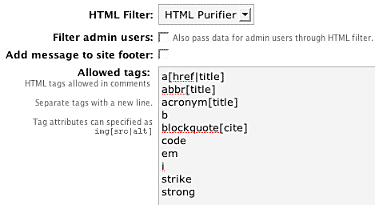
The allowed tags is a list of HTML tags and attributes that are allowed in comments. The list will be populated with defaults, and you can modify it as you see fit. One feature of the HTML Purified plugin is that any changes to this list will affect both KSES and HTML Purifier, and will be visible on your site (if displaying allowed tags is enabled in your comments form).
Filter admin users
WordPress does not normally filter comments by an administrator, and you can change this by enabling the ‘filter admin users’ option.
Footer display
Finally there is an option to display the number of purified comments in the footer of your site. Use of this is entirely optional, and provides some nice statistics and an incoming link for both myself and the author of HTML Purifier.
HTML Purifier Options
These options are specific to HTML Purifier:
Caching
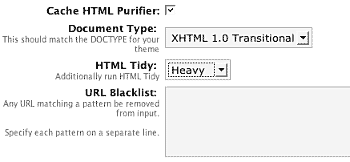
HTML Purifier performs a deeper analysis of HTML than KSES, and this results in increased processing time. However, as this increase only happens when a comment is submitted it is not a problem. Should you want to, you can enable the HTML Purifier cache, which attempts to reduce the processing time by caching internal data structures. The purifier cache is stored in a subdirectory of the standard WordPress cache directory wp-content/cache/html-purified/. If you enable the cache you must make sure the web server has write-permissions to this directory. Caching is advised in most situations.
Document type
The document type should match the document type of your chosen theme. Most themes will be ‘XHTML transitional’, but you can verify this by viewing the HTML source of your site and looking at the first line:
<!DOCTYPE html PUBLIC "-//W3C//DTD XHTML 1.0 Transitional//EN"
"http://www.w3.org/TR/xhtml1/DTD/xhtml1-transitional.dtd">
Tidy
As well as validating comments, HTML Purifier can also Tidy them. If you are unfamiliar, HTML Tidy is a popular tool that attempts to correct invalid, poorly formatted, and deprecated HTML. There are three levels of tidying that can be applied, and this reflects the amount of manipulation of the incoming comment. Select a level that suits the complexity of your comments, bearing in mind that the heavier the level the more likely a comment will be modified.
Note that this option does not require Tidy to be installed on your server, although the pretty-printing of HTML does. If you do not have Tidy installed on your server then pretty-printing will be silently ignored.
Blacklist
Finally, a URL blacklist is available. Any text entered into this blacklist will be used to filter the URLs contained within comments. For example, if you enter ‘viagra’, then any URL containing ‘viagra’ will be removed.