
| Download: | HTML Purified |
|---|---|
| Version: | 0.6 |
| Supports: | WordPress 2.9 – 3.3.1 |
| Other: | WordPress.org | SVN |
| Support: | Forum |
HTML Purified replaces the default WordPress and bbPress comments filters with HTML Purifier, a super HTML filtering library.
HTML Purifier is a standards-compliant HTML filter library written in PHP. HTML Purifier will not only remove all malicious code (better known as XSS) with a thoroughly audited, secure yet permissive whitelist, it will also make sure your documents are standards compliant, something only achievable with a comprehensive knowledge of W3C’s specifications.
HTML Purifier
Why would you want to do this? There is nothing fundamentally wrong with the way WordPress and bbPress filters comments, and in fact there has been no security alert related to this. However, this doesn’t detract from the desire to make things better, and the fact that HTML Purifier is much more thorough and exhaustive.
A comparison of HTML Purifier and KSES (the default WordPress/bbPress filtering library) is shown below and taken from a fuller description at the HTML Purifier site.
| Library | Well-formed | Nesting | Attributes | XSS safe | Standards safe |
|---|---|---|---|---|---|
| kses | No | No | Partial | Probably | No |
| HTML Purifier | Yes | Yes | Yes | Yes | Yes |
An additional feature of HTML Purifier is that it will produce valid well-formed XHTML code, something which KSES does not do.
Features:
- Configurable KSES or HTML Purifier
- Configurable list of HTML elements and attributes for both KSES and HTML purifier
- Additionally process comments with HTML Tidy
- URL blacklist
- Works in bbPress!
The plugin is available in the following languages:
- English
- Spanish, thanks to José Cuesta
- Belorussian, thanks to Marcis Gasuns
- Russian, thanks to Ilyuha
- Uzbekistan, thanks to Alexandra Bolshova
- Dutch, thanks to Pieter
- German, thanks to Andreas Beraz
- Polish, thanks to Dawid Spiechowicz and Kasia Ciszewski
- Romanian, thanks to Alina
Installation
The plugin is simple to install:
- Download html-purified.zip
- Unzip
- Upload
html-purifieddirectory to your/wp-content/pluginsor/my-pluginsdirectory - Go to the plugin management page and enable the plugin
- Configure the options from the Options/HTML Purified or Plugins/HTML Purified page
You can find full details of installing a plugin on the plugin installation page.
General Options
General options apply to both the default KSES filter, as well as HTML Purifier:
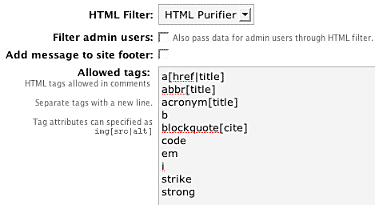
Allowed Tags
The allowed tags is a list of HTML tags and attributes that are allowed in comments. The list will be populated with defaults, and you can modify it as you see fit. One feature of the HTML Purified plugin is that any changes to this list will affect both KSES and HTML Purifier, and will be visible on your site (if displaying allowed tags is enabled in your comments form).
Filter admin users
WordPress does not normally filter comments by an administrator, and you can change this by enabling the ‘filter admin users’ option.
Footer display
Finally there is an option to display the number of purified comments in the footer of your site. Use of this is entirely optional, and provides some nice statistics and an incoming link for both myself and the author of HTML Purifier.
HTML Purifier Options
These options are specific to HTML Purifier:
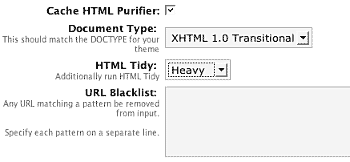
Caching
HTML Purifier performs a deeper analysis of HTML than KSES, and this results in increased processing time. However, as this increase only happens when a comment is submitted it is not a problem. Should you want to, you can enable the HTML Purifier cache, which attempts to reduce the processing time by caching internal data structures. The purifier cache is stored in a subdirectory of the standard WordPress cache directory wp-content/cache/html-purified/. If you enable the cache you must make sure the web server has write-permissions to this directory. Caching is advised in most situations.
Document type
The document type should match the document type of your chosen theme. Most themes will be ‘XHTML transitional’, but you can verify this by viewing the HTML source of your site and looking at the first line:
<!DOCTYPE html PUBLIC "-//W3C//DTD XHTML 1.0 Transitional//EN"
"http://www.w3.org/TR/xhtml1/DTD/xhtml1-transitional.dtd">
Tidy
As well as validating comments, HTML Purifier can also Tidy them. If you are unfamiliar, HTML Tidy is a popular tool that attempts to correct invalid, poorly formatted, and deprecated HTML. There are three levels of tidying that can be applied, and this reflects the amount of manipulation of the incoming comment. Select a level that suits the complexity of your comments, bearing in mind that the heavier the level the more likely a comment will be modified.
Note that this option does not require Tidy to be installed on your server, although the pretty-printing of HTML does. If you do not have Tidy installed on your server then pretty-printing will be silently ignored.
Blacklist
Finally, a URL blacklist is available. Any text entered into this blacklist will be used to filter the URLs contained within comments. For example, if you enter ‘viagra’, then any URL containing ‘viagra’ will be removed.
[…] HTML Purified replaces the default WordPress comments filters with HTML Purifier, a super HTML filtering library. (No Ratings Yet) Â Loading … […]
above you say:
do you mean it does not filter comments or it does not filter posts? I guess you meant posts, otherwise this does not make much sense to me !?
and besides, the
/wp-content/cache/html-purified/is writeable but your plugin still reports an error…its nagging me about this directory not being writeable !?and when I edit a post and click save, I get this error:
'Fatal error: Class htmlpurifier_definitioncache_decorator_memory: Cannot inherit from undefined class htmlpurifier_definitioncache_decorator in /var/www/web40/web/wp-content/plugins/html-purified/lib/HTMLPurifier/DefinitionCache/Decorator/Memory.php on line 11'function cache_directory (){
$dir = dirname (__FILE__).'/../../cache/purifier';
if (function_exists ('realpath'))
$dir = realpath ($dir);
return $dir;
}
the folder is called purifier NOT html-purified
Hi, Ovidiu; the HTML Purifier that is packaged with this extension is version 2.0.0, and the error you’re seeing sometimes shows up (not always though, I never figured out why). Try upgrading the contents of the library to 2.0.1, you can download it from the HTML Purifier website.
I get the same "not writeable" error even though I have verified that the folder is writeable.
Also – I don’t want ANY HTML tags allowed in my comments but when I delete what is in the "allowed tags" box they come back when I save it – how can I be sure NO tags are allowed?
Thanks!
[…] a plugin that helps keep the comments, at least its something, in compliance. Its called, “HTML Purified“. What it is, its a filter library that nests tags and keeps things simplistic in the code […]
Ovidiu, I meant comments. By default WordPress does not filter any comments made by an administrator (it does filter other people). The option in question forces all comments to be filtered, including those of an administrator.
Pross, thanks for pointing that out. Plugin updated.
Trisha, latest version allows no tags.
Thanks Edward, I’ve updated the plugin to contain the latest version.
ok, regarding the cache folder:
so the info here on this site is misleading or maybe I am just mis-reading it. will rename the folder and re-download the plugin.
ok with the new version I have no errors when saving a post like posted above, but I now get again the cache directory is not writeable error again.
btw. I had kept the old version renamed the folder from html-purified to purified and the cache worked, now after installing the new version the directory seems not writeable again?
did you change again the name of the cache dir? what should its name be? wp-content/cache/?
The information about the location of the cache is correct. The full directory (including WordPress location) is:
YOUR_WORDPRESS_DIRECTORY/wp-content/cache/html-purified/
The previous version of the plugin had the incorrect path.
[…] HTML Purified – prevent XSS/malicios comments […]
thx for all the help, everything is working great now 🙂
Hi, that’s a cool plugin – it would be great if there was an option so that ‘pages’ are also cleaned – thanks.
Consider adding this cool plug-in to official plug-ins repository at wordpress.org:
http://wordpress.org/extend/plugins/
[…] HTML Purified Dieses Plugin ersetzt WordPress Kommentar-Filter mit dem HTML Purified Filter, vorallem zum Schutz gegen XSS. […]
[…] a code cleaner. HTML Purified will not only remove all malicious code (better known as XSS) with a thoroughly audited, secure yet […]
[…] HTML Purified replaces the default WordPress comments filters with HTML Purifier, a super HTML filtering library. Share This Sphere: Related Content […]
[…] a code cleaner. HTML Purified will not only remove all malicious code (better known as XSS) with a thoroughly audited, secure yet […]
Hi, I made a patch to be better to coexist with some other plugins, one of them is `Gengo’.
I think this patch doesn’t make side effects; nothing will change but delaying of plugin initialization.
If you would think there’s no side effect, too, I’d appriciate to apply this patch.
Thank you.
*** /home/trac/www/wptest/wp-content/plugins/html-purified/html-purified.php.orig Sun Jul 1 19:50:59 2007 --- /home/trac/www/wptest/wp-content/plugins/html-purified/html-purified.php Tue Jul 10 19:44:31 2007 *************** *** 49,56 **** function PurifiedPlugin () { - $this->register_plugin ('html-purified', __FILE__); - $this->doctype = array ( 'html-strict' => __ ('HTML 4.01 Strict', 'html-purified'), --- 49,54 ---- *************** *** 564,569 **** --- 562,568 ---- function init () { + $this->register_plugin ('html-purified', __FILE__); $options = $this->get_options (); // Change $allowedtags and $allowedposttagsI just got curious: if this plugin can replace the kses filter for comments how about replacing the kses filter for posts?
Ovidiu: Filtering of posts is planned for the future (the code is actually in the plugin but it’s not ready yet – filtering posts is not as straightforward as it sounds)
Reedom: Thanks for the code. At first glance I don’t see how the change could affect anything (only one line seems to have changed), but I’ll download the Gengo plugin and see what the problem is.
[…] a code cleaner. HTML Purified will not only remove all malicious code (better known as XSS) with a thoroughly audited, secure yet […]
Hi, again, just want to know if this plugin can cache the ‘whole’ comments? Thanks.
There’s no need for the plugin to cache comments, all processing is performed once when commented, not everytime the comment is displayed.
Hi,
Yeah, is there any chance of this working for allowing p, div and class tags in pages in Wp mu? That would be lovely.
[…] the WordPress plugin version of HTML Purifier, installed, setup, and activated it in this blog (http://urbangiraffe.com/plugins/html-purified/). I tried putting all possible XSS attacks i can think of and it’s working […]
Hi,
Thanks for the work, this plugin is very nice, and some of your others are excellent…
I do have a problem with this one, though.
Trying to use the cache option, the plugin tried to tell me that the cache folder is not writeable. Maybe it isn’t, I didn’t check yet.
The big problem was that it throws an error calling a function "dir_relative_wp", which is not defined anywhere.
This is on WordPress 2.2.2, plugin version 0.2.3 (downloaded from your site earlier today, though the version info on this page still says 0.2.2).
Error on line 227 of html-purified.php .
$this->render_error (sprintf (__ ('The cache directory
%sis not writeable.', 'html-purified'), $this->dir_relative_wp ($this->cache_directory ())));It’s also not immediately possible to disable the cache once that happens, since this error gets thrown before the option page renders, and on a php error it doesn’t proceed to draw the page. I had to remove the error reporting line in the plugin, upload the "new" version, and disable caching.
Some work-in-progress function of yours to show the location of the cache directory relative to the main WordPress dir?
For now I removed the call to the dir_relative_wp() function, and just left the cache_directory() call. That allowed the access permissions error to be reported properly, even if the path was ugly, with "..\..\" in it.
It was partially right, the directory didn’t exist. Once I created it manually (odd, since the main cache folder has permissions to create subdirs), it did have write permissions in it, I get no errors, and it uses it.
hi
but this is not filtered the hexed xss codes i tried to convert xss code to hex code
then i post the comment and my script codes showed on commend screen. this is not block the hex codes
%22%3E%3C%73%63%72%69%70%74%3E%61%6C%65%72%74%28%31%29%3C%2F%73%63%72%69%70%74%3E
"><script>alert(1)</script>
scriptalert(1)/script
%22%3E%3C%73%63%72%69%70%74%3E%61%6C%65%72%74%28%64%6F%63%75%6D%65%6E
%74%2E%63%6F%6F%6B%69%65%29%3C%2F%73%63%72%69%70%74%3E
"><script>alert(document.cookie)</script>
scriptalert(document.cookie)/script
%27%29%3B%61%6C%65%72%74%28%27%6F%77%6E%27%29%3B%2F%2F
‘);alert(‘own’);//
any idea why Icould be gettign this error when going to write => post?
Warning: get_purifier(/var/www/web40/web/wp-content/plugins/html-purified/lib/HTMLPurifier.auto.php) [function.get-purifier]: failed to open stream: No such file or directory in /var/www/web40/web/wp-content/plugins/html-purified/html-purified.php on line 278Fatal error: get_purifier() [function.require]: Failed opening required '/var/www/web40/web/wp-content/plugins/html-purified/lib/HTMLPurifier.auto.php' (include_path='.:/usr/share/php:/usr/share/pear') in /var/www/web40/web/wp-content/plugins/html-purified/html-purified.php on line 278
ovidiu, somehow you have a version of HTML Purified without the actual purifier library! I’m not sure where this version escaped, but try downloading again.
hi, the plugin won’t block codes, it makes them harmless. This is demonstrated by your comment that includes the XSS codes
Yaron, yes you are correct and that function slipped out. Fixed in version 0.2.4
Thanks, John.
It seems to work fine now.
Lovely. Made my day (which is saying something)
[…] a code cleaner. HTML Purified will not only remove all malicious code (better known as XSS) with a thoroughly audited, secure yet […]
[…] Purifier John Godley tarafından wordpress’e uyumlu hale […]
ok, tried it again, it still says the cache dir is not writeable although it is… can you specify it again for me please?
I tried both, purifier and html-purified and the plugin still complains about not being able to write to…
The directory is shown in the error message, and is the standard WordPress cache directory (wp-content/cache)
*scratches head* I had tried 0.2.2 => updated to 0.2.4 and it works now. Didn’t change anything, except for deactivating the plugin you told me was conflicting with advanced permalinks, maybe that one was at fault too, here?
anyway thx.
[…] WordPress (http://urbangiraffe.com/plugins/html-purified/) […]
yes this is filter the comments but this is not filter the attacks on url like that:
http://www.site.com/?p="><script>alert(/XSS/)</script>
how can we block these attacks which made on url
Still not sure what you mean Tommy. Are you referring to URLs inside a comment?
no i mean that.
Attacker trying the xss codes on his toolbar. For example my site is that. http://www.site.com and attacker trying the xss codes on my searchbox ?s= or ?p=
or he is trying xss codes on my site like that: http://www.site.com/?p="><script>alert(document.cookie)</script> from his browser and a pop up appearing. it is showing his cookie. i want to block these codes on users browsers for my site
i wanna block these codes from users browser for my site. when attacker trying xss codes on my site a popup apearing and it shows his cookie. he is trying like that and his cookie appearing his cookie.
http://www.site.com/?p="><script>alert(document.cookie)</script>
[…] Purifier John Godley tarafından wordpress’e uyumlu hale […]
Tommy, that isn’t the purpose of this plugin.
i see, thank you
But very useful and secure plugin thanks again
[…] a code cleaner. HTML Purified will not only remove all malicious code (better known as XSS) with a thoroughly audited, secure yet […]
[…] WPå®˜æ–¹ä¸‹è½½é¡µé¢ | æ’ä»¶ä½œè€…ä¸‹è½½é¡µé¢ […]
[…] a code cleaner. HTML Purified will not only remove all malicious code (better known as XSS) with a thoroughly audited, secure yet […]
[…] a code cleaner. HTML Purified will not only remove all malicious code (better known as XSS) with a thoroughly audited, secure yet […]
[…] commenting system. What a shame! However, you can easily protect against this by installing the HTML Purified plugin. This plugin utilizes the HTML Purifier algorithm to cleanup your visitors’ comments […]
[…] HTML Purified is a standards-compliant HTML filter library written in PHP. HTML Purifier will not only remove all malicious code (better known as XSS) with a thoroughly audited, secure yet permissive whitelist, it will also make sure your documents are standards compliant, something only achievable with a comprehensive knowledge of W3C’s specifications. […]
Bug with the latest version: when using the HTML Purifier library, even with blockquotes as accepted input, this plugin will strip the content of a blockquote in the comments, but not the blockquote tags themselves.
I traced my last bug (see previous comment) to a particular behavior of HTML-Purifier, which requires block-level child elements inside of a blockquote. For some reason, my list of allowed tags for comments didn’t have the paragraph tag included (I don’t remember changing this–is it enabled by default?), so the plugin couldn’t automatically put the inner content into a paragraph, so it simply dropped it.
[…] HTML Purified Deze plugin zorgt ervoor dat alle HTML code van het WordPress weblog netjes en overzichtelijk blijft. Daarnaast filtert deze plugin alle code, die mogelijk schadelijk kan zijn voor jouw WordPress weblog, ook wel bekend als XSS (cross side scripting). […]
[…] HTML Purified Deze plugin zorgt ervoor dat alle HTML code van het WordPress weblog netjes en overzichtelijk blijft. Daarnaast filtert deze plugin alle code, die mogelijk schadelijk kan zijn voor jouw WordPress weblog, ook wel bekend als XSS (cross side scripting). […]
There’s conflict between HTML Purified with Quoter plugin. Two of replacement tags of Quoter plugin that i using are %name% (quoted commenter’s name) and %id% (quoted commenter’ ID).
And %name% tag output will be replaced by HTML Purified plugin with the quoter’s name (name of someone who quotes a comment), and the %id% tag output will be removed (disapear).
To make this clear, i give the working and non working example. First, before activating HTML Purified plugin the Quoter plugin output look like : [quote comment="10"]..blah blah blah…[/quote], its a working quote. And after activated HTML Purified plugin, the Quoter plugin output look like : [quote comment="13"]..blah blah blah…[/quote].
So, i believe the problem is on "13" (it should be "13") words, and its mean HTML Purified disallowed the double quotation marks since i’m using Quoter header look like: %name% wrote: on the Quote header of Quoter plugin. I’ve tried to adding some tags into Allowed tags column of HTML Purified, but still can’t resolve this problem.
So, please tell me which’s the right tags that i must put into Allowed tags column of HTML Purified so that output of Quoter plugin becoming normal.
oh shit, some of the original code above has converted to the right html output. i’ll send you the original code/tag via email.
[…] a code cleaner. HTML Purified will not only remove all malicious code (better known as XSS) with a thoroughly audited, secure yet […]
I’ve released a new version that adds an option for bbcode-style tags, and updated the HTML Purifier library (which has better support for blockquotes)
Hello John,
We are keen to include Word and Front Page cleanup in our new Foliopress WYSIWYG editor for WordPress.
Is there an easy way to integrate your WordPress HTML Purifier in the save routine from the Foliopress editor? (or any other WordPress Editor)?
We don’t want to destroy sophisticated code or legacy code in a website, but just to clean out the Word and Front Page junk.
The basic idea is that some bad tag triggers in the save routine will send in HTML purifier to do a specific cleanup which strips out the bad Word and Front Page tags.
As you well know, forms are particularly sensitive. We would want the filter settings to be particularly careful about breaking forms, erring on the side of caution.
HTML Purified only works on comments, not posts, as the cleanup routine is too restrictive for most sites. HTML Purifier can be integrated anywhere you see fit using its API.
[…] HTML Purified – will not only remove all malicious code (better known as XSS) with a thoroughly audited, secure yet permissive whitelist, it will also make sure your documents are standards compliant, something only achievable with a comprehensive knowledge of W3C’s specifications. […]
[…] Plugin Homepage […]
[…] usarlo en tu blog? Hay plug-ins para WordPress y para […]
Hello John
"Allow BBCode-style tags:" is on, but I still can’t use bbcodes or did I have to add them to "Allowed tags:" too?
WP internally uses the KSES PHP script (developed outside WP) to sanitize user input (to strip certain HTML tags, remove XSS, etc.). However, KSES has many bugs and lacks many features, and though it has ‘evolved’ into the much better htmLawed, WP doesn’t use the new code. But htmLawed seems to be easily integrable in WP, and some WP admins/modders may want to give it a try for its extended features. Also, it is just one file and a tenth of HTMLPurifier in size and memory usage.
[…] -HTML Purified Voor de beveiliging. […]
[…] WordPress (http://urbangiraffe.com/plugins/html-purified/) […]
I use WP 2.3.3. The html-purifier 0.28 doesn’ t work for me together with the wp-ids v0.47. Stuff like this: XHTML: You can use these tags:…. doesn’ t work. But disabling the html-purifier makes the WP intern kses feature possible. The counter counts, but i can’ t see results. Also the cache worked.
I have know installed the svn version of the IDS which comes together with the htmlpurifier. The IDS works, but the htmlpurifier is some sort of mysteries for me. I can’ t edit nothing, not even the allowed html tags, Maybe it is wrong installed, i don’ t know. It seems to work. I changed the name of the Config.ini and the result was a error message. Well, i don` t know. Any ideas?
@John, sorry for asking this, but i renamed the kses.php and got this error
Warning: require(/var/www/htdocs/wp-includes/kses.php) [function.require]: failed to open stream: No such file or directory in /var/www/htdocs/wp-settings.php on line 199
Fatal error: require() [function.require]: Failed opening required ‘/var/www/htdocs/wp-includes/kses.php’ (include_path=’.:/var/www/htdocs/wp-content/plugins/wp:/var/www/htdocs/wp-content/plugins/wp’) in /var/www/htdocs/wp-settings.php on line 199
Is this because WordPress checks for kses.php? I ask this because you have the button which filter to choose but that does not mean to disable kses.php for 100%, right?
I use wp 2.3.3 with html-purified 0.28 and this works.
[…] a code cleaner. HTML Purified will not only remove all malicious code (better known as XSS) with a thoroughly audited, secure yet […]
[…] WPå®˜æ–¹ä¸‹è½½é¡µé¢ | æ’ä»¶ä½œè€…ä¸‹è½½é¡µé¢ […]
Flux, kses.php is still needed by the rest of WordPress. Disabling it in HTML Purified only has an effect with regard to people submitting comments.
Dieter & Aship, I’ve added both of these to the features list
[…] a code cleaner. HTML Purified will not only remove all malicious code (better known as XSS) with a thoroughly audited, secure yet […]
Hello,
I tried this plugin in WordPress 2.5 but it doesn’t seem to work. It appears in options menu and everything seems alright but for example “allowed tag” don’t work. I allowed just a, b, br /, em, i, strong and u tags but nothing changed – still can use all tags 🙁
Ok… one more question – are you planning to release a new version that will work flawlesly in Wp 2.5? Thanks.
[…] HTML Purified […]
Yes I will
[…] HTML Purified is a standards-compliant HTML filter library written in PHP. HTML Purifier will not only remove all malicious code (better known as XSS) with a thoroughly audited, secure yet permissive whitelist, it will also make sure your documents are standards compliant, something only achievable with a comprehensive knowledge of W3C’s specifications. […]
[…] a code cleaner. HTML Purified will not only remove all malicious code (better known as XSS) with a thoroughly audited, secure yet […]
[…] a code cleaner. HTML Purified will not only remove all malicious code (better known as XSS) with a thoroughly audited, secure yet […]