
Filled In Plugin

Nov 1, 2006 | Tags: , , , | Written by Administrator

Filled In is a generic form processing plugin that will validate and store data submitted through forms. You can use it for any kind of data input, from simple contact forms on a blog to full-blown questionnaires on a business site.

The basic features of Filled In are:

  • Customizable data filters and data processors
  • Central data storage, with exports to CSV and XML
  • Email reporting, with attachments and inline images
  • AJAX support (forms always work in browsers without JavaScript)
  • Built-in CAPTCHA support
  • Built-in poMMo mailing list support
  • Built-in file upload support

Read the history for a complete list of features.

Filled In is available in the following languages:

Installation

Installation is like any WordPress plugin:

  • Download filled-in.zip
  • Unzip
  • Upload the filled-in directory to /wp-content/plugins on your server
  • Activate the plugin

Note that if you are upgrading from 1.5 you will need to reconfigure your forms. As much information as possible is retained, but the configuration details of individual filters and processors are not. You are advised to backup your data before upgrading, just in case something bad happens.

You can find full details of installing a plugin on the plugin installation page.

Using Filled In - The Basics

Filled In takes an existing XHTML form and routes all data submission through it's own routines, providing you with a consistent interface for managing form validation, data processing, and data storage. In order to route data you give the form an ID that matches a receiving Filled In form name (as created in the Filled In interface).

Create a Filled In form recipient, giving it a unique name.
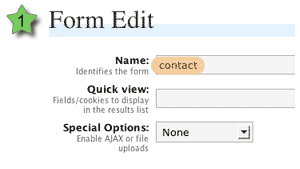
Edit Form Details

Create a form (or modify an existing form) and give the form element an ID attribute that matches the Filled In form recipient name.
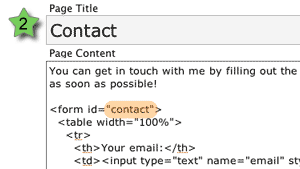
Edit Page Xhtml

Look forward to a fully validated form!
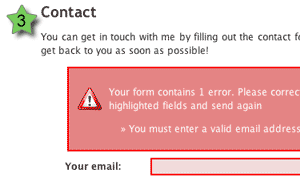
Form Errors

Note that all messages and styles are fully configurable.

If you are unfamiliar with HTML and don't understand how this all fits together then don't worry, there are plenty of pictures and even a few movies that will hopefully explain everything. You can use any application you want to create the forms themselves (for example, Dreamweaver), and the only required action is that the form ID must match a Filled In form.

If you were paying attention to the above images you might have noticed that no action or method attribute was needed on the form. As long as the ID can be matched, Filled In will insert the required form attributes, making sure the form is fully functional.

Taking It Further with Extensions

Filled In provides a lot more than just being able to change form attributes. When a form is submitted, Filled In passes the data through several customisable layers. These layers perform all kinds of tasks from validating the data, to sending out email reports.
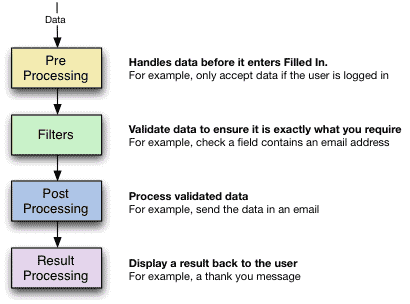
Layers

Each layer can have any number of extensions. Filled In comes with a selection of default extensions, and you can download or develop third-party extensions to perform any additional task yourself.

The default extensions are:

  • Pre Processors
    • Exclude/include fields - remove specified fields
    • Must be logged in/out - the user must/must not be logged into WordPress
  • Filters
    • CAPTCHA - add a CAPTCHA image to a field and ensure the field contents match the image
    • Checkbox/Radio - ensures a field is a checkbox or radio button
    • File upload - limit upload size and file type
    • Is Email - ensure a field contains an email address
    • Is Equal/Not Equal To - A logical equality comparison
    • Is Greater/Lesser - A logical comparison
    • Is Numeric - Ensure the field is a number
    • Is Required - Ensure a value is given
    • String Length - Ensure a certain number of characters are given
    • Word Count - Ensure a certain number of words are given
  • Post Processors
    • Send as email - send the data in an email with full templating, attachments, and inline images (courtesy of the super Swiftmailer)
    • Send to poMMo mailing list
    • Save to CSV - suitable for use with Excel
    • Save to XML
    • Save upload - move uploads into a directory of your choice
    • Login to WordPress - take submitted data and use it to login to WordPress
    • Register in WordPress - take submitted data and use it to register a new WordPress user
  • Result Processors
    • Display a message - simple give feedback to the user
    • Redirect to a post or URL
    • Redisplay input form - pre-filled with original data or empty

If a failure is detected on any layer then the progress of data is stopped, and a message displayed back to the user. Regardless of what happens, all data is stored, allowing you to not only review correct data, but to check what problems people have with a particular form.

The rest of these instructions will be based upon the concept of creating a contact form. Naturally you can adapt the details to any kind of form you want.

Further documentation

You can learn more about using Filled In by reading the documentation or the SDK. Details on certain extensions can be found on the extensions page.

Support

Please direct all support questions to the Filled In support forum. Any support questions left on this page may not be answered.

Bugs & New Features

Date Current outstanding bugs Status
09 Mar 2008 Creating CAPTCHA filter not working
06 Sep 2008 Downloading attachments

A full list of all bugs can be found in the Filled In issue tracker.

A full list of all requested features can be found in the Filled In feature tracker.

Share This

Comments (page 9 of 13)

  1. John (author) :

    Nov 8, 2007 3:38 am

    It would have to be handled by some custom code. When a payment is made then something (automated via PayPal's IPN, or manual toggle) could be stored in the user's profile (arbitrary data can be attached to a profile). The same custom code would then provide the appropriate filter hook that would check a file against the user's profile.

  2. Alec :

    Nov 6, 2007 3:44 am

    How would you recommend storing the on/off switch for a given user for a given file?

    In our hypothetical scenario, somebody makes a Paypal payment and is now eligible to download a certain file, as well as free files. There are four other paid files on the server all of which have separate permissions. Four of the files also can be purchased as a bundle.

    Scenario based on initial registration being handled by Filled In and WordPress, i.e. the purchaser is a registered user.

  3. John (author) :

    Nov 6, 2007 12:17 am

    I don't think programming skills are needed to use Drain Hole and it should be fairly simple to understand if you are familiar with FTP and URLs.

    As it happens Drain Hole does have an undocumented feature whereby you can refine the access level by hooking into the filter 'drain_hole_access'. This is fired whenever a file is being downloaded, and is passed an object containing all the file details. This leaves it open for another plugin to hook in and decide if the user can download the file (I didn't want to hard-code the plugin with different variations of permissions).

  4. Alec :

    Nov 5, 2007 9:57 am

    Hello Ken,

    I am in a similar situation where I want to use Filled In for registration and then Drain Hole for downloads.

    John is quite right that Drain Hole can be made to let only restricted users access the files. And Filled In can be used for registration. The issue with Drain Hole is that it has only a single restriction level. It would be very nice if we could allow further downloads as a user progresses (whether by payment or completing some task).

    But for single level access the combination of Filled In and Drain Hole can't be beat. Drain Hole is a fairly sophisticated plugin requiring folders above public_html or www so you'll probably want some programming hands on deck to implement it.

  5. John (author) :

    Nov 5, 2007 8:45 am

    Hi Ken,

    Not directly, but it can be made to do so. One method would be to use Filled In to register the user on the site. Once registered you could then use another plugin I've written (Drain Hole) to restrict access to files to registered users. Would that be suitable?

  6. Ken Savage :

    Nov 1, 2007 11:43 pm

    Hey John, first off let me thank you for some of the most detailed and thought out plug-ins for wordpress I've found. Would this plugin be able to submit a form and let someone download a file after successful form completion? I want to use this plugin for lead generation for my bands website.

  7. John (author) :

    Oct 30, 2007 11:15 pm

    Daily, I'll put those suggestions on the list of things to look at.

    Paragraph problem fixed in latest version.

  8. author
    Daily :

    Oct 30, 2007 7:30 am

    Hi, John and Gerard

    The problem is that Filled-In disables wpautop for every page, when it only should do so in pages that has forms. To fix this I changed John's wpautop function a little. So replace function wpautop located in file /plugins/filled-in/contoller/front.php with this:


    function wpautop ($text)
    {
    // WordPress makes a mess of any form. Here we remove the form, manually wpautop it, and then put the form back
    if (preg_match_all ($this->regexp, $text, $matches) > 0)
    {
    $text = preg_replace ($this->regexp, '[[form $2]]', $text);
    $text = wpautop ($text);

    foreach ($matches[2] AS $pos => $name)
    $text = preg_replace ('@(?:\s*)?\[\[form '.$name.'\]\](?:\s*)?@', $matches[0][$pos], $text);
    } else { // This line is added so pages without forms work correctly
    $text = wpautop($text);
    }
    return $text;
    }

  9. author
    Daily :

    Oct 29, 2007 8:52 am

    Hey, John. I have a same problem with Gerard. Apparently your plugin kills autop function.

  10. author
    Daily :

    Oct 27, 2007 11:04 pm

    Hi, John

    Thanks for a great plugin!

    I was wondering if there is a way to make custom error message? It would be great if u could edit the error message for each form the same way u can edit filters error messages. I'm working on a multilingual site at the moment, and i have also different forms for different languages, but i have no way of controlling the error message or do I?

    At the moment my feedback form has select box that u can choose who u want to send mail. Option value is users login name. When processing the form the i use the login name to retrieve the email address. This way i don't have to embed the email addresses in the code itself (for bots retrieve) and if user updates his/her information the feedback form stays up to date. Is it somehow possible to use the same logic with Filled In forms?

Leave a comment


XHTML: You can use these tags: <a href="" title=""> <abbr title=""> <acronym title=""> <b> <blockquote cite=""> <cite> <code> <del datetime=""> <em> <i> <q cite=""> <strike> <strong>

Home | Software | Terms & Conditions | Sitemap | John Godley © 2008
Close
E-mail It