
| Download: | Filled In |
|---|---|
| Version: | 1.7.7 |
| Supports: | WordPress 2.9-3.2.1 |
| Other: | This plugin is no longer actively maintained |
Filled In is a generic form processing plugin that will validate and store data submitted through forms. You can use it for any kind of data input, from simple contact forms on a blog to full-blown questionnaires on a business site.
The basic features of Filled In are:
- Customizable data filters and data processors
- Central data storage, with exports to CSV and XML
- Email reporting, with attachments and inline images
- AJAX support (forms always work in browsers without JavaScript)
- Built-in CAPTCHA support
- Built-in poMMo mailing list support
- Built-in file upload support
Read the history for a complete list of features.
Filled In is available in the following languages:
- English
- Italian, thanks to Simone Righini
- French, thanks to Zesty
- Polish, thanks to Kasia
Installation
Installation is like any WordPress plugin:
- Download Filled In
- Unzip
- Upload the
filled-indirectory to/wp-content/pluginson your server - Activate the plugin
Note that if you are upgrading from 1.5 you will need to reconfigure your forms. As much information as possible is retained, but the configuration details of individual filters and processors are not. You are advised to backup your data before upgrading, just in case something bad happens.
You can find full details of installing a plugin on the plugin installation page.
Using Filled In – The Basics
Filled In takes an existing XHTML form (from a post or page) and routes all data submission through it’s own routines, providing you with a consistent interface for managing form validation, data processing, and data storage. In order to route data you give the form an ID that matches a receiving Filled In form name (as created in the Filled In interface).
Create a Filled In form recipient, giving it a unique name.
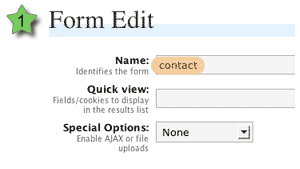
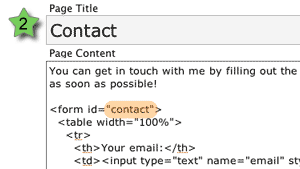
Create a form (or modify an existing form) and give the form element an ID attribute that matches the Filled In form recipient name.
Look forward to a fully validated form!
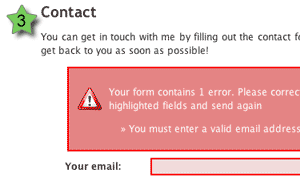
Note that all messages and styles are fully configurable.
If you are unfamiliar with HTML and don’t understand how this all fits together then don’t worry, there are plenty of pictures and even a few movies that will hopefully explain everything. You can use any application you want to create the forms themselves (for example, Dreamweaver), and the only required action is that the form ID must match a Filled In form.
If you were paying attention to the above images you might have noticed that no action or method attribute was needed on the form. As long as the ID can be matched, Filled In will insert the required form attributes, making sure the form is fully functional.
Taking It Further with Extensions
Filled In provides a lot more than just being able to change form attributes. When a form is submitted, Filled In passes the data through several customisable layers. These layers perform all kinds of tasks from validating the data, to sending out email reports.
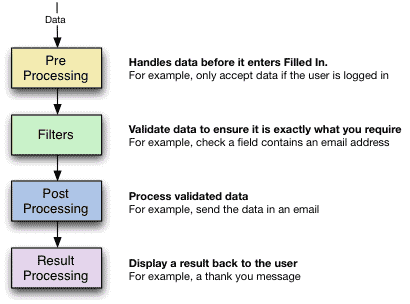
Each layer can have any number of extensions. Filled In comes with a selection of default extensions, and you can download or develop third-party extensions to perform any additional task yourself.
The default extensions are:
- Pre Processors
- Exclude/include fields – remove specified fields
- Must be logged in/out – the user must/must not be logged into WordPress
- Filters
- CAPTCHA – add a CAPTCHA image to a field and ensure the field contents match the image
- Checkbox/Radio – ensures a field is a checkbox or radio button
- File upload – limit upload size and file type
- Is Email – ensure a field contains an email address
- Is Equal/Not Equal To – A logical equality comparison
- Is Greater/Lesser – A logical comparison
- Is Numeric – Ensure the field is a number
- Is Required – Ensure a value is given
- String Length – Ensure a certain number of characters are given
- Word Count – Ensure a certain number of words are given
- Post Processors
- Send as email – send the data in an email with full templating, attachments, and inline images (courtesy of the super Swiftmailer)
- Send to poMMo mailing list
- Save to CSV – suitable for use with Excel
- Save to XML
- Save upload – move uploads into a directory of your choice
- Login to WordPress – take submitted data and use it to login to WordPress
- Register in WordPress – take submitted data and use it to register a new WordPress user
- Result Processors
- Display a message – simple give feedback to the user
- Redirect to a post or URL
- Redisplay input form – pre-filled with original data or empty
If a failure is detected on any layer then the progress of data is stopped, and a message displayed back to the user. Regardless of what happens, all data is stored, allowing you to not only review correct data, but to check what problems people have with a particular form.
The rest of these instructions will be based upon the concept of creating a contact form. Naturally you can adapt the details to any kind of form you want.
Further documentation
You can learn more about using Filled In by reading the documentation or the SDK. Details on certain extensions can be found on the extensions page.
Support & Bugs
This plugin is no longer actively maintained
WordPress: v2.3.1
MySQL: v5.0.45-community-nt
PHP: v4.4.7
Server: Microsoft-IIS/6.0
Reported:
WordPress database error: [Table 'weathervane.wp_filled_in_forms' doesn't exist]SELECT * FROM wp_filled_in_forms WHERE type='form' ORDER BY name ASC LIMIT 0,25
WordPress database error: [Table 'weathervane.wp_filled_in_forms' doesn't exist]
SELECT COUNT(*) FROM wp_filled_in_forms WHERE type='form'
Regards.
Frank, where are those errors being reported? Does it help to click the ‘remove filled in’ button and then install again?
JTee, pages are created as normal WordPress pages. Filled In does not create the forms for you, it manages validation and processing. See ‘Using Filled In – The Basics’
Adam and Blake, reports are saved wherever you configure reports to be saved! You must specify a filename in the CSV item.
Danny, no you can’t. Filled In runs inside WordPress. As your page is outside then it won’t work at all.
Martien, more than likely you need to increase the memory allocated to your site. Add this to your site’s .htaccess file:
php_value memory_limit 32MHi, i want to ask a simple question. may i send an email to form
given mail adress? (not to a predefined email adress) if i can how?
When the plugin is activated.
Hey Frank,
It all looks fabulous. And it must have taken a lot of work to create and now maintain. Most everything is so easy that it’s hard to find/implement! May I suggest that a little more detail in the documentation might save you much time. I cannot find the videos you speak of, and I have followed the instructions and matched the form ID, and there seems to be no connection between Filled-In and the page/form. There’s no submission button (understood this would come from Filled-in). How does it work hereafter? I have tried every other contact plugin, and just about given-up until I ran across yours. Can you shed some light, or send a link that can?
In gratitude,
Cindy
Dresah, yes just set the ‘to’ address to be something like $email$ (where email is the name of your email field)
Cindy, Frank is another user of Filled In. What videos are you referring to? Filled In does not add a submit button to your forms – presentation of the form is left entirely up to you, and Filled In handles the data processing .
Oh sorry John,
Looks like a great plugin…how it connects to the form we make I could not figure-out (even with ID attribute). Be nice to have specific instructions for the buttons. Your instructions say “If you are unfamiliar with HTML and don’t understand how this all fits together then don’t worry, there are plenty of pictures and even a few movies that will hopefully explain everything.” and that’s about where the ball gets dropped, even if you are familiar with HTML (as I am). There must be something between “Create a Filled In form recipient, giving it a unique name,” “Create a form with matchinf ID attribute,” and “Look forward to a fully validated form!” ?…(not even any mention of buttons). Mine did not work quite so magically. Time was ticking and my needs were simple, so I found an alternative for now. However I could see applications later on that this plugin would be great for, if I had better understanding.
That’s a good point about the video remark, I must have been planning some videos but didn’t have time.
With regard the steps involved it does mean create a full HTML form with all fields and buttons – Filled In does not create forms for you, it handles the data and requires that you handle all presentation (including submit buttons and fields) As such there is nothing between creating a form recipient and creating a form.
Is it possible to accept only one submission per email address? For example, can the form check data that has already been entered to see if an email address has already been recorded, and if so reject that submission?
Thanks!
Warning: Invalid argument supplied for foreach() in “xxxsiteroot”/wp-content/plugins/filled-in/extensions/post/save_to_csv.php on line 53
this is an error when i want to save form data as batch mode to a csv file.
what can i do for this error?
Craig, if you get people to register a WordPress account then yes it is possible. If not then it’s still possible, but requires some custom PHP. If you want to raise this as a feature request then it may get included at some point in the future.
Dresah, fixed
How can I use it for other websites. I mean apart from wordpress.
This plugin is totally brilliant. Thanks a lot, John. I had only one feature request, though — a progress bar for forms that have file uploads. Is that on the agenda?
Hi,
Is it possible to copy form settings to another form?
(Except manuel sql queries)
Manish, currently you can’t, but I do have that in the pipeline for the future.
Arun, unfortunately progress bars are impossible/near-to-impossible and depend heavily on web server and software, or impose too many conditions for it to be a reasonable feature.
Dresah, currently no, but if you want to raise this as a feature request then please do so!
First, apologies for not putting this in the forum – I tried, but registration stuffed up and now I can’t re-register with the same email, nor will it let me reset my password.
Anyways, I have FI working fine, provided the form I’m applying it to is pasted into a WP page/post. How do you apply FI to a form manually created eg in a page template such as page.php? Obviously tried giving the form the same ID, but how do you link the form to it’s corresponding Filled In behaviour/actions?
Just to clarify what I’m asking: I have a WP site with heaps of product pages – each page has a ‘quick quote’ form on it that lets a user request a price based on the product they are currently looking at. So it made sense to include the form as part of the theme page template that each of these pages use, this way the site editors onlu need to enter product info, the quote form is automatically included by the template.
The catch appears to be that Filled In does a search and replace on the WP database ie the contents of these pages (or posts). The WP theme template files remain outside the scope of Filled In’s search and replace. Is this correct? Can you manually call the Filled In form ‘search and replace’ function in the template.php file to work it’s magic on the hard-coded form?
I have the exact form working with Filled In, but only when I paste it into the post or page content in the WP interface.
Hi,
I want to modify form input values. Example: Uppercase or First Uppercase form input values.
I modified some extensions at filter section, yes it’s working. But it saves form input values without modified values.
Now,
For saving modified values, Where is the true modifying area? Pre, Filter, Post?
Is there an extension which you’re modified data before saving database. I would like to examine it.
Hi John, absolutely excellent plugin.
I would have submitted this in the feature tracker, but it’s returning a 502 error at the moment, so please excuse me for putting it here.
I’d absolutely LOVE to see you offer the ability to submit the form’s content as a wordpress post with custom fields to a chosen category. This inclusion as one of the post-processors would make this plugin incredibly usful as a makshift ticketing system, using wordpress’ existing comment features to follow each user-submitted ticket.
Cheers, and thanks again!
Hi is this the TDO Mini-Form in action? The one on this site.
Please help: Does anyone have any idea what my problem is?
Hi, I was wondering if you could help me out with this problem I have with form. I would really appreciate it, since I have searched and look everywhere for an answer but I can’t figure it out. I can’t get the form to be posted on a page were users can access it.
I have done the create a page, but it just creates a blank page exp.
http://www.mycharlieclarknissan.com/charlieclarkedblogging/wordpress/?page_id=15
Is it possible to use this as a comment form for WordPress, i’m really in need of an Ajax comment’s form, that works with paginated comments also? I’m really stuck and would be greatful of any advice no matter how small it is.
By the way your plugins are great, you really are a talented individual in a variety of different areas.
I love your plugin and have implemented it on a couple sites. After a recent marketing push I am discovering that only OS X users are able to actually successfully complete a form. I wondered if it was an AJAX issue, but I have disabled it and am still having a problem. Any suggestions or ideas? I didn’t find anything in the forum or comments…
The form is at: http://www.stratusmediasolutions.com/main/sneak-peek
Thanks,
Dave
[…] offering in this area, whereas FormPress and Form Builder look most promising. I just found out Filled In that looks very simple and […]
I just upgraded WordPress to 2.7 and you plugin is not compatible with new layout. You cannot create or edit forms anymore, or view stats of failed and submitted forms. When are you planing to release an updated plugin. Thanks
This has been a great plugin for us and like Anita, I have problems now that I upgraded to WordPress 2.7. The contact forms still seem to work however I am unable to access the failed forms from the panel. Seems that a lot of people have trouble with forms and that allows me to contact those cyber-challenged people. I hope that an update is in the pipeline.
Barry & Anita, are you still having problems with WP 2.7? The plugin works fine for me in 2.7, although you may need to clear your browser cache.
Dave, I’d be very surprised at that as I’ve tested it extensively in FireFox and IE, but I’ve added your problem to the bug tracker.
Milorad, added to the feature tracker
Dresah, have a look at a pre module
Dave, Filled In is primarily designed to work with posts and pages inside WP. You can manually call it using a technique explained elsewhere in these comments.
Thanks for writing John. Your plugin was really the backbone of our site.
Whenever any of the links in the admin page (ie. form edit, display successful or unsuccessful attempts) the url showed it was going thu tools.php yet failing in someway and then defaulting back to tools.php?page=… or something close, I did not make a note of it. Upon upgrading, filled in appears in the tools menu of 2.7 so I assume it has something to do with that but I am not a php jockey ; )
I had a different page that I was working on on my local server that was 2.6.1, I upgraded to 2.6.5 and installed filled-in and set up a form and it worked just fine. I then upgraded that to 2.7 using wordpress automatic upgrade, and it broke, showing the same symptom. I disabled all the plugins, then uninstalled gears, and the symptoms persisted. The forms came thru just fine, but they could not be edited from the admin panel nor could the data be accessed.
I finally gave up and installed cformsll. I did notice that the load times speeded up so there was probably a conflict somewhere in the site somewhere from before. The thing that was so wonderful about your plugin is that I was able to bring some very long online applications that were originally cgi and not have to rewrite the forms as in cformsll. I also liked the straight forwardness of your admin panel. It sounds like it was something specific to my site so that is my loss.
Barry, that’s a shame as I’ve just updated the plugin for full 2.7 compatability.
I’m gettin this error with WP 2.7 and Filled In 1.68:
Fatal error: Cannot redeclare class Swift_Exception in /wp-content/plugins/filled-in/lib/swift3/Swift/Exception.php on line 18
Can’t download the 1.7 since the file is somehow corrupted. Is there something else to do when updating than take back up and upload new files?
This error was due to another plugin. So apparently you can’t use MailPress Plugin together with Filled In Plugin.
So far I haven’t found a way to fix this.
Download link is broken!
Seems fine – must be a connection blip
hello
i wanted to use your plugin, but when i try to add filters or processors they never appear. i tried to reinstall and used internet explorer as well as firefox but it does not work. my wp version is 2.7
i noticed that your download link says 1.7 but in wordpress it appears as 1.6.13?
Please make sure you have installed the plugin correctly and that no other plugins are interfering.
John has forgotten to update the plugin file Version tag. That’s why it says in wordpress admin that it is version 1.6.13, even though it actually is version 1.7.
Hello John,
thanks alot for this great plugin it really helped me out!
however i am having the same problem with Extensions. I choose an option from the drop down menu and click “add” but nothing works. Also on the page even if i leave the form and just click submit it doesnt show any error nor any loading Message or Image it looks like its just refreshing the page. =S
Disable all other plugins and see if that has any effect – there may be some plugin clash. Also check that you are using WP 2.7
Hi,
I have the same problem. I have added filters, but if I submit the form, no error messages are given. And if the form is correctly filled, I don’t get a thank you message also (although I added this action).
I upgraded to 2.7.1 and disabled all other plugins, but still no progress.
Hi there.. same problem in here..
using wordpress 2.8.5 and filled-in 1.7.3 but cannot add filters.. it’s only refreshing the page when i select from dropdown menu..
and yes, i disabled all the plugins and no, i don’t get any javascript errors
my system specs are
imac, snow leopard, safari 4.0.3 (tried firefox, chrome and opera.. and it’s same in all browsers.. nothing happens)
Hi, Great idea for a plugin – just what I’ve been after. I’ve set up the form with an ID that matches that in the ‘filled in’ config screen, and if I send through the form with errors, the ‘form failed’ count goes up, but nothing seems to happen from the user’s point of view. The form submits, and the page refreshes but no error message is displayed?! How does the plugin know how to/where to insert the error message text?
I’ve attached an image of my filled in form config: http://img3.imageshack.us/img3/3750/filledinpluginforwp.png
Any help greatly appreciated.
Best regards,
Dan
Errors are added at the top of the form. Check the HTML of the page being returned to see if anything changes
Hi John – once again a great plugin. (Sorry for double posting here and in forum – not sure if you check forums as often)
I have a form that is mostly html based created and is layed out in the content of a post/page. However, there are 2 fields in the form that need to be created dynamically because they need to pull from database, so I created shortcodes for those 2 fields. They get displayed fine and can integrate with filled-in, except the problem is when I have ajax turned on for processing, when it comes back with errors, it doesn’t execute the shortcode – it just displays the short code text (i.e [myshortcode] ).
Can this be fixed? Or can I use sniplets in conjuction with filled-in to accomplish this?
Hi John,
Version 1.7.3 available for download above is almost empty. There are no files in any subfolders in the zip file.
I’ve tried to download to fix WP 2.8 compatibility and failed.
Thank you.
John – The latest download is missing all the php files in the sub-directories.
Also – Im testing filled-in on a 2.6.5 wpmu site and it gets an error on activation (doesn’t give explanation), but it appears to still work. But it does cripple the RSS Feed by adding an extra line to RSS top line – have you seen that before?
Hey John – any response on the RSS Feed being crippled by adding an extra line?
Or whether this plugin runs on wpmu2.6.5?
Thanks!
I found the cause of the RSS issue – it was one of the extensions I had added had an extra line after the final ?> 🙂
It appears everything is working fine on wpmu 2.6.5 – but for some reason it says there was an error when initializing it. But everything looks to be working great.
John,
A heads-up; the latest download doesn’t contain all the files. Nearly all folders are empty of files.
MB.
Yes, same here – the 1.7.3 ‘filled in’ plugin is not filled in. Missing files and will not activate in 2.8.
Sorry about that, I don’t know how the file ended up being 12K. The new version has been re-uploaded and I’ve double-checked that it contains PHP files.
Thanks for the quick response John, will upload it and see how I get on.
The Danish translation for Filled-in is still available from here. Most of John’s plugins are translated into Danish and are available from the same site.
Hi. Love your plugin. I’m getting ready to launch my site, and I’m trying to figure out if filled in will do a couple things. I need to be able to capture some fields in a post, and have that data preload into a form. I have some hidden fields on a post that include the name and id of the post and I can grab that data and send it to the user_meta table as part of the user profile, no problem but I want the user to click on a button in the post, and open a new form with that data displayed on the page as part of a new form. Can filled in do that,pass data from one form to another? Also, can I grab data from the database and have it displayed in a filled in form? For example, could filled in open a form and preload the user name, and select data from the wp_usermeta table?
Thanks for any help you can offer in using the plugin.
Steve.
Hello. I am experiencing the same bug noted in email_attachment.php error (#548).
I receive the following PHP error in the email attachment section.
Warning: Invalid argument supplied for foreach() in /::SITEDIRECTORY::/plugins/filled-in/models/email_attachment.php on line 84
Any thoughts?
I, too, am having this same problem on a site running WordPress 2.8.6.
However, I am not seeing this error occur with a different site running WordPress 2.8.5.
I’m getting the following error:
Fatal error: Call to undefined method: filled_in->_weak_escape() in /../../../wp-includes/wp-db.php on line 487
I’m not sure if this is because I upgraded to WordPress 2.5, but any help would be appreciated!
In my previous comment, I meant WordPress 2.8.5, not 2.5 🙂
“Can’t Add Extensions” problem for some users SOLVED!
I had this problem ages ago and just ignored it hoping someone here would figure it out. It finally became important for me to get Filled-In working again so I went through my non-working install to figure out what the problem was, why some were getting it, and why others weren’t.
Short answer: Javascript files in Unix-text format are all on one line when uploaded, which makes them not work for some reason.
Here’s how I tracked it down:
I also couldn’t add extensions to my forms. Firefox let me know this was the error:
Error: add_extension is not definedSource File: (SITEREMOVED)/wp-admin/tools.php?page=filled_in.php&edit=1
Line: 1
Looking through the code, Filled-In was definitely calling filled-in/controller/admin.js in my header, and loading my local copy of that file I found that it definitely had the add_extension function.
My initial thought was the upload of that file was corrupt and I just needed to reupload it. But to make sure I SSHed into my server and loaded the file in Pico.
It was all one one line.
Something about the format that the file is saved in natively, the unzipping I did myself, and then uploading screwed it up so it’s all on one line.
I removed that line, opened my local copy in Notepad++, copied it to the clipboard and then pasted the full file in. It properly showed up on multiple lines.
I saved it, refreshed my admin page and was instantly able to add filters and processors!
I checked other uploaded files and every single one of them was all one-line.
I fixed them all at once by removing filled-in’s folder completely and then uploading the ZIP file to my server and unzipped it right on the server. I checked the files and they were all properly formatted.
So there’s something wonky going on with the Mac/Unix formatted text being unzipped on a Windows machine and then being uploaded. You can fix it by either unzipping it right on your server or by changing the text format of each file yourself. Notepad++ can do Format > Convert to Windows format.
It’s odd, I haven’t seen this kind of problem in any other plugin. I don’t know enough about the different text formats to know why it’s a problem either, but there you go.
I’d like to connect a form that is used in my page template (not in the content of a page or a post) to Filled In. I’ve read that it is possible, “Dave, Filled In is primarily designed to work with posts and pages inside WP. You can manually call it using a technique explained elsewhere in these comments,” but I couldn’t find a comment that describes this process. Any help would be great.
Error message: The form is processed but when the thank you message is displayed the following error is shown
Warning: Invalid argument supplied for foreach() in /home/public_html/wp-content/plugins/filled-in/models/email_attachment.php on line 84
How can i fix it?
Thank u.
I can i send email to the person who filled the form using post processor. I tried $email$ where email is my field name but it didnt worked.
please help
regards
saurabh
Great plug-in! Very helpful. I’ve run into an issue though. I have a set of checkboxes, but when submitted, only a single value is passed. Perhaps I’m missing something? I have the following:
Own portal
Multi-payor portal
Transitioning from own to multi-payor portal
Don’t know
Not applicable
If the user selects any number of options, the only value that is passed is ‘5’. Any help would be greatly appreciated and thanks for developing this plugin.
So I thought my code would display, but it did not. I have five checkboxes, all with the same name, but different values and ids:
input name="Q11" id="Q11A" type="checkbox" value="1"

input name="Q11" id="Q11B" type="checkbox" value="2"

input name="Q11" id="Q11C" type="checkbox" value="3"

input name="Q11" id="Q11D" type="checkbox" value="4"

input name="Q11" id="Q11E" type="checkbox" value="5"
If the user selects any number of options, the only value that is passed is ‘5’. Any help would be greatly appreciated and thanks for developing this plugin.
For checkboxes you need to add [] to the name so it is passed as an array.
This plugin saved my life today…. I needed a form to automatically add to a csv file when a form was submitted. I hope you continue support on this, because its one of the better contact form plugins I’ve used. Thanks.
Great plugin! This is exactly what I’ve been looking for, except for one thing. I need to be able to specify the URL that the form posts to (the form action). Is there any way to do that with Filled In? Would it need to be done with a custom Post Processor extension? Any help is appreciated! Thanks.
No, the plugin is designed to post to the same page the form lives on.