
| Download: | Drain Hole |
|---|---|
| Version: | 2.2.8 |
| Supports: | WordPress 2.5-2.9 |
| Other: | This plugin is no longer actively maintained |
Drain Hole is a centralized download manager, with full monitoring and statistics, versioning, SVN support, and SEO download URLs (no more nasty query strings!).
In addition to it’s monitoring abilities, Drain Hole has a run-time tag replacement feature that lets you embed special tags in your post which are replaced with information from Drain Hole. For example, you can embed download URLs, version information, last update times, and so on. Whenever you change a downloadable file it is automatically updated throughout your blog, without you needing to change anything else.
Features include:
- SEO download URLs – a unique feature that allows files to look like real links
- Local or remote file storage – keep your files on your own server or have them stored somewhere else such as Amazon S3 or wordpress.org
- SVN support – attach a file directly to an SVN repository and have the contents automatically updated
- Versioning – maintain multiple versions of a file, allowing users to download older files
- Full download statistics, including number of downloads, access times, referrer, and download speed, available as CSV and Flash-based graphs
- Download security – permissions can be assigned to downloads (including Flash files), restricting them to WordPress roles
- Template tags – insert dynamic download data into posts, and into the sidebar as a Widget
- Hot-link protection
- Fully localized
Installation
Installation is like any WordPress plugin:
- Download Drain Hole
- Unzip
- Upload drain-hole directory to
/wp-content/pluginson your server - Activate the plugin
- Use Drain Hole from the Manage/Drain Hole menu
You can find full details of installing a plugin on the plugin installation page. SVN access to the plugin is provided at the SVN repository.
General Concepts
The Drain Hole plugin makes use of two fundamental concepts:
- Drain hole – a base URL and associated directory where files are stored and downloaded from
- Files – a file belongs to a particular Drain hole
It is important to understand the mapping between a Drain Hole’s URL and its associated directory. To do this you need to know two pieces of information:
- Where files are to be downloaded from (i.e.
http://urbangiraffe.com/download/) - Where files are to be stored (i.e
/users/john/download/)
This is a mapping from URL to directory:
http://urbangiraffe.com/download/ => /users/john/download/
All files inside the directory will be available at the Drain Hole URL. For example:
/users/john/download/myplugin.zip => http://urbangiraffe.com/download/myplugin.zip
It is preferable that your directory is not in a public location (i.e. in public_html) as Drain Hole may not then be able to function. Your URL must be part of your WordPress installation, but you should not create a directory for it.
Creating a Drain Hole
New Drain Holes require the following information:
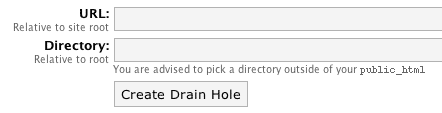
The URL is the URL on your website at which to make the files available. The directory is the real directory in which the files exist. These two values do not have to match up and the files do not (and ideally should not) be publicly available.
Once a Drain Hole has been created you can then edit it from the list of Drain Holes:

Editing a Drain Hole will allow you to set additional options:
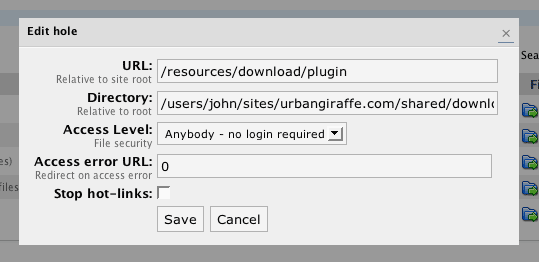
The Access Level is the minimum user level required to download files from the hole. This allows you to restrict download access to certain types of user. If a user does not meet the required access level then they will be returned a 404 error page or will be redirected to the configured URL.
The Stop Hot-links option allows you to stop external users from downloading files in the hole. This protection is achieved by analyzing the referring page for a given download – if the referrer is not from your site then the user is sent a 404 error page or redirect to the error URL.
Files
A Drain Hole can contain any number of files and sub-directories.
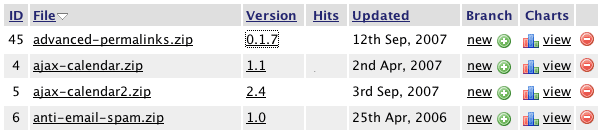
As with the rest of the plugin, columns are sortable, and data can be searched.
Each file allows you to:
- Edit the file configuration
- Manage version history (by clicking on the version number)
- View download statistics (by clicking on the number of hits or the charts link)
- Create a new version or update from SVN (by clicking on the branch link)
When editing a file you will be shown additional configuration details:
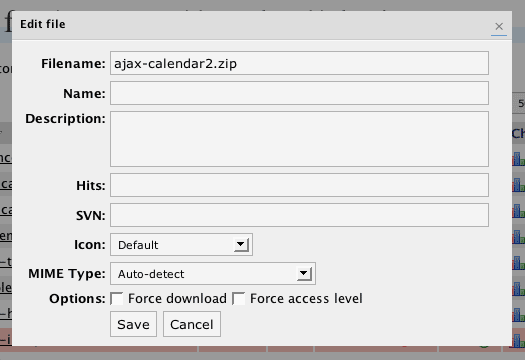
The filename is the actual name of the file and this may differ from the name, which is what will be shown in a download link. If no name is given then the filename will be used. As an extra function, you can insert $version$ into the name and it will be replaced with the file’s current version.
The description is a free-form field allowing you to enter further details about the download. This can be shown when the file is displayed.
The SVN field allows you to enter an SVN repository. See the SVN section later.
When displaying a file to download, an icon can be shown. You can change which icon is shown when editing a file.
The MIME type allows you to specify a custom MIME type for the file. This may be useful if you want a file to open inside the browser. If set to ‘automatic’ then Drain Hole will try and decide what the file is.
Forcing a download allows you to override default browser behaviour and force the file to always be downloaded. This is useful if you have a file that a browser usually tries to open (for example, a PDF), but you want it to always be downloaded.
Forcing the access level is an advanced option that is useful if you are trying to restrict files that are used inside Flash. For example, you may have a video tutorial that you want to restrict to registered users only. The flash video player requires your video file to be available, but may not provide any restriction options. Storing the video inside Drain Hole and then forcing the access level will ensure that only allowed users can access the file, even inside Flash.
Adding new files
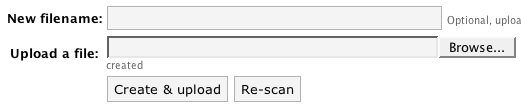
New files can be added by any of these methods:
- Uploading a file directly into the Drain Hole directory and ‘rescanning’
- Uploading a file through the browser
- Creating an empty file which can be uploaded later, or which requires an SVN repository
Versions
Drain Hole allows you to retain old versions of files, either for archiving purposes or for user downloads. To modify a file’s version you need to create a new branch:
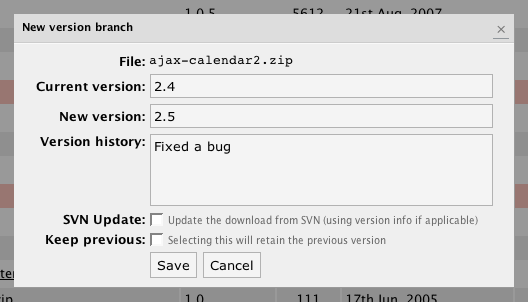
You can enter details about the reason for the new version, and this will be presented to the end user. To retain an old version you must check ‘retain old version’. This old version can be downloaded as follows:
http://urbangiraffe.com/download/myplugin.zip?version=1.2
SVN
Drain Hole provides simple SVN functionality that allows you to associate a file with an SVN repository. A file that uses SVN can then be ‘refreshed’ directly from the SVN repository, rather than requiring you to manually update the file.
SVN functionality requires that you have SVN installed on your host. You must configure the Drain Hole options and provide the full path to the svn executable. If you are in doubt you should consult your host for details.
When an SVN-based file is refreshed, Drain Hole will use SVN to retrieve the latest copy of the files. If a repository contains multiple files they will be automatically zipped.
As additional functionality, Drain Hole will detect if the SVN repository is for a WordPress plugin, and will automatically set the version according to the version information inside the plugin.
Note that no direct capabilities are provided for username and passwords. However, you can pass a username and password to SVN by including it on the SVN field:
http://svn.mysite.com/plugin/trunk/ --username=john --password=thing
Download As – Remote File Storage
With version 2.2, Drain Hole now allows you to keep your files stored on a remote server. For example, you may want to have the files stored on Amazon’s S3. To achieve this you can enter the full URL of the remote file in the ‘download as’ field on a file.
Note that entering a filename in the ‘download as’ will allow you to have the file download with a name different to the original. Additionally, if you enter $version$ in this filename then Drain Hole will automatically replace it with the file’s current version. This will be useful if you want one download URL that when clicked will download a versioned file.
Download Tags
The following tags can be inserted inside posts and pages to embed Drain Hole information. This information is generated dynamically, and will change whenever the underlying information changes:
[drain hole ID hits]– Displays the total number of hits from the specified hole ID[drain hole ID show]– Show a list of all files in the specified hole (change display code by copyingview/drain-hole/show_hole.phpfrom the Drain Hole plugin directory to the same directory path in your theme’s directory and editing the file)[drain file ID show template]– Displays the download template for the specified file ID. ‘template‘ is optional and can be ignored (the default template will be used)[drain file ID version]– Displays the version of the specified file[drain file ID versions limit]– Displays the specified number of versions from the file’s history[drain file ID hits]– Displays the total downloads for the specified file[drain file ID url name]– Displays a URL allowing the specified file to be downloaded. ‘name‘ is optional and is the text that will appear inside the download link (if not specified then the filename is used)[drain file ID updated]– Displays the update time of the specified file[drain file ID size]– Displays the size of the specified file[drain file ID icon]– Displays the download icon for the specified file[drain file ID href]– Displays the URL of the file
Where ID refers to the ID of the file or hole, as shown in the Drain Hole administration pages.
Download Templates & File Icons
A download template is a section of HTML code that is used to display all the information for a file download. For example, on this page in the top right corner is the download for Drain Hole itself. The icon and file information are all part of a download template that is re-used on each of the other plugin pages available from this site.
A download template is a file that is stored in your theme directory and contains standard HTML as well as special Drain Hole template tags:
$icon$$url$$version$$updated$$size$$href$
These template tags function similar to the post & page tags, but do not require an ID to be specified.
A default template is provided with Drain Hole. Custom templates are PHP files that are stored in view/drain-hole, inside your theme directory. For example, if you are using the default WordPress theme then:
/wp-content/themes/default/view/drain-hole/mytemplate.php
To use this template in a post you would insert the tag:
[drain file 5 show mytemplate]
This tells Drain Hole to use ‘mytemplate.php‘ to display file 5.
Custom icons can be stored inside your theme:
/wp-content/themes/default/view/drain-hole/icons/
Statistics
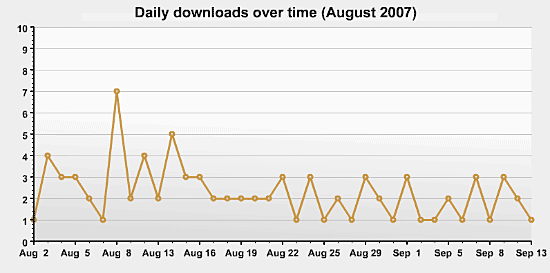
Drain Hole provides full download statistics:
Support & Bugs
This plugin is no longer actively maintained.
At the moment no, but it would be a good feature. I’ve added it to the feature list.
Thanks John
Would it also be possible in the next version to have a drain hole to a file specified by a URL?
eg. http://www.myotherserver.com/somefile.exe
so http://www.mymainserver.com/file.exe “drainholes to” http://www.myotherserver.com/somefile.exe (which is on a different server)
That wouldn’t really work for Drain Hole as it needs direct access to the files.
Thank you so very much! All of my Insurance Forms are easy to be published and downloaded.
Good Luck in future plugins 🙂
hallo,
i just found and installed your drain hole.
great plugin!!! thanx!
however i found a bug.
when i try to download data as csv i always get this error:
Parse error: syntax error, unexpected ',' in /home/.dweezil/rastitkac/music.rastitkac.net/wp-content/plugins/drain-hole/csv.php on line 14any suggestion?
Hi,
Thanks for this great plugin! it’s a excellent idea.
It would be nice if it is possible to add a payment feature (like “are paypal” plugin for exemple). I add this on feature request.
And is it possible to permit viewing only and not downloading with this plugin?
Thanks!
ledom
Hi,
Really great plugin guys! I would say it is my favorite of all. I have written a short review of Drainhole on my site about how I use it. Check it out.
im using 2.6.1 wp version and using yr wonderful plugin drain-hole .i created drain hole but i get this msg>> when trying to resume the download, internet Download Manager got a response from the server that it doesn`t support resume until one day before i could resume now i installed drain hole plugin few times re active de activate but couldnt figure out da problem ..could u tell me what I am doing wrong here …thanks “:)
Hey John,
I have a website which has 500-ish downloads at this point and will probably have a four-digit number of them sooner or later. Is Drain Hole suitable for me? I’m mainly asking because of the statistics feature, as that one is a problem with plugins that keep everything (e.g. Bad Behaviour or, one of your plugins, Redirection).
Not having downloads in the thousands I cannot say whether Drain Hole will cause any problem or not. Redirection can be configured to clear statistics and so you should never have a problem.
[…] Blog. After taking a couple of WordPress Plugins for a test run I settled for one called “Drain Hole“. Drain Hole is a centralized download manager, with full monitoring and statistics, […]
[…] Drain Hole […]
Can we use this plugin as a click tracker?
In what way?
Thank You for this great Plugin! Question: Do you plan a Insertmask in postviews for a direct access?
I mean, that i can in a post or page direct choose a download-link or file?
[…] Drain Hole […]
You can insert download links into a post using the above tags or by calling ‘the_drainhole’ and passing it one of the above tags.
Hey John,
The site’s been live now for two days and drain-hole is working like a charm. However, we a slight problem in that one of the files is a pdf and each person it seems accesses the file multiple times from the website to view it. The download counter therefore doesn’t reflect unique downloads. Any way to include this in the admin section? Also… is there any way to force the browser to open a save dialog box rather than open the file in the browser, as is the case for pdfs, docs, etc?
Thanks!
Hey John,
Looking at the download stats for the pdf, could it be that I’m getting multiple hits because of the way it is being opened in the browser? When “streaming” a pdf does the browser hit the file to be downloaded more than once?
Thanks
As far as I’m aware a PDF should only be loaded once per viewing. Do you have any browser plugins that may be caching or affecting the PDF viewing in anyway? You can force a PDF to be downloaded by checking the ‘force download’ option when editing the file
Thanks for that. I will monitor the downloads for the next couple of days to see if the multiple hits go away.
Phoat
Hi John,
Doesn’t seems to work for me. Latest WordPress installation at 1and1.com hosting.
I tried creating “drain hole” outside and inside server’s root – same result – always throws me to the “error” link.
I also created “gold members” group + assign drain hole to this group + created user for this group + login as that user.
Same story – won’t let me to download file.
Any ideas?
Gleb
Greetings,
Thanks for your great plug-in!
We recently decided to try WordPress 2.7 beta3, and something in the new WordPress breaks the management pages in the new Admin area. They have changed “Manage” to “Tools”. Do not know if this is the problem?
Hope you can repair this soon 🙂
Hi all,
I’ve just installed Drain Hole and think it is a fantastic plugin!! Everything worked as described until I went to examine my RSS Feed by Feedburner. Oppss! Not working.
Since Drain Hole uses pathnames relative to the site root it was no surprise actually that the RSS Feed would generate errors for the subscriber.
Any chance of getting an update that will fix this? It should be relative easy to embed the site root as part of the download path name – the way it is being done if you download from the WEB site itself.
Cheers, Markus
P.S. To fellow hosting it at 1&1 – I’m using the same provider and is working fine for me. Double check that your pathnames are correct.
Added to the tracker, thanks.
Can you please call it something sensible? I installed this on a client’s blog and they had no idea how to interpret “Drain Hole”. Thanks.
Drain Hole’s name is not going to change to please one of your clients, sorry.
I’ve tried to log in to the issue tracker but I’m unable to register or login with my current urbangiraffe.com information. Can you help me get in?
I’m having trouble getting this to work with WP 2.7… is this a known bug or am I doing something wrong?
Drain Hole stopped working with WordPress 2.7.
Currently using a very much “less” download management plugin.
Drain Hole will be updated soon.
Now, this is a great plugin. Thanks so much for developing it.
Two items on my wish list, fwiw:
1. The ability to assign a class to the download.png and other images so I can style them easier.
2. The ability to upload all files to one drain – and copy them (plus descriptions etc) to other drains from there. For instance, I’d like to be able to copy all my XLS/DOC/PDF files to separate drain holes, but right now, unless I missed it, it would mean uploading them again.
Other than that – kudos on a great job!
I made DH working on 2.7 by replacing each reference to “edit.php” with “tools.php” on drain_hole.php, view/admin/files_item.php, view/admin/version.php and view/admin/hole_item.php.
I hope this will help someone else. Ciao.
Thanks, Paolo!! You saved me from a big headache. And, since I’m posting here, thankyou too John for a fantastic plugin. I’ve been using Drain Hole for nearly a year now and never had any issues. Paolo’s “quick fix” worked a charm. =D
Drain Hole is supose to work in wordpress 2.7? i have a issue when click on files…
Why does the version begin at 0.1? It be nice if there was a way to have it begin at 1.0 for a new file. I know that it is possible to create a “branch” to get 1.0, but it would be better if new files started out at 1.0.
Thanks for a great plugin! I am looking forward to the version for WordPress 2.7.
I just tried to subscribe to the comment feed for this page, but the link in the “Information” box produces your main feed, not the comment feed.
First of congratulaions on making such a good plugin.. Cheers. I have two questions, please help me.
1.Can any one tell me the about the security of files?? how much the files are secure regarding the hot-linking and leaching. Can we compare the anti-hotlinking with any forum files protection??? Does this plugin uses the same security mechanism as phpbb or vbulletin forums do??? As i am planning to set up a forum due to files protection and if this plugin is secure enough, i dont need any forum.
2. Is there anyway to all the users to upload the files in the specific folder for this plugin, so they can post the links of those files in their posts??
Hanjra, those features don’t really have anything to do with security but more to do with access control. There is no anti-leeching feature in DH, neither does the plugin provide a facility for users to upload files (other than through the DH interface).
Ken, versions start at 0.1 because that’s what I want them to do. There is no need to branch – just change the version number.
Manola, as I’ve previously stated I am updating the plugin for WP 2.7
Hi there, thank you for the new version but unfortunately I seem to be having a problem with it.
On clicking a file in a drainhole to edit the name and icon etc the settings do not seem to be saved. It is working for version numbers, but not the actual file information.
I had to go into phpmyadmin and edit the details manually in the database for my new file. It had been added to the database structure but the information was not been saved on editing it from drainhole.
[…] Drain Hole […]
This is happening to me also – on WP2.7. FROM previous comment: On clicking a file in a drainhole to edit the name and icon etc the settings do not seem to be saved.
Also, John can you share a custom template the will allow the downloads to be displayed in rows/columns? table format I guess. Last question. How do we use template tags for dynamic insertion into posts?
Added to the tracker as issue #379
Hi John, I was wondering of you have completed the update for WP 2.7
It’s not clear if the current version supports 2.7 because it says WP 2.2+ on the icon.
I’m having trouble using it with WP 2.7 (it’s not allowing me to create a drain hole when I click the button – it says “The Drain Hole was not created – you must supply a unique URL (without http:// prefix) and directory”
I guess I’m trying to figure out if I’m doing something wrong, or if it just isn’t supporting 2.7 yet. Thanks!
Drain Hole is now only 2.7 compatible. The problem you are describing is probably to do with configuration and permissions. You would need to provide more details about what you are entering and whether your server has permissions to create the directory.
Im forced to use the WordPress Download Monitor, which is disappointing. Im unable to update anything for my downloads such as previous hits and other details. Making changes brings me to a screen that says, ‘are you sure you want to do this?’ however there is no yes/no button on the page. Is there active development on this project? When can we expect the next release. (Im using the latest wordpress version)
Yes there is active development on this project – as it says at the top of this page, the last update was 2 weeks ago. You can expect the next release when it is ready. I’m not sure if you are unable to update anything in Download Monitor or Drain Hole? Exactly what are you doing that is not working with Drain Hole?
When I attempt to edit the hits (in drain hole) I’m brought to a page that asks me if I’m sure I want to delete, yet there are no confirmation buttons to say yes or no. I had other issues, but drain hole is long removed from my site. I’ll put it back on and run through some tests again.
1. Create drain hole, select it, apply ‘delete’ bulk action, navigate away, click on drainhole under tools and previously delete drain hole has returned.
2. Create new file in hole, click filename in list to edit that file. change anything. press ok, nothing updates. refresh, still no updates. Only thing im able to update is the branch info (like version number)
3. Create drain hole, edit that drain hole, dialog appears but is too small for content, ok/cancel buttons are cut off at the bottom, alls that can be done is clicking the x to close the window.
Hi, I am not sure what went wrong. I added a file called Leion_net_Parking_Rates.xls. Why is the file url : http://blog.leion.net/http//blog.leion.net/files/Leion_net_Parking_Rates.xls instead of http://blog.leion.net/files/Leion_net_Parking_Rates.xls ?
Also, the file protection does not seem to work. I am able to download the file from anywhere…
Please help
Leion: Check the URL you used for the virtual directory path to the files. It looks like you entered a complete URL when you should have entered an URL that is relative to the site root. You probably just need /files
You are right. I have fixed this, but the file protection still does not work. I am stil able to download the file from this page here…
The file was able to download properly when I set this up, now it just send empty files… 0 size!
Please read the FAQ
I have an issue that I can’t seem to fix or even begin to understand.
I have wordpress 2.6. I have successfully installed drainhole and I “re-scanned” the proper folders etc and it found all the files.
I used the tag “[drain file 2 href]” and even tried “[drain file 2 icon]” (without the quotes offcourse).
It doesn’t seem to work?? The tokens display as is on the published page. No download link or download icon and i made sure to change the ID to the appropriate ID number listed in the drain hole admin area.
Can someone help??
Best regards,
Ryan
You have either entered the tags incorrectly or another plugin is preventing Drain Hole from working.
Hi john,
You have done a great job.And i need your help now.
Iam in a project of showing latest 5 downloads on wordpress homepage and i succeeded on adding the template tag but it is showing all the downloads as a list.Can we control it for showing only latest 5 downloads.Please let me know and i would like to donate $5.
Thanks,
R.Kamal.
At the moment no, but you can suggest it in the feature tracker.
Hi thanks for the great plugin! Is there anyway to sort the files alphabetically when showing all files in one hole?
No, but feel free to add it to the feature tracker
Hello John, same thing happens to me like what happens to Gleb (#93253). I set the file accessible for Silver Level.. and created a Silver role account.. it doesn’t let me download the file.. and gives me error.. but when i set the file to “Anyone-no login required”.. it let me download the file… Any Idea about this? Thanks….
Drain Hole makes no special provision for working with access roles other than as provided by WordPress
Hello. I think this plugin is amazing and helping me a lot. Just one simple question. I have two types of users. Type-A users can download all files (extensions .FLV, .MOV) whereas Type-B users can download only certain files (extension .FLV). Both Type-A and Type-B users need to be assigned to the Subscribers role and not any other. How would you hack your plugin to allow for this different access to files depending on the user type? I mean, which php file will you edit..
A user can have more than one role and using something like the Role Manager plugin you can create specific roles for type A and B users.
i want to say thank u for this great plugin
Hi there,
I created a page for free members contain download link. I protect the files with DH with purpose free members will only be able to download after they have registered. When I tested to download files from http://www.internet-marketing-site.com/free-download, it will always an error with 404, can anybody assist? Thanks
Hi
This plugin looks interesting 🙂
I have few questions but before asking them i want to give it a try. If i cant find my answers after using it, i will come back here and ask you :).
Thanks
Hi i was wondering how i would go about making a drain hole ive made appear in a post ive tryed the above [drain hole ID hits] also tryed the generated web addresses. im sure its something obvious but i cant see it any ware on this page or in the plug in area either.
Ignore above post i used my 3rd brain cell and got it showing now
Hi, I’m considering wordpress for my site and am checking out potential download managers first. Does this plugin have the ability to limit the number of files a user can download concurrently? Or can a client go through all your files and potentially try to download them all at the same time?
Drain Hole does not have this feature, although you can suggest it in the feature tracker.
Everything works fine until I place the .htaccess as required… If I put that in the download folder I always get a 404 error… any idea?
Thanks
I can only imagine that the details in the .htaccess file are causing an error. It’s hard to say any more. If you have more details please add them to the bug tracker
Hey John – this plugin is great and having fun with it. I have a lot of files in a drain hole and wondering if there is a way to force download all files in one hole to save going through them all individually. Thank You !
When ‘access level’ is active, is possible to know which user downloaded the specific file?
I’m looking for a way for users to click a “download all” or “download selected” button on my website, so I don’t have to tell them to get a plugin – and get Firefox if they don’t have it. Any ideas? Thanks.
Zip all the files together and allow them to download the combined file?
I’m just lost here as to why nothing shows on my posts…i put in [drain file 1 size] where 1 is the id of the file i want to show but it just shows [drain file 1 size] in the post.
What am i doing wrong?
Trying [drain file 1 show version] got something going on, but now my posts show “Rendering of template version.php failed”
Hi,
Today i realized that for no reason starting June 13th drain hole stopped showing me the # of downloads per item and the “downloads” section stopped updating, but i can still download things fine and files load properly….what’s going on here??? any help is appreciated!
I really need help, just tried to uninstall everything “Drain Hole” and I reinstalled it and everything works but the downloads and “hits” do not register! The files link correctly, everything works fine except the download # will not go up when I download a file…it was all working fine then all the sudden June 13th it all stops working….i’m really confused as to why, any help would be great…..or any direction at all!
Please read the FAQ for this
Drain Hole does not install on the latest 2.8 of WordPress – any suggestions?
How does it not work? Drain Hole is installed and working fine on this site, which is 2.8
If I understand the documentation and the FAQ … because it requires .htaccess and mod_rewrite this potentially killer plugin can’t be used in a Window server environment with MySQL?
I sincerely hope I am wrong.
Thanks in advance.
The only requirement is that you have permalinks working.
Windows based Apache servers have both .htaccess and mod_rewrite. IIS has a mod rewrite equivalent.
Perfect! … Perhaps amend the FAQ? … Thank you. 🙂
Hello,
plugin not working on wp2.8 – just downloaded the latest version of drain hole. i am working with wp2.8. after installing the plugin and activating the plugin when i try to access it via tools i get a white screen – nothing happens, the browser keeps on reading and nothing happens.
when upgrading the plugin via the wp admin console after it finishes and i click activate it mentioned that the plugin has an invalid header… i guess these things are related.
what can be done???
The plugin is working on 2.8 – I am using it on this site.
I described the specific symptoms of the malfunction I experience on my site…Any suggestions on why this happens? Thanks in advance 🙂
I am having the same issue. I tried installing it manually and via the WordPress admin. Using WordPress 2.8.1 and I get the white screen when I try to access the plugin settings. Disabled all other plugins. It is not working.
I also get the “white screen of death” when I try to go to the options page. 🙁
Also using WP 2.8.1
Really bizarre… but 2 days later, without changing anything, the “white screen” problem disappeared and I have access to the options page. Have no clue what caused it, but am glad to now be able to check drain hole out.
I get the same white screen. I am guessing that it is most likely interfering with a plugin.
Is it possible to put html in description of the file?
Since updating to the latest WP 2.8.1, I can’t edit any files. Every time I click on one to edit the settings it just says, “Please wait, loading”. Nothing ever loads, it just freezes. I have the latest Drain Hole 2.2.7. Please advise. Thanks in advance.
Hi, after having complimented you earlier on this page and saying I’ve never had issues I have to post about a problem.
I have been having issues with Drain Hole and WP Super Cache ever since WordPress was upgraded to 2.8.2. The files are still mapped correctly, however when a person clicks on the download link (rar or zip), the file opens in the browser itself. Drain Hole files work when WP Super Cache is turned off. That leads me to believe that they are conflicting in some way. I have tried downgrading both plugins but Drain Hole just doesn’t work correctly at all if I do that with WordPress 2.8.2. What does work is setting the option to “Force Download”. Changing the mime type doesn’t work at all – it looks like it saved that setting but it hasn’t. The problem with now having to set the download to forced, is that I have to update over 500 files(!), so that they can be downloaded. The next issue then is, that I can only click on one file to edit it. Clicking on a second file in a Hole after editing one does absolutely nothing. I have to reload the page to be able to edit another file. It’s very cumbersome to edit each file but would have done it by now as a “tedious fix” if I didn’t have to reload the page for every file.
Is there any fix for this? If downloads have to be enabled through the “Force Download” option, can a bulk action be integrated to force all files in the holes to be downloaded?
I really can’t turn off WP SuperCache because when I update I have a lot of visitors. I’ve already had one site turned off in the past because of high cpu usage through php applications.
I go to activate this plugin and I get “The plugin does not have a valid header.” error message.
Hi, thanks for your efforts. This plugin looks GREAT but like Mr. Saggers above, I encountered “The plugin does not have a valid header.” I’ll continue to Google this error, but in the meanwhile eagerly look forward to such a great solution.
Hey,
great work on this plug-in. I have a simple question, is it possible to show somewhere near the download link in the post the download count of that file?
Thanks!
Pete
Hi, first I’d like to thank you for creating and making this plugin available. It looks like a very well thought out functionality. There is just one thing with regards to the statistics. I am using the option of only registered users being able to download the files but there aren’t that many users so rather than just numbers I would like to see individually which users download what. Do you know if I could get this to display with your plugin by doing some mods to it or maybe if you know of or have integrated another statistics plugin that works well with yours?
Many thanks. Regards, Katrina
Ooops, sorry just saw the red box below. I will post the above message in your support forum.
Hi I think this may be the plugin I need, but am just curious about the stats; is it possible to get a report on who downloaded what? i.e. is there a report that can be generated which would list ‘latest files downloaded’ along with the user? Thanks
Hi. Love your plugIn! Just to clarify a couple things…
What is the reason for the “URL” directory if no files are going in it? I’m just curious.
Also, not sure if it’s a typo or not but, in your documentation it says, “Custom templates are PHP files that are stored in view/drain-hole, inside your theme directory”. I actually found it in my drain-hole plug-in directory. Tweaked it there and all is well!
@Chad – There are templates provided in the drain-hole plugin directory, but for creating cutoms templates of your own the corect thing to do is place them within view/drainhole inside whatever theme you are using. At least that seems to be the intention. I have created my custom template in that location and it works very well.
@John – This plugin is terrific! I have installed it on my site and it is exactly what I needed. There are a few things I would like to do that it may do already, but I just don’t know about. Is there any way to add custom fields? For instance I would like to have an author/creator type field where I can put in the name of whoever contributed the file and then be able to use that in my template. Another field I would add is a field for a youtube video id. I would also like to be able to upload an “icon” from within drain-hole, either that or have some sort of feature for image/thumbnails where I can specify an image to be uploaded and thumbnailed as a “preview” from within the file editing box. Again I would like this to be accessible from templates. I know that’s a lot to chew on, but let me know if it’s already possible, or maybe something that could be implemented in the future.
Thanks!
-Jeremy
Is this plugin WP2.9 compatible?
Drain-Hole looks like a great plugin- I’m considering swapping it in to replace what I have now, but had a question first- Is it possible to track downloads which are managed by drain-hole in Google Analytics? Typically this would be done one of two ways (calling trackEvent or trackPageview, assuming GA is already installed and active on the site), both of which involve a line of javascript being added to the “onclick” event of corresponding links.
I’ve modded the code for other wp plugins to do this before, but that means always having to re-do it when I upgrade the plugin- Less than ideal =/ . Something with built-in support would be ideal, even if it’s just a form field that says “add this code to onclick event” and I set it myself.
when activating it gives error “plugin does not have a valid header” in wordpress Version 2.8.6
James, I got that error too. But then I went into my plugins page and activated it again and it works. Using WP 2.9.1