
| Download: | Sniplets |
|---|---|
| Version: | 1.4.5 |
| Supports: | WordPress 2.5-2.9.2 |
| Other: | WordPress.org | SVN |
| Support: | This plugin is no longer actively maintained |
Sniplets is a generic text insertion plugin with support for an extensible processing framework. At it’s simplest this means you can dynamically replace text in your posts with text that may be defined elsewhere, or created by some other module. For example, you can use Sniplets to perform syntax highlighting of files, execute custom PHP code, insert data from a database, and perform all manner of other useful tasks within a standard interface. On top of this, Sniplets can be automatically inserted at key points on a page. For example, you can automatically insert text on every RSS post.
- Replace tags in a post with pre-defined text
- Customizable placement points and templates
- Apply processing modules to the pre-defined text to perform additional functionality
- Automatically insert Sniplets in key points of a page (before post, after post, more tag, header, footer, comment form, sidebar, and initialization)
- Apply pre-defined templates to Sniplets
- Includes a Sidebar Widget to allow Sniplets in the sidebar
- Custom modules can be written by the user
- Fully localized
New for version 1.3
Sniplets can now be placed in a variety of places including RSS feeds. This gives you the ability, for example, to add a message at the end of every RSS post.
Note that since version 1.3 Sniplets requires WordPress 2.5 and PHP 5. While every effort is made to retain data from previous versions, there is no guarantee that your data will survive the upgrade process. Sorry.
If you did use custom theme placements then you will need to change your places. Placements configured from the options screen can be found under ‘custom/your place name’.
Installation
The plugin is simple to install:
- Download Sniplets
- Unzip
- Upload the
snipletsdirectory to your/wp-content/pluginsdirectory
You can find full details of installing a plugin on the plugin installation page.
Creating sniplets
Sniplets can be local or shared. A local sniplet is only available to a specific post or page, while a shared sniplet is available across your entire site. Local sniplets are created from a special interface on the edit page:
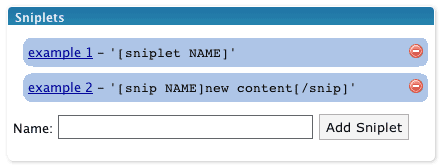
Shared sniplets are created from the Manage/Sniplets page.
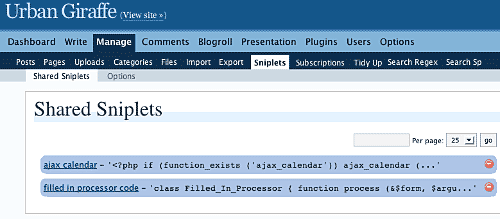
Wherever the sniplet is created it is edited in the same way:
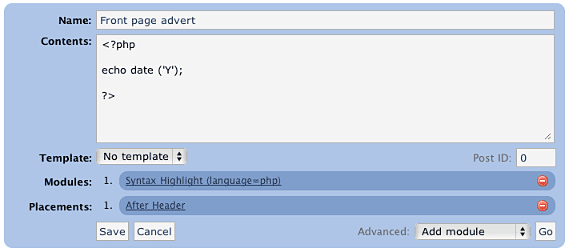
A sniplet has a name, some contents, a template, a number of modules, and a number of placements:
name– used to refer to the sniplet in your post (it may contain spaces and does not need to be unique)contents– can be any text, HTML, PHP, or whatever data you want to pass through any functionstemplate– determines if a pre-defined style is to be usedmodules– small modules that perform a specific function on the content of the sniplet. For example, one function may syntax highlight PHP code.placements– determines where on the page the sniplet will appear. Multiple placements are allowed, and a sniplet can always be manually placed in a post.
Modules
Sniplets takes the idea of text replacement one step further by allowing you to attach special processing modules to a piece of text. Multiple modules can be attached and are ‘executed’ in order. The first module takes some text, processes it, and passes it on to the next module. In this way it is possible to chain functions together and create a highly customized sniplet.
Modules can also accept parameters that change how the function works. Parameters are comma-separated, and are specific to the module:

Note how a parameter is defined by a name (language), an equals, and a value (php). If no equals is supplied then the parameter is assumed to be ‘true‘.
Adding sniplets into a post
Sniplets are inserted into posts by using a special tagging syntax:
[sniplet NAME]
That’s it! The name must match either to a local or shared sniplet, including any spaces. The Sniplets plugin will replace this tag with the results of running all functions on the sniplet contents.
If you configure Sniplets to do so, you can also use an additional tag to change the contents of a Sniplet from inside your post:
[snip NAME]new content[/snip]
This is basically the same as before but this time the contents of the sniplet are overridden by whatever is inside the start and end tag.
Placements
Sniplets can be automatically inserted into key points of a page by assigning placement points. For example, adding a placement point ‘comment form‘ to a sniplet will automatically insert that sniplet into the comments form area. The following areas are pre-defined:
- Header – appear in the theme header
- Footer – appear in the theme footer
- Before post – appear at the start of a post (first page or all pages)
- After post – appear at the end of a post (last page or all pages)
- More tag – appear where the more tag is defined
- Comment form – appear where the comment form is
- Initialization – appear before anything else on the page (useful for running custom code to insert cookies)
As part of version 1.3, these areas can now refined to specified pages of your website. For example, RSS feeds, posts, archives, and home page. Not all places are available for given page (for example, there are no comments on RSS feeds).
Additionally you can define your own placement points from within your theme or from the Sniplets options page. Custom placement points can then be inserted into your theme using template tags. To do this you need to use the special WordPress filter sniplet_places. You can hook into this from the functions.php file in the theme:
<?php

add_filter ('sniplet_places', 'my_theme_places');

function my_theme_places ()
{
  return array
  (
    'My Theme Name' => array
    (
      'mytheme/myspecialplace' => 'Before the Sidebar',
      'mytheme/myotherplace'   => 'After the Sidebar'
    )
  )
}

?>
Note how the points are defined as an array mapping from a unique ID to a description string. Since version 1.3 you must prefix all places with an identifier for your theme.
Alternatively you can define placements from the Sniplets options page. Here you can only specify the unique ID without description.
Limits
Sometimes you may want to limit the number of Sniplets that appear in a particular placement. For example, you have a message area at the top of your posts, but you only want a maximum of two messages to appear. You can achieve this using limits.
Limits are configured per placement area from the Sniplets option screen. Each placement has an input field where you can specify the maximum number of Sniplets allowed to appear there. A value of 0 means there is no limit. In addition to specifying the maximum limit you can also randomize a placement. This has the effect of displaying Sniplets in that placement in a random order. For example, you limit the placement ‘message’ to three, set the randomise option, and then create five Sniplets for that placement – the plugin will randomly select three of the Sniplets each time the page is viewed.
Templates
Templates are simple wrapping styles that are applied to the output of a Sniplet. Some templates are provided as default and they can be extended from the Sniplets options page:
- Inset – wrap the content in a
divwith classinset - Warning – wrap the content in a
divwith classwarning - Notice – wrap the content in a
divwith classnotice
Templates are defined in the sniplets/view/sniplets directory. If you add a new template to the Sniplets option page then you need to add a corresponding template file.
Bundled functions
The processing functions included with Sniplets are:
- Syntax highlighting (using GeSHi) – this will syntax highlight text from a variety of sources, including PHP, HTML, CSS, and JavaScript, using the GeSHi source highlighter
- Execute as PHP – executes the contents as though it was PHP code
- Include file or URL – treats the contents as a filename or URL and retrieves the contents of that file/URL
- User is logged in/out – returns an empty peice of text is the user is not logged in or out
- Random line – randomly selects a line from the contents
- Ramdom word – randomly selects a word from the contents
- Reverse – reverse the contents
- wpautop – apply WordPress auto-formatting to the contents
- HTML Encode – HTML encode the contents
Full documentation on modules can be found on the Sniplet modules page.
Execute PHP
The Sniplets plugin has an additional replacement mode that will execute and replace any PHP code in a post. This mode must be enabled from the Sniplets options page as it represents a security risk if you do not trust your editors.
For example, with the mode enable you can directly enter this into a post:
Today is the year <?php echo date ('Y'); ?>, and it's very lovely.
Security Concerns
Some of the modules open a big door into your website and could give someone the ability to cause a lot of mischief. The Sniplet plugin allows anyone to insert a Sniplet tag in a post, but only an administrator can create a Sniplet. This should be sufficient for you to restrict what an untrusted user can do. If you need further restrictions then you may want to consider deleting some of the modules. This can be done simply by deleting the appropriate file in the ‘sniplets/modules‘ directory.
Creating your own module
Creating a custom module is simple (provided you know PHP!):
- Create file in
wp-content/plugins/sniplets/modules - Write code to process the
$textvariable - Output any results to the screen (i.e. use
echo) - Include a special header at the start of the file so Sniplets will know it is a module:
<?php
/*
Name: Name of your module, as appears in the drop-down box
*/
?>
Template Tags
You can also insert a Sniplet directly in a theme template file by including the function:
<?php the_sniplet ('name'); ?>
You can insert a placement point by including the function:
<?php the_sniplet_place ('place'); ?>
This will insert the contents of all Sniplets that have the same placement.
Alternatively you can insert Sniplets and placements using WordPress ‘actions’:
<?php

do_action ('the_sniplet_place', 'mytheme/yourplace');
do_action ('the_sniplet', 'sniplet name');

?>
This has the advantage that should the Sniplets plugin not be active then the theme will not show any errors.
Support & Bugs
Support and feature requests should be made through the Sniplets support forum. You can contact me directly but I spend a very limited amount of time on direct support and you stand a better chance of being answered through the forum.
If you find the plugin useful then please do consider making a donation – it is appreciated and helps towards the maintenance of the plugin.
Thanks!
This plugin is no longer actively maintained
This is an extremely powerful plugin! I wonder why it hasn’t received more publicity.
I found your page by searching wordpress insert data in Google.
Hello,
Congratulations for this great plugin!
I just want to ask if there is a way to run a sniplet inside a template, not a post.
I tried but it didn’t work. Only sniplets written in post’s text editor are executed.
Thanx
Added ‘the_sniplet’ template tag – place this function anywhere you want a sniplet to appear in the theme
Thanks for all your highly valuable job ! This plugin is highly dangerous too ! You gave some clues to work around those dangers. All your peace of mind, as an administrator, relies on an assumption that other administrators are honest and loyal enough too… A little bit naive isn’t it?
However I’ve downloaded sniplets and activated it in my blogs provided I am the one and only administrator of them. Thanks again.
Last but not least, how can you make sure that all of your interesting plugins zips aren’t intercepted by malicious attackers servers so that downloading and activating them on users sites could induce potential jeopardy ?
Well, as a developer I should spend a while reading your code … What about those guys without that know h ow ?
Bonjour de Strasbourg, France. You have fans everywhere in the world !
Not naive, no. If you can’t trust your administrator then you’ve got bigger problems than this plugin!
Would it be possible to pass variables to the snippets? Say I want to display a dynamic information set from any of several different reviewed websites such as page rank or incoming links.
It looks like right now I would have to create a separate snippet for each site I reviewed. But if there were a way to pass a URL or an ID then a single snippet would be able to handle all of them such as
<!-- snipplet getRank php | variable -->Hi Dane,
I have thought about it but decided against it in the initial version as I was wary about making the syntax as complicated as a similar plugin I wrote (InScript, which does do what you requested). I actually need this functionality myself, so it will probably be included soon!
This plugin has now been updated to version 1.0.2, which includes chained functions and the ability to pass parameters.
I got this on visit to Manage\Sniplets in wp admin:
WordPress database error: [Table ‘tungcode_wp.wp_sniplets’ doesn’t exist]
SELECT SQL_CALC_FOUND_ROWS * FROM wp_sniplets WHERE post_id IS NULL ORDER BY name ASC LIMIT 0,25
Deactivate\Reactivated the plugin but the error is still there…
please check
Try version 1.0.3
Hey there John,
Wow… what’s with the Firmware fixes you’ve got going on this Sniplets page? Is that an example of how Sniplet’s can be used to add static text to dynamic content? For example, like that weird guy was doing with semi-static WordPress home pages 🙂
Anyway, any idea what the cause of the:
Warning: Missing argument 2 for get_by_name() in D:\Apache\www\WP221\wp-content\plugins\sniplets\model\sniplets_class.php on line 88
when pulling in Sniplets into a template? Would be great for semi-static homepages if this could be fixed.
Cheers,
Zain
PS: That’s a great FAQ you got there BTW… is that a plugin? 😛
hiya,
nice plugin, but as far as i can see it breaks tinymce when using firefox. no problems with ie so far.
–rgds marcO
Marco, bug fixed.
Zain, remind me never to install a new plugin and then decide to go for pizza!
A new version has been released which adds a stack of new functionality including placements, which allow for automatic sniplets. It also takes care of that bug
John… you go *out* for a pizza? What kind’ve Super Developer are you? Blimey… one with a social life and gets away from his computer – that’s unheard of!?!?!
Anyhoo – just got back and will be getting a take out and testing out the new plugin a bit later (and the other top secret hush hush one too!). Looks excellent. As usual, I’ll send you any bugs.
And anyone reading this comment – please make a donation for John’s hard work. Otherwise kittens may cry! 😉
Hi,
First, congratulations for this plugin. Very useful !!!
Second, you guess that I have a problem but which one 😉
I use a sniplet in my sidebar to display an image. This sniplet works perfectly on all my website except on the homepage, where the image is repeated 2 times.
I think the problem is that I’m using a static page as a homepage. When I use the default homepage, it works well. But when I use a static page, the sniplet is displayed 2 times.
I hade the same problem whith the ‘more’ function on articles that I display on this static page. I use
<code></code>to override this problemMaybe there is a like-trick for your plugin ?
Thanks
Jooj, I couldn’t recreate the same problem when I tried Sniplets with a static front page so I suspect the duplication issue may be something specific to your site (possibly plugin or theme related). I can’t think how <code> would stop this happening, but fundamentally you shouldn’t be getting any duplication!
OK i tested with another static page (based on the page template) and it works.
I found that the problem came from my request query_posts (I show some static elements then the last x articles).
I changed for get_posts and it works. But I do not know why.
This plugin looks like exactly what I need. I am using the Excerpt Reloaded plugin (http://guff.szub.net/2005/02/26/the-excerpt-reloaded/) on the category page. Sniplets is displaying them twice on the cateogry page. Any idea why it would be doing this?
Hi Dave, what do you mean by Sniplets is displaying them twice – the excerpts or Sniplets on category pages?
Hi John,
I updated with version 1.1.4 and when I call a sniplet directly in the template with it does no longer work. Do you have an idea ? (Mabe there is somemthing special to do when updating ?
I also have another question: can I call a sniplet in another sniplet content ?
For example, I have the sniplet [sniplet example1]
and the content of this sniplet is :
<a href=”[sniplet link_exemple1]” rel=”nofollow”>Link</a>
?
Jooj, sorry, I forgot to update the documentation about the template tags. In the latest version you need to echo the function to the screen:
echo the_sniplet ('name'). Currently you can’t nest sniplets, although this is more from not wanting to create an infinite loop than any technical reason. I’ll look at adding this into the next version.Hi John,
Thanks for the correction. It works well.
Concerning my sniplet into a sniplet, I find a solution in passing the the_sniplet function in a sniplet with php execution and it works well !!
but everything is not perfect. I always have the problem with the sniplet repeated twice on my homepage.
I reproduce this problem on a website : http://bojo.free.fr/blog/
My homepage is a stacic page based on a template page where I put the content of the page and after the last 3 posts.
I think the problem comes from the last 3 posts loop because if I remove this portion of code it works.
Any idea ? If needed I can send you by mail login and pwd.
Regards
Hi, I have a question about your plug-in. I’m using it with the newly released WordPress 2.3, with Safari, and I can’t delete Sniplets. Additionally, I don’t get that extra bit for choosing the program language. Thank you for any help.
Jooj, I’ve fixed this problem and it will be included in the next version. Check back soon!
Omar, what is the extra bit for languages?
Groovy baby !! You’re the best John.
So impatient to download the new version 😉
Hi!
I tried this:
Before post – appear at the start of a post (all pages)
and it shows only when you click on " Continue Reading ". I have 2.2 (WP) and 1.1.4 (Sniplets)
Thanks
Roger
Roger, yes, the before posts (all pages) is referring to when you have multiple pages in a single post, not that it appears on the home or archive pages (which I think is what you want to happen?)
Hi John,
Any deadline for the next version ? I am so impatient 😉
Hi.
Cool job!
But here’s my question:
As far as I see, the sniplets work only on single post pages, and not on the homepage. Is that true? And if it is, why is that so?
Suppose my posts appear in the homepage as well, the sniplets wouldn’t run.
Thanks again for your good work!
Hello ,
I question is–If particular website i am visited daily and only updated party i want lighlighted can i used this type of website or code !
Thanks,
Baks
Not sure what you are asking bakul, but if you want code to be highlighted then yes you can use this plugin.
Neat plugin, but i cant seem to get it to work. Plugin activates ok, but the sniplet just doesn’t seem to register. I think I might be doing it wrong 😛
What i was wondering is, are the images in your FAQ messed up? Some seem right, but in the "adding snippets" section they look funky.
Ok, i got it working (I’m dumb, heh). Great plugin. Pageview is pretty cool too.
I have installed successfully but everytime I try to edit a Shared Sniplet, I get this message :
Service Temporarily Unavailable
The server is temporarily unable to service your request due to maintenance downtime or capacity problems. Please try again later.
When I switch to Manage/Sniplets/Options view and then return to Sniplets view, the sniplet is still there but edits didn’t take… I’m not sure that I’m using this properly as it seems like your FAQ (above) has some display problems as one commenter was trying to say earlier… do I need to start out creating a Sniplet’s content by putting the [snipletname] or the actual code? It’s not clear to me.
I only get the other options after entering a Sniplet name and something (anything) in the content area and then clicking on the linked Sniplet name.
Sorry for so many questions but usage isn’t clear to me… I know what I want to do with it but can’t figure out how to get it working.
i cant see how to insert a sniplet into a post. your instruction page here seems to start to emplain it but then says "no snipplet called NAME" and then it says "thats it!". but i missed the bit where you actually explain what the code to insert a sniplet is. it looks like some sort of error on the page or something where the explanation code is executed instead of distplayed. thanks for your help with this.
Hi, this is a great plugin! I didnt need to write a seperate page anymore to run it on my wordpress… However I encountered a problem… when I do :
<?php// Read all folders in the current directory
$dir = "/home/XXXXXXXX/XXXXXXXX/XXXXXX/XXXXX/";
if ($dh = opendir($dir)) {
$folders = array();
while (($folder = readdir($dh)) !== false) {
if ((filetype($dir . $folder) == "dir") && ($folder != "." && $folder != "..") ) {
array_push($folders, $folder);
}
}
closedir($dh);
}
// Sort the folders
$count = 1;
sort($folders);
foreach ($folders as $folder) {
print "
$folder
";
// Read the animes in each folder
if ($dh_inner = opendir($dir . $folder)) {
$files = array();
while (($file = readdir($dh_inner)) !== false) {
if ($file != "." && $file != "..") {
array_push($files, $file);
}
}
}
// Sort the animes
sort($files);
foreach ($files as $file) {
print ("$file");
}
print "";
$count++;
}
?>
some parts were generated with an extra \ which caused the drawer effect not to work.. Any ideas?
mostly came from this part :
Hi:
Your plugin appears to be a great tool. However, I cannot get it to remember the module with sniplet… I can select the module from the module dropdown list, Save without error. But when I edit again, the module reverts to HTML encoded.
I’m using wp 2.3.1 and sniplets 1.1.4
Any help would be appreciated, Nigel
OK I’ve worked it out!
For anybody looking at sniplets, it’s a great and powerful plugin which lets you put absolutely anything in any WordPress page with a minimum of hassle.
John, your documentation above is missing tagging syntax.
For those who are interested the current syntax is enclosing a sniplet in a comment tag. It looks like this:
<!-- sniplet name-of-action -->It’s that simple. I take some issue with John’s use of a comment tag as a lot of WordPress WYSIWYG editors and Tidy and so on mangle or delete comment tags. Perhaps he has an alternate syntax available now.
John, you might consider including the Syntax in your read me documentation.
Pixeldotter, it’s possible the plugin is being affected by Apache’s mod_security. Take a look here and see if that affects the problem.
Starfield, I’m not sure what you are trying to do, but if you get backslashes in your output then take a look at the PHP function stripslashes.
Foliovision, the above documentation is correct. The plugin has not used comments for some time now.
Sorry John, you are quite right. We are still running .3.1.
If we upgrade does that the comment tags will no longer work at all?
If you upgrade then the comment tag won’t work. An automated upgrade was too risky, and the number of pre 1.0 users to few to make it worth the while. You can use something like Search Regex to locate the comment tags and even replace them.
Hi John,
I’m still enjoying your plugin. Very useful.
I have to manage many sniplets now (~50) and I would like to know how to sort them by alphabetical order as default in the manager page
Regards
I am using the Sniplets plugin and I like it very much.
However, It only seems to work on one single template file, namely index.php.
When I try to use the sniplet import
<?php echo the_sniplet ('text'); ?>on search.php, nothing appears.How can I get it to work on other pages than index.php?
Thank you in advance!
Hello John,
To update on the updating issue – I did update one weblog without sniplets from .3 version. Result an extra table and an error message:
WordPress database error: [Unknown column 'placement' in 'field list']UPDATE wp_sniplets SET name='embedusage', contents='<h3>Usage</h3> <p>Usage is very simple. Edit the post you wish to embed a menu inside and insert: *** menu *** To embed a menu of all sibling pages. Or insert: *** menu child *** To embed a menu of all child pages. Embedded menus are presented as an ordered list wrapped inside a div element with a class of \'embedmenu\'. A default style is included with the plugin and can be changed to suit your own site.</p> <h3>Menu depth</h3> <p>You can specify an optional depth parameter to configure how many levels deep you want the menu to go. This is achieved by simply adding a number after the menu command: *** menu 2 ***</p> <p>This works the same for child and sibling menus, and a value of 0 indicates there is no limit (i.e. as many levels as needed will be displayed)</p>', placement='', template='' WHERE id='23'
Progress delete
Solution: use your delete button and reenable the plugin.
Hence no smooth update of Sniplets possible from early versions.
Next issue: Sniplets do not allow me to put a URL into them.
I wanted to link to you at the bottom of this page in the credits:
http://foliovision.com/seo-tools/wordpress/plugins/embedded-menus/
No such luck. Every time I put a URL in the sniplet, I got this error:
I tried with a number of Modules and had no luck.
Point of interest: Sniplets get caught by the Foliopress Embedded Page Menu plugin, unless the triggers are html entity encoded.
I’m having some trouble using the sniplets in my post… I have a sniplet named "Store Hours", and in my post editor I’ve added "[sniplet Store Hours]" just once, but the published page prints the sniplet three times! No one else seems to be reporting this problem… what am I missing?
John – I seem to have a problem running Sniplets v1.1.4 with WordPress v2.3.2. Sniplets are critical to my website as I use them to provide real-time updates of the weather conditions. All said, I have approximately 12 different Sniplets running on the website.
Previously, I contacted you with a problem and you knocked out v1.1.4 for me. (That shows you how long ago it has been since I had to fool around with my Sniplets.) At the time I had to use Netscape v8.1.3 to edit/delete the actual Sniplet instead of my browser of choice: IE v7. No biggie. But today when I tried to add a new Sniplet using Netscape it exhibited the exact same problem as IE – no way to delete or edit the Sniplet. The buttons are all there but not the fuctionality or the drop-downs. Is the problem related to the version of WordPress I’m running or is it another browser compatibility issue?
John – After I posted my problem, I loaded Opera v9.25 and had the same issues as before – unable to either edit or delete. Then I loaded Firefox and the problem disappeared!
All, Sniplets 1.2 has now been released. This release takes care of most of the issues that have been reported and adds a lot more functionality. As with any major new release you are advised to backup your database before upgrading the plugin in case the upgrade procedure removes any important Sniplets. If you do experience problems in upgrading then please do contact me.
Alec, as stated, upgrades from 0.3 are not supported. The Internal Server Error is a result of mod_security running on your host.
John,
I have a text widget on left sidebar where i want to display something depending on whether user is logged on or not. But when I put [sniplet login_register] in text widget – this got displayed on rendered page as is:
"[sniplet login_register]" – so sniplet is not rendered at all.
When I insert the same sniplet into some page – it got rendered somewhat….
Do you know if I can make sniplet to be displayed on text widget as well?
Thanks in advance
PS: I using Semiologic Pro.
Gleb
John, sorry I found "Sniplet" widget and trying to use it without much success either. Here’s what I’ve done:
1. Create sniplet "ppp" with the following contents:
<?php echo 'HELLO'; ?>2. Added "Sniplet" widget to left side bar, specifying ppp as a name of it and type = sniplet.
3. Enabled Manage->Sniplets->Options – [x]Execute PHP in posts (I tried both – on and off – same result).
Reload page – nothing visible on sidebar.
Same sniplet within page text : [sniplet ppp] – will correctly render to "HELLO".
What do it need to do to have my custom php to get executed on sidebar?
Gleb
PPS: Sorry for spamming – figured that out. I had to add "module exec as PHP" to PHP-ish sniplet. Thanks! –gleb
I can’t believe you haven’t been rated in the WP plugin site. Your plugin is great.
Hi,
Newbie question…. (I am not a programmer) Can I use this plugin to simply append text at the end of my posts? If so, please show me how I would add something like:
Thanks for visiting, you can subscribe HERE.
and HERE is a link to the RSS feed
thanks for your assistance
Lane
Lane, yes you can. You would simply create a new shared sniplet that contains your text and set the automatic placement to ‘After post’. That’s it!
great, thanks!
I can’t seem to get php includes to work with Sniplets. Is this a known issue or am I maybe just doing it wrong?
Dave, you’re probably doing something wrong (PHP includes are powering a lot of this site). Can you provide more details over in the support forum?
I am trying to use sniplets to add some javascript to a post, but wordpress is converting all the line feeds to s… is there any way around this?
Woops, my post got gobbled up. Wordress is converting all my line feeds to br’s
Great plugin John! 🙂 However I have some difficulties. Like Scott, I’m trying to create a sniplet with javascript inside and all my line feeds have P tags inside and my scripts fail to work. A quick workaround was to try to write my entire script in one line but this is ugly… 😛 How do I pass parameters? I can’t figure this out. For example, let’s say that I have the sniplet XXX, that looks like:
How do I pass a new class to replace myClass? And another thing. If I use something like the sniplet above, at some point I have to close the div. I would like to have something like:
[sniplet XXX]something here[/sniplet XXX]Where
[/sniplet XXX]does the or whatever I want in closing. Any ideas?🙂
Hi,
i have a problem,
yes i know everything has a limit.
— what is the “Contents” are limit. —
i want to add my forms with sniplets but i cant do this because of “Contents” area limit.
— is there a way to use long content with sniplets? —
Sniplets was hacked last night.
Please pinpoint the code and fix it asap.
Here’s the proof.
http://www.floppingaces.net/2008/02/27/flopping-aces-hacked/
Yes, Sniplets had a code vulnerability for people running PHP with the register globals setting enabled. If you have a decent host then you shouldn’t be affected, but regardless you should upgrade to the latest version.
Dresah, I don’t understand your question. What are you trying to do?
Zdeto, that sounds a lot like the WordPress auto-formatting routine is munching your code. You can disable this with a plugin such as HeadSpace. With regard to your second question you can achieve that by enabling the ‘sniplet content’ option. An example is provided on the options page itself.
Is there a way to get the (shared) sniplet to work for posts that are in an archives page or on the home page? I’m using the default Kubrick template and I can’t get the shared sniplet to work for the home page. Anytime wordpress shows the entire post (and only the entire post–meaning no additional posts are possible) it works, just not when there are multiple articles.
Thanks!
I came across this plug-in while looking for a syntax highlighter… Very powerful plug-in — yet very scary due to vulnerability issues! Wondering if the whole register_globals issue could be fixed?
Have you seen this security alert yet?
http://securityreason.com/securityalert/3706
nevermind, I guess you’re aware and it’s more an issue of register globals, just thought I’d pass it on. This one of my favorite plugins of all time.
Jeromy & Pedro, as detailed in comment #65, the register globals vulnerability was fixed
Tripp, shared sniplets should work everywhere, including home, archives, and other pages.
I have a shared sniplet setup for the beginning of ALL POSTS but it doesn’t show up in Archives, the home page, or category archives.
I’m using the k2 theme and I think it’s not working because theloop.php is inserted into the index.php using include (TEMPLATEPATH . ‘/theloop.php’). I even tried to manually add the sniplet to theloop.php right before the_content by using both methods of adding sniplets to a page per your instructions.
Is there a way to reference included files when using a sniplet?
what is the syntax of passing arguments if we use a function in a sniplet located in a post
?????
[snip NAME]argument1,argument2[/snip]
when i type in my post it will automatically change to
what is wrong?
hi there adsinterface.com. you have to disable the visual wysiwyg editor.. create a function shared snipplet… then placement should be in header. add a module… then call the function with arguments. arguments with html chars will produce an error so better pass argument as numbers or ordinary text.
thanks to urbangiraffe.com
Tripp, I misunderstood your original message and yes the shared sniplets wont appear in the areas you mentioned. This was a design decision based on my own requirements. I’ve added feature request #102 to provide an option to allow it on all areas.
Ads, parameters are specified in the sniplet interface, not inside a post.
I can’t seem to input characters like chinese or korean into shared sniplets admin panel.. It garbled after being saved.. is this because of lack of support of chinese characters in sniplets ? Has anybody had a workaround ? This is one hella fine plugin.. I couldn’t live without this plugin… thks
Added as bug #107
Hello John,
Seems to be a great plugin, however i’m having a prob that apparently i’m the only one to have, when installing the plugin (just after activation):
Fatal error: Call to undefined function register_sidebar_widget() in /home/.invitation/lolizbak/laurentk.com/wp-content/plugins/sniplets/plugin.php on line 501
I’m on WordPress 2.3.2, and didn’t find an answer on the forum … Would you mind helping ?
Are you using K2 by any chance Laurent?
Hello John,
Yes I am. Compatibility issue ?
Thank you!
Yes, K2 does weird things with Widgets that causes problems with Sniplets. Version 1.2.5 should fix this
I am trying right now … Will update asap !
Another question: which plugin do you use for comment subscription ? there are a bunch on the market, but yours seems very fine to me ! I guess you’re using wp-subscription-manager, but i don’t find it … does it have a specific other name ?
Thank you !
Wow, it works (K2), and gosh it’s powerful !
Starting to envision all the possibilities !
Thank you !
Comment subscription is provided by subscribe to comments
Hi John!
I dont know what i am doing wrong…
I have installed wordpress-2.5-RC1. I activated sniplet(1.2.5) plugin as per your instructions. When i try to create either Shared or Private Sniplet on any page in editing mode, upon clicking the “Add Sniplet” I only see the blue line with a hyphen(-) in on its left and two icons in right of the blue bar with out any name i given to it.
Please guide me what i am doing wrong. It would be great if you have some working example application.
I am using PHP 5.0.4/MySQL 4.1.14-nt-log on windows XP service pack 2.
Thanks,
Shahid
I’m having the exact same problem as Shahid, commenter #86.
Also, let me suggest a feature: How about locations related to the feed only (feed footer, feed header, etc.) I am researching plug-ins to insert a footer in the feed, but none of them support php code. This would Sniplets the best “feed footer” plugin around.
I understand that I can make a custom placement, but I’m still not familiar where should I add the code… Will investigato how to create feed-only content after I can make it work.
Thanks for this great plug-in. I am also very puzzled why this doesn’t seem to get any publicity.
Hi,
–
Thanks for this great plugin.
–
The 2 functions I’m waiting:
1. the sniplets appear on the blog frontpage and archives pages;
2. The sniplets appear in the feed items (before post, after post).
–
Thanks a lot.
–
Chris Masse
Can this be used to create “callout” boxes within a post? Like, a memorable or important piece of text from within the post, I want to appear bigger, with quotes, and have the text flow around it.
Thanks!
There are some issues with WP 2.5 which have been added to the bug tracker. I’ve also added the suggestions to the feature tracker.
DG, yes you can do that. For example, I use it on this site to create the red warning boxes just below the comments, as well as the download area at the start of the page.
Cool.
Any tips on how to do the downloads box you made?
How to position it so text can flow around it in a post?
thanks!
Use the ‘inset’ template in a sniplet and somewhere in the CSS for your site add a style like this:
.inset{
float: right;
padding-left: 1em;
}
You can make the style more attractive if needed but that’s the basic functionality to get it inset to the right and having text flowing around it.
Hi John, I love this plugin and am really frustrated that it’s not working on 2.5. I have the same problem as 86 & 87. Any idea when you might have a fix?