Due to time constraints I am no longer able to offer support on this plugin. Please do not contact me regarding any problems you may have. The plugin fulfils my own requirements and unless anything else is required then development is unlikely to continue. You are, of course, still able to download and use as you see fit.
Thanks for your interest.
John

| Download: | Advanced Permalinks |
|---|---|
| Version: | 2.9.2 |
| Supports: | WordPress 2.1 – 3.0 |
| Other: | WordPress.org | SVN |
Advanced Permalinks is a WordPress plugin that extends the default permalink functionality and allows you to create different permalink structures for each post on your site. This is particularly useful when migrating an old permalink structure to a new one.
For example, your site currently displays posts like
/2007/05/06/this-is-my-post
But you’d like to make it:
/reviews/this-is-my-post
Your only choice here is to create 301 redirections for each existing post and change the permalinks for everything. With Advanced Permalinks you can configure your site to keep all its existing permalinks, but to use a different permalink structure for new posts.
/2007/05/06/this-is-my-old-post
/reviews/this-is-my-post
No 301 redirections are needed and all incoming links remain exactly the same. Perfect!
Features of Advanced Permalinks:
- Create multiple permalink structures for posts
- 301 redirect old permalinks
- Create category-specific permalink structures, whereby posts in a certain category will have a different permalink structure
- Remove the requirement to have a category base
- Change author permalinks
- Allow periods in permalinks – ideal for website migration
Advanced Permalinks is available in the following languages:
- Bulgarian (thanks to Alexander Dichev)
- Belorussian (thanks to Marcis Gasuns)
- Russian (thanks to Slava Mikheev)
- Uzbekistan (thanks to Alexandra Bolshova)
- Lithuanian (thanks to Nata Strazda)
Note that much of the functionality of this plugin can now be achieved using WordPress 3.0 and custom post types.
Installation
The plugin is simple to install:
- Download advanced-permalinks.zip
- Unzip
- Upload
advanced-permalinksdirectory to your/wp-content/pluginsdirectory - Go to the plugin management page and enable the plugin
- Configure the options from the Options/Permalinks page
You can find full details of installing a plugin on the plugin installation page.
Configuring the plugin
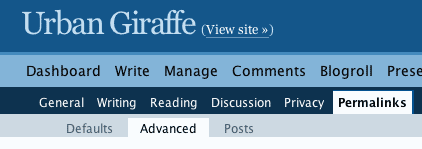
All configuration is made through the standard WordPress permalinks page. When the plugin is enabled you will see some new sub-menu options:
Advanced post permalinks
To assign a different permalink structure to posts you need to have a start and end ID. These IDs reflects that first and last post that you want the structure to apply to.
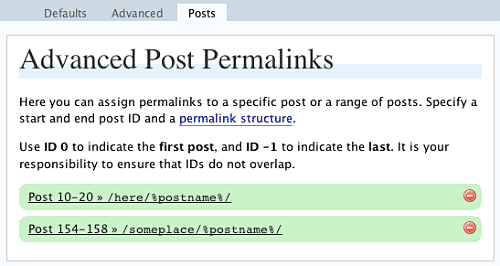
If you want the structure to apply to all existing posts then enter 0 for the start ID, and -1 for the end ID.
If you want to migrate your permalink structure then you would copy the existing permalink structure and apply this to all existing posts. You would then change the default permalink structure.
Category-specific permalinks
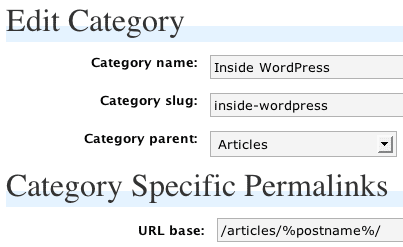
Category-specific permalinks allow a permalink structure to be defined for categories. Any post that belongs to that category will appear on the custom permalink. This is useful for separating different areas of your site.
Other permalinks
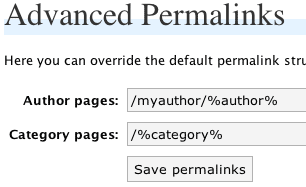
You can configure author and category permalinks:
Migration
A migration feature exists which allows you to define old permalink structures that will be redirected to the current permalink structure. You would typically use this if you decided to change your permalink structure, but wanted to have all old permalinks redirected.
Support & Bugs
Support and feature requests should be made through the Advanced Permalinks support forum. Due to time constraints I will no longer answer questions about this plugin myself. You are advised to make use of WordPress 3.0 and custom post types.
I installed, activated, went to options – permalinks -posts and got this error:
Warning: Invalid argument supplied for foreach() in /var/www/web6/web/wordpress/wp-content/plugins/advanced-permalinks/view/admin/permalinks.php on line 1
any hints what could be wrong?
all I actually want to do is migrate my permalink structure from: /%year%/%monthnum%/%day%/%postname%/ to /%categoryname%/%postname%/ but I had problems with permalink redirect plugin so I tried yours, still witout luck 🙁
The plugin is working, it’s just mis-reporting an error. Version 0.1.2 removes this message. You should be able achieve your migration (it’s the exact purpose I wrote the plugin for!)
ok, I’ll try again. will this apply the new permalink to old and new posts as well?
there are more problems: I can’t delete my first try of permalink redirection when I tried your plugin earliear…I will try and paste the errors I found with firebug here:
document.getElementById("quicktags") has no properties[Break on this error] document.getElementById("quicktags").innerHTML += "
I just found this text:
There has been words that WordPress is going to integrate the functionality of Permalink Redirect into its core, and looks like it is going to be available in WP 2.3 (currently SVN trunk).
so if this functionality will be available in 2.3 I can wait until then to change my permalinks…
well, it seems ican’t paste code here, if you will give me a way of contacting you I can email you those firebug errors.
Permalink redirect provides different functionality than this plugin. Advanced Permalinks allows you to have multiple permalink structures, while permalink redirect creates 301 redirections for incorrect URLs. I can be contacted from the contact page
[…] fixes and everything about blogging, especially with WordPress. Go ahead, subscribe to our feed!Advanced Permalinks extends the default permalink functionality and allows you to create different permalink structures […]
[…] Plugin Releases for 8/30 Advanced Permalinks extends the default permalink functionality and allows you to create different permalink structures […]
This was exactly what I was requiring to reorganise things and keep my permalink structure.
Top stuff.
any idea what is going on with those firebug errors? its still a no-go for me 🙁
The new version (0.1.3) fixes the missing delete text. I can’t get any other javascript errors to occur, but if they do let me know what browser version you are using.
I found some problems with preview of post with this plugin enabled. If I disable it, preview works again. Tested with version 0.1.2.
Preview seems to work regardless of whether the plugin is enabled or not. How does it not work for you?
I try with LiveHttp headers to check what is going on.
http://blog.gruber.si/?p=204&preview=true
is redirected to
http://blog.gruber.si/?p=204
And this loops until browser give up. If I disable plugin it works as it should. I did not configure plugin, so it’s all default.
i found some error on this plugin, it dosent work with wp2.2.2 and get some php headers error on preview of post or edit posts!
Hi,
It is workign great and is a wonderful & useful plugin for existing site
I have tried to explore it for category links to have the ".html" extension but it could not worK.I am using wordpress 2.2.2.
What I wanted to have the .html extension for the category also so In the
"Advanced Permalinks " I defined /%category%.html ,.then I have refreshed
the page and I could see that category links was also having .html extension But when I click a particular link than it fetch the correct page and shown the error "Sorry, no posts matched your criteria."
When I have deactivated your plugin OR when I have taken out ".html" from
/%category%.html than system was back on track but without .html extension
in the caregory links.I think like your another plug " Slug with period"
scripting style may help here to handle ".html" extension in the category link
also also so that internally it takes out ".html" while passing the further working to wordpress system.
Can you please look into .If it ican be done than only it may be useful for
old websites conversion to word press.I may be interested to support the plugin by making some
donation.
Thanks & Regards,
Ajay Jain
India
[…] Advanced Permalinks BloÄŸunuzda yer alan adreslendirme yapısını deÄŸiÅŸtirmek istediÄŸinizde, indekslenmiÅŸ olan eski sayfalara girmeye çalışan kiÅŸi aradığı adresteki içeriÄŸe ulaÅŸamayacaktır. Bu eklenti ile eski yapıdaki tüm adresler yeni adres yapısına yönlendirilir. […]
=> Any update about " Is it possible to have .html extensions for the category links also "
=> It is going to involve good amount of time than I will support the work means of donation.
Ajay, I’ll look into it when I have some available time. Updates will be posted here
Sekundek, I still cannot reproduce your problem, and no redirection happens for me so I can only assume that it’s caused by a clash with another plugin. If you can try disabling other plugins then it may help locating where the problem is. Also, how do you have preview enabled? In recent versions of WordPress the preview function has been removed
Pouya, it does work in WP 2.2.2 as that’s what it was developed with.
The new version adds an option to enable periods in permalinks. This will be very useful when migrating old websites.
Hi John,
Merger of both the plugin is a nice idea.
I have done the testing with your recently updated "Advance Permalink plugin" but it gives 404 error while using the Advanced Permalinks settings ( Option / Permalinks / Advnace ) .
To resemble the problem please check out http://www.servercarecenter.com and than try to click on any category link.
For exploring it more I am sending you the login details at your gmail address.
Regards,
Ajay Jain
I found a bug in 0.1.7 while using WP Beta 3… when you add a custom permalink to a specific category, then go back in and delete the custom permalink, it auto-fills the field with the root directory /.
Try it.
Remove a permalink from a category, then it will make that category turn all links into URL’s pointing back at your home page.
yes Nick I have experienced the same thing.
There seems to be one more bug found while creating sub category with .html extension.Problem is that it show the upper level extension also like catgory.html/subcategory.html
To resemble the problem for please do the following
=> Activate the "Advanced Permalinks" plugin
=> Create a category "A" under root with slug name "a.html" and save it
=> Create a category "B" under A with slug name "b.html" and save it
=> Write some post under and assign it to "B" category.
=> View the site
=> Now hover the mouse over category B . It will show the path as domainname/category/a.html/b.html .this is the problem as it should should show the hove link path as domainname/category/a/b.html
Ajay, that’s not a bug, that’s just how it works. You created two categories with .html in the name, and therefore the combined URL will be /a.html/b.html
Nick, fixed.
John, I’m not sure how to use this plugin for what I need to do. I’ve currently got two problems:
1. I’d like to switch from date-based permalinks to category-based permalinks — I think I know how to do this with the plugin.
2. I’ve got too many categories, and would like to delete some, combine others, etc. Can I use your plugin to do that? How do I make sure posts classified under a certain category and indexed in search engines that way will get a 301 redirection to the new category?
Thank you in advance for your assistance with this! Perhaps you could put together a demo video, like you did for the redirection plugin, covering the various uses of this plugin? That would help a lot.
[…] Advanced Permalinks (http://urbangiraffe.com/plugins/advanced-permalinks/) 0.1.8 […]
With WordPress 2.3, when using a permalink structure like /%category%/%postname%, pagination in /%category%/ doesn’t work. Clicking page2 link gives a 404. Category feeds are also broken.
Hi John,
This is a great plugin and it’s exactly what I’m looking for…unfortunately, I’m having trouble getting it to work. I’m using v.0.1.8 with WP 2.3.
I’m trying to preserve my old permalink structure on my existing posts while establishing a new permalink structure for new posts.
I set up the configuration for my old permalink structure (/%year%/%monthnum%/%postname%.html) on the Advanced Post Permalinks page, but when I change the "default" permalink structure to my new permalink structure (/%category%/%postname%), none of my old permalinks work. I don’t get any error messages, just a blank page.
Is this an issue with setting permissions for my .htaccess file? Am I missing something? Thanks so much for your help!
[…] Advanced Permalinks extends the default permalink functionality and allows you to create different permalink structures for each post on your site. […]
Worked a dream with renaming links to /site/
However the categories stopped working with 404 errors
Any ideas anyone?
Regards
Alex
Hi John, thanks for anothe great plugin. It’s really phat! Here’s my question: "Is it possible, that it is not working with the wordpress 2.3 or 2.3.1? Fpr an update I would be very pleased…excuse my (sometimes) bad english.
There is a specific page that I want to turn into permalink, like "http://website.com/?page_id=50" to "http://website.com/anyname" can I do it with this plugin John?
Thanks
It appears to be working fine for me on 2.3.1. I have it currently using an old structure for 250 old articles, with new articles using the default WP structure… no problems encountered so far.
There may be a bug with changing the default permalink structure though… I haven’t checked that since I want to use the WP default structure going forward…
I’m testing your plugin on WordPress 2.3.1 (yeah, I know it’s not "officially" supported), and everything seem to work fine, except one thing: when using Category Specific Permalinks, my 404.php file is NOT detected: I only get a blank.
Here’s what I mean: one of my categories has this new custome structure: /wireless/%postname%.html
1) all posts both inside and outside this permalink structure work fine
2) non-existing URLs OUTside this new permalink structure (eg /category/wireless/fake.html) bring up my 404.php normally
3) but non-existing URLs INside this new path (eg /wireless/fake.html) only turn a blank — my 404.php file is not displayed.
Any help with this would be greatly appreciated.
I need to use subdomains for some PAGES. So 3 special pages have their own subdomain. I have pointed CNAME to the same host, where the rest of wordpress lies, but i am unable to do anything with that – the wordpress still rewriting everything to www. something. So the only what I was able to do was to 301 rewrite mysubdomain.example.com to example.com/top-page/sub-page
Do you know about any sollution how can I achieve what I wanted (show the content of example.com/top-page/sub-page on mysubdomain.example.com page)? I was trying to solve it for 20 hours without success
I just don’t seem to be getting this… I am a complete wordpress newbie, but really want to organise my permalink structures from the off.
How do assign an id to a post, so that it falls within the category id’s i set within your plugin? I just can seem to get this to work? Does the general wordpress permalink need to be set to default?
Really need a dummies guide to getting this working – any help much appreciated!
Hi, thak you for this great plugin.
I’m using the 0.1.8 version under WP 2.3.1 and it works fine.
But when I try to update to the new 0.1.9 version I have a bug, home page and category pages are ok but when i try to see a single article page I have a 404 error page.
I’m back to the 0.1.8 version but if you know what’happening and you have a solution to fix that bug let me know. Thanks.
hello.
i’m having some big problems with the plugin and wp2.3.1. the wwp permalink structure i’m using is /blog/%year%/%monthnum%/%day%/%postname%. besides this, i want to also set up an online portfolio and have a work category, and use links like /work/%postname% for it. this works ok with the plugin, the only problem is that by doing so the category archives no longer work returning a 404 error.
i also need to mention that i’m using a static page for my homepage and that the blog posts are displayed on the Blog page (which is also a static page).
does anyone have an idea on how this could be solved.
thanks a lot!
Version 0.1.9 is available from WordPress.org, but 0.1.8 is still online here… you might want to update the copy over here.
Is there a way to have /%category% as permalink AND /%post%
I have it like that but it is not working for the posts names.
Hi, I have a 404 Error when I choose to use /%category%/ token for category and any token without the "%category%" token for post (e.g. /%postname%/ ).
Should I downgrade it to the older version, because it works then =P.
(*Also, if this plugin redirect all instance of http: //site.com/permalink/* to http: //site.com/permalink/, could you have an option to input exception for some instance like http: //site.com/permalink/print/ or http: //site.com/permalink/email/ => because so we can use the WP-Email and WP-Print plugins =)…
Same here. If I activate version 0.1.9, I got 404 errors for both /%category% and /%author%
This doesn’t seem to work with All in One SEO Pack..
i tried it and i got this on advance permalink posts..
Warning: Cannot modify header information – headers already sent by (output started at /home/xxx/public_html/wp-content/plugins/all-in-one-seo-pack/all_in_one_seo_pack.php:158) in /home/xxx/public_html/wp-includes/pluggable.php on line 391
First, my apologies for taking such a long time to reply to questions and bug reports.
Blueverse, do you have any more details? I can’t reproduce this.
Moises & Blogger SEO, can you provide more details? Specifically what you are trying to do and what values you have put in what field on what page?
George, Tudor, LGDA, and Jazmin this situation should be covered. Try the latest version and send me (by email) the output of the new debug page.
Marc, you don’t assign an ID to a post. Yes the general WP permalink needs to be set. If you want posts in certain categories to have different permalinks then you need to edit the category and set the permalink there (see category specific in the page above). As you are starting with a new site then this is more than likely what you want to do.
Syam, I can’t reproduce this effect. /category/ should’nt work anyway as it’s not a valid WP page
Raoul, yep, point one should be easy with this plugin. Point 2 is not something the plugin can do, and you will need something like Redirection.
Hey John,
See if i activated Advanced permalinks and i have a category "articles" with "/category/postname" permalink structure.
And i have all in one seo pack on at the same time
those permalinks dont quite work when i click them i get the error posted in my previous comment.
If you have any messenger id i can show it to you while it happens..=/
O.K. Here is how I got the 404 error:
1. When go to the "Advanced" tab and choose "/%category%/" permalink for the CATEGORY permalink, click "Save permalinks" and, then, go to http://BestWordpressTemplate.com/announcements/, all the CATEGORY pages work.
However, RIGHT AFTER I hit "Update Permalink Structure" with the /%postname%/ token for the POST permalink, I get a 404 Error when I try to access all the CATEGORY pages! (The SINGLE POST pages show up fine).
2. This is vice versa: if I hit "Update Permalink Structure" for Single Post FIRST and, then, "Save permalink" for Category LATER, there is a 404 Error when I try to access the SINGLE POST page. (All the CATEGORY pages are fine).
I hope I had clarify this problem, if not, please shoot me an email =P.
~The SEO Blogger~
[…] Advanced Permalinks and Redirection. Both are perfect to sort out the problems I was having, with out braking everything 🙂 […]
SEO Blogger, that’s a great explanation and you’ve hit a fundamental problem with WordPress permalinks. Basically, because you have /%category%/ and /%postname%/ as your permalinks, WordPress cannot tell the difference – is /thing/ an attempt to access a category or a post? WordPress doesn’t have the fuzzy logic to ask ‘let me check the categories first and then check the posts’. I’ve made a note of this on the page warning that it is possible to create holes in the permalinks. To workaround this you’ll need to create a category base or permalink structure that allows WordPress to differentiate between the two.
Blueverse, thanks. Unfortunately I still can’t get this to happen on my test site. Could you either send me a temporary login so I can look at your All-in-one configuration, or send me some screenshots of the configuration pages?
Heres more info
the page after advanced permalinks is on
http://imgtrak.com/files/40.jpg
All in one seo config
http://imgtrak.com/files/41.jpg
Hi John,
I think you have already done this in the Advanced Permalinks plugin, but somehow this plugin redirect all instance of "site.com/posttitle-permalink/*" to "site.com/posttitle-permalink/".
The reason is because I’d really like to use the WP-Print and WP-Email plugin, which produce these permalink structure: "site.com/posttitle-permalink/print[/]" and site.com/posttitle-permalink/email[/]".
I think you have coded the exception rules for the above 2 instances but the Advanced Permalinks plugin still "smartly" redirect all instance of site.com/posttitle-permalink/* to site.com/posttitle-permalink/… but it doesn’t work on my end =P, as you can see here:
http://bestwordpresstemplate.com/header-and-footer-sidebar-widgets-feature-additions/emailpopup/
*The better solution I think is to ask Lester Chan to change the email and print URL for each post to site.com/print/posttitle-permalink/… yes/no? (It’s probably a yes =)…
Anyway, thanks for the explanation about the permalink structure John.
Hope WordPress will be smart enough to check those two instance of same permalink structure soon.
~The SEO Blogger~
Please disregard my last comment about the redirection of site.com/permalink/* to site.com/permalink/…
Well, after hitting the "Save permalinks" and "Update Permalink Structure" a bunch of time, the exception for /email/ and /print/ WORKS!!! Hey, thanks again John (don’t know if you’re an SEO or not, but your plugins e.g. HeadeSpace2/Redirection and this one sure are SUPERB!!!… Thank you once again =).
For me, there’s something that’s not working.
In the Options -> Permalinks panel, "Default", "Advanced" and so on, appear as a Unordered list, instead of submenus from the WP panel.
Besides, the Advanced Post Permalink entries, are not showing correctly, either.
I’ve just downloaded the plugin, moved it to plugins directory, and nothing more.
Any suggestion?
Thank you in advance!
I have tried to install this on my site and no luck. Once I enable to plugin, my static pages no longer work and my categories all link to my main page … What can be happening here?
Lucas, can you send me the HTML (Save as source) from one of the pages that are not displaying correctly?
Blueverse, still not seeing any problems! The only thing that would help now is if you could give me an admin login on a site where it’s happening so that I can experiment.
Sent! 🙂
Thank you.
hm.. I can’t seem to migrate from /%postname% to /%category$/%postname%
hello.
i want to modify the plugin so that it does not assume that the first category is a post’s main category.
for example, if a category has a custom url base, and one of its child categories has a different url base, the parent’s category url base is used. i think it would make more sense if it was the other way around, meaning that the child’s url base would be used.
could you suggest what i would need to change?
thank you!
Hello!
I’m really grateful to you for your plugin but I wish it worked.
My goal is to set unique permalinks based on title contents for each post. The titles are in Russian so I can’t just use %postname% URLs – they are displayed in some weirdo %#%# hoodoo-woodoo.
Examples (of what I need):
http://malecoffee.ru/blog/2008/01/20/02:13:47/Getting-workplace-neat-in-10-steps
or at least:
http://malecoffee.ru/blog/Getting-workplace-neat-in-10-steps
The steps I followed:
(0. Installing the Advanced Permalinks)
1. Setting the Default structure for URLs in [Permalinks|Defaults]
(I figured out that if this setting is not Default then I get 404 on every newly customized link. Otherwise, however, I’m getting back to parent directory clicking the mod_rewritten URLs but it seems more of a right way…)
2. Skipping [Advanced]
3. Setting someting like:
Post 3 » /%year%/%monthnum%/%day%/%hour%:%minute%:%second%/getting-workplace-neat-in-10-steps
Post 4 » /another-unique-topic
..in [Posts]
4. Skipping [Migration] and [Debug]
And this would do that, I thought. And I actually saw new links made by my template and your plugin and I was happy until I clicked one.
If there a .htaccess in my /blog/ directory with standard instructions:
RewriteEngine On
RewriteBase /blog/
RewriteCond %{REQUEST_FILENAME} !-f
RewriteCond %{REQUEST_FILENAME} !-d
RewriteRule . /blog/index.php [L]
…then when clicking on a customized URL I got back to the index page of my blog.
If I deleted .htaccess, I got "Cannot open… No such URL" (from browser/server, it wasn’t a templated WordPress 404 page).
I’d be happy if you could help me.
When the Common Options are Default, the debug window is empty, so I have nothing to attach.
Did I miss any step? Any advice?
Thank you.
Tudor, it’s a lot more trickier than it sounds and the best thing I can suggest is to give both the parent and child a specific custom base
Sylv3rblade, why can’t you migrate? I’ll need more information!
I uploaded as instructed, enabled plugin, but when I go to OPTIONS >> PERMALINKS , I don’t see the SubMenu for Advanced Permalinks (Defaults, Advanced, Posts)
I am using the newest WP release, not sure if that is the problem.
Is this plugin still needed with the newest version of WP?
Hi,
Great plugin! I’ve just installed and was wondering if the following is possible…
Current structure: /post/%post_id%/
Desired structure: /%year%/%monthnum%/%day%/%postname%/
I’d like to assign the existing posts the desired structure while setting a migration redirect from the current to the desired structure. That way all permalinks across the site will be the desired structure while external links will still find the right posts. I’ve tried setting up the plugin as described but no success. Any ideas?
Cheers
I’m also having trouble getting the plug-in to work… the advanced
sub-menus don’t appear?!
I dunno which place you check often so I’ll subscribe to comments and wait.
The problem I’m having is not migrating atm, I’ve tried it and that works fine. It’s just that the plugin breaks child categories. Whenever I click on a child category (i.e. under the post title) I get a 404 even though I have posted something in the category. I’ve been trying to change the structure but without success.
I want it to be like this:
parentcategory/childcategory/postname if my post is in the child category. Is this possible?
To add to the above comment:
childcategory/postname would be fine too as long as it’ll work. 🙂
[…] Advanced Permalinks – allows you to be more flexible about your permalink structure. I only use this in a really basic form to allow me to have my categories URLs at root level, e.g. http://www.antramm.com/projects instead of http://www.antramm.com/category/projects. […]
Is there any documentation for using the “Migration” tab of this plug-in?
I’m having an issue I hope someone can help me with:
My category permalink is setup as “%category%.html”
Everything works fine, except that I can type anything as a directory in front of the resulting category URL, and still pull up the same page.
Example:
http://www.mysite.com/cool-page.html —- pulls up the original page.
http://www.mysite.com/fdfdafdafdaghffdafdfdsafdafdaf/cool-page.html —- will pull up the same page!
Why is this, and is there a way around it? Thanks!
[…] Click here to visit the Download Page Now […]
weeend, WP 2.3 doesn’t add any features that Advanced Permalinks provide
SavWare & Kelvin, it doesn’t matter what version of WP you are using. If the menu isn’t appearing then it is likely that some other plugin is preventing it
The Editor, you can add /post/%post_id%/ to the migration page, and then set the permalink structure to your desired structure
Jay, I don’t really understand what you mean there. Could you create a bug report with exact details of what you entered and where, and what the result is?
Tim, it would be better if your category pages had some base. While Advanced Permalinks does allow you to remove the base you should only do so if you know exactly what effect it might have as it’s likely that an ‘impossible’ set of permalinks will be created where WordPress cannot determine a URL correctly. This may well be the situation you are facing.
A wonderful find indeed.
I’m planning to move one of my blogs from domain.com/blog to domain.com.
Will AP handle this migration, at the same time as going from numbered posts to using meaningful names?
Gary Harvey
The plugin does not pay any attention to what comes before the site location, so yes it should be able to handle it
Hi John, I’m currently testing WP 2.5 and Advance Permalinks. It seems that the “Author Link” failed to redirect to the author page: http://marketing-sources.com/author/admin/
Please let me know asap when have visited the above link and when you can get that fix, so I can turn Advance Permalinks off.
Thank you.
Best regards,
~Mint Tree~
P.S. I don’t know you do it, but this plugin and Headspace2 freaking rock!!! =P
I’m not sure what the problem is, Mint Tree? Advanced Permalinks does no redirection for author pages. Following the link provides no information that I can use.
Hi John, it seems there is an issue with WP 2.3x as well for the author link. Check out these two author link with Advance Permalinks activated:
http://webdesigndevelopment.org/author/admin/ => WP 2.3.3
http://marketing-sources.com/author/admin/ => WP 2.5
*It might be just me?… Or can you access to the profile page? In I.E. the page didn’t go anywhere once you click on it, and this is the error I got in Firefox (although I’m pretty sure it’s not cookie-related):
####
The page isn’t redirecting properly
Firefox has detected that the server is redirecting the request for this address in a way that will never complete.
* This problem can sometimes be caused by disabling or refusing to accept cookies.
###
Hi there,
Im not quite sure what my problem is.
I have a site where I have a page which uses the url http://www.europeholidayaccommodation.co.uk/england/
I then want my post sub-categories to fall from this url.. eg:
http://www.europeholidayaccommodation.co.uk/england/attractions-england/
This gives me a 404 error.
I can only see the posts if i view the post, not the category/subcategory that they belong to. http://www.europeholidayaccommodation.co.uk/england/attractions-england/england-attractions
is there a way around this??