Step 2: Translating
This is the most important step and the one where you use your multi-lingual abilities. While the process involved may differ depending if you are using poEdit or gettext, the principles remain the same. All translation must be done intelligently and not literally. In most cases the original text may not translate directly into another language and it is up to your judgment to decide upon an alternative that makes sense in the localized language.
You may experience instances of not knowing what the original text means. For example, the text %s %d means nothing to anyone other than the programmer. In these situations you will need to look at the context, and this requires you to go to the source. In poEdit you can use the Show reference option from the Edit menu, and in gettext you will need to open the specified source file (both file and line number are shown in the POT file). Hopefully when you see the text in its context you will be better able to decide what it means. If all else fails go to the theme or plugin author and see what they say!
poEdit
poEdit presents all the localizable text in its main window. Clicking on any line allows you to edit the localized version:
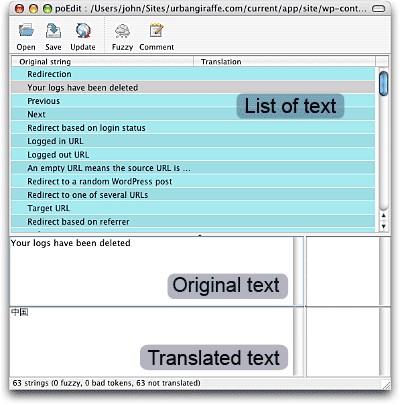
You should work your way through the list of text until everything has been translated.
If poEdit should find text that requires pluralization it will present you with a slightly different interface:
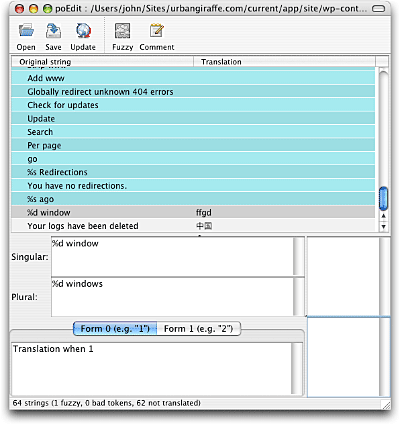
You can see that there are two items of text to translate (singular and plural). The tabs along the bottom will change depending how many forms of pluralization your chosen language contains (based upon the plural forms value in the catalog settings). You should enter a translation inside each tab that reflects the number shown in the tab title. For example, ‘Form 0 (e.g. “1”)’ will, in the case of English, contain the singular form, while ‘Form 1 (e.g. “2”)’ will contain the plural form.
As with any software you should make sure to save regularly.
gettext
At this stage of the localization process you will need to use a text editor. The choice of editor is left up to you, but it should be capable of handling character set encodings correctly (i.e. when you save the file it is saved in UTF-8, or whatever character set you require). On Windows you can use UltraEdit, on Linux you can use vi or Emacs, and on Mac OS X you can use TextEdit.
Open the POT file using your editor. Every localizable text is contained in its own section:
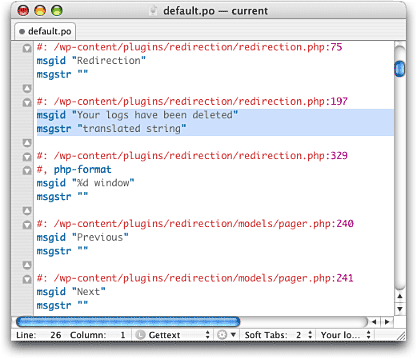
You should work your way through the file, entering translated text in the empty section. That is, for every line starting with msgid you should put the translation into the following line starting with msgstr. Pay attention to the surrounding quotes, and if you do need to enter a quote into the translated text you must escape it by prefixing it with a backslash:
msgstr "My "escaped" quote"
Pluralization will occur as follows:
msgid "%d window"
msgid_plural "%d windows"
msgstr[0] "Translation when 1"
msgstr[1] "Translation when more than 1"
The msgid value defines the original singular text and msgid_plural the original plural text. You should enter a translated version in each of the msgstr[] lines as necessary for the pluralization rules of the target language.
Notes on translation
Programmers often need to insert run-time values into text. This is achieved using something known as printf-style format strings. A printf-style format string is a string of characters that is passed to the PHP function printf and which, when accompanied with run-time values, results in a final formatted string. For example:
<?php printf ('Hello %s', $username); ?>
Here the format string is ‘Hello %s‘. The printf function knows that %s means to insert a run-time string, and the value of this is passed in the $username variable. The result of this function may be:
Hello John
In terms of translation, you will be required to retain printf-style formatting in translated text. Sometimes it is important to also be able to change the position of the run-time values, and this is achieved through placeholders:
Hello %1$s, today is %2$s
As before you should retain these placeholder codes. However, you are free to move their position about in the translated text. In this example, %1$s will always be the name, and %2$s will always be the day.
Today is %2$s and your name is %1$s
Dates and times are also another part the localization process, and a programmer will typically include special date format strings to be translated:
F j, Y g:i a
Each character represents a particular attribute of a date or time (such as month or year). You should consult the PHP date page for full details of what choices are available, and use the most appropriate codes for the target language (including changing the order). The above example will result in a date in the style of: August 9, 2007 4:05 pm.
nice post, and sometime later i would translate it into chinese and post it to wordpress user at theme paradise
WordPress汉化手册…
WordPress在国内的å‘展æ£åœ¨èµ°å‘æ£è½¨ï¼Œè¿™æ˜¯æ¯ä¸€ä¸ªçƒçˆ±WP的人都ä¹æ„看到的。éšç€WPçš„æ™®åŠï¼Œè¶Šæ¥è¶Šå¤šçš„人们开始将WP作为架构Blog的程åºï¼Œç”¨æˆ·çš„å¢žå¤šï¼ŒåŠ ä¹‹ç”¨æˆ·çŸ¥è¯†å±‚æ¬¡çš„è‰¯èŽ ä¸é½ï¼Œæˆ–者是个…..
[…] gettextä¸åšè®¨è®ºï¼Œå¦‚有需è¦ï¼Œè¯·å‚阅原文;如果您对GNU […]
Thanks a lot !
but i have 1 question :
How can i "Run a tool over the code to produce a POT file " ?
Ala, the rest of the article explains how to produce a POT file
[…] If you can provide a language translation then please get in contact with the author. A PO file is provided with the plugin and can be used in translating with poEdit. […]
i used your redirect plugin, to translate it to Arabic, Saudi Arabia, utf-8, i added the path of the extracted plugin, i put the keyword(–,-e,-ngettext:1,2), then i pressed ok, it did some scan put nothing appeared in the list & no .pot file was created. thanks for your time in advance.
Homaid, did you use __ or –?
Very helpful article. I have a question about the catalog path settings. The poEdit help states that the path information is relative to the location of the .po file. This is a little different than what you’ve said here. If I follow the help and the .po file is in c:/thisplace/lang then the path for the source files are relative. (This is what the help file states). In practice, however, this doesn’t seem to work. Setting additional paths to “../src” with a basepath of c:/thisplace.lang” yields ‘no source files found in ../src”. Setting a complete path to a plugin directory under say under “c:/mypath/wp-contents/plugins/myplugin” will allow it to locate source files if the additional path “src” is added. The ‘#:’ statement contains “src/somefile.php:” – this seems ‘non-portable’ to me somehow. The ‘src’ file is relative to the base path but not relative to the location of the .po file – as a result translations don’t appear to work. I say ‘non-portable’ because not everyone is going to have the same path as the developer. Most .pot files I’ve looked at have a base path of ‘.’ – this makes more sense to me because the basepath is the ‘current directory’.
I’m not understanding this and the help file isn’t much help. Maybe you could shed some light on this.
– thanks –
[…] å‚考1:http://www.wp-theme.cn/2007/08/18/wordpress-chinese-localization-handbook/ å‚考2:http://www.444p.com/mod/wordpress/aid2590-po_mo/ å‚考3:http://urbangiraffe.com/articles/translating-wordpress-themes-and-plugins/ […]
Great article, thanks.
Unfortunately, most themes require more work to make them fully translated :/
Hi…its very ice post!
In way translating my WordPress, I have big problem. PLS help me.
I translating English vertion to Uighur language version(Arabic). Uighur later writing from right side to left( likes Arabic). How can I make it from left to right side?
i’ll translate to indonesian language
Hello,
I have translated the theme I’m using for my site into two languages; Danish and Arabic.
My Danish site shows the translation, but the Arabic one doesn’t, it uses the Danish translation.
I can’t see what the problem is.. Any idea?
Could be any number of reasons. Have you configured WP to use Arabic?
Hello,
if you mean by that, that I have included the Arabic PO-file to my language directory, then yes.
No, I mean to configure WP to use a localization – putting the files in the directory is not enough, you need to tell it to use the files too
Ok.. How do I do that?
See here
Hello again,
I added the following code to wp-config.php:
define (‘WPLANG’, ‘ar_BH’);
That means I have these to lines now:
define (‘WPLANG’, ‘da_DK’);
define (‘WPLANG’, ‘ar_BH’);
But nothing happened..
You can only have one language line. I suggest you head over to the wordpress.org support forums
well,
Thank you alot for your time 🙂
Great post, I have been using Global translator plugin for WP as I did not think that I was up to writing something of my own, but it has led to being banned from Google translation I suppose due to not having the /en /fr /de etc folders nofollowed or blocked in my robots.txt file. I am now left with a whole bunch of links in google in different languages that now cannot be reached. Since our blog does not change that frequently other than the items in our nextgen gallery I will definately explore the options you have outlined above. Thanks very much for these options.
Great article! It looks to take a bit of time to setup WordPress for other languages but when I have the time I am definitely going to move forward using this article.
Thanks for the research,
Richard
I am in the process of creating translation of my client website into Spanish. Thanks for the information you shared here. It’s very useful.
Is en_EN valid? It seems common but undocumented so will it mess up language switching?
And it would be very very nice to have a tag for themes on http://wordpress.org/extend/themes/ which just says “localizable” or “i18n”! Otherwise you always have first to download a nice looking theme to find out if it is using the __ or _e functions so that you could easily tranlate it into german or turkish for a customer. If not you only have a nice looking theme and nothing else. (Maybe english theme editors are too lazy to care for l10n or i18n…)
I am planning to use poEDIT for translation of a hospital management software made by my friend from English to other Indian languages. Thanks for the info..
Great Tutorial! Unfortunately you didn’t mention anything about using:
load_theme_textdomain()for including the theme xx_XX.mo file. Took me some time, a break and then another 5 minutes 😉 Thanks anyway for this introduction to gettext.Great post and very useful but I have a problem and it’s killing me , I have my plugin in this path
C:/AppServ/www/wordpress/wp-content/plugins/mine
I wrote in the Base path :
C:/AppServ/www/wordpress/wp-content/plugins/
and in the paths
mine/
well it give me an error that there is no files in this path , my question is : what kind of files does it searches for ??
because I only have mine.php inside it .
Could you please help ?
Regards,
Feras Allaou
Feras, instead of full Windows paths, use relative paths in Poedit, defined via “.” (the dot character) in your Catalog Settings. I’ve found the following path settings work for me, when translating John’s plugins on Windows.
– Base path: .
– Paths: ..
As far as I can tell, single dot means “this folder” and 2 dots mean “one level up”. Since John has the language files always under the sub folder ‘locale’, Poedit needs instructions to look one level up in the folder structure for source code files, thus the “..” path.
I suggest you use Poedit’s Catalogs Manager for all your translation projects. There, when staring a new project, you get to choose the project’s folder via convenient ‘Browse’ button. Poedit scans this folder for language files and presents you with a list. Open the desired language file (catalog), go to ‘Catalog’ > ‘Settings’ and define the paths with dots. As a final thing, make sure that on the ‘Catalog’ > ‘Settings’ ‘Keywords’ tab, the PHP gettext language variables “_e” and “__” are defined.
If you get the ‘Paths’ and ‘Keywords’ right you can do a catalog update every time the plugin source code has been updated to let Poedit find the changed strings for you. It’s very, very convenient.
Hope this helped.
Super article. Found a mistake in the POT file generation with gettext:
–from-code=UTF8
should be
–from-code=UTF-8
I have generatet two .po files from Icanlocalize.
One for wp-admin, which is allready localized. And one for wp-content.
My question is, how can I integrate my second .po file from wp-content, in the first one?
And afterwards convert this to a new .mo file.
Or is this the right way to do this?
Thank you for the deep explanations!
Regards
Finally found an in-depth explanation for localization. Thanks for the detailed how to on name conventions.
there is something missing here. where to put this pluginname-fr_FR.po file? in the directory of plugin or a sub-directory called langues or smilar?
In the plugin directory.
Inside the plugin directory
thanks a lot. Now I can give my plugin a translation.
Hi, I am trying to translate wordpress network site into icelandic and translations are not showing. Does anyone have a clue if there is some solution to translation of wordpress network sites?