Pings and trackbacks are a way for weblogs to communicate with each other and say ‘hey, I talked about your site’. They allow you to see how far your site has spread, and exactly who is reading your content. By default, WordPress mixes pings and comments together, clogging up the conversational flow and making it hard to follow what people are saying.

This guide is another in the Inside WordPress series and will show how to separate comments from pings and trackbacks. Unfortunately this is not as straightforward as it could be, and no solution exists that doesn’t require some PHP coding and a modification to your theme. This guide will attempt to provide a clear and simple solution to separating comments and pings. It will will be written from a beginners perspective, and will assume a familiarity with HTML and PHP, although full details will be given at each stage.
By the end of this guide you should be able to go from this:
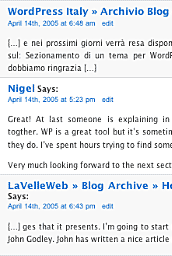
To this:
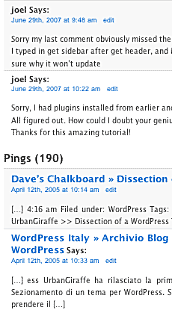
Much easier to read!
Hi,
I love the concept of this plugin because it cleans things up really nicely. However, is there an easy way to aggregate the pings in one place so you can keep the conversation easy and flowing, yet as a blogger be able to see easily (without visiting every post) who has pinged your site?
Thanks!
You would need a plugin to provide that functionality. It wouldn’t be difficult to implement, and just requires querying the database to fetch all pings.
I installed your plugin and modified the code. However, the pings are BELOW the comment form. How do I modify the code to get the pings immediately below the comments but above the comment form?
You can see what I mean here:
http://www.jhsiess.com/2007/08/21/wordless-wednesday-31/#more-352
Thanks in advance.
JHS, it is because you put the code to display the pings after the comment form. In
comments.phpjust moved the pings code above the part that starts ‘leave a comment’.Hey there, this is a great page. How do you change the code so it says "1 ping" rather than "1 pings" if that’s the case? Also, ever since following your directions, the no self-ping plugin doesn’t work.
Jessica, you can use something like:
<?php echo sprintf (__ngettext ('%d post', '%d posts', $pings), $pings); ?>
This will output '1 ping' or '2 pings'
i’ve activated the separate-comments-pings plugin and have replaced my comments.php file with comments.php file (taken from default folder/zip, i download from this site). but i got error:
Parse error: syntax error, unexpected T_ENDIF in /home/aufkgorg/public_html/wp-content/themes/vista/comments.php on line 144
so, please give solution !
Kevin, I had simmilar problem, find last
and delete oneJohn, I changed line from your previous comment, but it gives “1 postsâ€. Can you, please, check it?
Hello there,
First off thanks for a great plugin!
Still I have a question. How did you get your pings and trackbacks so nice? I have used the piece of code you provided:
foreach ($pings AS $comment)

  $display[] = sprintf ('%s',$comment->comment_author_url,$comment->comment_content); echo implode (', ', $display);?>
But im still getting something that looks like this: […] Lets make our move… […]
[…] Lets make our move… […]
How did you get yours so nicely like above: techathand.net, techie-buzz.com
Just the main website name and it links to the specific article.
Thanks in advance 🙂
Now I’d love to know the code on how to separate pings from comments using WordPress version 2.7… 🙂 (i.e., when the threaded and paged comments functions are activated)
Yes yes yes! Thank you very much for this great tutorial. It was very helpful!
Thanks 🙂