Step 4 – Footer
The footer element, while not as important as the header, visually closes the web page. It also serves as an appropriate place to locate copyrights and other information that are needed on every page.
Let’s look at the code for footer.php:
<div id="footer">
<hr />
  <p>
    <?php bloginfo('name'); ?> is proudly powered by

    <a href="http:/.org">WordPress</a>
    <br /><a href="feed:<?php bloginfo('rss2_url'); ?>">Entries (RSS)</a>

    and <a href="feed:<?php bloginfo('comments_rss2_url'); ?>">Comments (RSS)</a>.
    <!-- <?php echo $wpdb->num_queries; ?> queries. <?php timer_stop(1); ?> seconds. -->

  </p>
</div>
</div>

<!-- Gorgeous design by Michael Heilemann - http://binarybonsai.com/kubrick/ -->
<?php /* "Just what do you think you're doing Dave?" */ ?>
    <?php do_action('wp_footer'); ?>

</body>
</html>
There’s not a lot here really. Everything is wrapped up inside the footer element (line 1), and we have an additional terminating div (line 14) for the page element started in header.php. Following the footer element is a PHP function call:
<?php do_action('wp_footer'); ?>
This just ensures that any relevant plugins can insert their own data.
You will also notice inside the footer element (line 10):
<!-- <?php echo $wpdb->num_queries; ?> queries. <?php timer_stop(1); ?> seconds. -->
Anything enclosed within <!– and –> is an HTML comment and will not get interpreted by the browser. The PHP code is still executed, and if you look in the HTML for your website you should see some statistics embedded right at the very end:
<!-- 17 queries. 0.187 seconds. -->
This is just related to WordPress database activity. If you want this information to appear to the user then remove the comment tags.
Changing the footer
The footer currently displays something like:
UrbanGiraffe is proudly powered by WordPress
Entries (RSS) and Comments (RSS).
You can insert whatever you want here. I will modify it to display some copyright information.
Now let’s look at matching some footer styles to the previous header styles.
 Option 1 – Full width footer
Here we match the footer to the first header option.
#footer {
  background-color: #F6C760;
  clear: both;
  padding: 20px 20px 20px 7.5%;
  margin-top: 2em;
  height: 3em;
  color: #804A0F;
}
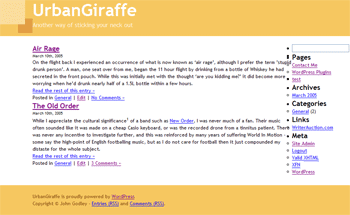
No explanation is necessary as no new techniques are introduced. A full width footer matches the full width header.
Option 2 – Content width footer
Here we match the footer to the second header option.
#footer {
  margin: 2em auto;
  clear: both;
  text-align: center;
  width: 85%;
  height: 3em;
  color: #804A0F;
  padding-top: 10px;
  padding-bottom: 10px;
  background-color: #F6C760;
}
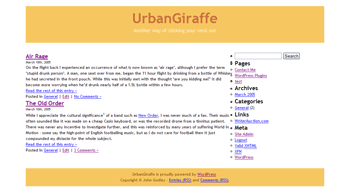
Again no details are necessary. The footer matches the width of the header, with the text centred.
Option 3 – Fancy footer
Here we match the footer to the third header option
#footer {
  clear: both;
  margin: 50px 200px 20px 0;
  color: #804A0F;
  background-color: #F6E4CA;
  border: 1px solid #F2D5AC;
  padding: 15px;
  text-align: right;
}
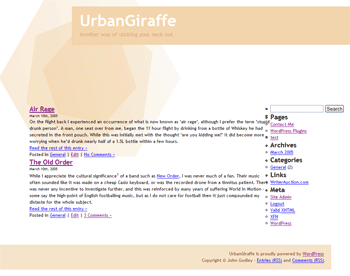
This is a little more interesting, and I’ve made the footer a lighter shade than the title so it doesn’t cause a distraction. It’s also offset in the opposite direction to the header, with text being right-aligned.
I’ve gone through your tutorial several times. I get everything to work but the footer. For some reason it doesn’t appear to be applying the css from the stylesheet. Can you take a look and point out my error?
I totally dig your work, its been a huge help so far. Thanks.
I am putting up a site and have found your tutorial extemely helpful, but on my site I have this line right below my header and I can’t figure out how to get rid of it for the li8fe of me. Any help would be greatly appreciated.
Hi.
You´r first themguide (part 1) is really good and easy to understand but part 2 of it did not make much changes on my blog unfortunately.
Allthough I followed all the steps you made.
Can it be different if it is WordPress 2.0.5?
My headerimg from the kubriktheme didnt disapear and the margin didnt´n change. The footer did not change either.
In step 3 the apperence of the page did not shrink either.
I would love to learn why.
Thanks.
[…] 「Dissection of a WordPress theme: Part 2ã€ã®è¨³ã€ŒWordPress テーマã®è©³èª¬ï¼šç¬¬äºŒç« ã€ãŒã‚„ã£ã¨çµ‚了。 […]
[…] ã“ã®ã‚¬ã‚¤ãƒ‰ã¯ John Godley ã«ã‚ˆã‚‹ã€ŒDissection of a WordPress theme: Part 2ã€ã®ç¿»è¨³ã§ã€è‘—作権㯠John Godley ãŒä¿æŒã—ã¦ã„ã¾ã™ã€‚ã“ã®ã‚ªãƒªã‚¸ãƒŠãƒ«ãƒšãƒ¼ã‚¸ãŠã‚ˆã³ï¼ã¾ãŸã¯ã“ã®ç¿»è¨³ãƒšãƒ¼ã‚¸ã®è¤‡è£½ã«ã¯åŽŸè‘—者ã«ã‚ˆã‚‹è¨±å¯ãŒå¿…è¦ã§ã™ã€‚- This guide is the translation of the guide UrbanGiraffe » Dissection of a WordPress theme: Part 2 by John Godley who is the owners of the copyright. Any reproduction of the original page and/or the translated page is allowed only with the permission of the author. […]
Internet Explorer is aggravating me. I’ve tried everyway possible to get the sidebar to position correctly within IE, but to no avail. Of course Firefox and Safari both behave normally. I’m not sure what is wrong. I’ve pasted the style information for the content, sidebar and wrapper. Any help would be appreciated.
#wrapper {padding:9px;
padding-top:0;
padding-bottom:10px;
border-left:solid 1px;
border-right:solid 1px;
border-color:#9F9E9E;
margin:0 auto;
width:expression(document.body.clientWidth #wrapper{
width:97.5%;
}
#sidebar {background-image:url(images/content_bg.gif);
background-repeat:repeat-x;
background-color:#C2C2C2;
border:solid 1px;
border-color:#9F9E9E;
margin-bottom:10px;
width:27%;
float:right;
padding-right:10px;
}
#content {background-image:url(images/content_bg.gif);
background-repeat:repeat-x;
background-color:#C2C2C2;
border:solid 1px;
border-color:#9F9E9E;
margin-bottom:10px;
width:69%;
float:left;
padding-left:5px;
padding-right:7px;
text-align:justify;
}
Bryan, all I can suggest is to make the elements smaller and see if it starts working in IE. Sometimes with a percentage width, a fixed padding/margin can confuse IE so it thinks there isnt enough space and pushes elements out of the way.
[…] 2) http://urbangiraffe.com/2005/04/22/themeguide2/Â […]
This guide is what got me on the road to learning CSS. I am no designing websites commercially and fluent in CSS. Thanks for this fantastic resource – it has proved itself to be invaluable to me.
hello!
Thanks for the nice tutorial!
Well, my site is not working completely. I think that I missed a part where to configure the approiate spacing or something in the content, because it is placing the posts not aligned with the header and footer
Also, comment CSS is not working! 🙁
Sorry my english!
PD: http://futuroesplendor.mud.cl/capsulecorp
Elear,
You should give your header element the same width as your page:
#header { width: 700px}It is also likely you will need to remove the left-padding from #headerimg. The same goes for the footer
Thankyou for a great tutorial. Beginning with that and no previous experience of CSS I’ve made the site I wanted. The only problem is when I checked it on IE and find that the sidebar is dropping down below the posts – it displays fine in Firefox.
Can you tell me where I start looking for the problem?
Amanda
I’ve managed to improve it a bit by fiddling with the percentages after reading another here comment on one of the other questions. It’s not perfect because the sidebar doesn’t sit flush right.
Another strange thing is that the colour of the post headings changes half way down the page in IE – not in Firefox. Why would that be given that they’re controlled by the same code? Very odd…
Thanks again
Amanda
Amanda, does this FAQ entry help?
Hi John,
Thanks for this great tutorial. I bought the printable version of it and there are several differences with what’s online ("Fluidity without the breakdown, notably"). Which should I rely on?
Cesco
The printed one is newer. They should both be reliable.
[…] of a WordPress Theme – Part 1, Part 2, Part 3, Part 4 A detailed look at what makes up a WP theme and how to create your […]
[…] of a WordPress Theme – Part 1, Part 2, Part 3, Part […]
[…] 2ä»Žé›¶å¼€å§‹å¼€å‘ WordPress 主题教程 – 第2部分Dissection of a WordPress Theme – Part 1, Part 2, Part 3, Part 4详细介ç»äº† WordPress 主题的构æˆï¼Œä»¥åŠå¦‚何创建 WordPress 主题So […]
[…] of a WordPress Theme – Part 1, Part 2, Part 3, Part […]
[…] older tutorial, but still relevant, this is an in-depth series from Urban Giraffe (See parts 1, 2, 3, and 4) that will take you through the entire process of developing a WordPress theme, with […]
[…] of a WordPress Theme – Part 1, Part 2, Part 3, Part […]
[…] of a WordPress Theme – Part 1, Part 2, Part 3, Part […]
Hi,
This is great learning material you have here, I would first like to thank and congratulate you for it.
I think a found a minor mistake:
In sentence “(…) pointed out yet, header.php defines the div ‘page’ which contains everything, (…)” on page 4, instead of file “hader.php” it should refer to file “index.php”.
Thanks again,
Miguel
Sorry, after reading with more attention I see this is not a mistake.
Ok, so div ‘page’ is defined in header.php file. But now my doubt is, why does the div ‘page’ contains everything, including the div ‘wrapper’, since this is defined in the index.php file in paralle with call for header.php that defined the div ‘page?
Is it because the div ‘page’ is always on top of other user defined containers? Maybe I should get into CSS more thoroughly…
Thanks,
Miguel